
Mastering Vertical Phone Aspect Ratios: Expert Tips for Smartphone Video Creation
Discover a user‑friendly editor, a wide range of effects, and step‑by‑step tutorials from the official channel.
When capturing a moment for social media, deciding between portrait and landscape is critical. Mastering the phone aspect ratio vertical ensures your content looks its best on every platform.
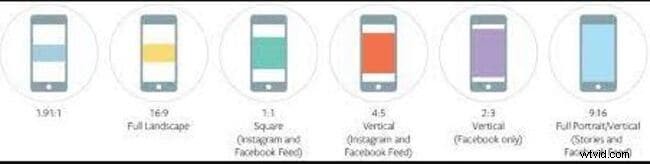
This guide explores the growing popularity of vertical phone videos and provides practical advice on using a phone ratio calculator and determining the right mobile vertical video size for YouTube, Instagram, or broadcast.
Table of Contents
Part 1 – Why Vertical Videos Gain Attention
Video creators typically use six aspect ratios: 9:16, 16:9, 1:1, 4:3, 3:2, and 21:9. The first decision is whether a video should be vertical or horizontal. A portrait (vertical) video is taller than it is wide, maximizing screen real estate on a held‑upright smartphone and drawing viewers’ focus.
While the traditional format for phones has been horizontal (16:9), vertical videos (9:16) have become the default for mobile viewing because they fill the entire screen without the need for scrolling.
Part 2 – Understanding Mobile Aspect Ratios
The phone aspect ratio vertical is expressed as a proportion, with the larger number first. For example, 16:9 can also be written as 1.78 (16 ÷ 9).
Common ratios:
● 16:9 – The most prevalent ratio on smartphones and other devices, offering a wide view and no letterboxing on compatible screens. When content is not 16:9, black bars appear (letterboxing).

● 18:9 – Provides a slimmer profile for better one‑hand usability, but often introduces side black bars when viewing 16:9 content.

● 19:9 – Popular on flagship devices, offering extended height with minimal bezels.
iPhone Vertical Video Dimensions
Apple’s iPhones from the 5th generation onward feature a 16:9 screen. To produce vertical content, set the resolution to 9:16. The standard high‑quality output is 1080 × 1920 (720p is 576 × 1024).
Part 3 – Tips for Shooting Vertical Video
Below are essential practices for creating compelling vertical footage:
1. Quality vs. Content – Focus on engaging storytelling; high production value is secondary for many audiences.
2. Use the Ideal Dimensions – Whether on iPhone or Android, stick to the recommended resolutions.
3. Engage Audiences – Add captions, graphics, or subtle on‑screen text to enhance comprehension without sound.
4. Optimize for Silent Playback – Ensure your video communicates its message even when muted.
5. Capture Immediate Interest – Start with a compelling hook; storytelling is key to retaining viewers.
Part 4 – Top 6 Practices for Perfect Vertical Ratio
To guarantee your footage looks polished on any platform, follow these guidelines:
1. Shoot in the Desired Ratio – Use your phone’s portrait mode or crop during editing to 9:16.
2. Leverage Split Screens – Combine vertical frames with creative horizontal overlays for dynamic visuals.
3. Fill the Frame – Move closer or adjust angles to avoid empty space, especially for long shots.
4. Minimize Camera Shake – Stabilize with a gimbal or a sturdy selfie stick to keep footage smooth.
5. Resize for Each Platform – Adjust aspect ratios to match the destination, ensuring no important content is cropped.
6. Add Visual Enhancements – Integrate text, stickers, or GIFs that complement, not distract, from the main subject.
Pro Tip: Use Wondershare Filmora for Seamless Vertical Editing

Wondershare Filmora – The Leading Video Editor for Mac & Windows
Over 5.4 million downloads worldwide.
Filmora offers intuitive drag‑and‑drop effects, auto‑editing tools, and a suite of resizing options to match any vertical aspect ratio.
Key Features:
- Resize and crop to 9:16 or any custom ratio.
- Trim and zoom to highlight focal points.
- Add multiple video effects and transitions.
- Export directly to mobile, DVD, or YouTube.
- Supported on macOS (10.10+) and Windows 10+.
How to Crop to a Specific Aspect Ratio in Filmora
1. Import your video via the Import tab or drag‑and‑drop.
2. Drag the video onto the timeline.
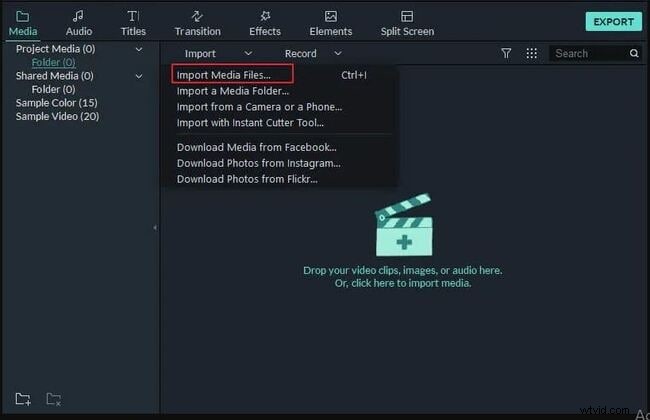
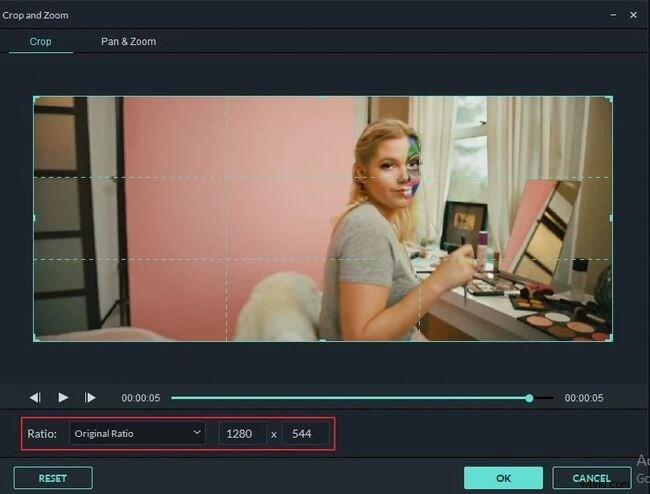
3. Select the video on the timeline and click the Crop & Zoom button.
4. Choose from preset ratios: 16:9, 4:3, 1:1, or 9:16.
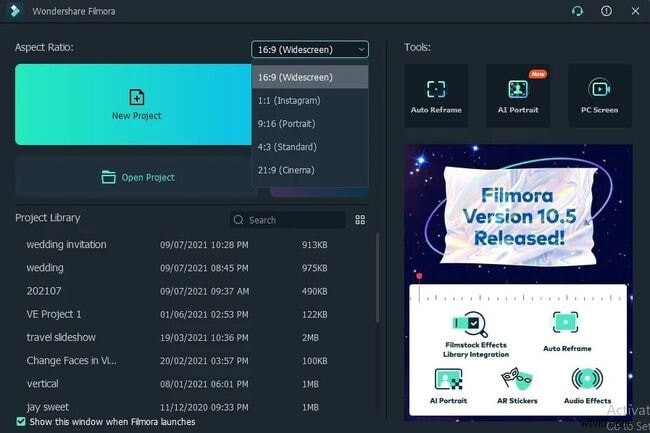
Select Project Aspect Ratio
When starting a new project, choose the desired ratio—16:9, 4:3, 9:16, or 1:1—and hit New Project.
Key Takeaways
- Comprehensive understanding of phone aspect ratio vertical for both iOS and Android.
- Knowledge of mobile vertical video sizes across platforms.
- Six proven practices to shoot and edit vertical footage with perfect alignment.