
Video content wields a unique power: it conveys messages and evokes emotions beyond dialogue and visuals. While the narrative and shots lay the foundation, visual effects—especially color grading—can elevate the mood and reinforce the story’s tone. If you’re aiming for a somber, atmospheric feel, a moody LUT (Look‑Up Table) is your quickest route to that cinematic depth.
In this article, we’ll explore the advantages of moody LUTs, recommend free options you can download, and walk you through a step‑by‑step application in Wondershare Filmora. Keep reading to transform your footage with just a few clicks.
In this article
-
- Key Features
- Step‑By‑Step Guide
-
- Emphasize specific elements in your footage
- Add drama and intensity
- Deliver the exact mood you desire
- Enhance overall quality and visual appeal
-
- Moody 03
- Moody 06
- Moody 01
- Moody 05
How to Add Moody LUTs to Your Videos Using Wondershare Filmora?
Moody LUTs can instantly upgrade the look of your projects. By selecting the right one, you’ll ensure the effect aligns with your creative vision. Wondershare Filmora offers a streamlined workflow for applying these LUTs. Follow the steps below to get started.
Key Features
Filmora equips editors with a rich set of tools that make LUT application straightforward:
- 3D LUT Library – A broad catalog of ready‑made LUTs, including free moody options, that you can apply with a single click.
- Intuitive Editing Workflow – Advanced editing features are accessible without a steep learning curve.
- Creative Asset Suite – Stock images, clips, audio, filters, and effects that complement your LUT‑enhanced footage.
- Custom Templates – Drag‑and‑drop templates that speed up project setup.
- AI‑Powered Enhancements – Tools such as AI Voice Enhancer, Smart Cut Out, and Text‑to‑Video help refine your content.
- Flexible Export – Export to MP4, WMV, AVI, MOV, MKV, GIF, and more, with full control over format and quality.
Step‑By‑Step Guide
Filmora’s user‑friendly interface makes LUT application a breeze. Follow these steps to add a moody LUT to your video:
Step 1: Download and install Filmora from the official website.
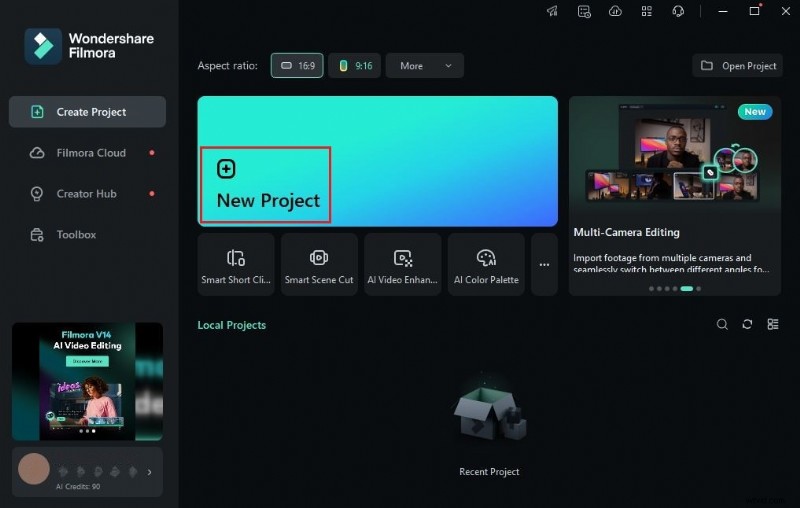
Step 2: Launch Filmora, click New Project or open an existing session from the Local Projects section.
Step 3: Import your media via the Elements Panel → Import under the Media tab. Drag the assets into the timeline.
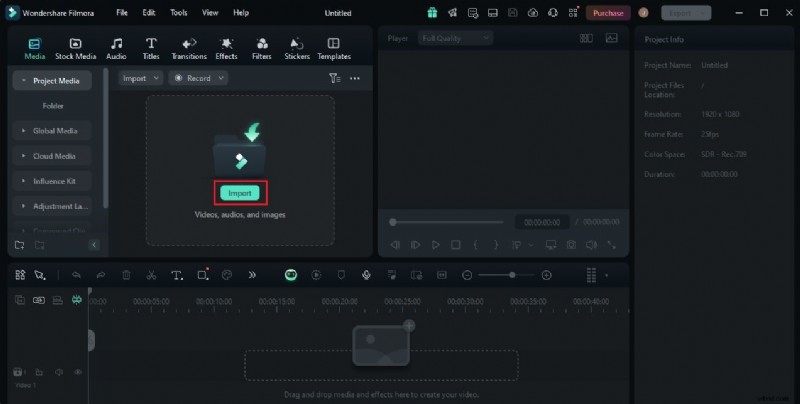
Step 4: Arrange clips, trim, and sync audio as needed.
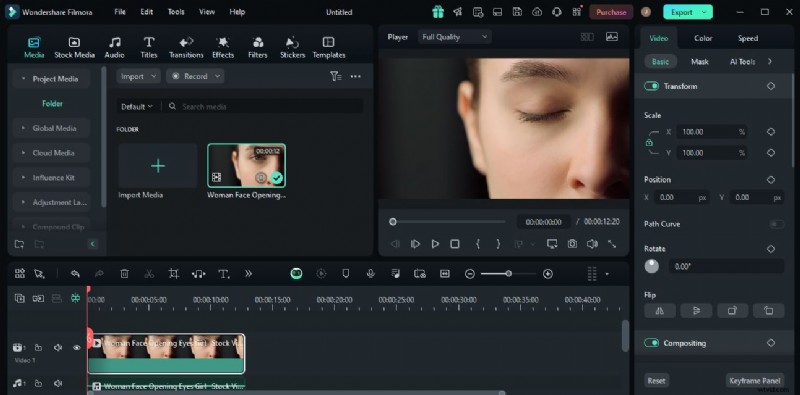
Step 5: Select a clip on the timeline. A right‑hand panel will appear.
Step 6: Click the Color tab, locate the LUT section, and toggle it on. Choose a built‑in LUT or click Add to upload an external one.
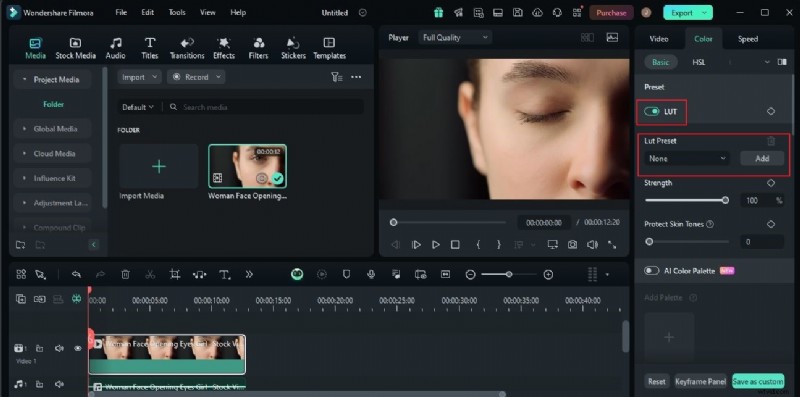
Step 7: Fine‑tune the effect with the Strength and Protective Skin Tones sliders or by entering a custom percentage.
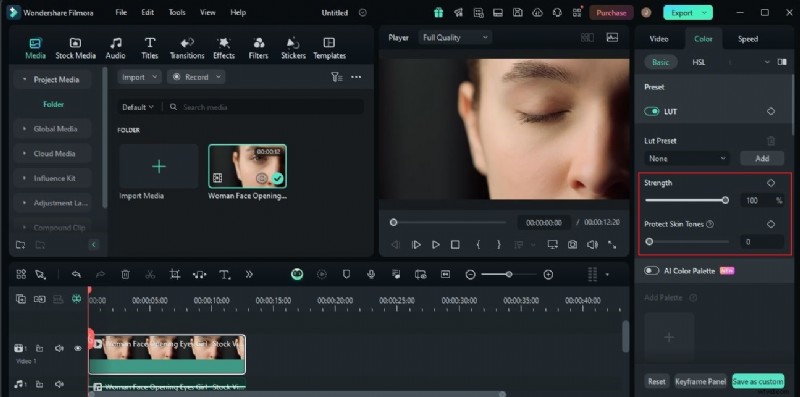
Step 8: Preview your edit. If satisfied, click Export to render the final video. Adjust further if needed.
Should You Use Moody LUTs in Your Video Content?
Moody LUTs offer tangible benefits beyond mere aesthetics. Here’s why they’re worth considering:
Emphasize Specific Elements
By darkening background tones, moody LUTs draw attention to key subjects—ideal for scenes featuring emotional moments or narrative focus.

Add Drama and Intensity
These LUTs naturally evoke feelings of tension or melancholy, enhancing the emotional impact of dramatic footage.
Deliver the Desired Mood
While often associated with gloom, a variety of moody LUTs exist. Each imparts a distinct hue and contrast level, allowing you to match the exact tone you envision.

Improve Overall Quality and Appeal
By refining color balance and contrast, moody LUTs elevate visual polish, giving your videos a professional finish.
What is the Best Moody LUT For You?
Filmora hosts several free moody LUTs, each tailored to different styles. Here’s a quick look:
Moody 03

Featuring warm brown‑red tones, Moody 03 is ideal for serious, content‑rich narratives.
Moody 06

A brighter, green‑dominant LUT with high contrast, perfect for dynamic scenes.
Moody 01

Dark blue hues give this LUT a deep, dramatic feel—great for intense storytelling.
Moody 05

With a softer yellow tint and lower contrast, Moody 05 shines in low‑light, atmospheric shots.

Beyond Filmora’s library, numerous free moody LUTs are available online. Download, import, and experiment to find the best fit for your project.
Conclusion
Moody LUTs aren’t a one‑size‑fits‑all solution, but they can dramatically enhance specific video projects. By leveraging Filmora’s built‑in LUTs or importing external ones, you can achieve professional, emotionally resonant visuals without extensive technical expertise. Try out a moody LUT today, and see how it transforms your storytelling.