
Video is something I have begun to play with over the last few weeks in the form of a vlog on YouTube, but as you might know it's difficult to gain that organic reach you're used to on social platforms. That doesn't mean its impossible, but by using various other channels to advertise and push them to that new content is key in today's world. That is where vertical video comes in on Instagram! Yes, it might be annoying as hell to see yet another vertical video, but hold tight as I walk you through why this is a brilliant place to use it and also how you can do it yourself.
Let's start by removing the elephant in the room. Vertical video is a thing and it's not going anywhere anytime soon, it lives across many social avenues now with Instagram, Snapchat, and Periscope. Why does it exist? Because we created the need by making tall portrait style touch screen phones and tablets. Sure people can flip the device on its edge and watch a video from YouTube horizontally but how many of us actually do that? I find it annoying to always have to turn on and off the rotate lock button my iPhone. So why not take advantage of it all while it's here? Lets dive into why I am getting into vertical video, how it reached an audience on Instagram, and how you can go to create your own, both on your phone and in editing software like Premiere.
(Vertical) Video on Instagram and Why It Works
Instagram added video to the platform almost two years ago and it now consumes around 40% of the content shared. It's not something you want to ignore as a photographer, and especially as a videographer. Why does video on Instagram matter if you are a photographer? Views! A recent change to the video player on Instagram is you now see views just like YouTube and Vimeo rather than likes. For me, that shows nearly double the engagement as likes, and I am sorry but what we really are looking for is engagement here. So do brands, they want to see that your content is being seen by the masses and in turn they will hire you over someone else.
Yes, any video on Instagram will garner more views than likes but remember that the platform plays much nicer to portrait style content. Since they allowed for new aspect ratios outside the famed square crop, the benefits are that content will show larger and in full view to the user. Sure it cuts down into your caption but in the end we want to see the goods and then if we are intrigued we will read on. See below for example.
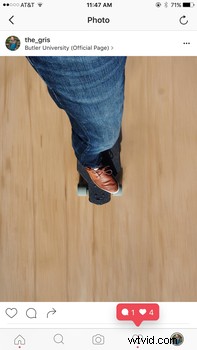
As you can see the majority of the content fills the screen, not too hard to see the benefits of using portrait vs landscape shots. Now, my idea sparks a challenge to accept vertical video to garner a larger audience in the form of views rather than likes. I am not saying this should replace horizontal video work but rather compliment it. A simple way to share snippets of the main video or even completely fresh content that pairs well with the root video work. This can be used as a tool to push them to YouTube or any other place you look to publish the final work in full.
How to Create Your Own Vertical Video in Premiere
As I mentioned above creating vertical video is not a recommended way to publish finalized work but rather a way to create a snippet or sample piece that can be used for social media, mainly Instagram, that can then bring folks to your place of choice. In my case its my new YouTube channel. That will be where I want people to go view, like, and eventually subscribe to my work. In the meantime posting to Instagram will allow me to track a larger audience and give potential clients the illusion of engagement since views will be larger than likes.
Lets get started. This is Premiere for those that are not familiar. At the bottom is my timeline where most of the cutting and editing happens. Top left is where I can drag and drop footage to then be scrubbed and cut into pieces to then add to my timeline. Top right is just another viewer or editor to show my final work in whole.
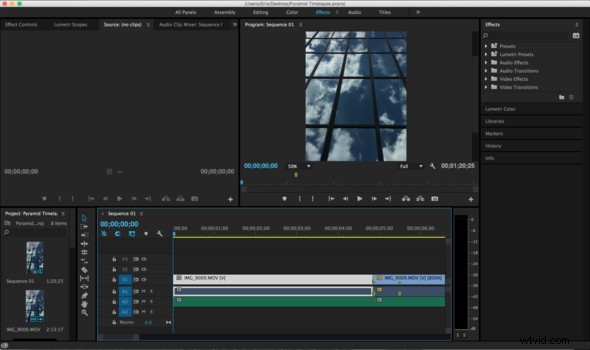
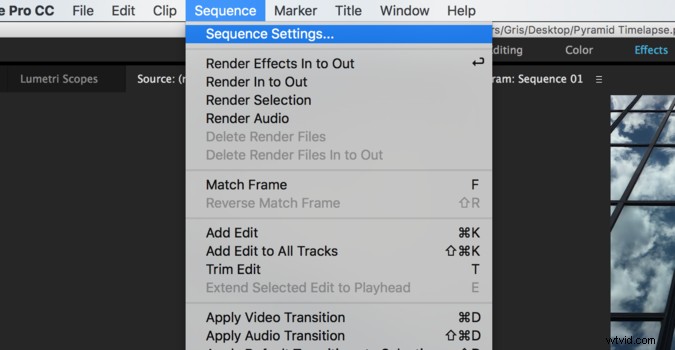
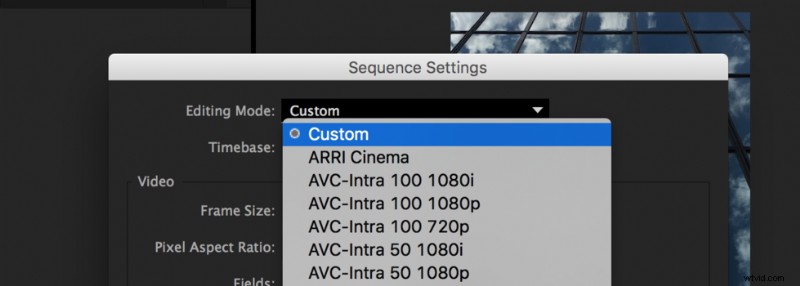
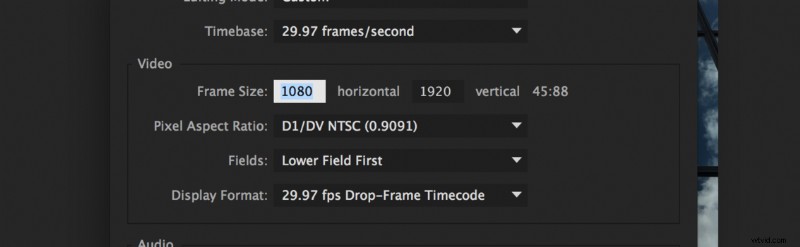
Once the settings are dialed in you can then see in the top right viewer a screen size that looks similar to that of mobile friendly vertical video. This will become your base for adding in your own video snippet.
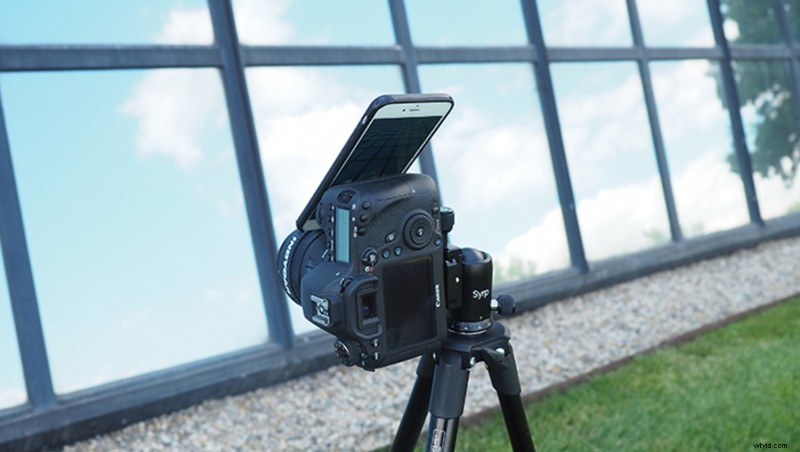
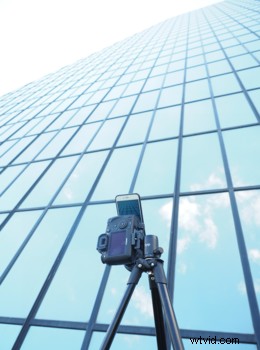
How exactly did I shoot vertical video? You can do it one of two ways. You can attach your camera to a tripod and flip it vertically on the ball head to shoot vertical and then flip the footage in Premiere later to fit the size. Or you can simply use your iPhone to shoot the clip by setting it to video or time lapse in the upright position, as shown below. Yes, I used a Canon 6D as a tripod for my phone because I left my phone tripod at home.
What Vertical Video Looks Like On Instagram
Here it is, the final piece live on Instagram both in a link and also as a screen grab to show its use of the full screen size. The end result gives me a solid seg way into where I want to bring people, my final video work on YouTube. Though this piece may never actually get used in the final video work it still fits within the subject matter as well as brings an interesting dynamic to my photo work that is already on Instagram.

Final Thoughts
Now that the fiasco that is the rebrand of Instagram is over, and we can all go back to simply enjoying the content we publish and view on the platform, what do you think? Vertical video may seem like the bane of our existence, but in reality its used daily and I see that as an opportunity for photographers and videographers to use it to their advantage. Knowing that Instagram plays into the vertical format very well it just works really well for me. Hit me up in the comments below on your thoughts on this marketing tactic and if you would use it in the near future.