
As digital marketing is at its peak, selling products and services through memes has become quite viral. Brands like Netflix and Gucci are using these strategies to skyrocket their engagement and sales. It grabs the audience's attention, along with providing a touch of humor with witty image-driven content. Whether it's a savage comeback or a clever pop-culture reference, memes have the power to make your brand unforgettable.
In fact, meme-based campaigns can generate 60% more organic reach than standard content. The relatability and viral potential have made it one of the best media to create ads for marketing personnel. If you are not using memes to sell your product or service, you are missing out on potential conversions and higher sales. This article will walk you through everything you need to start with meme marketing.
In this article
- Know Your Audience Before You Meme
- Build a Meme Content Strategy
- Static Image Memes
- Reaction Video Memes
- Dialogue Remix or Lip-Sync Memes
- Comparison/Duet Memes
- Steps for Creating Image Memes with Wondershare Filmora
- Craft Meme Videos and GIFs Using Filmora
Part 1. Crafting The Perfect Meme Marketing Strategy
For people who are new to this approach, the following are some of the top ways to create the perfect marketing strategies:
1. Know Your Audience Before You Meme
It is not enough to be funny to create memes that truly connect; you need to be relevant and audience-specific. The relevance comes from a deep understanding of who your audience is and what makes them laugh.
Tips To Know and Understand Your Audience
- Identify your niche audience's interest through demographics and psychographic data to learn what entertains your audience.
- You can also determine when your viewer is most active and what type of content they engage with.
- Try to monitor the trending meme advertising formats on platforms like Instagram and TikTok.
- You can use the social listening tools to learn more about your audience.
- Observe viral brand examples such as Spotify memes in which users and brands alike riffed on Spotify's year-end summary, making it a seasonal moment.

2. Build a Meme Content Strategy
Once you have learned who your audience is and what makes them laugh, the next step is turning that inside into a consistent means strategy. A well-crafted meme strategy not only brings smiles to the audience's faces but also reinforces your brand message and keeps you relevant in fast-moving online conversations.
Key Elements to Craft a Perfect Meme Strategy
- Set a clear goal and define what success looks like to you while driving traffic and conversion for YouTube ad memes.
- Create memes that align with brand voice and messaging. A playful tone suits lifestyle and entertainment brands, while a witty meme can be better for Tech or finance companies.
- Always create a meme calendar and plan your releases around cultural moments, holidays, and viral trends.
- You should keep a balance between images and short-form video memes. Image memes have quick humor that brings likes and shares, while video memes will reach a maximum audience.
Part 2. Types of Meme Content to Create for Marketing
To shape your strategy, it is important to understand the different types of memes available on the internet across different platforms. Choosing the right meme format can significantly increase your reach and relatability. Below are some of the most effective types of funny marketing memes today:
Static Image Memes
Ideal For: Twitter, Instagram, and Facebook Feeds
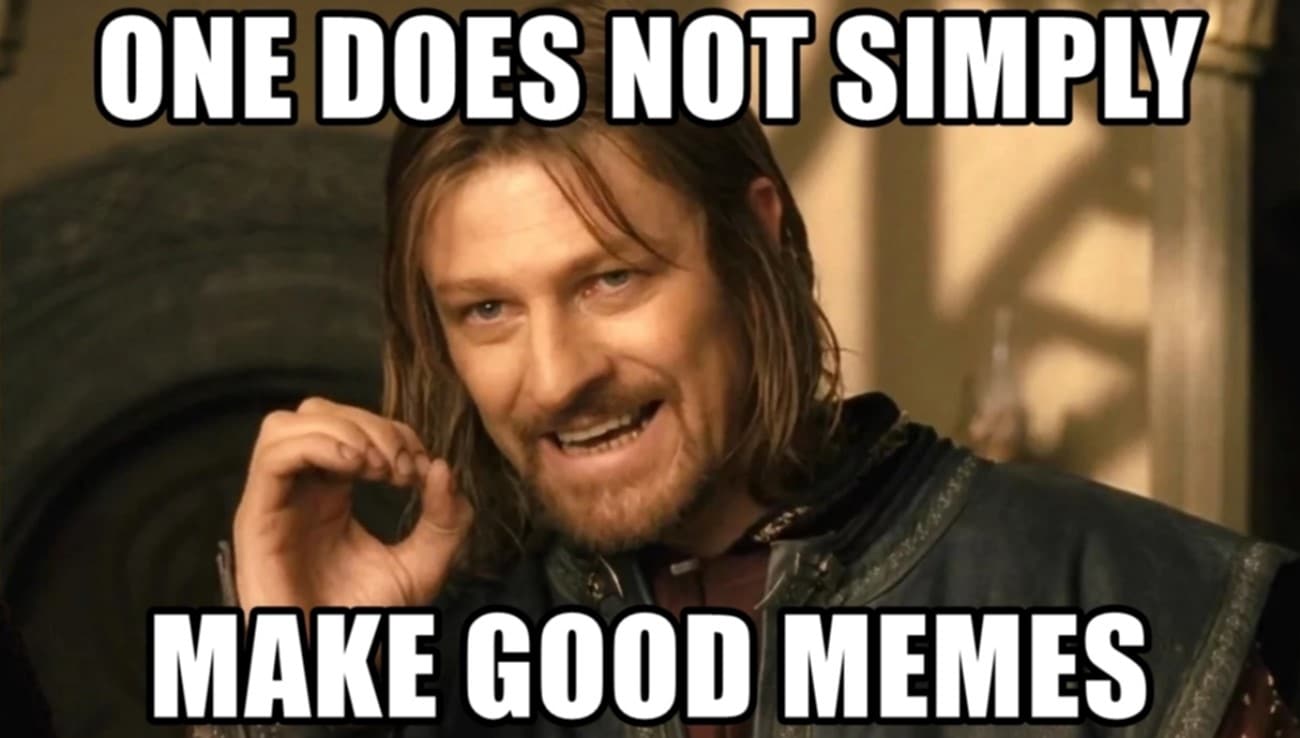
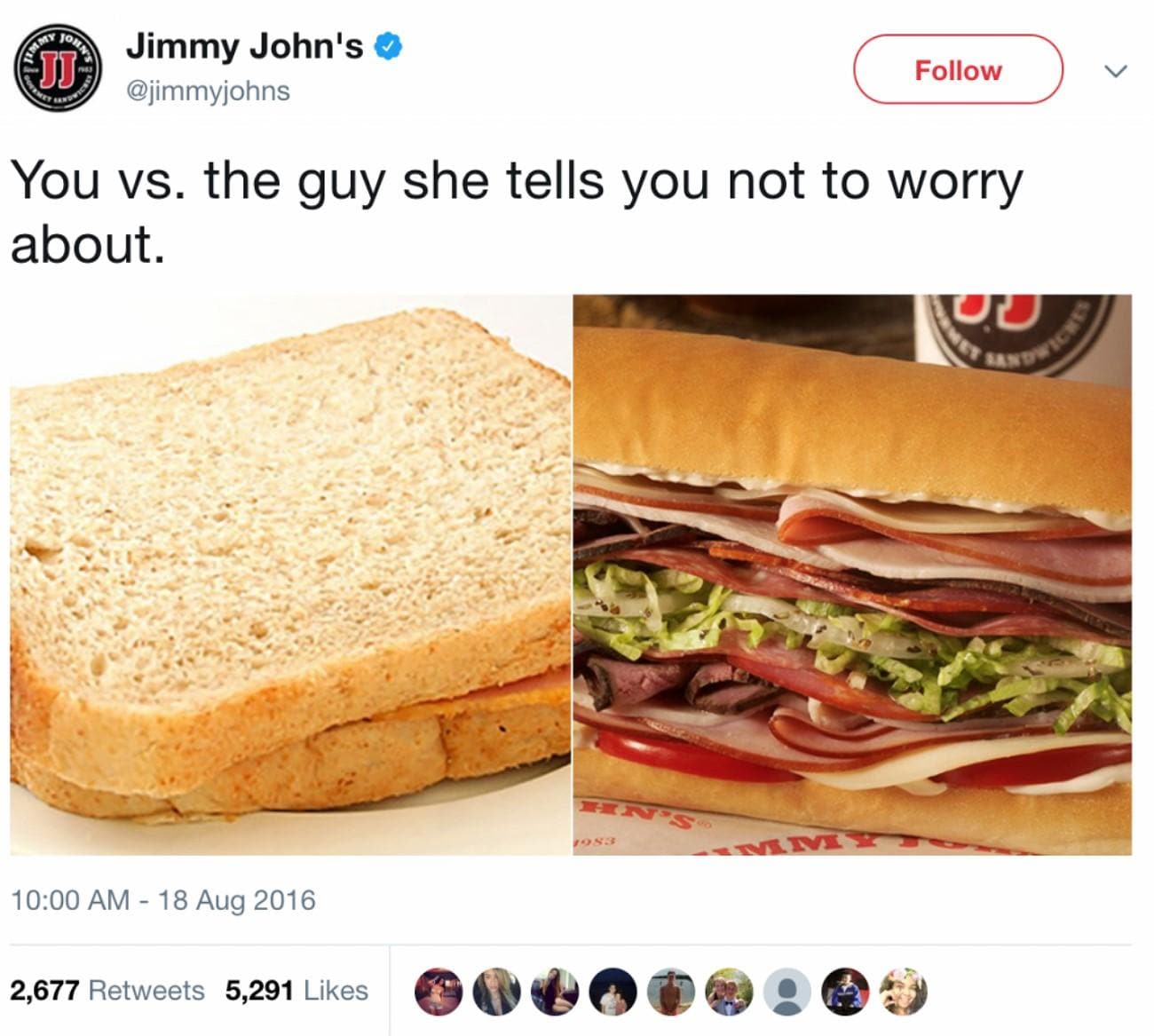
Static image memes are classic screenshots with captions that dominate platforms like Instagram features and Facebook pages. Whether you are using templates like Drakeposting or the Salt Bae meme, these formats offer instant customization and recognizability. Many brands often adapt these templates to insert their products or target customer pain points, creating humorous and shareable content.
Reaction Video Memes
Ideal For: YouTube Shorts and Instagram Reels
This meme format uses real-time reactions to create viral content about products or trends. These videos are engaging because they humanize your brand and tap into popular culture in a way that feels spontaneous and genuine. Many brands used Leonardo DiCaprio's funny laughter video to humorously mock the audience who haven't bought that product yet.
Dialogue Remix or Lip-Sync Memes
Ideal For: TikTok Videos and YouTube Shorts
In this type of meme, trendy audio clips or voices of the dialogue are used with your own visuals. They are ideal for brands on TikTok, which allows creators to re-create pop culture moments or brand-specific situations with humor and relevance. Many brands have famously used viral audio snippets on the TikTok accounts lip-synced by their own mascot to joke about certain customer behaviors, which is a classic meme marketing example.
Comparison/Duet Memes
Ideal For: Twitter and Facebook Feed
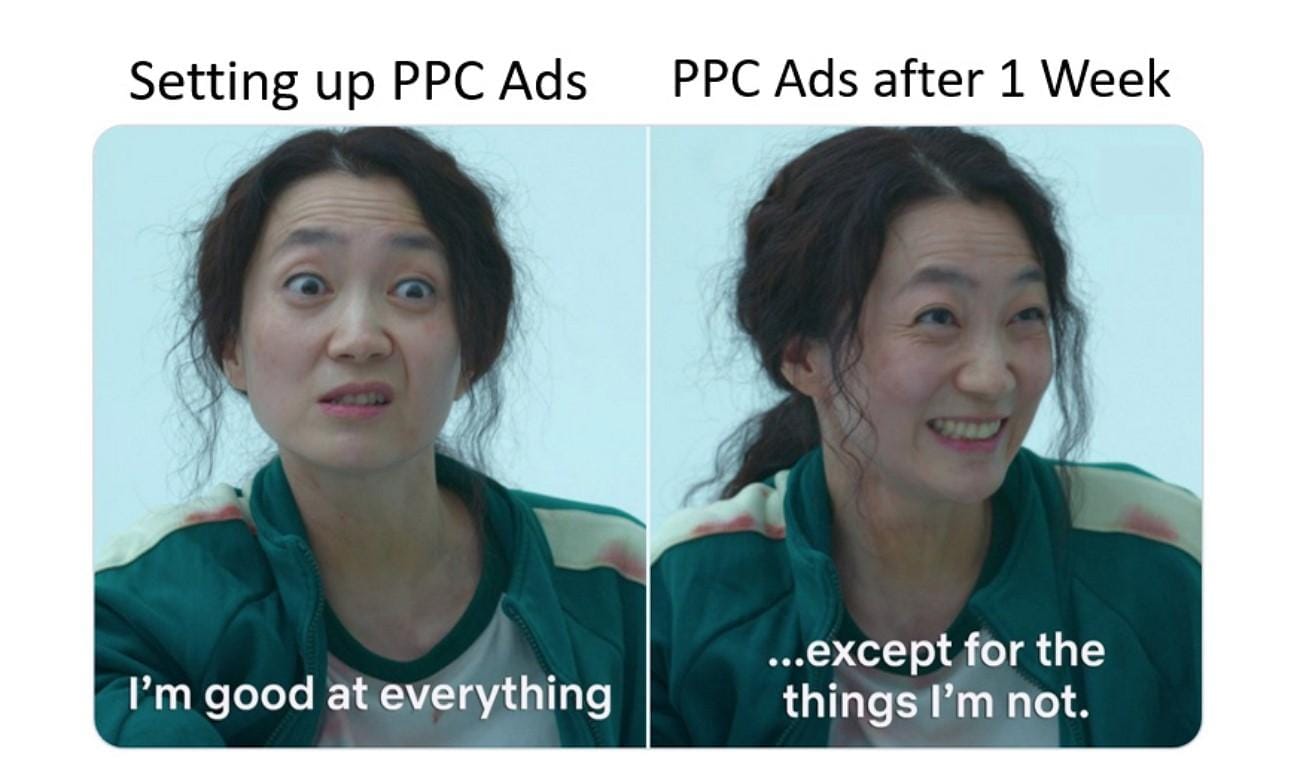
Mostly used on TikTok and YouTube shorts, these types of meme styles allow brands to respond to trending videos to show the before-and-after product experience. Many skincare brands use this template to display the real-time results of the product to their customers by showcasing before and after results.
Part 3. Create Advertising Meme With Video Perfection: Effective Guide
Imagine you are running a skincare brand, and you want to jump on a trending meme sound on TikTok or YouTube to grab your audience's attention. You have a great idea with a lip sync audio clip with before and after shots of your product results. However, your meme needs to be polished to look effortless and keep the viewer engaged in alignment with your brand's visual identity. This is where you can use tools like Wondershare Filmora.
- Filmora helps brands avoid amateur-looking meme marketing by supporting high-impact visuals that match your brand identity.
- It offers drag-and-drop meme templates and advanced editing tools to turn ideas into eye-catching ad content.
- With Filmora, you can easily create polished static meme images for marketing campaigns.
- It also supports the production of scroll-worthy meme videos and GIFs to boost engagement.
Steps for Creating Image Memes with Wondershare Filmora
With Filmora, users get the ability to create viral images from scratch or choose from the stock media offered by the tool. Mentioned below are the steps for creating meme pictures using this efficient tool:
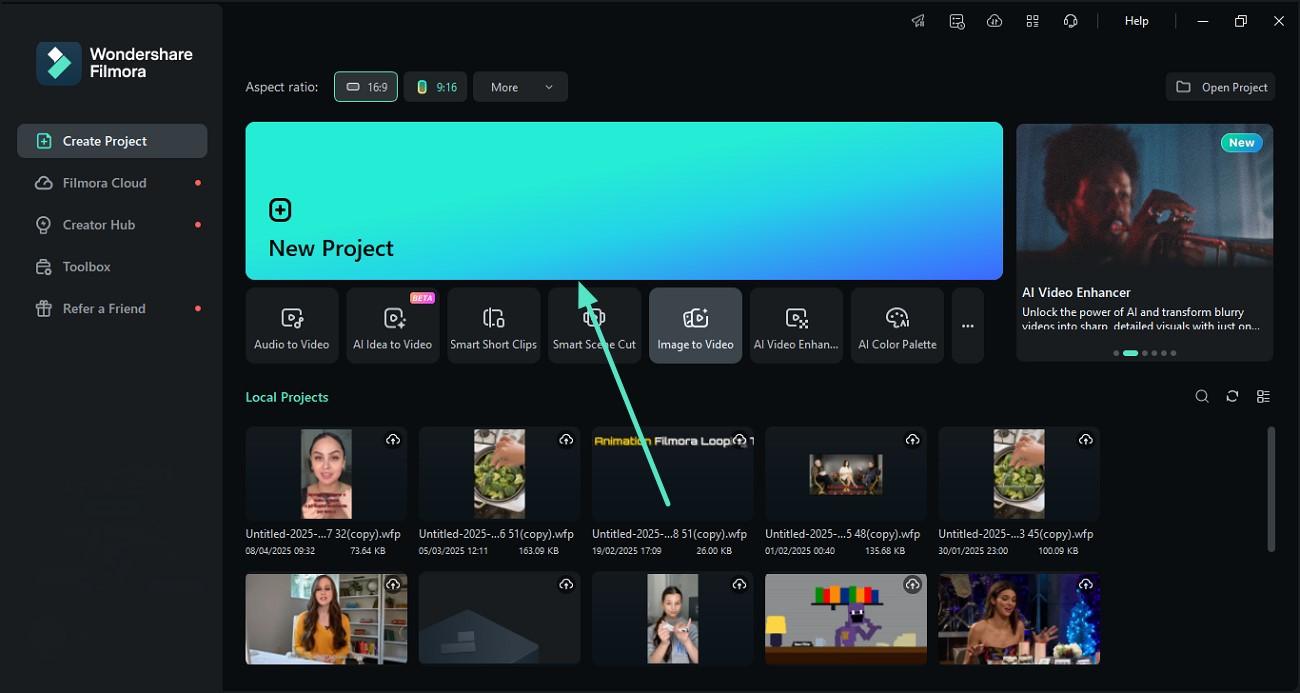
Step 1. Create a Project And Import a Meme Image
- Launch Filmora and click "New Project" on the homepage to get started with your meme ad content.
- Import your meme image and drag it to the timeline for further editing.


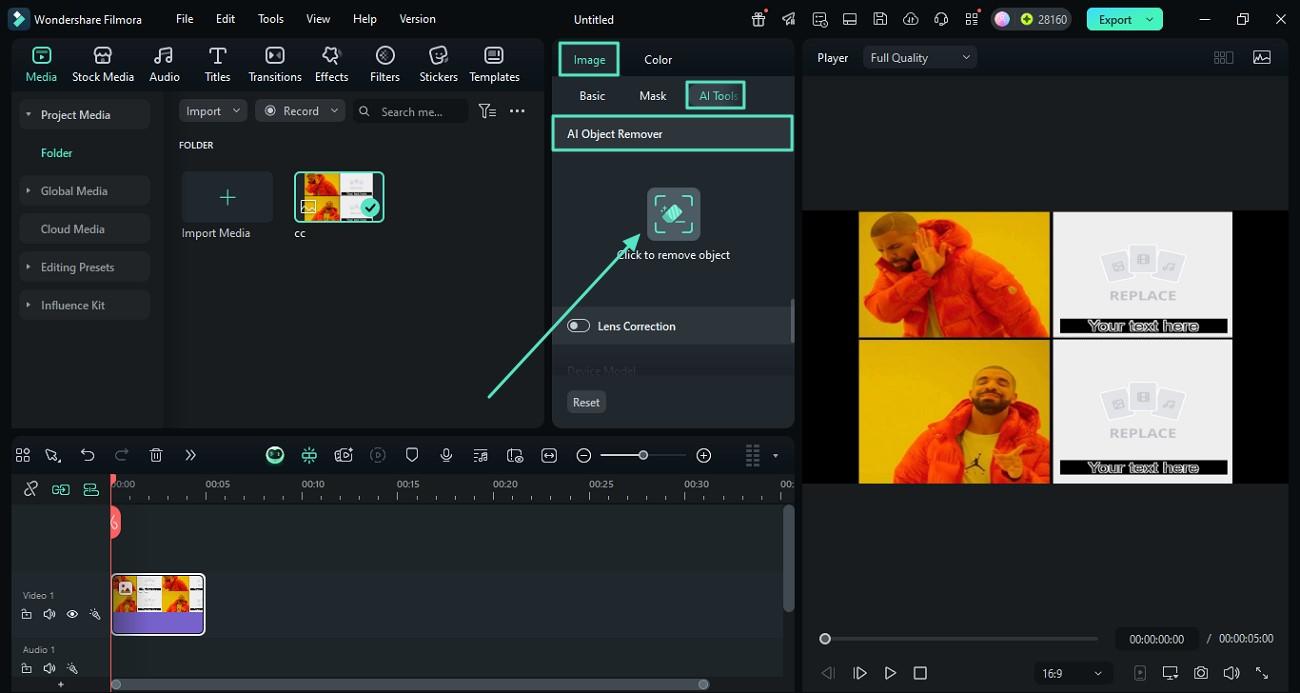
Step 2. Remove Any Unwanted Watermark
- Go to the "Image" panel and enable the "AI Tools" feature to access smart cleanup options.
- Activate "AI Object Remover" and select "Click to Remove Object" to eliminate watermarks or logos from your meme image.
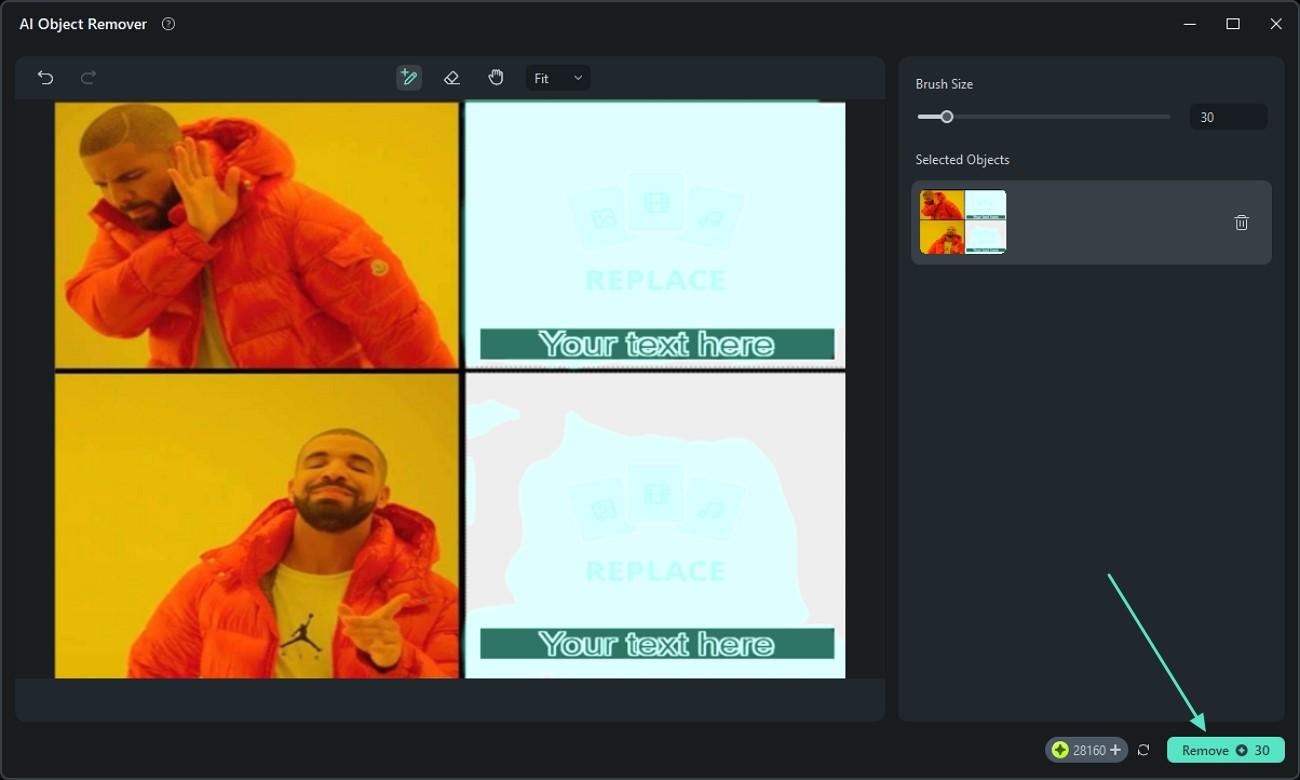
Step 3. Brush and Remove the Watermark
- Use the brush tool to highlight the watermark or any irrelevant elements you want to erase.
- Adjust brush size for precision and make sure the full area is covered.
- Click "Remove" to clean up your meme for professional use in ads.
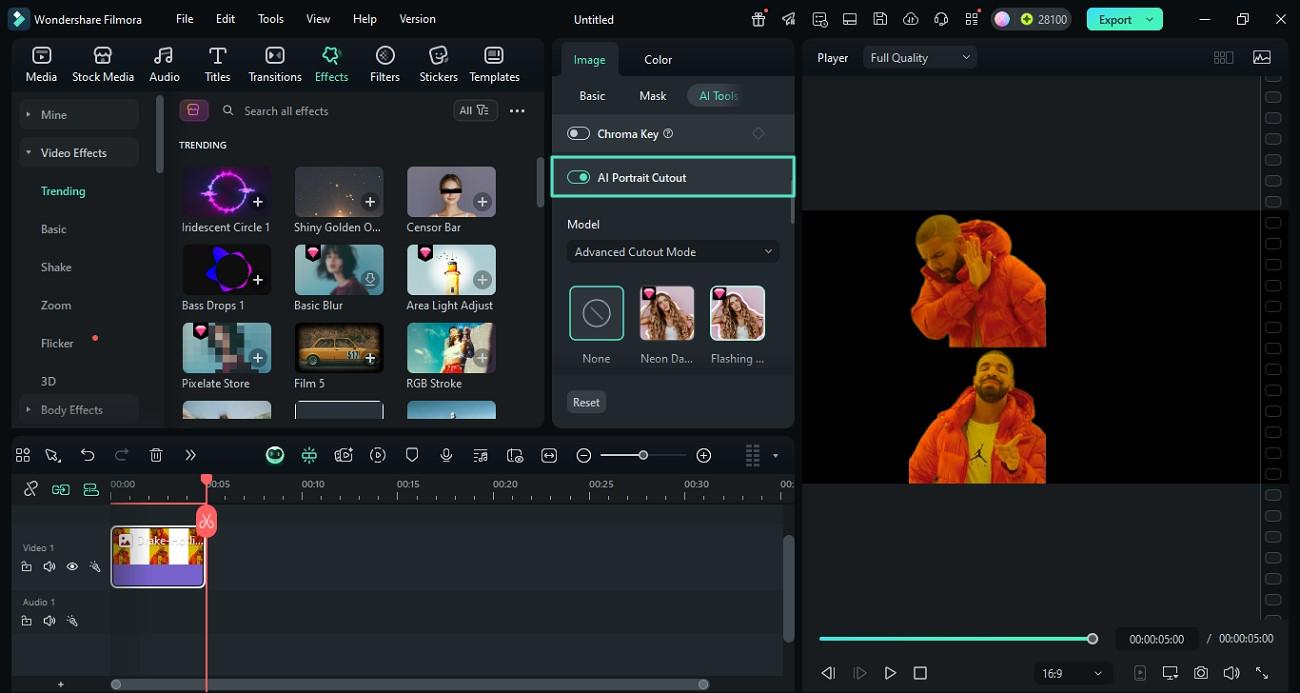
Step 4. Remove Unwanted Background
- Toggle on "AI Portrait Cutout" to instantly erase the background and make your meme stand out.
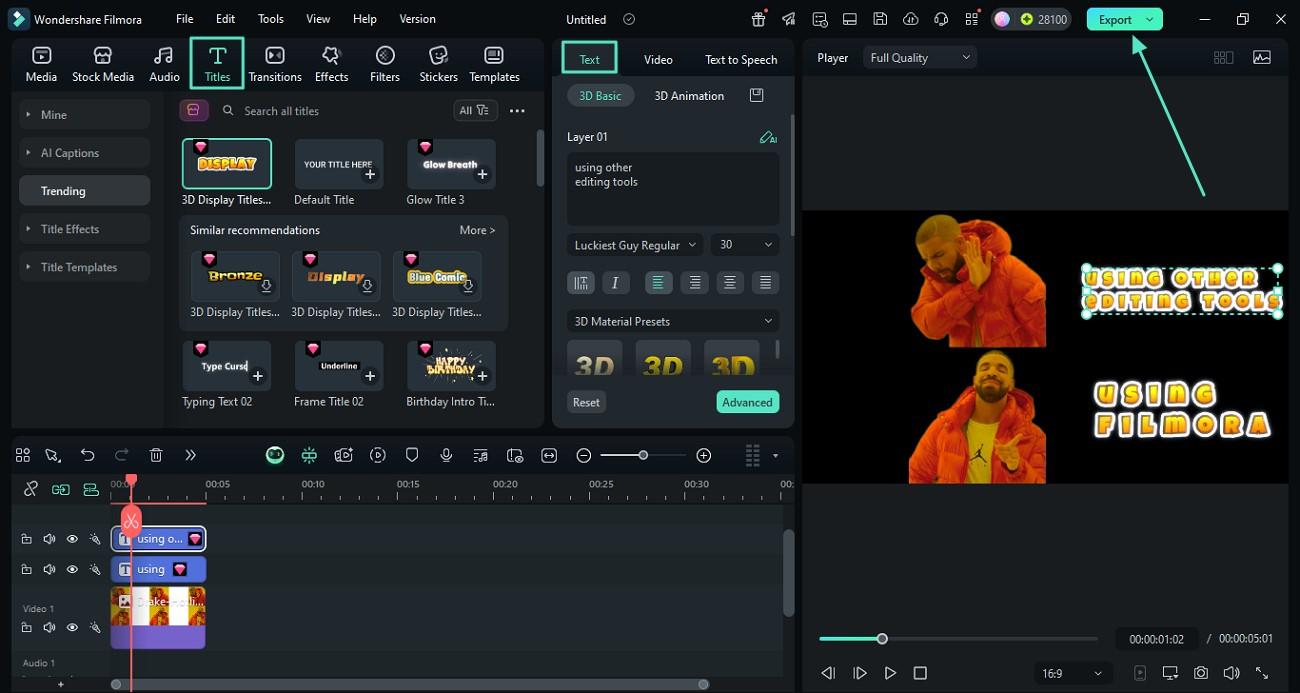
Step 5. Add Captions or Ad Messaging
- Open the "Titles" section and choose a text template that suits your meme advertising style.
- Type in your marketing caption or punchline under the "Text" panel to convey the brand message.
- Click "Export" to save your meme image with engaging text overlays.
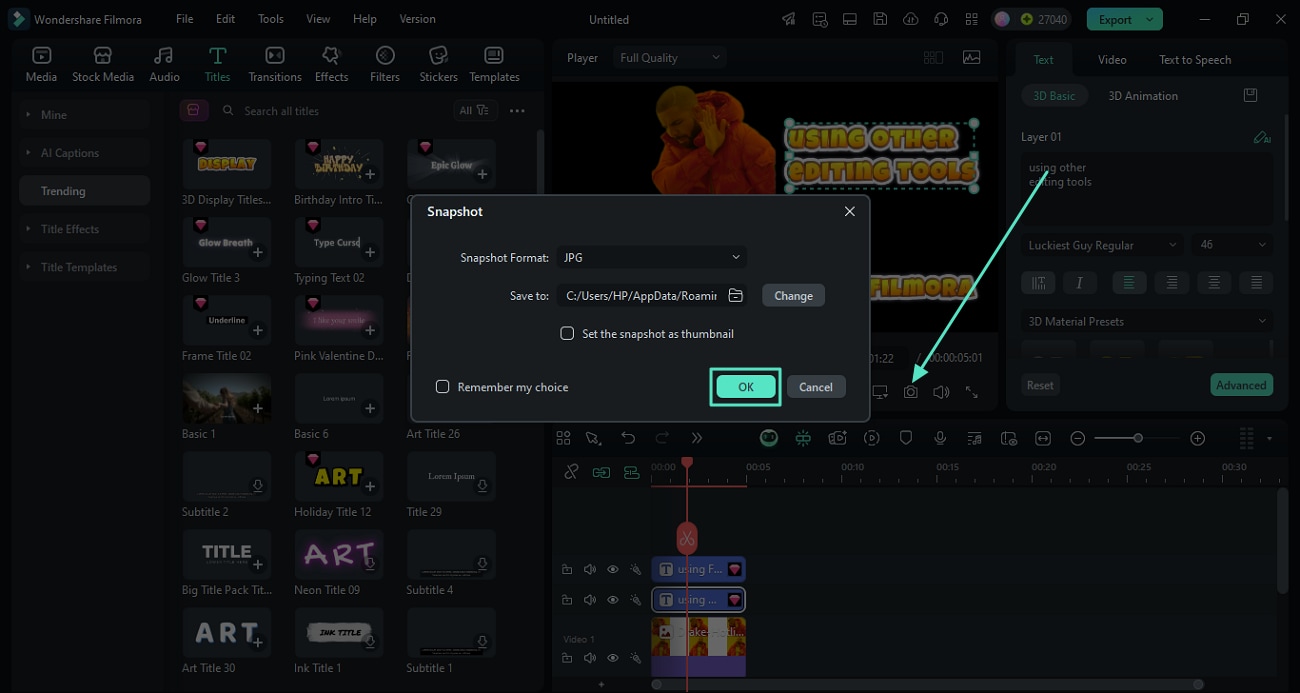
Step 6. Capture and Save as a JPG Meme
- Click the "Camera" icon below the preview window to take a snapshot of your final meme ad.
- Select JPG format and destination folder, then click "OK" to save and use in your marketing channels.
Craft Meme Videos and GIFs Using Filmora
As discussed, Filmora offers various resources to create video memes effortlessly, even for users who do not have editing skills. Mentioned below are the steps for creating a perfect meme video for your brand using this coherent tool's image-to-video feature:
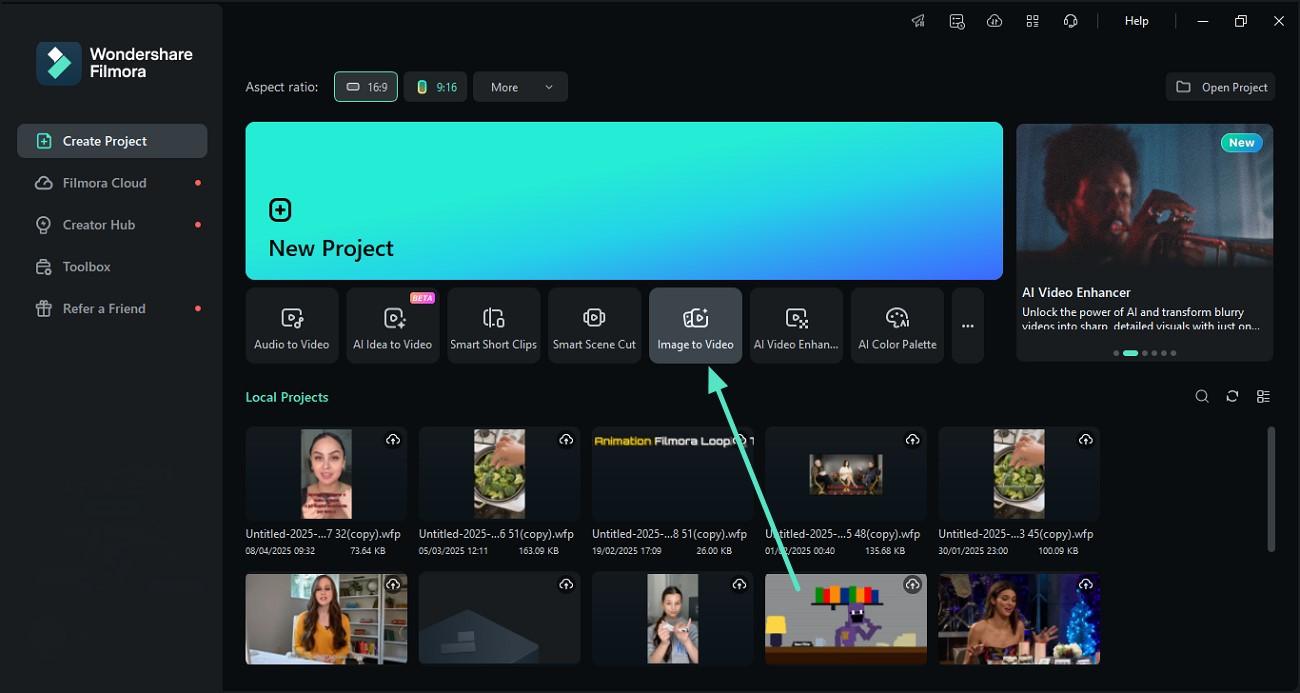
Step 1. Choose the Image to Video Feature
- Start by launching Filmora and locating the "Image to Video" tool, then click to open it.
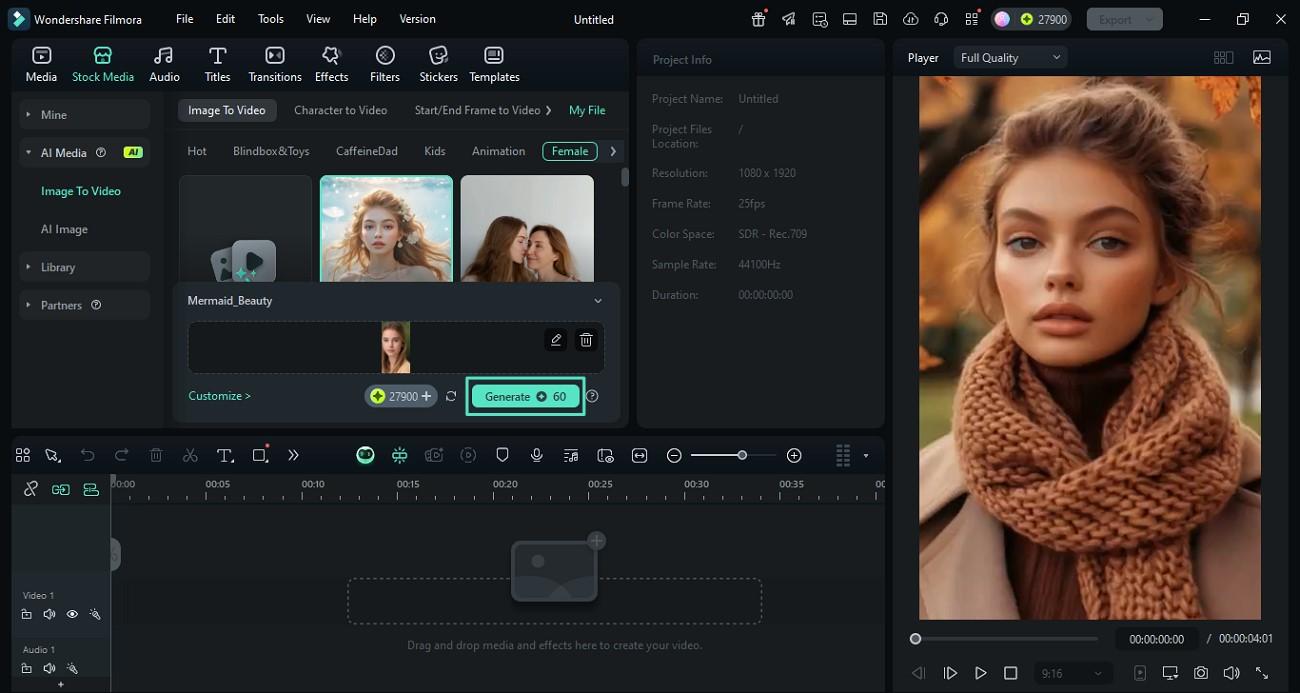
Step 2. Select a Template or Customize Your Own
- Browse the available templates and select one that fits your meme marketing style.
- Import your image, then click the "Generate" button to start creating the video.
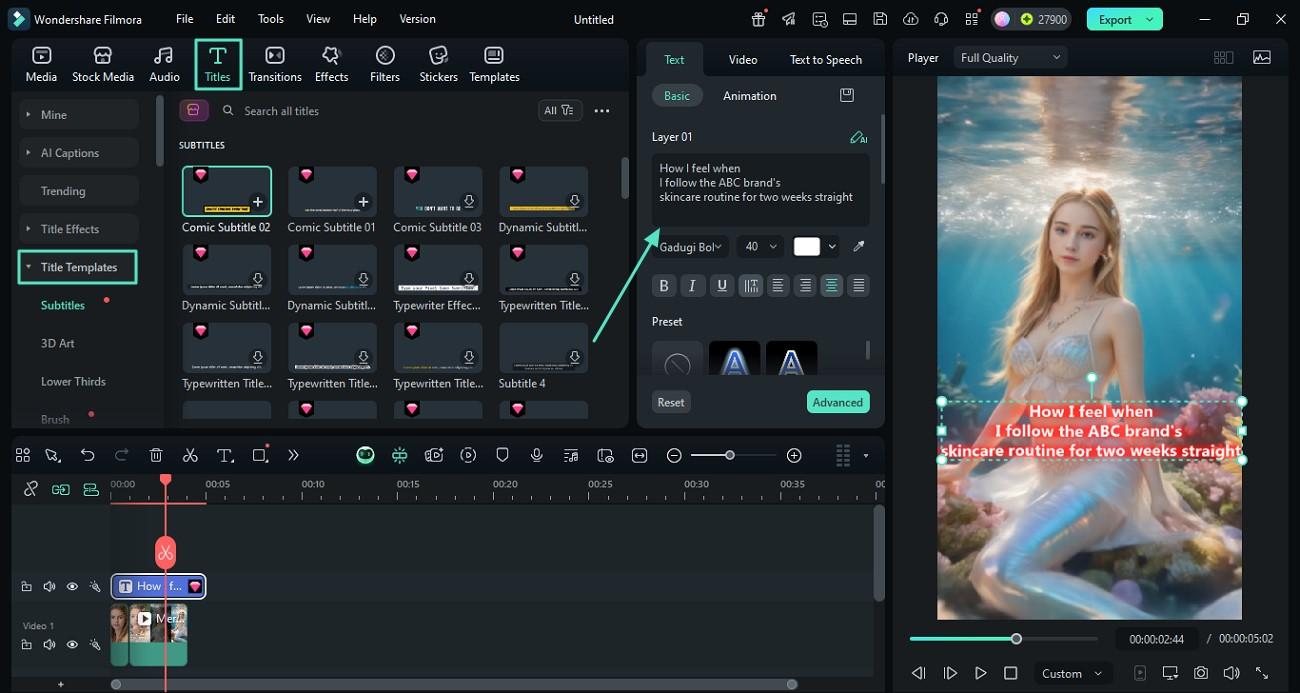
Step 3. Add Text to Customize Your Meme
- Go to the "Titles" section and open the "Title Templates" panel on the left to access text styles.
- Enter your desired caption or message in the text field to enhance your meme marketing video.
- Adjust font, size, and other text settings to match your brand's tone.
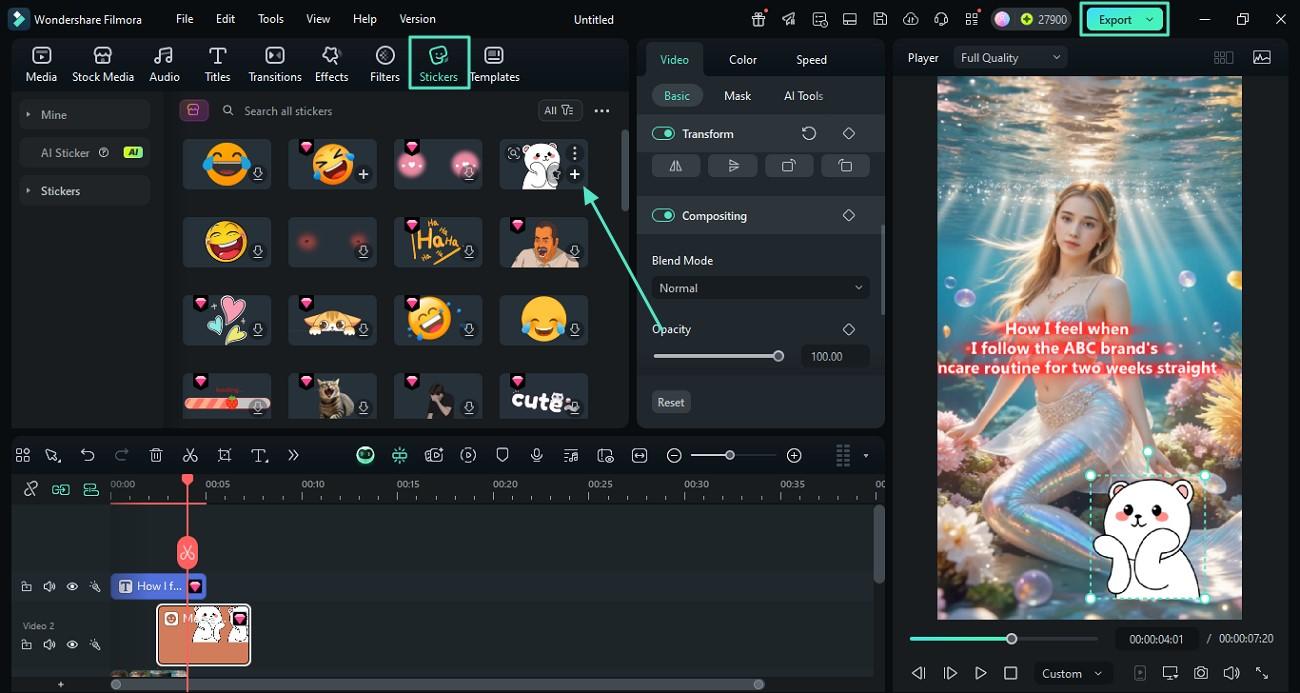
Step 4. Add Stickers to Boost Engagement
- Navigate to the "Stickers" section and select stickers that fit your meme's style.
- Click the "+" icon on the sticker thumbnail to apply it to your video.
- Once you're satisfied, click the "Export" button in the top-right corner to proceed.
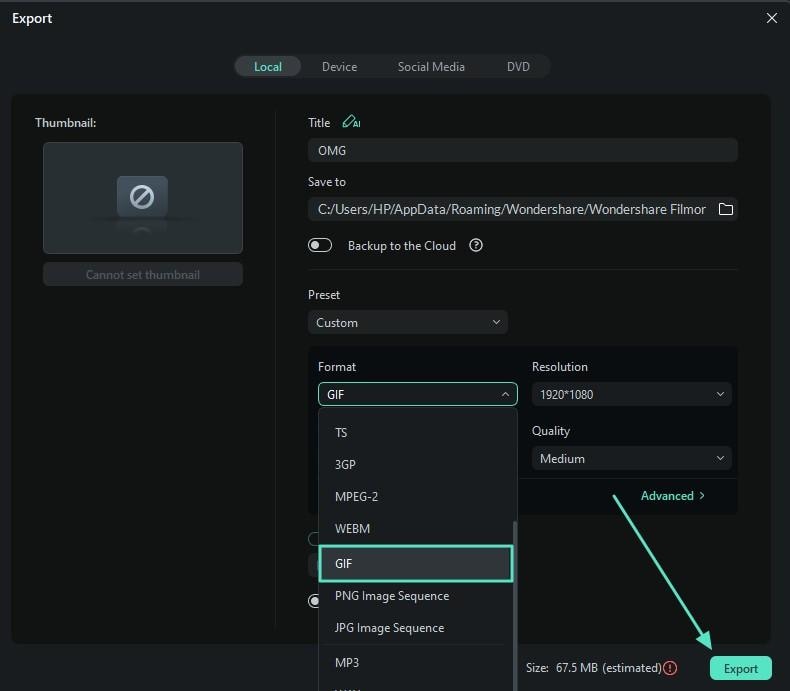
Step 5. Export and Save as GIF
- In the export settings, adjust parameters like resolution and file name as needed.
- Select "GIF" as the output format and hit "Export" to save your meme marketing video as a GIF file.

Filmora
⭐⭐⭐⭐⭐
The Best AI-powered Video Editing Software and App
Conclusion
To wrap it up, this article discussed various tips and techniques to create meme marketing images and videos you can upload to social media. The article suggested that Wondershare Filmora is one of the most reliable solutions when it comes to creating a meme that can help you and your brand trend. You can start from scratch or use the templates to create meme images and videos that resonate with your brand.