
***DISCONTINUED***
We discontinued development of the WordPress plugin, the API that the plugin was based on is still available. If you’ve installed the WP plugin on your site already it will continue to work in its current version for the time being.
***DISCONTINUED***
Video recorder for WordPress – updates
Our video recorder and uploading plugin for WordPress allows you to embed a button on your website to collect and share videos from your users and site visitors.
They can record videos or select existing video files using the plugin, which are then converted and compressed to the settings you choose, and uploaded to your WordPress site, YouTube channel, Google Drive account or another cloud storage destination.
All of this is done from within the browser and runs in both desktop and mobile versions of WordPress.
We are happy to announce a number of new features to our HTML5 camera recorder and video uploading plugin that will make collecting videos on your website easier than ever!
Embedding video in WordPress posts
We’ve made it easier to build end-to-end applications on top of the video plugin. Putting it simply, we added an option to embed any new video that has been recorded or uploaded using Clipchamp into a new WordPress post.
Here is a sample video post with a recording directly embedded after it was taken. You can either publish each recorded video automatically or keep them as drafts so you can vet them before putting them online.
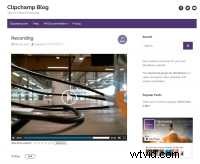
We automatically set the preview image of that post to be a still image from the video and we embed an HTML5 video player into the WordPress post that lets you play the recorded video.
Easier integration
We understand that the end-to-end application scenarios involving our plugin can be quite unique on different websites. Because of this, we offer a plethora of customisation options to adjust our service to your site’s needs.
One of the ones we have recently added is an option to also customise the downstream process after a video was recorded and uploaded using our service.
To do that, we extended our plugin’s settings screen to let you paste in custom JavaScript code, which is run after a video was uploaded. That code receives metadata about the video, the storage location, and optionally also the WordPress post identifier, all of which you can use to perform some custom finalisation logic.
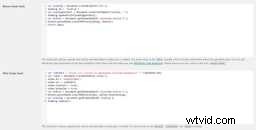
For example, you can redirect your users to another page, where you request more data and in this way, make the Clipchamp video upload part of a screen flow of forms (such as in a questionnaire).
New trial period without credit card
We introduced a free 14-day trial period that provides full access to all features of the video recorder for WordPress (and our underlying HTML5 camera recorder API) without the need to enter a credit card to start the trial. This lets you test the plugin as much as you like for 2 weeks before deciding on a plan and starting a subscription.