
The digital audio workstation – or DAW, as it’s affectionately known – is the backbone of modern music production. If you’ve ever wanted to compose or record music, there’s a strong chance you’re at least somewhat familiar with what this piece of software does.
Put simply, DAWs provide musicians, producers, and sound engineers with a comprehensive set of tools to create, mix, and master music and other audio projects.
- READ MORE: Best MIDI controllers for creating music in your DAW
And today, there are more options than ever. While heavyweights like Logic Pro, Ableton Live, and FL Studio remain the most popular choices, we’re seeing countless innovative upstarts offer fresh and innovative approaches to making music.
To a certain extent, selecting a DAW is a question of personal preference rather than one of functionality. As time has gone by, we’ve seen greater parity of features across DAWs. For example, Ableton finally received comping in Live 11 – a capability Logic Pro and other DAWs have had for years. Meanwhile, Logic Pro’s 10.5 update aped Live’s iconic Session View with its Live Loops feature.
Instead, the software you choose comes down to how it fits into your creative process – whether that’s in terms of workflow, interface, instruments and effects, or simply if it inspires you to create music.
With that said, modern DAWs do still have their own strengths and weaknesses. In this guide, we show you the best DAWs based on a range of musical applications to help you pick the perfect tool for the job.
Best DAWs at a glance:
- Ableton Live 12 – Our pick for overall best DAW
- BandLab – Best mobile DAW
- UA Luna – Best free DAW
- FL Studio 2025 – Best for sampling and beatmaking
- Reason 13 – Best for sound design
- Logic Pro 11 – Best for mixing and arrangement
- Steinberg Cubase Pro 14 – Best for scoring and soundtracking
- Bitwig Studio – Best for modular workflow
- RipX DAW – Best for AI tools and stem separation
Our Pick: Ableton Live 12
 Image: Ableton
Price:
- Live 12 Intro: $99 / £69 / €79
- Live 12 Standard: $439 / £259 / €279
- Live 12 Suite: $749 / £539 / €599
Ableton Live is among the most popular DAWs, and it’s easy to see why. It’s incredibly versatile, catering to a wide range of uses across both music production and live performance. A major hallmark of Live is its Session View, which provides a clip-based, non-linear workflow for music creation and improvisation.
But make no mistake, Ableton Live is an incredibly powerful workhorse that’s a capable centrepiece of any setup. It includes some fantastic built-in plugins, like the Operator FM synth, the self-explanatory Wavetable, and more experimental synths like Tension and Collision that offer physical modelling. There’s a full roster of studio-grade effects that let you mix and master your productions too.
With the release of Live 12 in March 2024, Ableton cemented its position as one of the best all-round DAWs, with inspiring MIDI generation features, the new MPE-enabled synth Meld, and a range of workflow improvements. And if that wasn’t enough, the Ableton Live 12.2 update in June 2025 introduced native stem separation and Splice integration, among other enhancements.
Pros:
- Session View offers unmatched live performance and clip-based workflow
- Wide range of built-in synths and studio-grade effects
- Max for Live extends functionality near infinitely with custom devices
- Cheaper Intro edition great for beginners
Cons:
- Interface and workflow can feel unconventional to new users
- Suite edition is quite pricey
Learn more in our review of Ableton Live 12.
Best Mobile DAW: BandLab
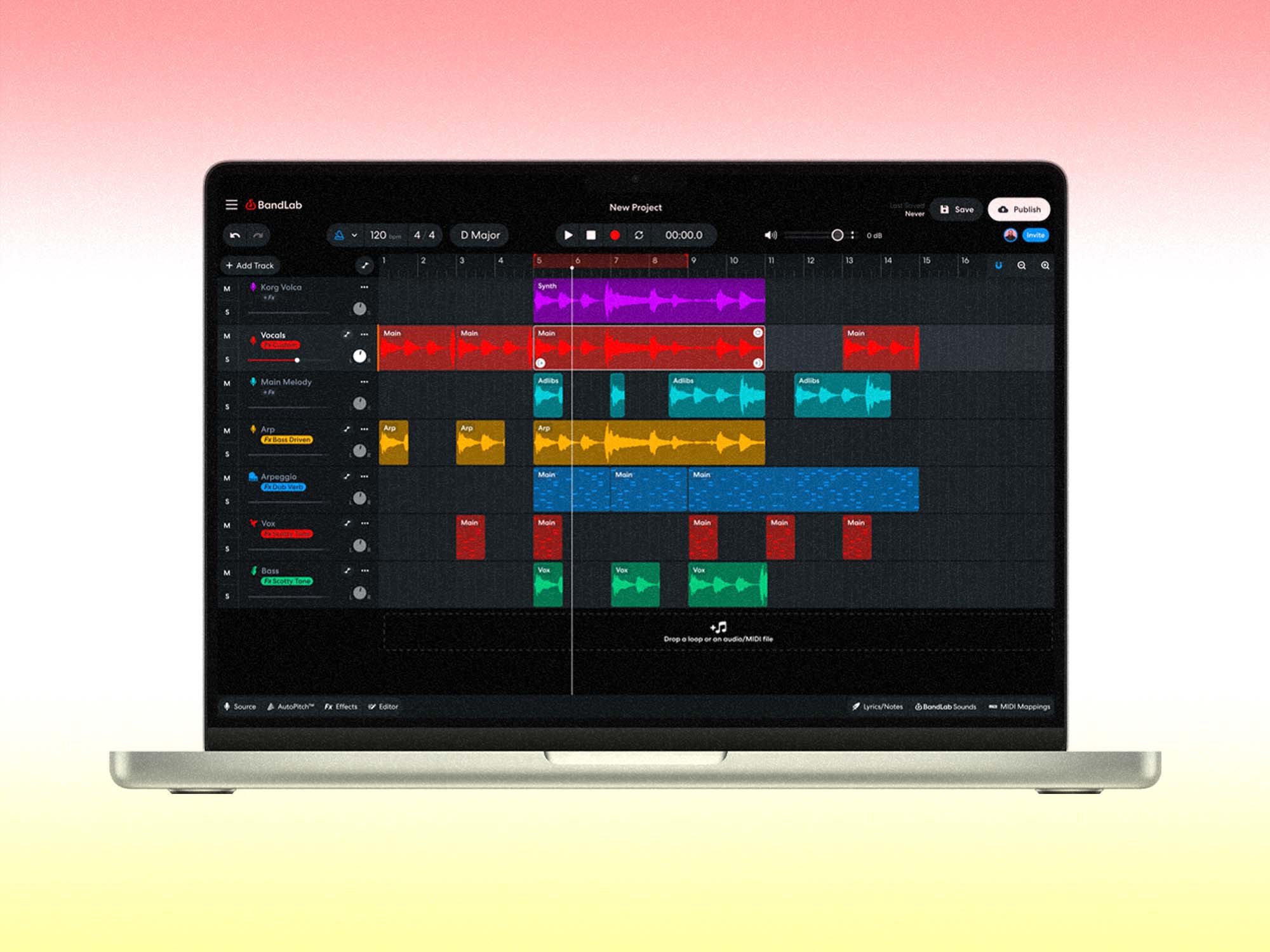 Image: BandLab
Price: Free
Our vote for the best mobile DAW goes to BandLab, the perfect choice if you’re making music on a phone or tablet. Its cloud-based approach offers two significant benefits.
First, it means you can make music anywhere. On the go and sketching out an idea on your phone? Simply log into your BandLab account on desktop and finish things off in the browser.
Secondly, BandLab is great for collaboration. Recording a vocalist? Want input from your band members? Send them an invite to Fork your track and you’ll be able to work together on the project in real time. You can collaborate across iOS and Android devices, plus any computer that can run Google’s Chrome browser. The social media side of BandLab also lets you share tracks, connect with other artists, and discover new music production techniques.
Other features of the BandLab DAW include a royalty-free sample library of over 100,000 sounds (including many made by MusicTech), stem separation tech, and an AI-powered idea generator, all seamlessly integrated within the platform. The icing on the cake? It’s entirely free to use.
However, BandLab is so much more than just a DAW. It also offers a range of services to help you distribute and promote your music, letting you release on DSPs, earn money from your fans through a tip jar, and submit your music to exciting industry opportunities.
Pros:
- Fully cloud-based and accessible on mobile, desktop and browser
- Real-time collaboration across devices and platforms
- Includes royalty-free library of 100,000+ samples
- Offers integrated distribution and promotion tools
Cons:
- Limited compared to pro desktop DAWs in terms of advanced features
- Requires a stable internet connection for full functionality
Find out more at bandlab.com.
[Editor’s note: BandLab and MusicTech are both part of Caldecott Music Group]
Best free DAW: UA Luna
 Image: Universal Audio
Price: free, or $99 / £85 / €98 for Luna Pro
Universal Audio is best known for its powerful audio interfaces and sophisticated analogue-style plugins. But in 2020, the company surprised us with the launch of its brand-new DAW, Luna. Previously only available to owners of Universal Audio hardware, the software is now free for all macOS and Windows users.
Despite its lack of price tag, Luna provides a high-quality recording and mixing environment on par with the best-paid DAWs. And, unlike some other free DAWs, the track count is unlimited — you can record or play back as many as your machine can handle. You can also run AU and VST plugins, which greatly expands your capabilities.
Another major selling point is the focus on analogue emulation – both in terms of sound and workflow. In fact, Luna might just be the closest you can get to an in-the-box mixing desk thanks to advanced summing algorithms modelled on classic consoles from Neve and API.
On top, Luna’s tight integration with other UA products means it works flawlessly with your favourite UAD plugins while providing low latency and high fidelity.
Pros:
- Deep integration with Universal Audio interfaces and UAD plugins
- Excellent bundled virtual instruments
- Accelerated Realtime Monitoring delivers ultra-low latency recording
- Zero cost of entry
Cons:
- Missing some features of more mature DAWs
- Neve and API summing and other effects require paid version
Learn more in our review of Universal Audio’s Luna.
Best for sampling and beatmaking: FL Studio 2025
 Image: Image-Line
Price:
- FL Studio Fruity Edition: $99 / £89 / €99
- FL Studio Producer Edition: $179 / £199 / €229
- FL Studio Signature Edition: $269 / £279 / €319
- FL Studio All Plugins Edition: $449 / £469 / €539
Long affiliated with the hip-hop world — although perfectly capable of handling any genre you throw at it — FL Studio is our pick if you’re looking for a DAW for sampling and beatmaking.
Renowned for its pattern-based workflow and intuitive step sequencer, FL Studio is especially popular with those new to music production. But don’t let its user-friendly appearance deceive you — this DAW is just as suitable for audio pros, offering plenty of advanced features and functionality, including native stem separation.
The most recent update, FL Studio 2025, introduced AI assistant, Gopher, to help with navigation and speed up troubleshooting, so there’s never been a better time to give this DAW a try. FL Cloud integration continues to grow too, offering built-in access to samples, plugins, distribution, and mastering tools.
Starting at £89, FL Studio pricing is highly accessible, but users get free lifetime updates too – we think that’s incredible value for a fully-fledged DAW. Looking for beatmaking software with a tighter focus? Give Serato Studio or MPC Beats a try.
Pros:
- Unique sequencer-centric workflow ideal for beat-driven genres
- Excellent piano roll and MIDI editing tools
- Free lifetime updates — buy once, own forever
- Entry-level Fruity Edition is excellent value
Cons:
- Audio and MIDI recording workflows feel clunkier than other DAWs
- Grid-based workflow less suited to non-electronic styles
Learn more in our review of FL Studio 2025.
Best for sound design: Reason 13
Price: $499 / £499 / €499 (also available as Reason+ subscription)
Reason is a little different to other DAWs — in fact, it nearly transcends the label entirely.
It’s built around the Rack, an emulation of a real hardware rack which users can stock with instruments and effects, and then connect them up in all sorts of different ways. This modular approach makes Reason the sound designer’s best friend. Once you’re done crafting a sound, you can bake it into a single rack unit with a custom faceplate, or even bring it into another DAW by using Reason as a third-party plugin.
However, it works just as well standalone thanks to the Studio which provides recording and sequencing functionality, audio editing tools, and even a mixing desk modelled on the famous SSL 9000k.
The current version, Reason 13, launched in 2024 and added many quality-of-life improvements like an overhauled browser, improved editing in the sequencer, and even a dark mode, alongside new devices like the Polytone analogue-style synth and the Ripley vintage delay.
While Reason is available as a one-off purchase, those opting for the monthly Reason+ subscription also get access to a plethora of samples and audio packs along with additional Rack devices and the latest updates.
Pros:
- Unique hands-on rack system with cable patching encourages experimentation
- Rack can run as a plugin inside other DAWs for flexible sound design
- Strong bundled devices
- Recent updates bring Reason in line with modern workflows
Cons:
- Expensive one-off licence compared to competitors
- No surround, scoring, or video support
Learn more in our review of Reason 13.
Best for mixing and arranging: Logic Pro 11
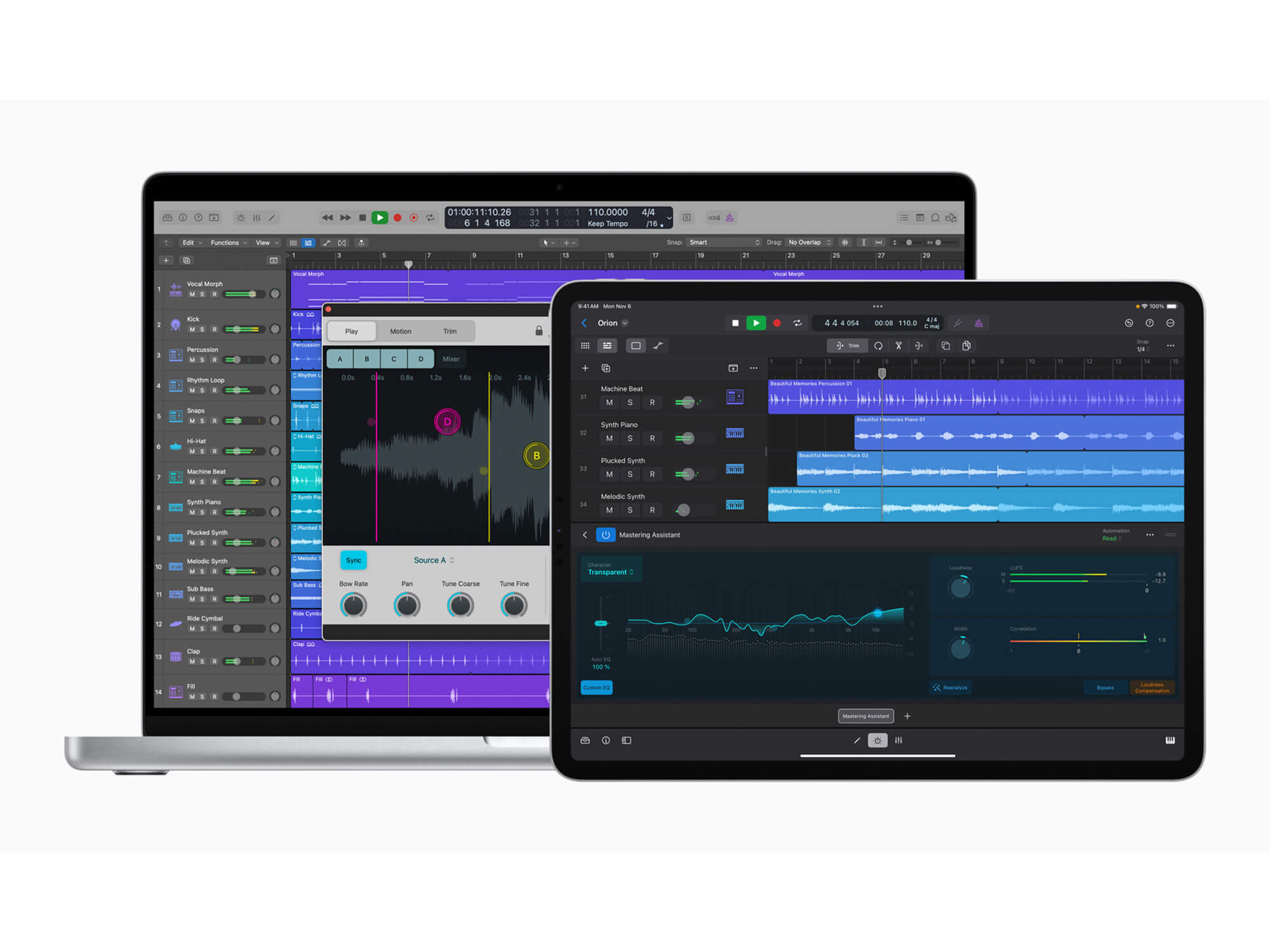 Image: Apple
Price: $199 / £199 / €229
Of course, focusing solely on mixing and arrangement is selling this DAW short, and this all-in-one music production suite regularly receives inspiring new features. Recent updates include AI-powered pitch correction, smart Session Players, and new hardware emulations that can enhance your mix with some analogue colour. The DAW’s native stem separation tool also received an upgrade in the Logic Pro 11.2 update.
Pros:
- Outstanding value thanks to lifetime free updates
- Professional-grade recording, editing, mixing, and scoring tools
- Huge bundled library of instruments, effects, and samples
- Strong surround and spatial audio support for Dolby Atmos
Cons:
- Available for macOS only, and some features require Apple Silicon
- AU plugins only, no VST support
Learn more in our review of Logic Pro 11.
Best for scoring and soundtracking: Cubase 14
 Steinberg Cubase 14. Image: Press
Price:
- Cubase Elements 14: $99 / £83 / €99
- Cubase Artist 14: $329 / £273 / €329
- Cubase Pro 14: $579 / £481 / €579
Steinberg Cubase may lack the aesthetic appeal of DAWs like Ableton Live or FL Studio, but it remains an audio production staple — particularly for those working with moving image.
Off the bat, Cubase integrates well with video, allowing users to accurately sync music with visual content. The platform touts advanced MIDI capabilities too, letting you get the most out of today’s detailed multi-sample libraries to create highly expressive compositions that match the emotion of the scene.
That said, this DAW is just as powerful for electronic music producers, with the Cubase Pro 14 introducing Modulators — LFOs, step sequencers, envelope followers, and even custom scripts that can control any available parameter. The new Pattern Editor improves loop-based workflows too, with note probability and velocity variance proving particularly useful tools for generative music.
One drawback? Many features TV or film composers require — such as the Advanced Score Editor, Time Warp, and support for Dolby Atmos — are locked behind the highest pricing tier.
Pros:
- Excellent video integration for producers working with moving image
- Industry-leading MIDI and audio editing tools, plus advanced scoring and notation
- Huge bundled instrument and plugin library
- New Modulators open up impressive sound design potential
Cons:
- Pricey compared to rival DAWs
- More ‘traditional’ workflow than modern options like Ableton or FL
Learn more in our review of Cubase 14.
Best for modular workflow: Bitwig Studio 6
 Bitwig 6. Image: Bitwig
Price:
- Bitwig Studio Essentials: $99 / £79 / €99
- Bitwig Studio Producer: $199 / £169 / €199
- Bitwig Studio: $399 / £339 / €399
Want your workstation to feel more like a modular instrument than a DAW? Once a new ‘challenger’, Bitwig Studio has now been on the scene for over a decade, developing a passionate userbase along the way thanks to its unique focus on experimentation.
Rather than dictating how you work, Bitwig’s fluid interface bends to your own creative flow thanks to Clip Launcher and timeline views. An integrated modulation and plugin system lets you use macro controls, note expressions, LFOs, and envelopes to modify pretty much anything in the DAW, including tempo. There’s even an entire modular sound design system included.
In our Bitwig Studio 5 review, the DAW scored full marks and received our Innovation Award on top. With forward-thinking features like plugin crash protection, extensive multi-touch support, and the new open-source CLAP plugin format, it’s easy to see why. Throw in a Bitwig Connect interface and the hardware-software boundary is removed entirely — Bitwig meets Eurorack, anyone?
Version 6 is now in public beta, introducing Automation Clips that let you treat modulation data like audio or MIDI, Clip Aliases that streamline arrangement, and a Step Input mode for speeding up note entry.
Find out more about the upcoming Bitwig Studio 6 release.
Pros:
- One of the most creative, modular DAWs available
- Offers several innovative features not found in competitors
- Comes with the Grid modular environment for building custom synths and effects
- Cross-platform (Windows, macOS, Linux)
Cons:
- Smaller content library and bundled instruments compared to competitors
- Potentially steeper learning curve
 Hit’n’Mix RipX DAW. Image: MusicTech
Price:
- RipX DAW: $99 / £99 / €114
- RipX DAW Pro: $198 / £198 / €228
AI tools continue to proliferate throughout DAWs, augmenting music production workflows for creative and routine audio tasks alike. But RipX DAW is one of the first to position these tools centre stage, focusing heavily on AI-driven sound manipulation.
Its standout feature is astonishingly accurate stem and note separation. Load in any track, and you can isolate vocals, drums, bass, or even individual notes with forensic precision. From here, producers can export stems as audio or MIDI, build backing tracks, repair noisy recordings, or completely reimagine existing material.
RipX probably won’t replace your main DAW — not yet, at least — but if you’re regularly working with stem separation or audio clean-up, this groundbreaking solution is surprisingly affordable.
Learn more in our RipX DAW review.
Pros:
- Best-in-class stem and note separation tools
- Flexible editing of pitch, timing, harmony, and effects
- Excellent cleanup and repair tools in Pro version
- Wide creative and practical applications
Cons:
- Less traditional DAW functionality
- Demands a high-spec, modern computer
Other options to consider
Avid Pro Tools – Best for multitrack recording
Still a staple of commercial studios worldwide, Avid Pro Tools excels at large-scale multitrack recording, editing, and mixing. Its industry-standard status makes it the go-to DAW for professional recording engineers and post-production facilities.
DJ.Studio – Best for DJs
Designed specifically for DJs, DJ.Studio integrates with Rekordbox, Serato, and Traktor to streamline playlist creation, stem separation, and transitions. You can also export to YouTube or Mixcloud, and there’s a built-in visualiser for video mixes.
Read our DJ.Studio review.
Steinberg Nuendo 14 – Best for post-production and game audio
Nuendo 14 is Steinberg’s flagship post-production DAW, packed with ADR tools, video cut detection, and support for advanced surround formats like Dolby Atmos and Ambisonics. It’s overkill for pure music production, but indispensable for film and game audio professionals.
Read our Nuendo review.
Moises AI Studio
Moises AI Studio brings generative AI into a browser-based DAW, letting users create context-aware instrumental parts, generate stems, and access over 50 AI vocal models trained on ethically sourced data. It’s ideal for remixers, content creators, and quick demo building.
Learn more about Moises AI Studio.
Why You Can Trust MusicTech
MusicTech reviews hundreds of new products every year, from powerful synthesizers, DAWs and pro plugins through to everyday headphones and portable speakers. Our expert reviewers are producers, engineers and enthusiasts with hundreds of years of collective experience, with a keen ear to the ground on new trends and technologies.
Every guide on MusicTech is created by a producer, musician and tech enthusiast just like you. We understand what you’re looking for when searching for a new DAW, and we want to ensure you purchase genuinely useful products for your craft. So you can guarantee that every product MusicTech recommends to you is a product we’d be happy to have in our studios.
For more buyer’s guides, click here.

James is a freelance writer for MusicTech. You'll often find him pushing plugins to their limits, skimming through the latest sample packs, or obsessively watching Rig Rundowns. With a background in live music, he also loves finding elegant solutions to complex problems — especially when it comes to gear.