
One adapter is normal, two is unusual but three! Canon has released three EF-R mount adapters alongside the R range. Why? Genuinely I think that Canon has taken so long to produce the mirrorless camera that everyone has been waiting for, they wanted to spread the odds and cater to everyone.
But what’s the difference between each, and what they do? Let’s start at the beginning and take a look at what most other camera manufacturers do.
When Olympus launched the Pen and the MFT mount on its cameras it also launched an adapter. This enabled those using a four-thirds lens to mount them onto the new system bodies. Likewise Sony did much the same but left it to a third party to provide the mount, and of course, there’s the Nikon’s Z mount adapter.
One mount is normal, but here Canon has given us the choice of three.
The first is the ‘Mount Adapter EF-EOS R’ – This is the adapter that we expected and enables you to attach your old EF lenses to you R body.
Then there’s the ‘Control Ring Mount Adapter EF-EOS R’ this is similar in function to the ‘Mount Adapter EF-EOS R’ but adds a customisable ring around the barrel.
Through the R’s interface, you can customise this ring to do a variety of different things including changing the aperture, shutter speed and sensitivity. There’s eight main options that you can select alongside off.
This ring gives you back the functionality that some of the more modern Canon lenses stripped away. A gentle click lets you know when you’ve changed settings, for example, the aperture which is handy when shooting stills. Filmmakers make note; a lens click for aperture control is annoying but here it can be deactivated to give a smooth transition.
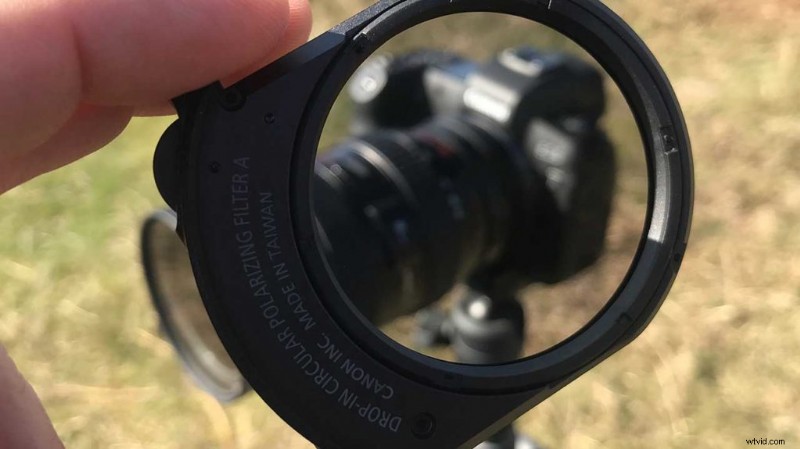
Finally, there’s the most interesting adapter by far the ‘Drop-In Filter Mount Adapter EF-EOS R’ this enables you to drop-in one of three filters. PL, CL, and VND.
What is the Canon EOS R Drop-In Filter Mount Adapter EF-EOS R
Drop-in filters have featured on video lenses for years, but to see them appear on a mirrorless is something new. They’re a handy and neat way of controlling the light and being an integral part of the body and camera they’re convenient and easy to use.
The adapter as with the other two sits in between the EOS R body and the EF lens, primarily acting as an adapter between the two different mounts.
The filters are held in the side and can be popped in and out as needed. Each features its own mechanism to increase or decrease the effect. The filter adjustment dial is positioned within reach of your index finger so is easy to adjust as your shooting.
The PL and CL polarisers help to draw out detail from clouds, polarise skies and cut reflections. There are two options the PL which is a straight polarizer and the CL which boosts colour and contrast.
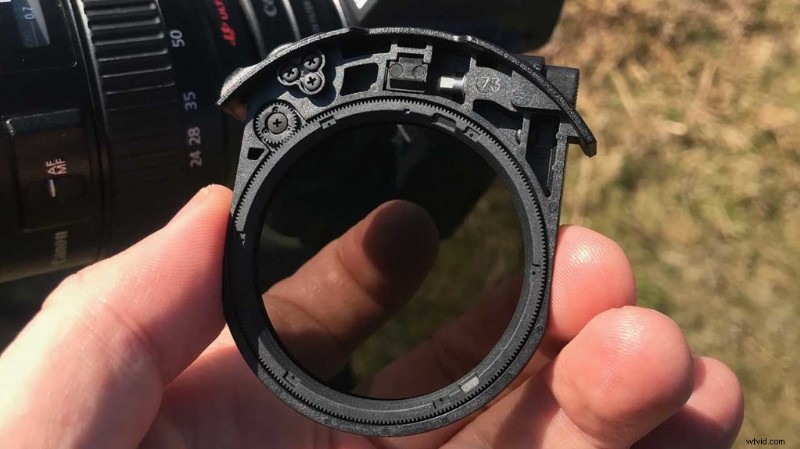
Then there’s the Variable ND. This adjusts the amount of light that gets through to the sensor. Its adjustment stops down the exposure, so if you want to shoot outdoor portraits on a sunny day with a wide open aperture you can.
Where a variable ND comes into its own is when shooting video. If you want to adhere to the 180-degree shutter rule to capture smooth natural motion then the filter can be used to stop the light down.
Shooting at 4K25p you’d need a shutter speed of 1/50, this is unlikely in bright conditions even dropping the Sensitivity/Gain down to ISO 200. A variable ND reduces the actual light hitting the sensor so you can get the settings and creative control you need.
In use, the filter system is incredibly easy and could almost be the instigator for many wanting to switch back to Canon from Sony. The drop-in filter adapter is an excellent piece of kit, if Canon can just free up some of the R’s video potential then I could see a lot of people making the leap back.