
Formatting your memory card is a good habit to get into, as it not only maximises your storage space but ensures your card is completely compatible with your camera.
It may seem like a scary thing to do, given that formatting a memory card will erase all your images, but as long as you back up your photos you’re simply allowing yourself to take more great images!
We have a great tutorial here on formatting vs erasing a memory card. Personally, I prefer to format a card, and in this tutorial I’ll show you how to format a memory card in the Nikon D3400.
If you’ve bought the Nikon D3400, chances are this is your first interchangeable lens camera and first time you’ve had total control over the image-making process. Which can seem overwhelming at times.
Rest assured, you don’t have to format your card if you don’t want to. But doing so does guarantee your card will record everything you see and capture.
- Nikon D3400 review
Format an SD card in the Nikon D3400
- Press the Menu button
- Press the left arrow button on the four-way controller on the back of the camera so that you can navigate through the main menu sections on the left side of your Nikon D3400 LCD screen. You’ll know you’re there when the icons are illuminated
- Scroll down to the Setup Menu, or wrench icon
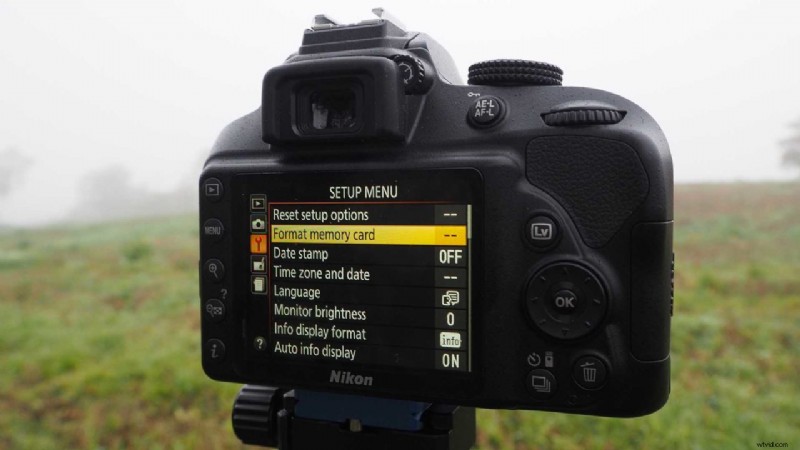
- The second option down will be Format Memory Card. When on this selection, press the right arrow, or the OK button
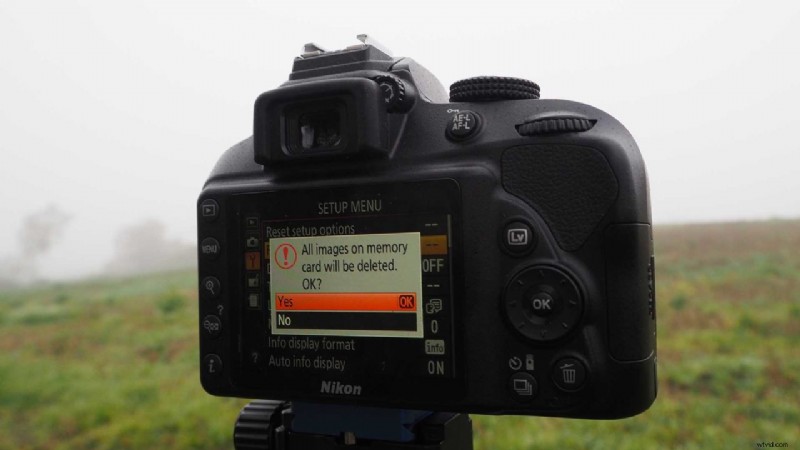
- You’ll now see a sub-menu appear asking you to select Yes or No. Scroll up or down until you’ve highlighted Yes, and press OK.
One thing to remember about navigating the Nikon D3400 menu system is that you can advance through sub-menus either by pressing OK or the right arrow button on the back of your camera. My video above illustrates how this works in practice.
That’s it! Your memory card is now formatted to work in perfect harmony with your Nikon D3400!