

Apple has released iOS 13.6 and iPadOS 13.6 for all iPhone, iPod touch, and iPad users with compatible devices.
iOS 13.6 and iPadOS 13.6 include a new toggle for adjusting installation of software updates, a digital car keys feature for compatible cars, a “symptoms” category for the Health app, along with other minor feature enhancements, bug fixes, and general improvements.
Separately, Apple also released MacOS Catalina 10.15.6 and Security Updates for Mojave and High Sierra Mac users, watchOS 6.2.8 for Apple Watch, and tvOS 13.4.8 for Apple TV.
How to Download iOS 13.6 / iPadOS 13.6 Updates
Always backup the iPhone or iPad to iCloud, iTunes, or a computer, before installing any update to system software.
- Open the “Settings” app on iPhone or iPad
- Go to “General”, and then go to “Software Update”
- Choose “Download & Install” when iOS 13.6 or iPadOS 13.6 update shows as available
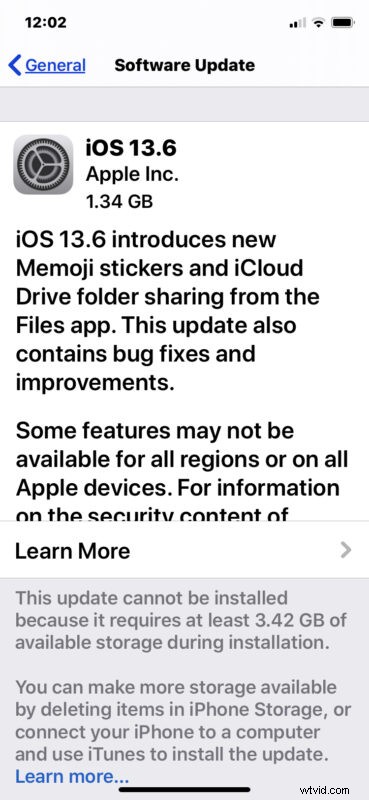
The device requires a fair amount of free storage available to perform the software update, and it will restart automatically to complete installation.
Another option is to update to iOS 13.6 and iPadOS 13.6 with a computer by connecting iPhone or iPad to a Windows PC with iTunes, a Mac with iTunes, or a Mac with MacOS Catalina and using Finder.
Advanced users can also use IPSW files to update system software manually using the links below.
iOS 13.6 IPSW Direct Download Links
- iPhone 11
- iPhone 11 Pro
- iPhone 11 Pro Max
- iPhone XS Max
- iPhone XS
- iPhone XR
- iPhone X
- iPhone 8
- iPhone 8 Plus
- iPhone 7
- iPhone 7 Plus
- iPhone SE
- iPhone SE 2
- iPhone 6s
- iPhone 6s Plus
- iPod touch 7th-generation
iPadOS 13.6 IPSW Direct Download Links
- iPad Pro 11-inch 2018
- iPad Pro 11-inch 2020
- iPad Pro 12.9-inch 1st generation
- iPad Pro 12.9-inch 2nd generation
- iPad Pro 12.9-inch 3rd generation 2018
- iPad Pro 12.9-inch 4th generation 2020
- iPad 7 10.2-inch 2019
- iPad 6 9.7-inch 2018
- iPad 5 9.7-inch 2017
- iPad Air 3 2019
- iPad Air 2
- iPad mini 5 2019
- iPad mini 4
- iPad Pro 9.7‑inch
- iPad Pro 10.5-inch
iOS 13.6 Release Notes
Aside from iOS 13.6 and iPadOS 13.6, MacOS Catalina 10.15.6, Security Update 2020-004 for High Sierra and Mojave, watchOS 6.2.8, and tvOS 13.4.8 are also available as updates for hardware capable of running those versions of system software.