

Mac users who are interested in jailbreaking their iPhone, iPad, or iPod touch running iOS 9, iOS 9.0.1, or iOS 9.0.2 will now find a version of the Pangu tool available for OS X. Previously, the Pangu utility was only available for Windows. Aside from the Windows vs oS X compatibility difference, all else with the jailbreak remains the same, including supported devices and iOS versions.
Jailbreaking is generally reserved for advanced users who understand the potential risks and limitations that come along with a jailbreak. Apple could choose to void warranty coverage for devices that are jailbroken if they need service, though it’s usually possible to unjailbreak before a warranty service is necessary in most cases.
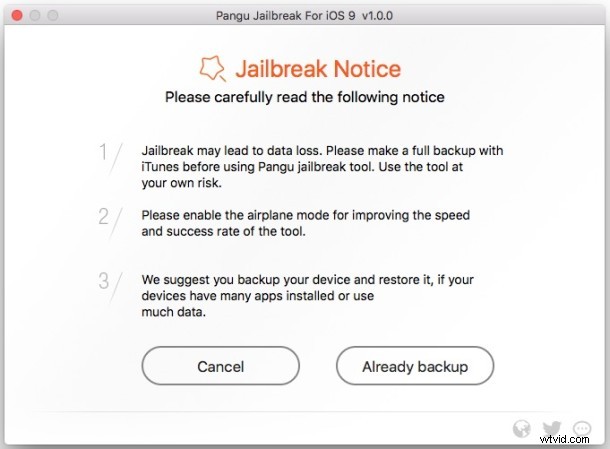
Always backup an iPhone or iPad before attempting to jailbreak.
Jailbreaking iOS 9 from Mac OS X with Pangu
The jailbreak process works with iOS 9.0, iOS 9.0.1, and iOS 9.0.2. It does not work with iOS 9.1 or iOS 9.2. The procedure is similar to Pangu for iOS 9 in Windows, obviously using different software and OS X instead:
- Back up the iOS device if you haven’t done so yet
- Go to the Pangu site to download the utility for Mac (or Windows)
- Enable AirPlane Mode on the device
- Connect the iPhone, iPad, or iPod touch to the Mac and launch the Pangu tool
- Follow the on-screen instructions to complete the jailbreak process
When the device is finished jailbreaking, it will reboot and you will find the familiar brown Cydia icon on the Home Screen.
The average iPhone and iPad user will not benefit from jailbreaking their devices and therefore should probably not do so, making the procedure most appropriate for advanced users or those who have a compelling reason to modify their iOS software.
If you’re considering whether to jailbreak or not, it’s a good idea to review the reasons Apple does not recommend it before making a decision.