REC

Recommended: Video Production, Editing & Gear Maintenance Guide

 WTVID >> WTVID >  >> Video Editing >> video editing software

Master Vintage Film Photo Editing: Quick Lightroom 4 Tutorial & Tips

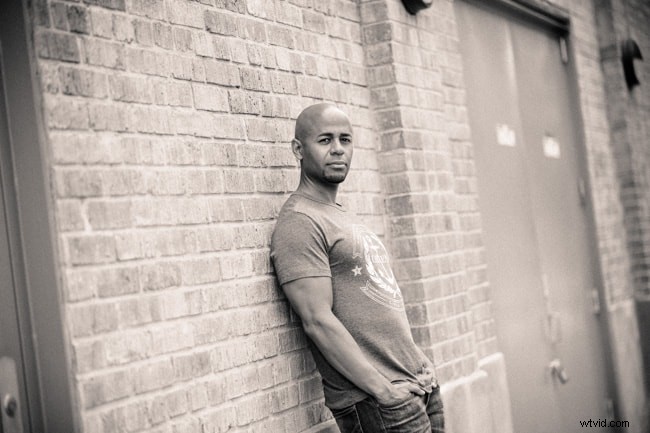
Its a digital world!  With some basic photo editing tips and skills you can transform any ordinary photograph into a vintage work of art using my favorite photo editing program – Adobe Photoshop Lightroom 4.   Watch the photo editing tutorial below to see how quickly you can perform this edit with some basic photo editing tips! In the case below, about 60 seconds.

As you are following along in the video here are the key steps involved with performing this photo-edit:

  1. Do all basic exposure edits
  2. Convert photo into Black & White
  3. Add slight orange/red tint in split toning section (both highlights & shadows)
  4. Adjust balance  (personal preference)
  5. Add grain (personal preference)
Done!


Master Vintage Film Photo Editing: Quick Lightroom 4 Tutorial & Tips

Sean Croxton from Underground Wellness, photo by: Cole Joseph Photography.

I really hope you enjoyed this tutorial, if so, please support the site by signing-up to our mailing list right here to receive more exclusive FREE tutorials, tips and giveaways!

Thank you!
Cole


  1. Master Flawless Screencasts: 9 Essential Video Editing Tips for Perfection

  2. Edit Photos Like a Pro: The Ultimate Complete Guide

  3. Walter Murch's Six Criteria for Masterful Film Editing: Expert Insights

  4. 10 Expert Tips for Effortless Photo Editing with a Graphics Tablet

  5. 10 Expert Tips for Mastering Smartphone Photo Editing

video editing software
  1. 5 Expert Tips to Boost Profits in Video Editing by Doing Less

  2. 5 Expert Tips to Slash Video Editing Time in the Suite

  3. Master Photo Editing on iPad: Pro Tips for Mobile Photographers

  4. Corel AfterShot Pro 3 Contest Winners Announced – Stunning Photos Revealed!

  5. GIMP vs. Photoshop: Ultimate Comparison to Choose the Best Photo Editing Software

  6. Master Dodge and Burn: Pro Photo Editing Technique for Perfect Exposure

  7. Mastering Film Editing: Timing & Pacing for Dramatic Impact

  8. Master Video Editing: The 5 Essential Phases for Efficient Workflows