
Searching for the best free online video invitation maker can be challenging because there are numerous options. And each online video invitation maker has a different purpose from the next one. Some online video invitation makers are excellent wedding choices, while others are best suited for naming ceremonies, birthdays, graduations, etc.
If you want to make an invitation video online for any of your events that your recipients will find impressive, then you should know the right one. In this article, you will learn about the best free online video invitation makers to use for any of your events.
Part 1. 10 Best Free Online Tools to Create Invitation Videos
Here are the ten best free online video invitation makers to use; you will find the best one that fits your needs perfectly.
1. Animaker
Animaker is a versatile and user-friendly online platform that enables users to create engaging video invitations for various occasions, including weddings, birthdays, baby showers, and corporate events. As of 2025, Animaker boasts over 25 million users worldwide and offers a vast library of more than 100 million stock assets, including images, videos, icons, and music tracks
Step-by-Step Guide: How to Create a Video Invitation with Animaker
- Visit Animaker's Invitation Video Maker and sign up for a free account or log in to your existing one. Animaker offers a free plan with access to various features suitable for creating high-quality video invitations.
- Browse through the Invite Video Templates to find a design that matches your event's theme. Animaker provides a wide range of customizable templates for weddings, birthdays, baby showers, and more.
- Use Animaker's drag-and-drop interface to personalize your chosen template.
- Add background music or voiceovers to enrich your invitation.
- Before finalizing your invitation, preview the video to ensure all elements are cohesive and accurately represent your event. Make any necessary adjustments to the visuals, text, or audio components.
2. FlexClip
FlexClip is a user-friendly online video editor ideal for creating personalized invitation videos for various events such as weddings, birthdays, webinars, and graduations. It offers a vast library of customizable templates, making it accessible for beginners to produce professional-looking invitations without prior video editing experience.
Step-by-Step Guide: How to Create a Video Invitation with FlexClip
- Visit FlexClip's Invitation Video Maker and create a free account or log in to your existing account.
- Browse through the available invitation templates and select one that aligns with your event's theme. Templates are categorized for various occasions, making it easy to find a suitable design.
- Input your event details, such as date, time, venue, and RSVP information. Upload personal photos or videos to make the invitation more engaging.
- Incorporate background music from FlexClip's royalty-free library or add a voiceover to convey a personal message.
- Review your video to ensure all elements are correctly placed and the information is accurate. Once satisfied, export the video in your desired resolution.
3. Promo
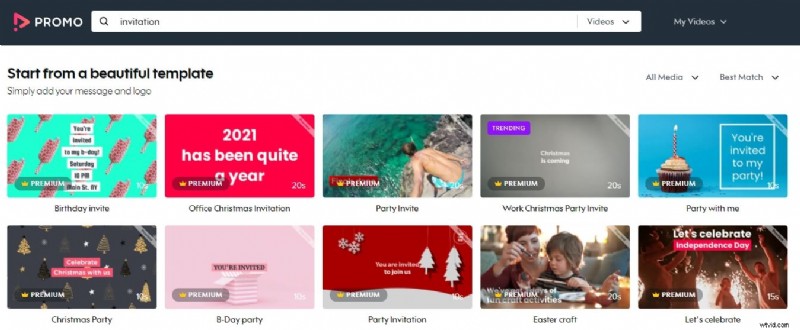
Promo is a versatile online video creation platform ideal for crafting personalized invitation videos for various occasions, including weddings, baby showers, office events, and retirement celebrations. With its extensive library of over 110 million photos and videos, along with a vast collection of royalty-free music tracks, Promo.com enables users to produce professional-quality invitations effortlessly. The platform's user-friendly interface and customizable templates make it accessible for users of all experience levels.
Step-by-Step Guide: How to Create a Video Invitation with Promo.com
- Visit Promo.com's Invitation Video Maker and create a free account or log in to your existing account.
- Select from Promo.com's extensive collection of invitation templates suitable for various occasions, or upload your own video footage to start from scratch.
- Personalize your chosen template by inputting event details such as date, time, location, and RSVP information.
- Browse Promo.com's royalty-free music library to add a soundtrack that complements your invitation's mood. You can filter tracks by genre, mood, and tempo to find the perfect fit.
- Review your video invitation to ensure all elements are cohesive and accurately represent your event. Make any necessary adjustments to the visuals, text, or audio components.
4. Biteable
Biteable s a user-friendly online video maker that enables you to create professional-looking invitation videos for various events, such as birthdays, weddings, and corporate functions. With its extensive library of templates, animations, and music, Biteable simplifies the video creation process, making it accessible even for beginners.
🎬 How to Create a Video Invitation with Biteable
- Visit Biteable's website and sign up for a free account or log in to your existing account.
- Navigate to the Templates section and select an invitation template that suits your event. Biteable offers a variety of templates tailored for different occasions.
- Replace the placeholder text with your event details, such as date, time, location, and RSVP information.
- Enhance your video by adding background music from Biteable's royalty-free library or by recording a voiceover to convey a personal message.
- Review your video to ensure all elements are cohesive and accurately represent your event. Make any necessary adjustments before finalizing.
5. InVideo
InVideo is a versatile online video creation platform that enables you to craft engaging invitation videos for various occasions, such as birthdays, weddings, corporate events, and more. With its extensive library of customizable templates and user-friendly interface, InVideo simplifies the video creation process, making it accessible even for beginners.
📝 Step-by-Step Guide to Creating a Video Invitation with InVideo
- Visit InVideo's website and create a free account or log in to your existing account.
- Navigate to the Invitation Templates section and select a template that suits your event. Templates are categorized by occasion, making it easy to find the perfect match.
- Upload personal photos or videos to personalize your invitation.
- Select background music from InVideo's royalty-free library or upload your own. You can also record a voiceover or use the AI text-to-speech feature to add a personal touch.
- Incorporate transitions, animations, and smart frames to make your invitation more engaging. InVideo offers a variety of effects to choose from.
6. Veed.io
VEED.IO is a user-friendly online video editor that allows you to create personalized and dynamic invitation videos for various occasions, including weddings, birthdays, baby showers, corporate events, and more. With its extensive library of customizable templates, stock media, and intuitive editing tools, VEED simplifies the video creation process, making it accessible even for beginners.
📝 Step-by-Step Guide to Creating a Video Invitation with VEED.IO
- Visit VEED.IO and create a free account or log in to your existing account.
- Navigate to the Invitation Templates section and select a template that suits your event. Templates are categorized by occasion, making it easy to find the perfect match.
- Replace placeholder text with your event details, such as date, time, location, and RSVP information.
- Select background music from VEED's royalty-free library or upload your own. You can also record a voiceover to add a personal touch.
- Incorporate transitions, animations, and smart frames to make your invitation more engaging. VEED offers a variety of effects to choose from.
7. Renderforest
Renderforest is a versatile online platform that enables users to create captivating video invitations for various occasions, including weddings, birthdays, graduations, and corporate events. With its extensive library of customizable templates and user-friendly interface, Renderforest simplifies the video creation process, making it accessible even for beginners.
📝 Step-by-Step Guide to Creating a Video Invitation with Renderforest
- Visit Renderforest's website and create a free account or log in to your existing account.
- Navigate to the Invitation Templates section and select a template that suits your event. Templates are categorized by occasion, making it easy to find the perfect match.
- Customize Your Invitation by replacing placeholder text with your event details, such as date, time, location, and RSVP information.
- Select background music from Renderforest's royalty-free library or upload your own. You can also record a voiceover to add a personal touch.
- Incorporate transitions, animations, and smart frames to make your invitation more engaging. Renderforest offers a variety of effects to choose from.
8. Typito
Typito is a user-friendly online video invitation maker that allows you to create captivating invitations for various events such as weddings, birthdays, webinars, and corporate gatherings. With its intuitive drag-and-drop editor, Typito simplifies the video creation process, making it accessible even for beginners.
📝 Step-by-Step Guide to Creating a Video Invitation with Typito
- Visit Typito's website and create a free account or log in to your existing account.
- Navigate to the Invitation Templates section and select a template that suits your event. Templates are categorized by occasion, making it easy to find the perfect match.
- Customize Your Invitation by replacing placeholder text with your event details, such as date, time, location, and RSVP information.
- Select background music from Typito's royalty-free library or upload your own. You can also record a voiceover to add a personal touch.
- Incorporate transitions, animations, and smart frames to make your invitation more engaging. Typito offers a variety of effects to choose from.
9. VideoCreek
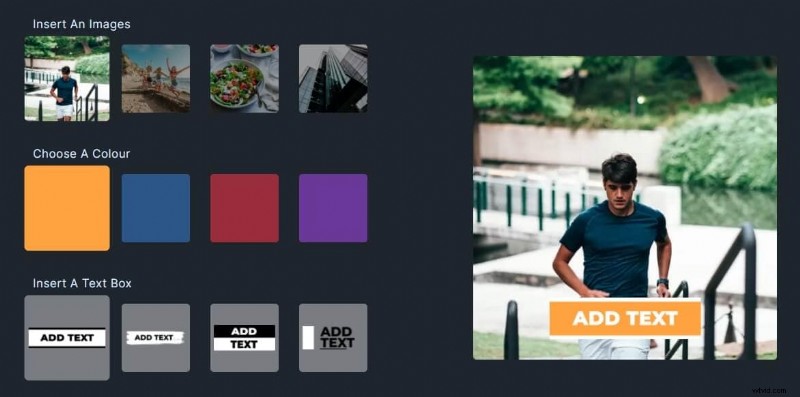
VideoCreek is a user-friendly online platform that enables you to create personalized video invitations for various occasions, including farewells, anniversaries, bachelor parties, and birthdays. With its extensive library of customizable templates and intuitive editing tools, you can craft engaging invitations without any prior design experience.
📝 Step-by-Step Guide to Creating a Video Invitation with VideoCreek
- Visit VideoCreek's Invitation Maker and create a free account or log in to your existing account.
- Navigate to the Invitation Templates section and select a template that suits your event. Templates are categorized by occasion, making it easy to find the perfect match.
- Customize Your Invitation by replacing placeholder text with your event details, such as date, time, location, and RSVP information.
- Select background music from Typito's royalty-free library or upload your own. You can also record a voiceover to add a personal touch.
- Incorporate transitions, animations, and smart frames to make your invitation more engaging. Typito offers a variety of effects to choose from.
10. Design Wizard
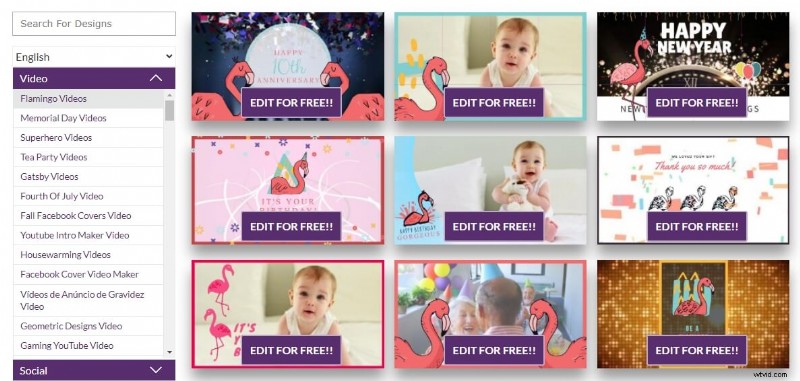
Design Wizard is a versatile online video invitation maker, ideal for creating personalized invitations for various occasions such as birthdays, housewarmings, bridal showers, and retirement parties. With its extensive library of customizable templates and user-friendly interface, you can craft engaging video invitations without any prior design experience.
📝 Step-by-Step Guide to Creating a Video Invitation with VideoCreek
- Visit Design Wizard's website and create a free account or log in to your existing account.
- Navigate to the Invitation Templates section and select a template that suits your event. Templates are categorized by occasion, making it easy to find the perfect match.
- Replace placeholder text with your event details, such as date, time, location, and RSVP information.
- Select background music from Design Wizard's royalty-free library or upload your own. You can also record a voiceover to add a personal touch.
- Incorporate transitions, animations, and smart frames to make your invitation more engaging. Design Wizard offers a variety of effects to choose from.
Part 2. Bonus: Best Desktop & Mobile Invitation Maker - Filmora
Filmora is a versatile video editing tool available on both desktop (Windows and macOS) and mobile (iOS and Android) platforms. It's designed to help users create professional-looking video invitations effortlessly, thanks to its intuitive interface and a plethora of features. Whether you're crafting an invitation for a wedding, birthday, or any special event, Filmora provides the tools to make your invitation stand out.
For users who are running Wondershare Filmora, you can search birthday, wedding, baby shower in the effects search bar to navigate to the related effects easily.
- Cross-Platform Compatibility: Seamlessly switch between desktop and mobile devices.
- Extensive Template Library: Access a wide range of customizable templates tailored for various occasions.
- AI-Powered Tools: Utilize features like AI Music Generator and AI Video Enhancer to add a professional touch.
- User-Friendly Interface: Drag-and-drop functionality makes editing straightforward, even for beginners
 Secure Download
📝 Step-by-Step Guide to Creating a Video Invitation with Filmora
On Desktop (Windows/Mac):
Step 1
Choose a Wedding Invitation Template
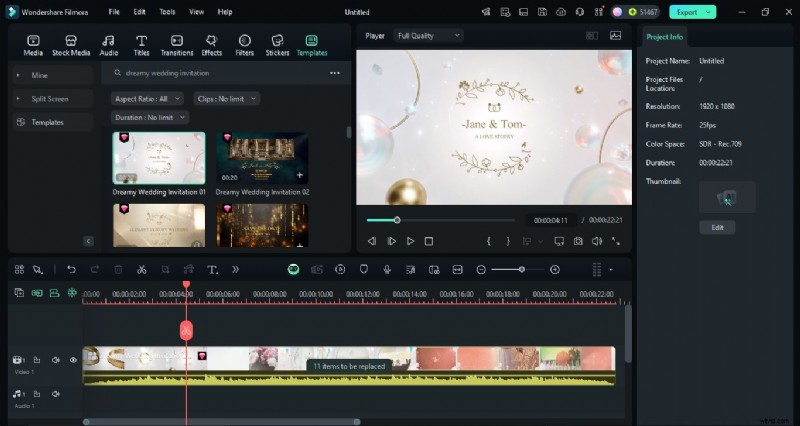
Download and install Filmora from the official website. Open it, import your photos and videos, then go to the Templates tab. Search for “wedding invitation” and pick a style that matches your theme.
Step 2
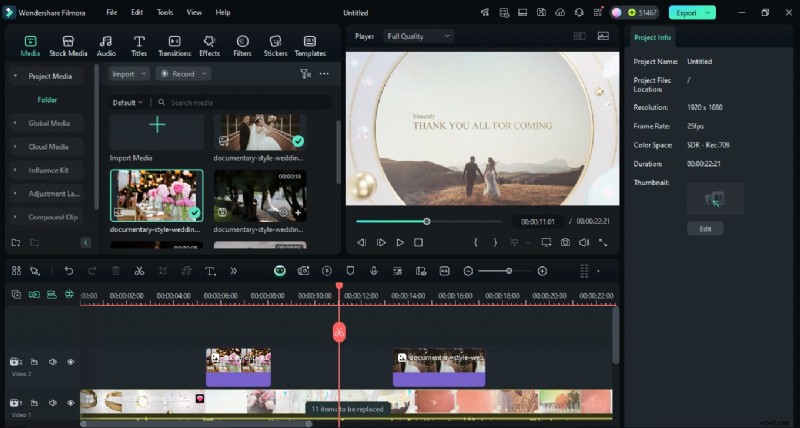
Add Your Photos and Video Clips
Insert your wedding photos and video clips into the template. Resize, reposition, and adjust clip duration so everything flows naturally.
Step 3
Apply Transitions and Effects
Add romantic or cinematic transitions from the Transitions tab. Then go to Effects > Dreamy Overlays to enhance the mood with soft glows or glitter.

Step 4
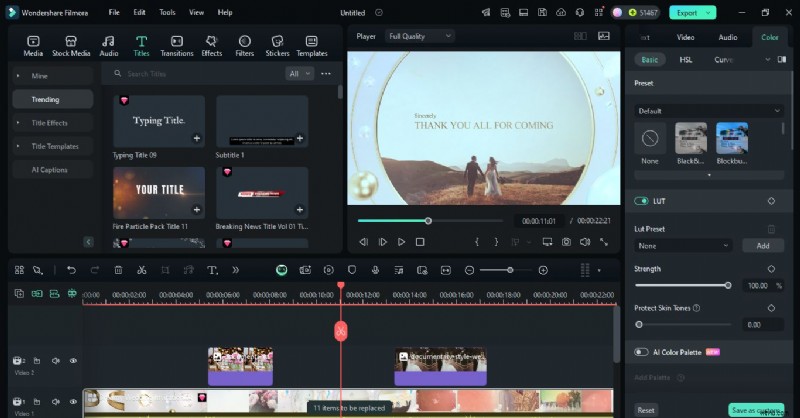
Adjust Colors and Filters
Go to Color > Presets and apply romantic filters like Pastel Glow or Vintage Romance. Use Color > Adjust for fine-tuning brightness and contrast.
Step 5
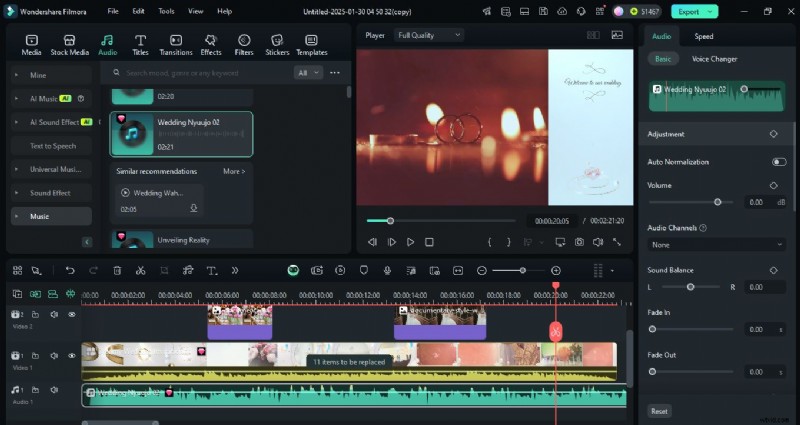
Add Text and Background Music
Open the Titles tab to add names, dates, venue, and RSVP details. Customize fonts and animations, then add romantic music from Filmora’s library or import your own track.
Step 6
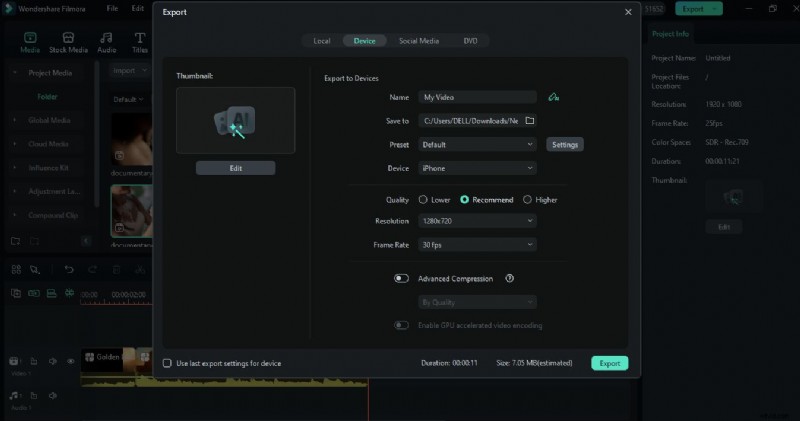
Export and Share Your Invitation
Preview your video, choose the desired resolution and export settings, then click Export. Share it on YouTube or download it for personal sharing.
On Mobile (iOS/Android):
Step 1
Start a New Project
Download and open the app, then tap New Project to begin editing your video invitation.
Step 2
Add Video and Find Effects
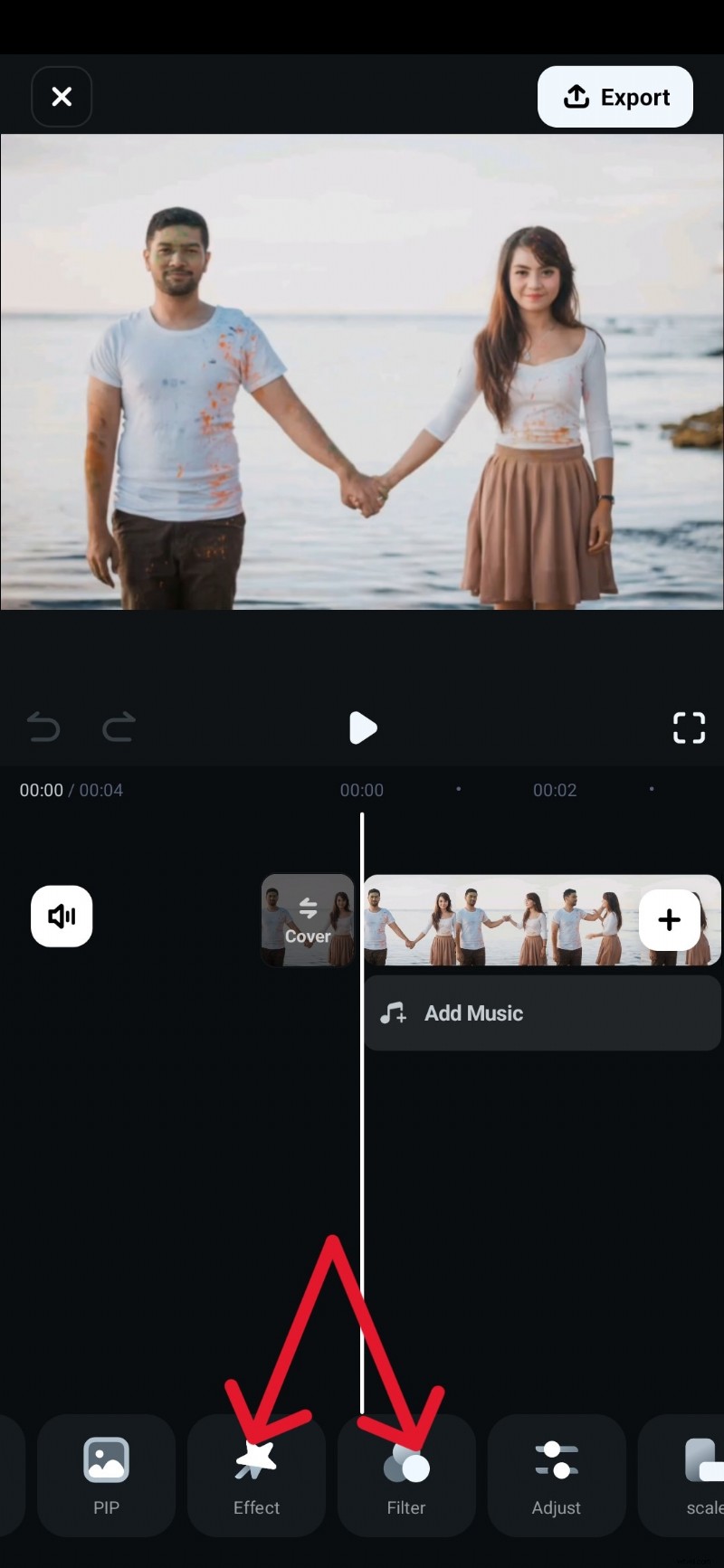
Import the video from your phone. Swipe through the toolbar below the timeline to locate the Effect and Filter options.
Step 3
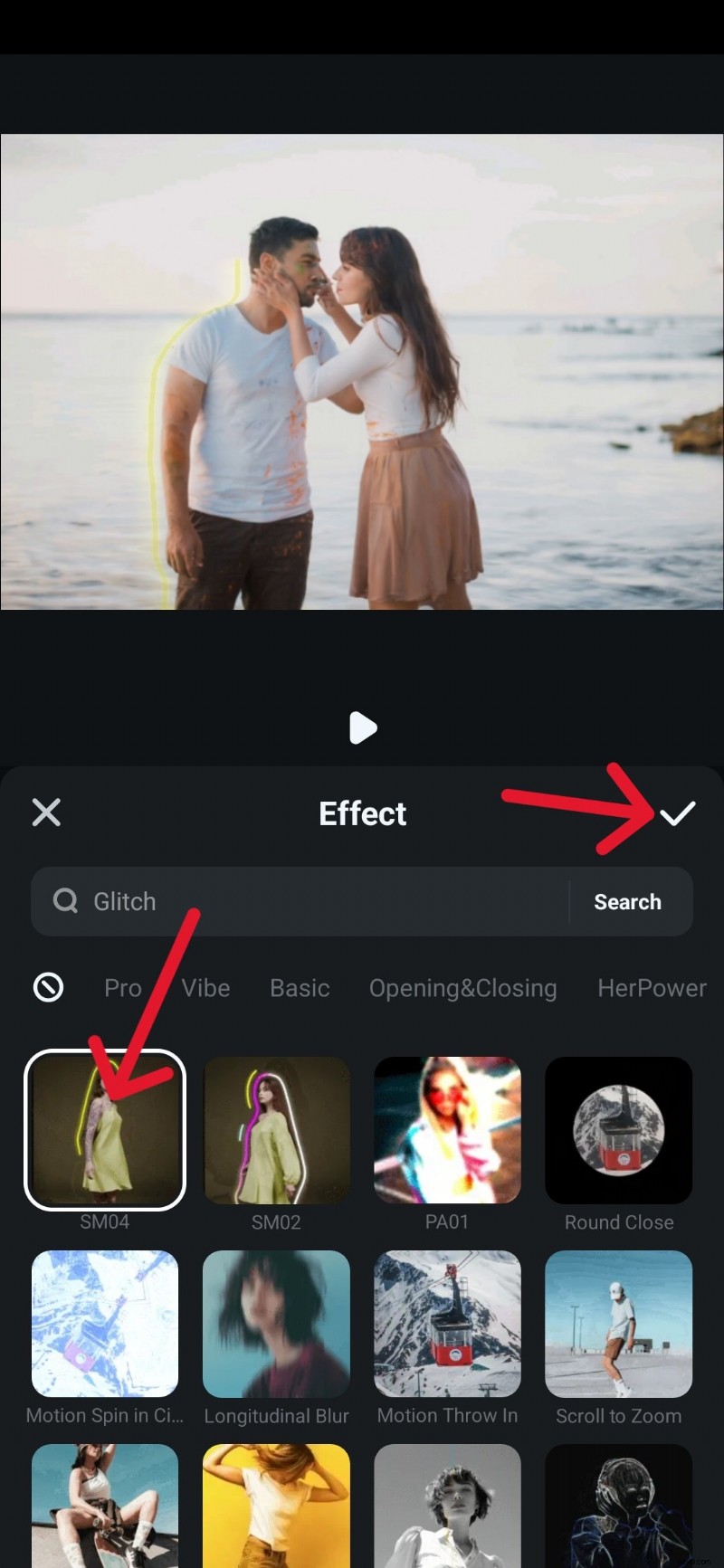
Apply Video Effects
Open the Effect menu, scroll to find a style you like, and confirm it by tapping the checkmark.
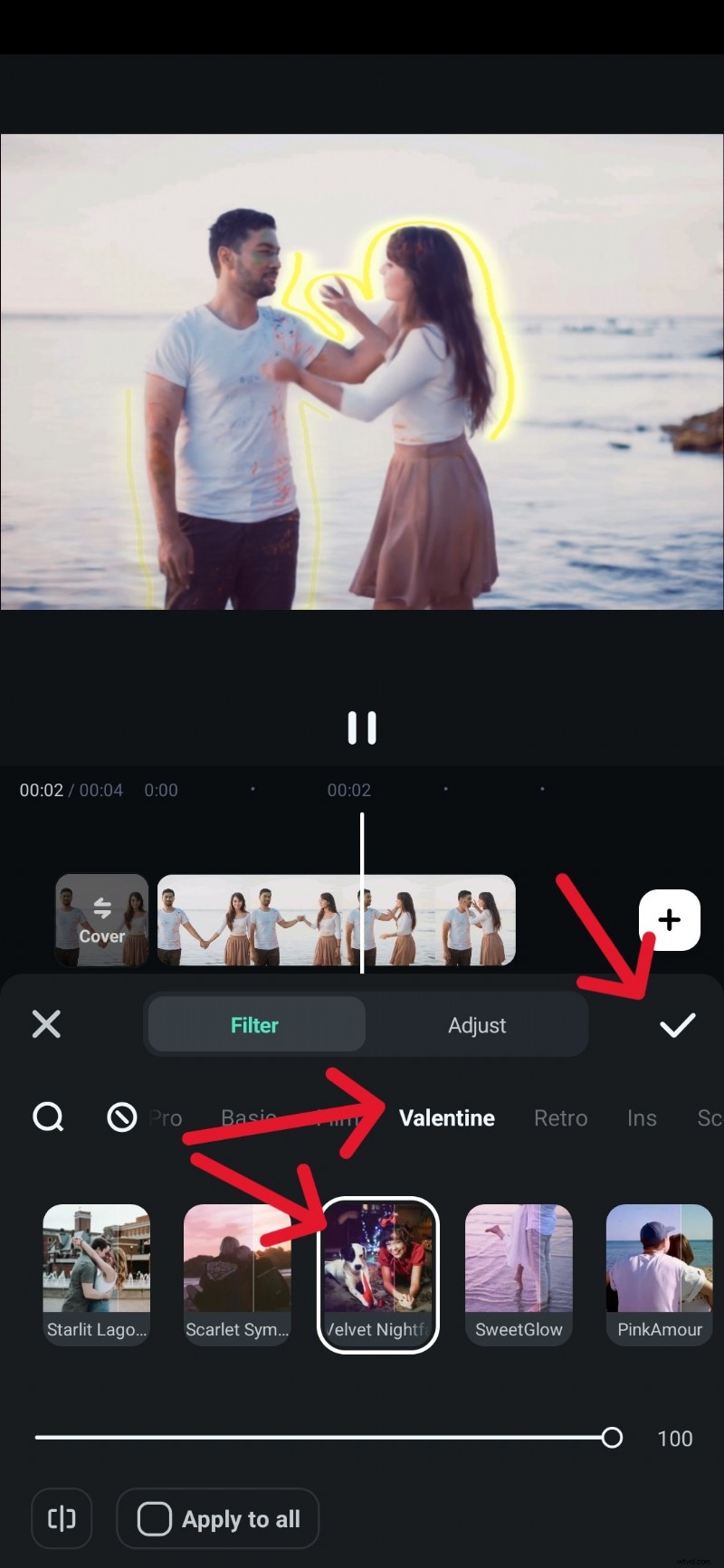
Go to the Filter menu and swipe to preview different looks. Fine-tune the filter before applying it to set the right mood.
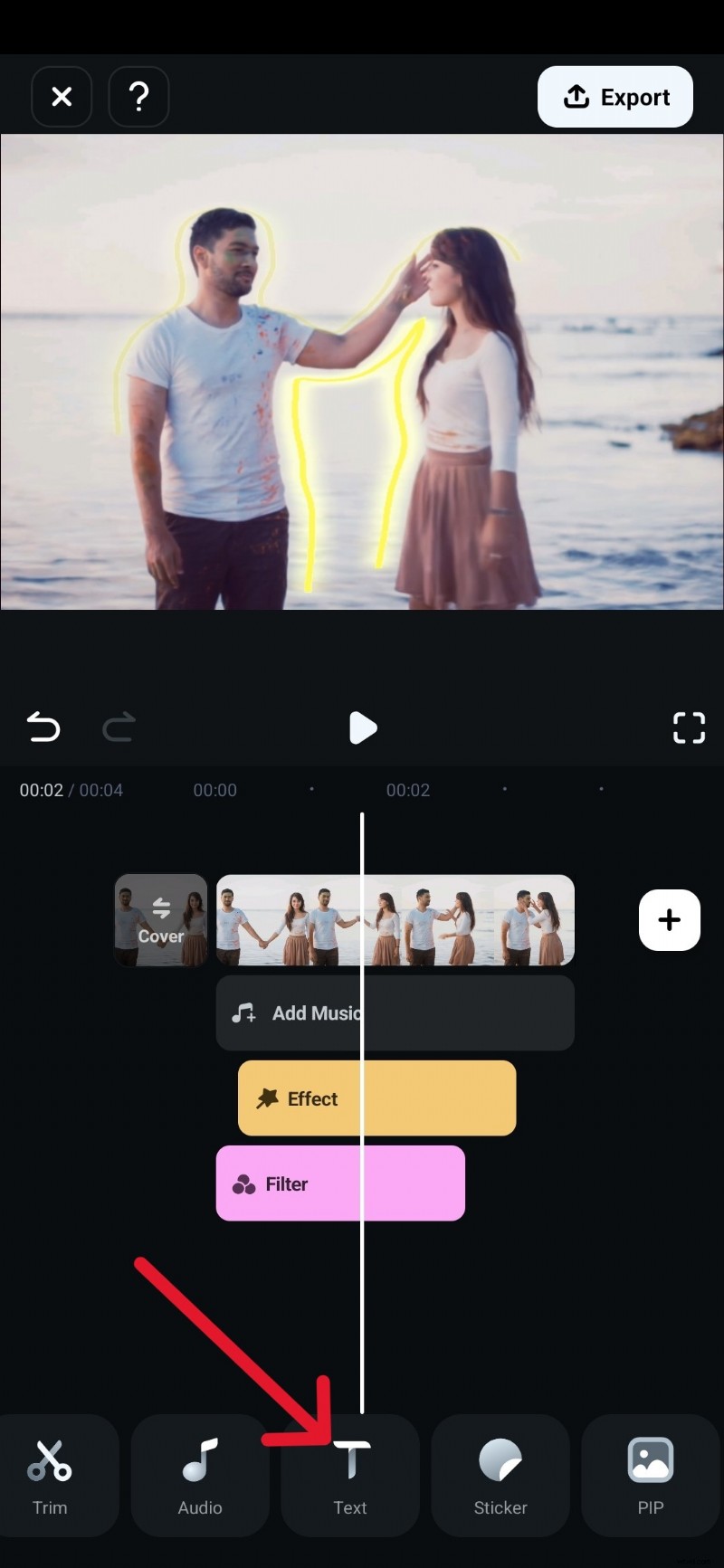
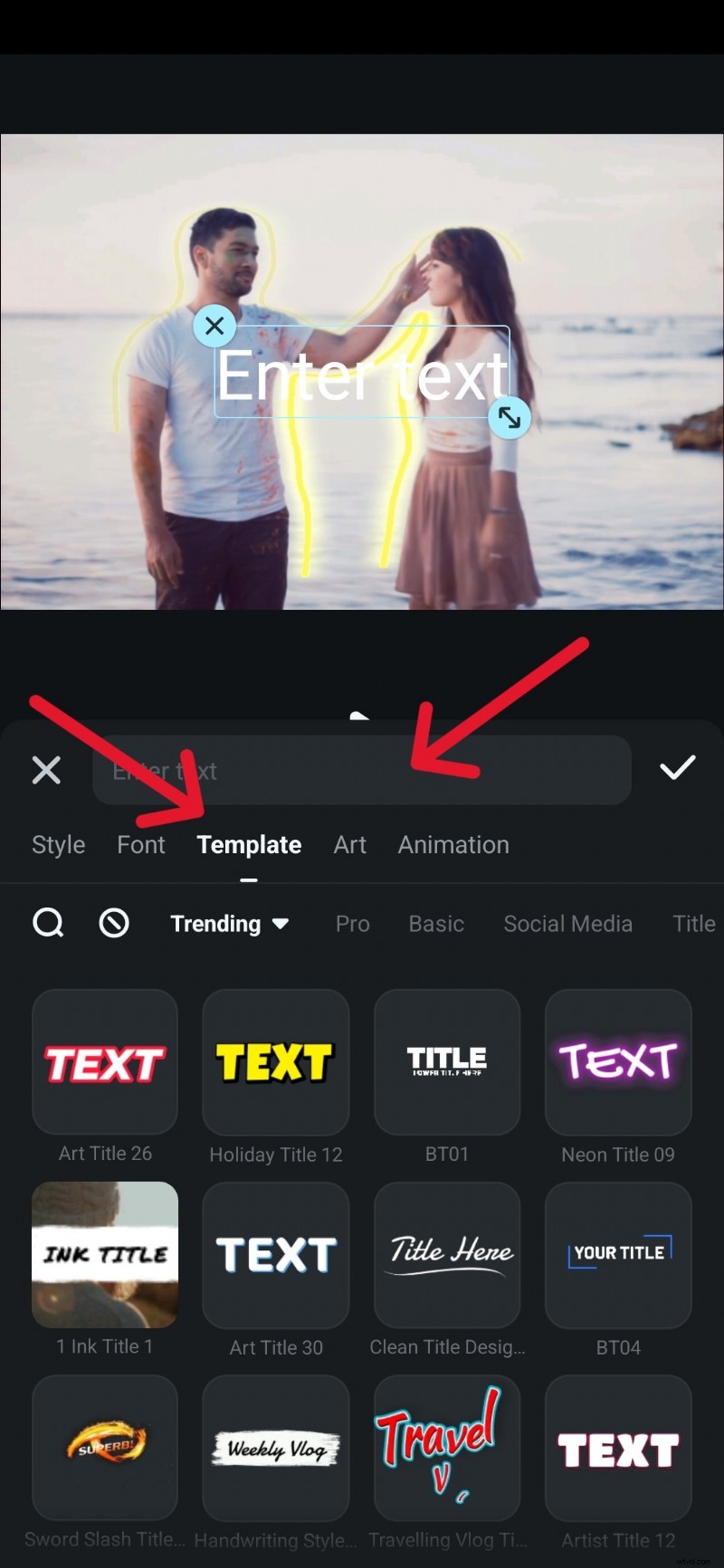
Swipe through the editing tools, find Text, and tap it to start adding titles to your video.
Step 6
Customize Text Style
Enter your text and choose from different Templates and fonts. Adjust colors and styles, and place text on different parts of the video.
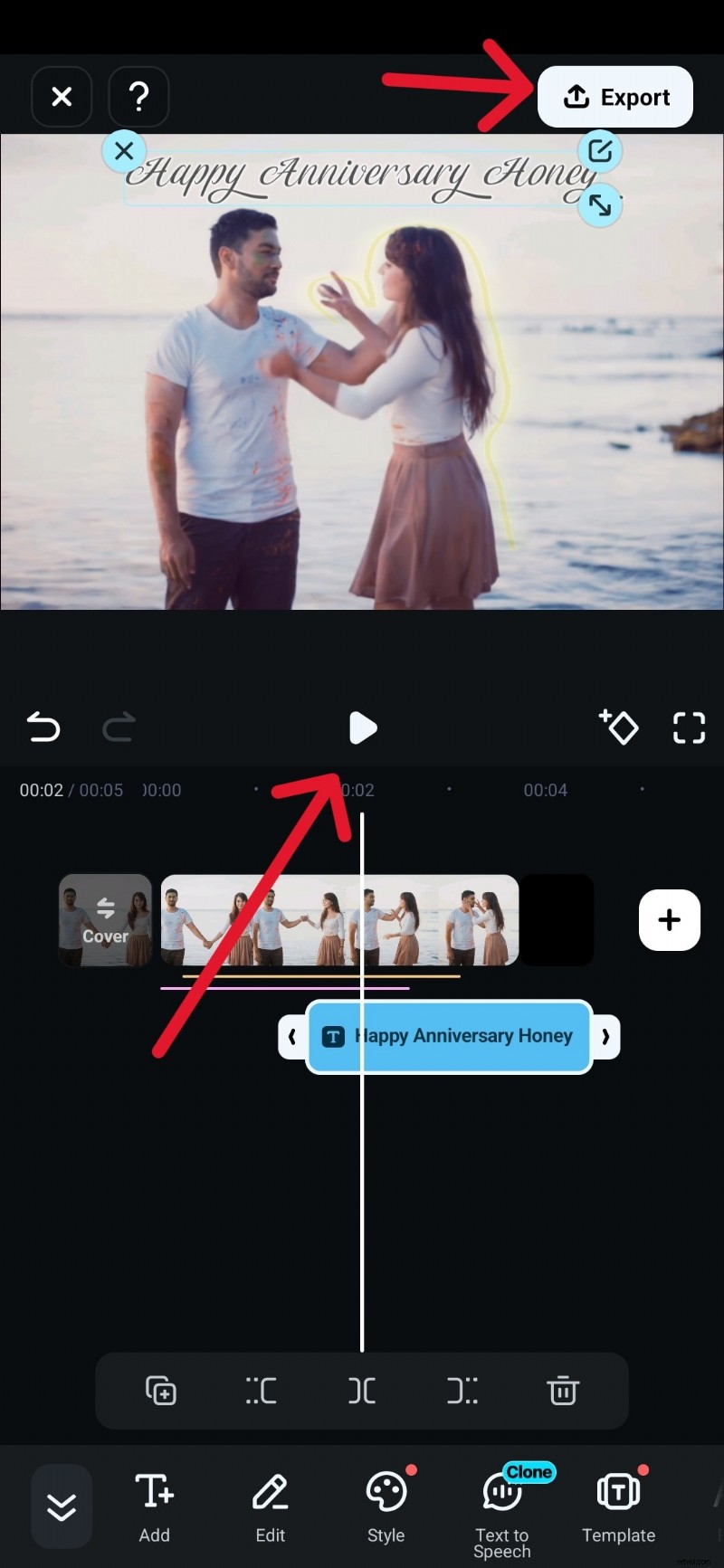
Tap Play to preview your video. When everything looks right, tap Export to save and share your video invitation.
Part 3. How to Make a Digital Invitation Video: Key Tips
Wedding invitation video maker online free has to be used in a certain fashion to make it look gullible, sophisticated, and according to the wedding theme. In this section, we shall discuss some tips and ideas that make the wedding invitation card a "food for thought" for every person out there.
- It is advised that you use the same filter and light for the complete invitation video. Moreover, soft and romantic country music makes the content more soothing and likable.
- A wedding invitation video does not always have to be extravagant. You can shoot it from your couch while playing Fortnite or binge-watching a tv show to tell people what your couple is all about.
- An invitation video reflects upon the theme of your wedding. It has to cover the décor, snippets of team bride and groom, costumes, stage, and whatnot. Stick to the theme to make it look gripping.
- A slideshow invites with the couple pictures and covering important events to date is always an amazing idea to keep people on the edge of their seats throughout the wedding invitation video.
Here is a video tutorial about how to make a weddig invitation video with Filmora, you should try as well.
Final Thoughts
When selecting the software to use for editing video invitations, you must know the one that will fit your events. With this article, Choosing the best online video invitation maker to use has been made easy for you. You now know the right free online video invitation maker to use for any of your events. Now, you can create stunning, eye-catching video invitations that will wow your guests and make them look forward to your event.

Filmora
AI Video Editing App & Software
Best tool for making videos anywhere for all creators!
Simplify all your steps in video editing, from the pre-processing to finalizing, Filmora AI stays tuned.