
AI tools have surged in popularity, propelling the global AI media market into a period of unprecedented growth. Among the most innovative platforms is Vivago AI, a powerful AI video generator that empowers creators to transform static images into dynamic videos with ease. This in‑depth Vivago AI review explores its image‑to‑video technology, pricing tiers, and a comparison with professional editors like Filmora.
1. What Is Vivago AI?
Vivago AI is a mobile‑centric creative platform that democratizes professional‑looking image and video production. Unlike many desktop‑only solutions, the app is fully functional on iOS (4.5/5 on the App Store) and Android (4.3/5 on Google Play with over 10 million downloads), allowing users to create and publish content directly from their phone.

Version 2.0 introduces 300+ ready‑to‑use templates and six new core features, significantly expanding its creative toolkit.
2. Key Features: Image‑to‑Video & AI Effects
Image‑to‑Video Generation

Users upload a photo, describe the desired motion, and the AI automatically animates the image into a polished video clip. Ideal for social media posts, product showcases, and storytelling.
AI Effects and Templates
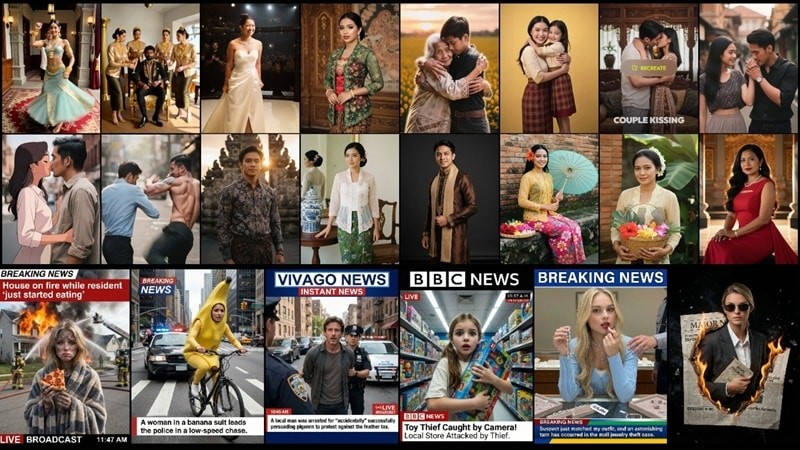
With over 300 pre‑designed templates, creators can bypass the learning curve of prompt engineering. The platform auto‑applies settings, enabling rapid production of high‑quality content.
Additional Tools
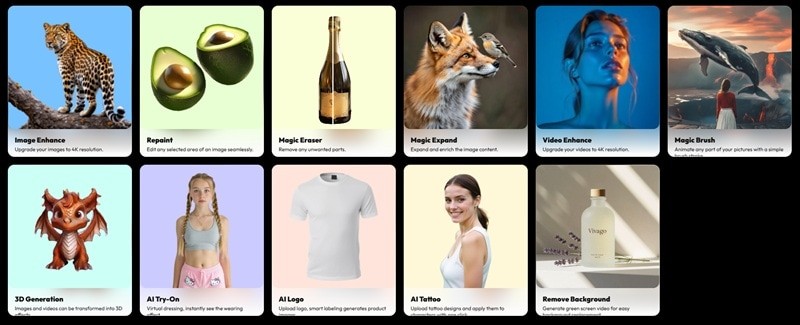
- Image & Video Enhance: Upscales footage to 4K for a crisp, professional finish.
- AI Repaint: Edit unwanted elements by simply painting over them with a new texture or color.
- Magic Eraser: Instantly removes unwanted subjects from a frame.
- Magic Expand: Extends the background to fit a wider aspect ratio, imagining what lies beyond the original frame.
- 3D Generation: Converts 2D images or prompts into 3D models suitable for VR or motion graphics.
- AI Logo: Generates a unique, brand‑consistent logo in seconds.
- Remove Background: Quickly produces green‑screen‑style clips or transparent stickers.
3. Pricing – Is It Worth the Investment?
The free tier offers a taste of the platform, but watermarks and a 5‑second video limit constrain its use for serious projects.
| Plan | Monthly Price | What You Get |
|---|---|---|
| Free | $0 | Daily free credits, 5‑second videos, watermarks |
| Basic | $5.99 | 1,000 fast credits, 10‑second videos, no watermarks, 2 queue slots, 4K output |
| Plus | $19.99 | 4,000 fast credits, 10‑second videos, no watermarks, 4 queue slots, 4K output |
| Pro | $59.99 | 1,500 fast credits, 10‑second videos, no watermarks, 8 queue slots, 4K output |
Choosing the Right Plan
- Free: Ideal for newcomers testing the waters.
- Basic: Great for casual creators needing watermark removal.
- Plus: Best for small businesses and consistent creators with commercial usage rights.
- Pro: Designed for agencies and power users requiring high output and fast queue processing.
4. Creating Social Media Content with Vivago AI
Below is a concise, mobile‑first workflow to produce a polished video clip.
Step 1 – Select a Template
After downloading Vivago AI, log in to unlock daily credits. Tap the Template tab, choose a trending style, and enable High Resolution for a crisp result.
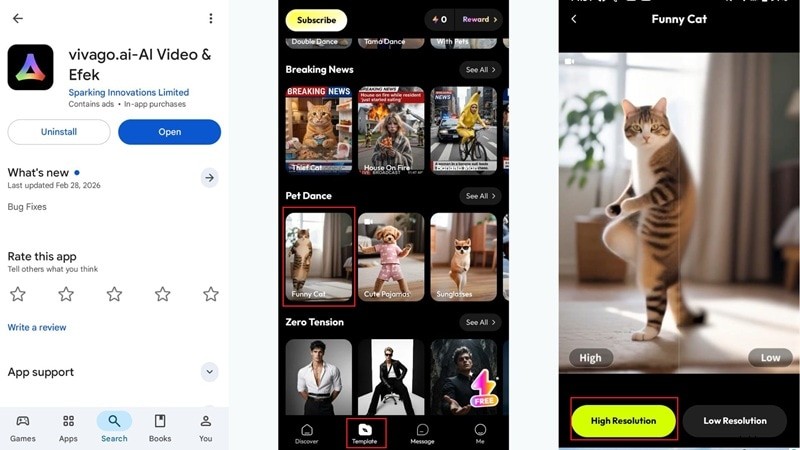
Step 2 – Upload Photo & Generate
Upload your chosen photo, hit Create, and wait for the AI to render the video. Once ready, preview it and tap Download to save locally.
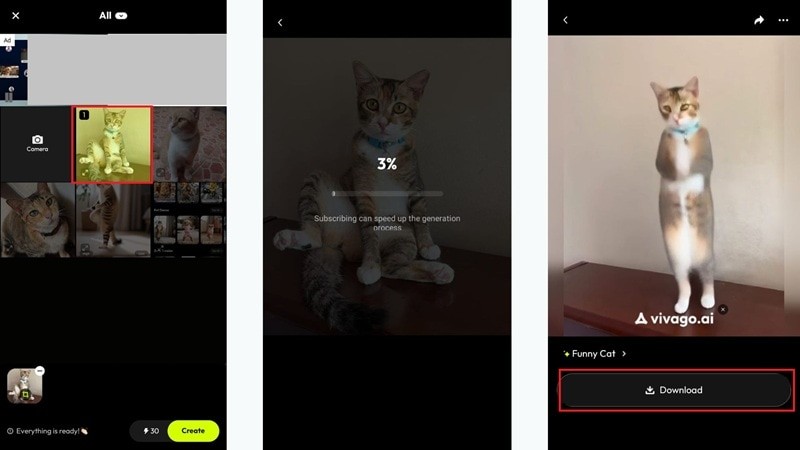
Share the finished clip instantly on your preferred platforms.

5. Vivago AI vs. Professional AI Video Editors
While Vivago AI excels as a quick, mobile‑friendly solution, power users may find the occasional ads and sporadic bugs limiting. For a more robust, stable experience, Wondershare Filmora stands out as the industry benchmark.

Filmora’s Edge as an AI Video Editor
- Rapid Production: Filmora 15 leverages OpenAI Sora 2 and Google Veo 3.1 for realistic AI Text‑to‑Video, Image‑to‑Video, and Audio‑to‑Video.
- Custom Asset Creation: AI Sticker, Music, and Sound Effect generators streamline asset production.
- Quality Enhancement: AI Video Enhancer and Denoise upscale footage to 4K/8K, removing grain and noise.
- Cinematic Styling: AI Color Palette and Beauty Filter deliver movie‑grade color grading and polished visuals.
- Audio Mastery: AI Audio Ducking and Voice Enhancer ensure studio‑quality soundtracks and narration.
Side‑by‑Side Feature Comparison
| Feature | Vivago AI | Filmora |
|---|---|---|
| Platform Support | Android, iOS, Web | Windows, Mac, iOS, Android |
| AI Video Generation | Text‑to‑Video, Image‑to‑Video, Image | Text‑to‑Video, Image‑to‑Video, Audio‑to‑Video, Image |
| Extra AI Tools | Background removal, 3D effects | Stickers, Music, Color Palettes, Audio tools |
| Templates | 300+ social media styles | 3,000+ professional assets |
| Audio Features | Limited | Advanced: Ducking, Denoise, Voice Enhancer |
| Editing Style | One‑click templates | Full timeline control |
| Stability | Occasional bugs, ads | Highly stable, professional‑grade |
| Best For | Casual social media clips | High‑quality, professional productions |
Conclusion
Vivago AI is a solid choice for creators who need quick, flashy social media videos without the complexity of traditional editing software. Its mobile‑first design and extensive template library make it approachable, but the presence of ads and limited functionality may hinder productivity for advanced users.
For those seeking a more powerful, reliable platform, Wondershare Filmora offers a comprehensive suite of AI tools that elevate video production to a professional level.

FAQs About Vivago AI
Is Vivago AI free to use?
Yes. The free plan includes daily credits but adds watermarks, limits videos to 5 seconds, and caps uploads to 2 images per generation.
How do you export videos from Vivago AI?
Simply tap the download button once the video is rendered. The file can then be shared directly to social platforms or uploaded elsewhere.
Is Vivago AI suitable for beginners with no editing experience?
Absolutely. The intuitive interface, ready‑made templates, and minimal learning curve make it ideal for novices.