
With a simple prompt or a single photo, AI can instantly turn your creative idea into a polished, publish‑ready piece. This capability has become a key reason many creators maintain an active social media presence without spending hours on manual editing.
Among the growing roster of AI‑powered tools, YouCam AI has attracted significant attention. According to a Yahoo Finance report, by 2025 users of the YouCam ecosystem generated almost 200 million AI‑produced images and videos. While the numbers are impressive, the critical question remains: does the output live up to the hype?
In this in‑depth YouCam AI review, we examine the platform’s latest 2026 updates, evaluate its YouCam AI image‑to‑video feature within a professional social‑media workflow, break down the YouCam AI pricing, and compare it to pro‑level editors such as Filmora.
Part 1. What Is YouCam AI? Core Features for AI Video & Photo Generation
Developed by Perfect Mobile Corp, YouCam AI enables users to edit photos and create videos quickly. It is available on the web, iOS, and Android. The mobile version even offers separate apps for some specialized tools.
Key capabilities include:
YouCam AI Photo Enhancer

The YouCam AI Photo Enhancer uses advanced algorithms to restore clarity to blurry selfies, upscale low‑resolution shots, and improve low‑light images. It functions as a top‑tier AI image upscaler, ideal for creators who need high‑quality assets fast. The tool supports batch processing of up to 50 photos and can colorize black‑and‑white images with the Photo Colorizer feature.
YouCam AI Video Generator

With the Video Generator, text prompts or still images become dynamic video clips. YouCam AI offers several AI models—Vidu 2.0, Google Veo 3, Sora 2, Hailuo 02, Kling 2.5 Turbo, and Seedance—allowing creators to experiment with diverse styles. Ready‑to‑use templates further accelerate production, eliminating the need to start from scratch.
YouCam AI Video Enhancer
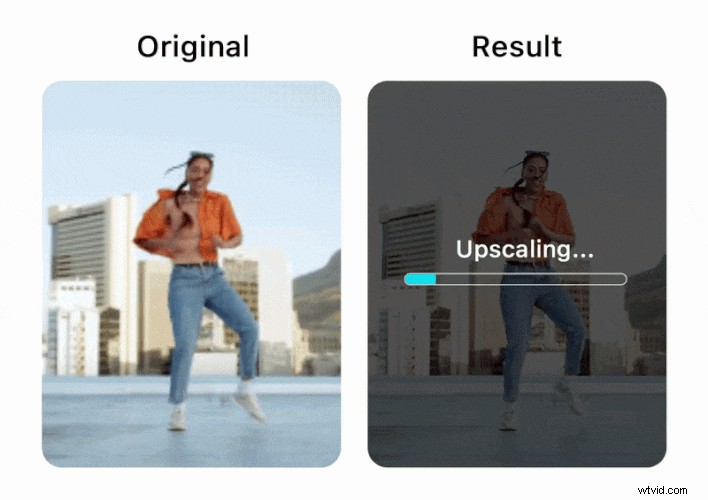
The Video Enhancer automatically corrects blurry, grainy, or dark footage. Upload an MP4, MOV, or M4V file up to 500 MB, and the AI upgrades the video from HD to 4K while preserving natural skin textures. The result is a sharper, smoother clip that feels polished and ready for sharing.
Part 2. Using YouCam AI for Social Media Content (Step‑by‑Step)
To illustrate real‑world performance, we tested the Image‑to‑Video workflow for TikTok and Instagram Reels. The platform offers two approaches: custom prompts or template‑based creation.
Create a Video with an Image and Prompt
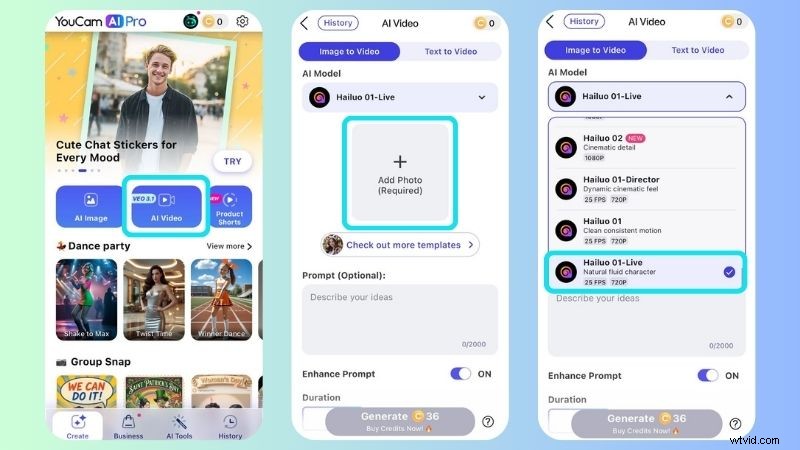
- Open YouCam AI and tap AI Video → Image to Video.
- Select an AI model that matches your desired style. For a cinematic feel, we chose YouCam Motion.
- Upload your photo and enter a prompt describing the desired video effect.
- Adjust duration and mode, then click Generate.
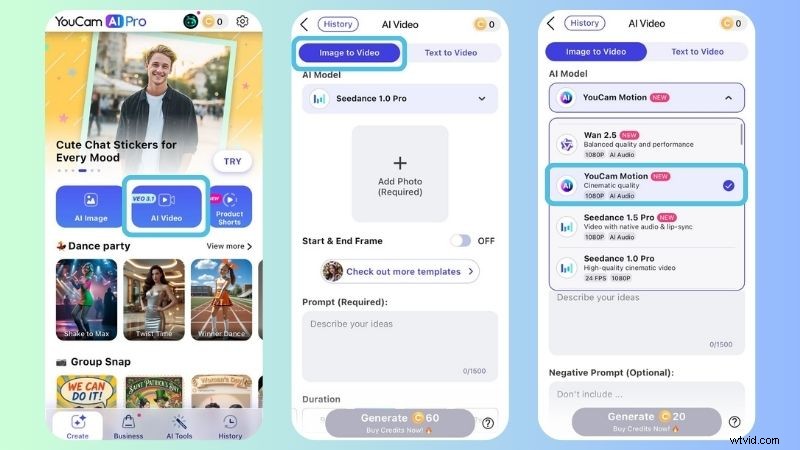
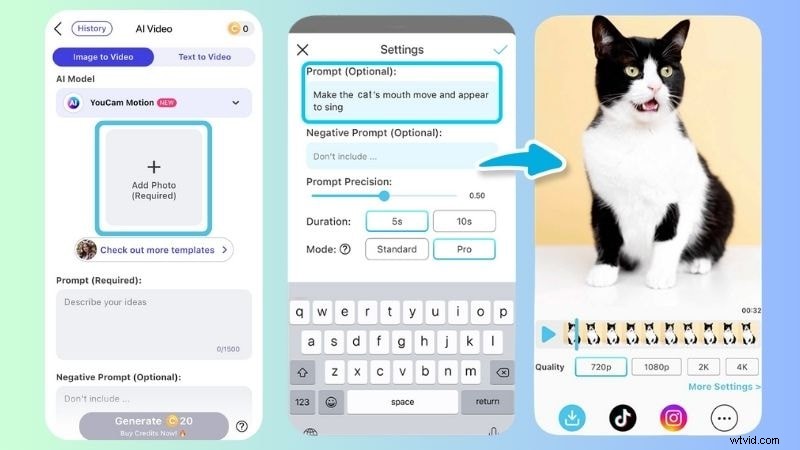
The generator produces the clip in a few steps, ready for upload to TikTok, Instagram Reels, or YouTube Shorts.
Create a Video with a Template
- Launch YouCam AI and select AI Video.
- Upload your photo and choose a model; we used Hailuo 01‑Live.
- Pick a template—our example used Elegance.
- Set video quality, duration, and review the credit usage before clicking Generate.
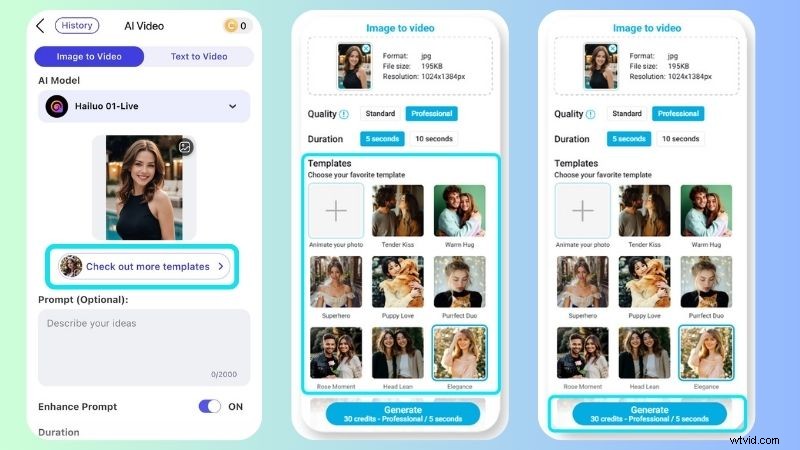
The final clip showcases a lively, animated version of the original still photo, with subtle movements like blinking and hair flow that enhance the portrait’s appeal for social media.

Part 3. Is YouCam AI Worth It? Pros and Cons
After evaluating functionality and workflow, we assess whether YouCam AI delivers value for creators. We also examine pricing structures and provide a balanced view of strengths and limitations.
Pricing Overview
YouCam AI offers both subscription and one‑time credit purchases. The pricing varies between web and mobile versions, with credit limits that influence how frequently you can use generative tools.
YouCam AI Web Plans
| Tool | Free | Plus | Pro |
| Price | No cost | Starts at $3.33 per month | Starts at $5.83 per month |
| Credits | 5 credits for first‑time sign‑ups | 100 credits per month | 300 credits per month |
| AI Photo Enhancer | 2 times/day | 5 times/day | Unlimited |
| AI Photo Colorizer | 3 times/day | Unlimited | Unlimited |
| AI Image to Video | Not enough credit | 8–320 credits per video | 8–320 credits per video |
| AI Video Enhancer | 10 seconds | 200 seconds | 600 seconds |
| Batch Editing | No | Yes | Yes |
| Watermark | Yes | Optional | None |
| Show More | Show Less |
For users who need more credits, one‑time purchases start at $29.99 for 100 credits, valid for one year.
YouCam AI Mobile Plans
| Tool | Free | Plus | Pro |
| Price | No cost | Starts at $6.99 per week | Starts at $9.99 per week |
| AI Photo Enhancer | Once per day | Once per day | 200 times per day |
| AI Image to Video | 1 video | 5–240 credits per video | 5–240 credits per video |
| Watermark | Yes | Optional | None |
| Show More | Show Less |
The mobile suite is streamlined compared to the web version, so choose the platform that aligns with your workflow.
Pros
- Fast Processing: Video generation and enhancement complete quickly, and the steps are intuitive.
- Comprehensive Enhancements: Photo and video tools cover skin smoothing, noise reduction, and 4K resolution upgrades.
- Wide Toolset: Beyond basic enhancer functions, the platform supports face swaps, background changes, and photo expansion.
- Regular Updates: New models and features are released consistently, improving results over time.
Cons
- Limited Free Access: Advanced features require a paid plan.
- Result Variability: Some outputs may not match prompts perfectly, requiring prompt tweaks.
- Automation Focus: Professional editors may find the lack of granular manual control restrictive.
- No Desktop App: Web and mobile usage means performance depends on internet connectivity.
Part 4. Why Filmora Remains the Professional Choice for Video Editing
While YouCam AI excels at quick AI visual generation and basic enhancement, it is not a full‑featured video editor. For creators needing a complete editing suite, Wondershare Filmora offers extensive flexibility and manual control.
Timeline‑Based Editing
Filmora’s timeline interface lets users layer video, audio, text, and effects precisely. Dual‑monitor support allows simultaneous previewing, which improves workflow efficiency.
Powerful Tools and AI Integration
Filmora includes keyframing, motion tracking, and an AI music generator. Its audio library and sound design tools provide a professional edge.
Extensive Effects Library
With over 14,000 transitions, filters, and motion graphics, Filmora offers a vast palette for visual storytelling, far beyond what YouCam AI focuses on.
Cross‑Platform Editing
Filmora is available on iOS, Android, Windows, and macOS, with cloud project sync that lets you start on one device and finish on another.
Social Content Planning
The integrated Social Content Planner allows creators to schedule posts across platforms, track engagement metrics, and streamline publishing.
Part 5. Choosing Between YouCam AI and Filmora
Both tools serve distinct needs. The comparison below highlights key differences.
| Aspect | YouCam AI | Wondershare Filmora |
| Platform Support | Web, iOS, Android | iOS, Android, Windows, macOS |
| Core Features | AI photo and video generation | All‑in‑one AI video editor |
| AI Video Generator | Yes | Yes |
| AI Photo Enhancer | Yes | Yes |
| AI Video Enhancer | Yes | Yes |
| Best Use | Trendy short videos | Vlogs, podcasts, educational content, digital ads |
| Best For | Social media creators | Content creators & professionals |
| Show More | Show Less |
YouCam AI is ideal for quick, one‑off creations—short AI videos, photo enhancement, or basic edits. Filmora, on the other hand, delivers a full editing environment that balances manual precision with AI assistance.
Conclusion
Our review confirms that YouCam AI performs well for generating shareable, trend‑aligned short clips. However, for creators seeking comprehensive editing capabilities and deeper creative control, Wondershare Filmora remains the superior choice.
After finalizing a video, the next step is strategic posting. Filmora’s scheduling tools help you focus on content creation while ensuring timely publication.

Filmora – AI Video Editing App & Software Best tool for making videos anywhere for all creators! Simplify every step of video editing, from pre‑processing to finalization, with Filmora AI.
FAQs
-
Can I use YouCam AI results for commercial use?
Commercial usage of YouCam AI content is limited to Pro users and images generated via the API.
-
Are the results generated from YouCam AI watermark‑free?
The free version adds a watermark. Upgrading to a paid plan removes it.