
How do I download CapCut on my Android? Read our complete guide to know more about CapCut and download it from Google Play Store or uptodown website. We provide a solution to an error when downloading CapCut App from the Play Store.
CapCut, formerly named Viamaker, is a popular video editing app on TikTok, developed by Bytedance Company, the parent company of Tiktok, in April 2020. In June of the same year, Viamaker was renamed CapCut by TikTok, and the features within the app are the same as before.
CapCut is a free all-in-one video editing app that can help you create incredible videos on your Android device. Before we get started with how to download CapCut Android Package, we will find out what is so great about the CapCut video editor and why it is loved by so many Android users.
Table of Contents
Part 1. What are the Highlights of CapCutPart 2. Step-by-step Guide to Download Capcut on Android Device
Part 3. Detailed Tutorial Download CapCut from the uptodown Website
Part 4. Bonus Tips: Fix Can’t Install CapCut Error On Google Play Store in Android
What are the Highlights of CapCut
When you don’t have your computer with you and you need to do some editing tasks, CapCut is definitely the right choice. With CapCut’s powerful video editing features, you can create bravo videos on Android anytime and anywhere.

CapCut APK
Listed below are some of the main features of CapCut that you might be interested in.
- Easy-to-use user interface: CapCut’s user interface is clean and easy to navigate, even novices can operate it to edit videos with simplicity.
- Huge library and exclusive copyrighted songs: Extensive online catalog and local music to keep your videos up to date, plus exclusive TikTok music for subscribers.
- Built-in popular short video templates: A variety of popular short video template collections are built-in for video content creators, and professional video templates can be imported with one click.
- High-Quality Video Support: CapCut supports custom export of videos up to 4K and 60 frames per second.
- Multiple Video Effects: Get creative with a range of amazing effects to your videos, and even apply 3D scaling effects to your videos.
- Multi-Language Support: CapCut adds new languages as options for users to choose from, including English, Simplified Chinese, Russian, French, and more.
For some CapCut lovers, you can find the 10 most popular CapCut video templates in the video tutorials below.
Step-by-step Guide to Download CapCut on Android Device
Now, let’s go to how to download CapCut APK in detail. Make sure you have enough space on your phone before performing this process. If you don’t have enough space on your phone, then uninstall the unwanted apps and go through the process again.
Step 1. Search for CapCut on Google Play Store
To download the CapCut app to your Android device, click to open the Google Play Store. Now go to the search bar at the top, then type CapCut in the search box and search for it.
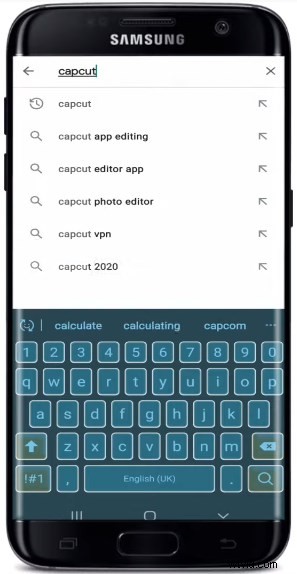
Search CapCut in the Google Play Store
Step 2. Download and Install CapCut App on Android Device
Find the CapCut app displayed in the search results and click on Install at the top. Wait for the app to download and install on your Android device.
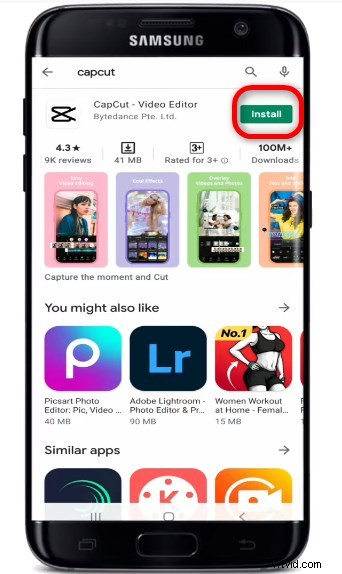
CapCut APK Download
The download and installation process will take a while, depending on your network speed. So make sure to have a strong internet connection to your phone.
Step 3. Edit A Video with CapCut
Once the download and installation are complete, you can click to open the app. You have already downloaded the CapCut app on your Android device, now start a new project.
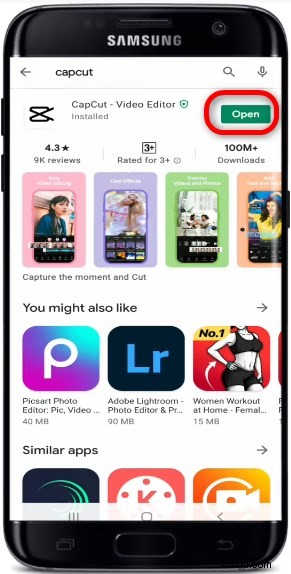
Open CapCut on Android
To start editing your video, click on the New Project button and allow CapCut to access the photo files and media on your device. Click “Allow” in the pop-up window and select any video you want to edit and start editing.
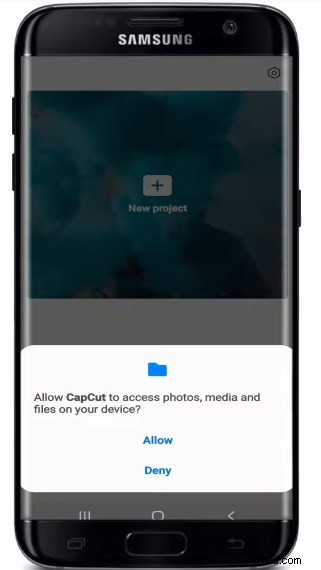
Create A New Project on CapCut
That’s how you can easily download the CapCut app on your Android device, now let’s move on to the next part.
Detailed Tutorial Download CapCut from the uptodown Website
If the above method does not work on your device, let’s explore how to download the CapCut APK from the uptodown website.
Step 1. Set Up A VPN Connection
For users in some countries, you need to connect to a VPN to download CapCut directly from the web.
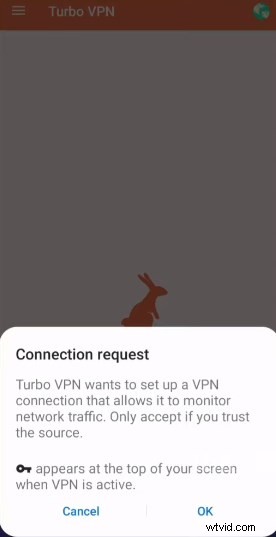
Set Up A VPN Connection
Here we recommend Turbo VPN, which is free. Download it from the Play Store and install it on your device, then open it and let it connect.
Step 2. Access to Uptodown
Access to the uptodown on your Android device, you can find CapCut from the top downloads or search it from the search bar at the top.
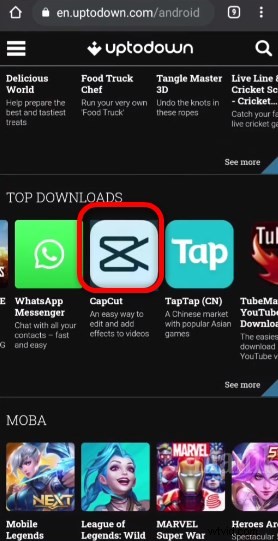
Find CapCut App
Step 3. Download and Install CapCut APK
Click the Download button to download, and then select the Install button in the pop-up window that appears.
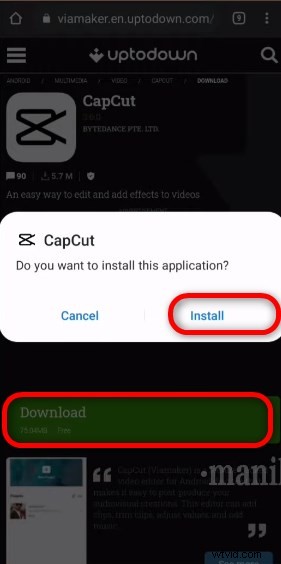
Install CapCut APK
Wait patiently for CapCut to install successfully on your Android device, then click the Open button to enter the main interface of the software. It’s that simple.
Bonus Tips: Fix Can’t Install CapCut Error On Google Play Store in Android
If you can’t successfully download CapCut from Google Play Store, don’t worry. We’ve got you covered, the steps below will help you fix the problem of not being able to install the CapCut app from the Google Play Store.
Step 1. Setup the App Download Preference
Open Google Play Store, tap on Three Line>select the Setting>click the App Download Preference>select Over any network&tap on DONE.
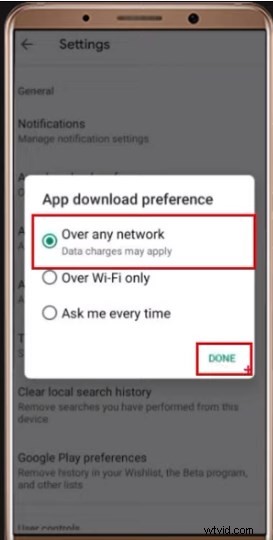
Customize App Download Preference
Step 2. Customize the Phone Settings
Go to Phone Settings>select APPs or Manage Apps>scroll down the menu bar to find Google Play Store and tap it>Select the Storage, then Clear cache&Clear data.
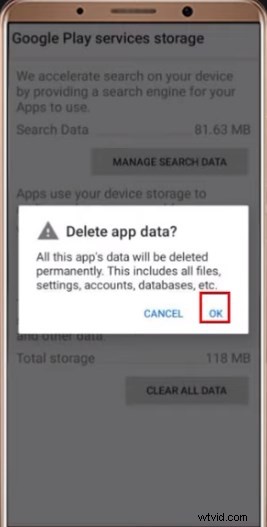
Delete CapCut App Data
Then click on Uninstall Updates(Right Side Two Dots)>go back to Google Play Service and Click on Storage usage>clear Cache and Click Manage Space> select the CLEAR ALL DATA and tap OK.
Step 3. Restart the Device to Activate the Settings
Finally, restart your Android device and then login to your Google Play Store. The problem is solved and you can now successfully download Capcut APK from Google Play Store.
The Conclusion
The introduction of editing tools by major video platforms is essential to further lower the barrier of use for users. The learning curve decreases while it is more conducive to developing user habits. The nesting of “simple and foolish” to achieve the most surprising effect is what can capture the users the most. I’d also like to mention FilmForth, a robust video editor that lets you bring stories to life.
There are over 10 million #CapCut tag videos within the TikTok app, and more and more Tiktokers are now using CapCut to create videos. To get a lot of traffic on TikTok and followers, CapCut is really useful for you. Follow the steps described above to download CapCut to your Android. Don’t hesitate and give it a try.