
The top CapCut editing tips and tricks that you must know are here. Learn from this post about what it takes to become a more-followed TikToker using the CapCut video editor!
Essential CapCut Editing Tips and Tricks
CapCut app by ByteDance is now one of the most popular video editing apps favored by TikTokers and content creators. Video editing on mobile phones is getting more and more popular lately, for the rise of video-sharing platforms and the ease of use of mobile video editing apps. So how does a video editing beginner make awesome video editing in CapCut?
No worries! You can learn from this guide to get the essential CapCut video editing tips and tricks you need.
Some Basic Editing Skills in CapCut You Should Know
Prior to starting some fancy video editing in CapCut, you should have a general understanding of CapCut’s features and functionalities, and you need to first acquire the basic video editing skills such as:
- Creating video projects
- Trimming videos
- Adding music to videos
- Add text to videos
- Change video speed
- etc.
If you have zero experience in editing videos or editing using CapCut, our CapCut review may have the information you need.
Top Advanced CapCut Editing Tips and Tricks
This guide will put more focus on the advanced video editing features that CapCut has to offer, with which you get to crank your video up a notch, outperform the other creators, and eventually get more views on TikTok.
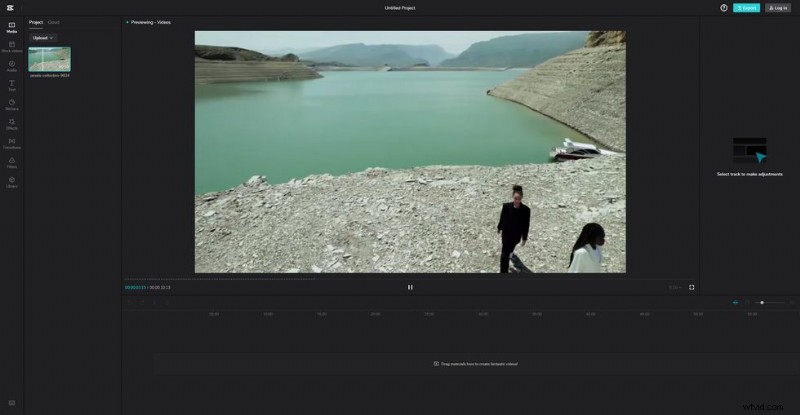
Edit Videos with CapCut Online
Aside from the CapCut desktop version, the CapCut online version is now available as well for you to edit videos on PC using CapCut, within a web browser application.
Navigate to the official CapCut website: https://www.capcut.com/, click the Get started for free button, and you’ll be able to edit with CapCut Online.
Moreover, according to a later release, the official CapCut app is available on PC as well.
Using CapCut Online
Match Cut the Beats
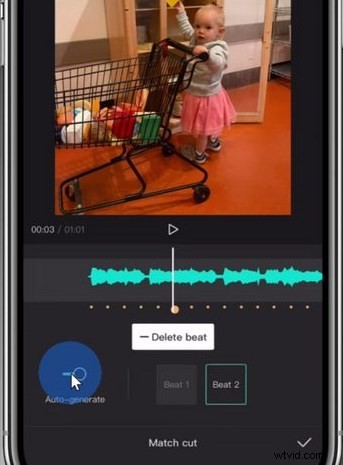
Things are a whole lot easier, editing beats in CapCut. Open a video editing project with background music (an audio track) in the timeline, select it, and hit the Match Cut button.
Then you’ll be led to the Match Cut editing screen.
Sure, you can add beats manually but it’s much easier to use the Auto-generate feature. Upon clicking on the button, CapCut automatically finds the beats in the music and generates the auto-beats in the form of yellow dots.
The yellow dots in the timeline from the main workplace makes beat editing much easier.
Auto Match Cut CapCut
Text to Speech
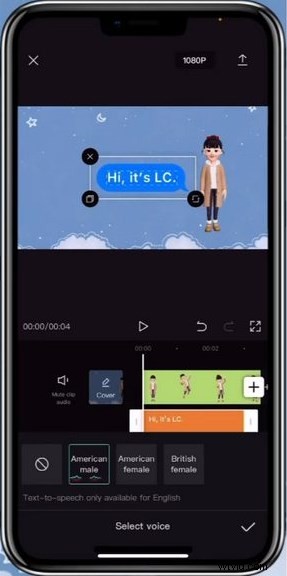
Now you no longer need to read the scripts of your video by yourself! The AI voices will do it for you. The text-to-speech CapCut feature allows you to add speeches to your video by simply typing in text, and many TikTokers have already been using this trick already.
Add text to your video first, then select the added text in the timeline, and hit the Text to Speech button. And you can see a lot of voice types are available. The CapCut desktop version has more text-to-voice options, so don’t forget to have a try!
Add Text to Speech CapCut
Automatical Captions
As we know there is a good deal of users who do not like raising the mobile phone volume while using TikTok. And for them, auto-captions are a great help, allowing them to get a clue about what the people in your video are talking about instead of having to listen to it.
To use auto-captions in CapCut, hit Text from the main workplace in CapCut, and hit the Auto Captions button. Then you can choose the language and the video sound type for your captions.
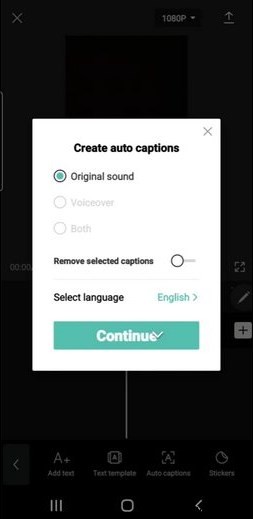
CapCut Automatical Captions
Combine Your Own Editing with Templates
Instead of editing everything on your own, it’s also a good idea to use the CapCut templates created by other people. Some CapCut templates have trending social elements that you should also try using in your videos, and you may also get inspired by other people’s editing creativity.
But now you can come and join to discover the best CapCut templates to learn what people like!
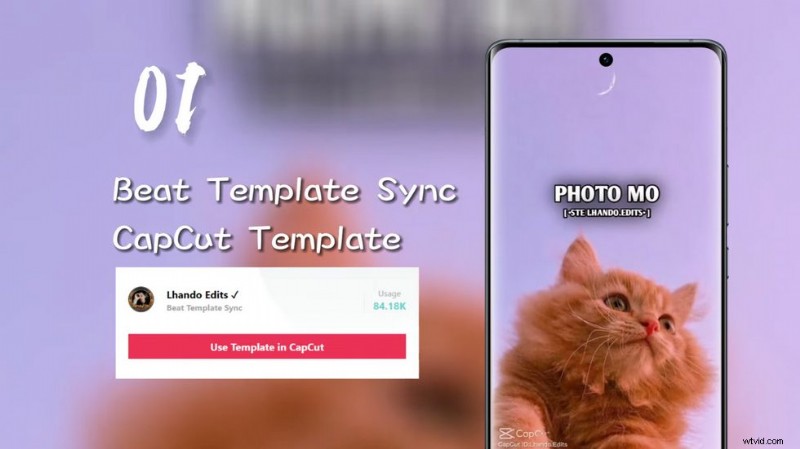
Find CapCut Templates
Follow the Trend
Keeping up with the latest video editing trends on TikTok or CapCut is a good way to attain more views, even when your video is not as competitive in terms of content quality.
For example, joining the latest video editing trends such as 3D zoom effect or velocity edit helps easily get tens of thousands of views for a less than 10 seconds video.
Remove CapCut Watermark
The CapCut video editor app has a default CapCut logo in the video ending, and you can find the CapCut logo in some of the templates you downloaded as well. And if you don’t like it in your video, the option is offered for you to easily remove CapCut watermarks by deleting them at the end of the timeline.
You can also disable the default CapCut ending logo by going to the settings from the CapCut home screen.
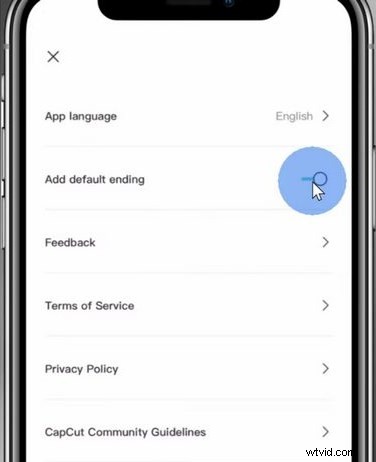
Remove Watermark on CapCut
As complete as this post could be, it’s not possible to gather all CapCut editing tips and tricks in one place since it’s such a multifunctional and powerful tool with practically anything you can think of.
But you can also check our latest CapCut tutorials to find out more about CapCut!
More CapCut Tips and Tricks
- How to Overlay Videos in CapCut
- How to Do CapCut HDR
- How to Do Pull Edit in CapCut
- How to Add Video Background in CapCut
- How to Do Green Screen in CapCut
Conclusion
You don’t need every video editing tips and tricks referred to in the article, but learning the ideas and principles of which will certainly help you become a more versatile video creator. And this page is complete enough for you to become a video editing professional in a short time, so don’t forget to bookmark it for the next time reading!
And if you find this page helpful, please help share the knowledge with more people!