
When you listen to a wonderful song and then you may want to set a certain clip as your ringtone, so how can you trim the unwanted audio clips? You can try MiniTool MovieMaker developed by MiniTool and it can help you trim and split your audio. And do you know some online audio trimmers? This post will give you answers.
You might be very curious about trimming audio length. Don’t worry, this problem can be settled easily with online audio trimmers.
1. Bear Audio Editor
Bear audio editor, the first recommended online audio trimmer, is a powerful and simple tool to trim audio online. It is a web-based audio editor, providing 3 ways to import audio: opening from the audio URL, recording audio, and importing audio from its sound library and it can trim, delete, split audio, and adjust the pitch. Also, it offers a fast speed with HTML5 technology.
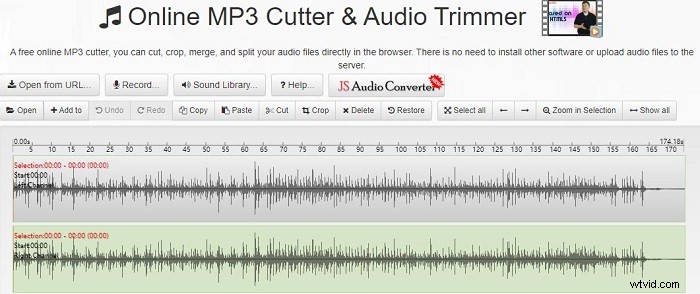
Main features:
- It supports import formats: MP3, WAV, OGG.
- It supports export formats: WAV, MP3, M4R, OGG, AAC, WMA.
- It supports to open audio files from different sources.
2. Swifturn Soft
Swifturn Soft, the second recommended online audio trimmer, is a versatile audio editing tool because it can edit audio, record sound, make ringtone, convert audio and extract audio. Besides, it is also a video converter, DVD audio extractor, and disc creator.
Main features:
- It is clean, convenient, and simple to use and free.
- It is available to listen to changed tracks.
3. audiotrimmer.com -Online Audio & MP3 Cutter
Online Audio & MP3 Cutter, a simple and free online audio trimmer, has an easy-of-use interface, which enables people to trim audio online effortlessly. As an MP3 cutter, it can trim MP3 tracks easily without downloading other software and provides step-by-step guides.
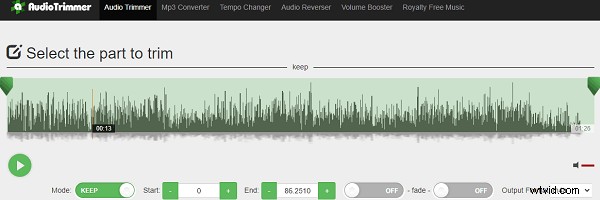
Main features:
- It supports many audio formats, like MP3, M4R, OPUS, M4A, and so on.
- It can make ringtone online.
- It is mobile-friendly, working on computers, tablets, and mobile phones.
4. Kawping
Kawping, one of the most popular online audio trimmers, is simple to trim and cut audio to a perfect length using sliders on its ease-of-use interface. Besides, it is helpful to add audio to video, resize video, add text to image, reverse video, and so on.
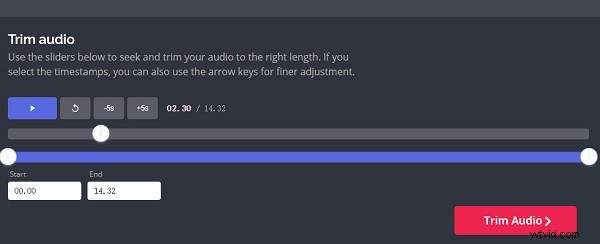
Main features:
- It is a comprehensive tool for audio editing, video editing, and photo editing.
- It is easy to use.
5. Audioalter
Audioalter is a professional online audio editing tool and can trim audio online very precisely because the waveform of audio helps to think of which part you want to cut out. With the fade effect, the volume of the audio will be increased or decreased. And you also can control how long you want the fade effect to continue.
What’s more, it can speed up or slow down the audio changing the tempo without changing the pitch. And it can reverse audio and remove the sound from a song only remaining instrumental vocals.
Main features:
- It supports several audio files formats: MP4, WAV, FLAC, and OGG.
- It can change audio volumes.
- It supports a maximum audio file size is 20MB.
6. Online Audio Cutter
Online Audio Cutter, another free online audio editing tool, is simple to trim audio online because it doesn’t require special skills. And it can extract sound from a video.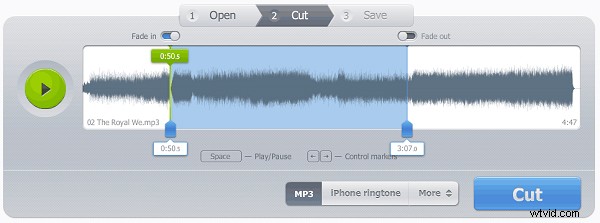
Main features:
- It supports 300+ formats of audio and videos.
- It can add fade-in and fade-out effects.
- It can make iPhone ringtones.
Bottom Line
Now it’s your time to practice trimming audio. Choose one online audio trimmer and have a try.