
What is Google Drive? Google Drive is a cloud storage service that can store various files, including photos, audio files and movies. So how to watch movies on Google Drive? The post will give you a detailed guide. If you want to create an amazing movie to save on Google Drive, try MiniTool MovieMaker.
Developed by Google, Google Drive provides file storage and synchronization service with users that let users access all files from any device. And there is 15GB free Google Drive storage for backup, where is a safe place to make Google Drive stream. Meanwhile, it supports file sharing between users, which makes you get Google Drive movies.
On the one hand, you can save the movie which was shared in the public web into Google Drive and watch it online anywhere without downloading it. On the other hand, you can download Google Drive movies into the computer and watch it offline. The following contents are around these two ways to solve how to watch movies on Google Drive.
See also: 4 Solutions to Fix Google Drive Processing Video Error
How to Watch Movies on Google Drive Online
There are publicly shared Google Drive movies on the Internet. You can save these shared movies or upload your own video to Google Drive, and then you can watch them online on any device with Google Drive, which is a portable way to watch movies anywhere.
Here’s a step-by-step guide on how to watch movies on Google Drive online.
Step 1. Find Google Drive movies.
In Google search frame, type in “site:drive.google.com (the movie you want to watch)” to find the publicly shared movie, such as “site:drive.google.com Finding Nemo 2003”.
Step 2. Save Google Drive movies.
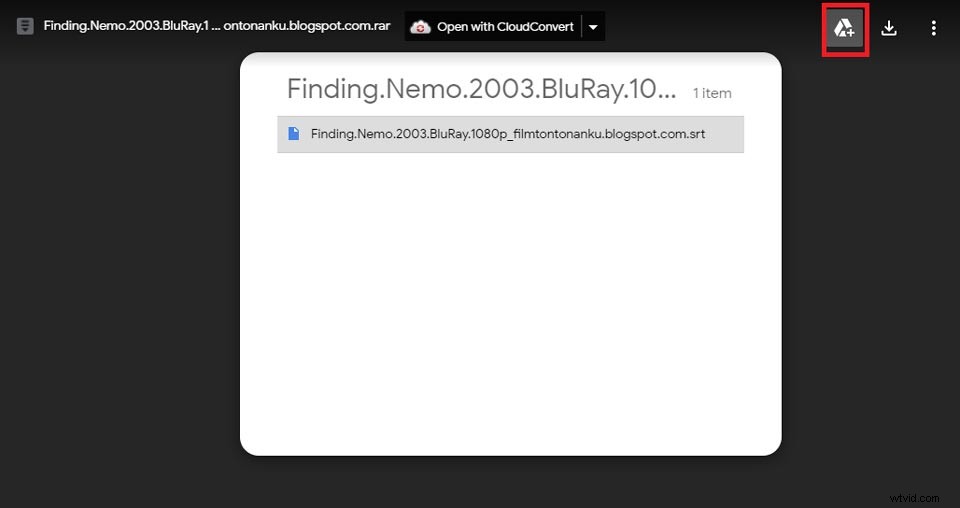
Choose the proper one you want to watch, and then click the Add a shortcut to Drive icon to choose the folder you want to save in your Google Drive.
Step 3. Make Google Drive movies stream on any device.
Open your Google Drive, and find the movie just now. Click the Play button to preview it on the computer. Alternatively, you can open the Google Drive app on your mobile phone, and find it to play it online.
You may also have an interest in: Top 18 Best Putlocker Alternatives in 2020 (Free)
How to Watch Movies on Google Drive by Downloading
Google Drive is also a free downloader that can download the movie you have saved. In case others’ share would be invalid or canceled, downloading it from Google Drive to watch is a safe way when you find a valuable and high-quality Google Drive movie.
Here are two options to download movies.
Option 1. When you find the shared Google Drive movie, you can directly choose to download without saving into your Google Drive folder.
Option 2. If you want to firstly save to preview whether it’s your target movie, you can always opt to download it later on Google Drive storage. There is a Download icon in the preview window.
Note: Please make sure the security of the movie you want to download, because Google is unable to scan the file for viruses if the movie exceeds the maximum file size.
Related article: How to Embed a Video in Google Slides (YouTube & Google Drive)
Bottom Line
Google Drive is a very useful storage service that helps you backup your important files and photos, and it is a shortcut that can help you find free Google Drive movies shared by other users. So if you have mastered how to watch movies on Google Drive, you will have no limit to explore movies.
If you have any questions or suggestions when you read the above content, please feel free to contact us via admin@wtvid.com or leave your comments in the below section.