
Choosing a professional animation maker for kids is necessary. It can create a fun and interactive environment for kids to unleash their creativity and express themselves. If you want to pick a more advanced animation tool for yourself, MiniTool MovieMaker is recommended here.
Using an animation maker to draw, doodle, or make cartoons is a great way for kids to express their creativity and explore technology. If you are looking for an animation maker for your kids, you will be interested in our review of the top 5 best animation makers.
1. PowToon
Price: Free Trial
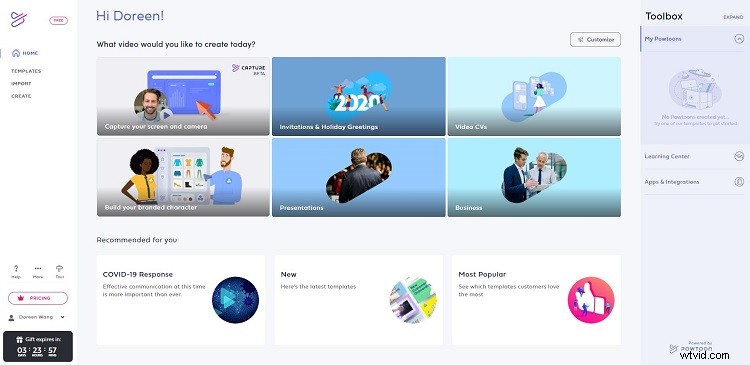
PowToon is an interesting online animation tool and one of the best animation makers for kids. Although it was not initially developed as an animation tool for kids, it’s easy to use, making it perfect for kids and beginners.
With this animation maker, kids can tell compelling stories through hundreds of animated characters, templates, video backgrounds, soundtracks, and more.
Features:
- Available free guide.
- Easily create high-quality animated videos in minutes.
- A huge library of professionally-designed templates, scenes, characters, props, videos, soundtracks, text, and more.
- Upload your own videos, GIFs, images, voiceovers, and anything you need.
- Integrated with YouTube, Facebook, Twitter, etc.
2. Animatron
Price: Free Trial
Animatron is another best online animation maker for kids that allows anyone, including kids to turn their ideas into cartoons. Through this online service, they can draw, animate, and narrate different stories.
Animatron is very easy to work with. Especially the Lite mode of the program is a perfect choice for kids as it is a drag-and-drop solution for harnessing their creativity.
Features:
- A collection of 500K royalty-free videos, photos, and audio clips.
- Thousands of pre-animated characters and objects.
- Make explainer videos
- Whiteboard animation style.
- Import and export in any format.
3. Pencil2D
Price: Free
Pencil2D animation is a simple and free animation maker for kids that can run on Microsoft Windows, OS X, and Unix-like operating systems. This easy-to-use and lightweight 2D animation software can help kids create 2D graphics and animations.
Besides, it allows kids to use raster graphics and vector graphics at the same time, and they can easily switch between the two types of artwork.
Features:
- Lightweight and easy to use.
- Cross-platform compatibility.
- Customizable templates.
- Advanced animation curves.
- Seamlessly switch between raster and vector workflows.
4. Toon Boom Harmony
Price: Free Trial
Toon Boom Harmony is a powerful end-to-end animation maker. It has bitmap and vector tools for creating art, 3D imported models for hybrid productions, and the option to create multiplane scenes with Z-depth.
This software is especially suitable for kids because there are a lot of free videos, webinars, and other learning resources that kids can use to master this software.
Features:
- Available in three versions.
- Most advanced brush engine.
- Defined color pallets and painting.
- Innovative cut-out animation and rigging.
- Special effects and compositing.
5. FlipBook
Price: Free
FlipBook is the easiest animation maker for kids. This animation tool lets kids draw directly on the screen using a touch display and a stylus. It even allows kids to add soundtracks. Of course, this feature is suitable for older children.
Flipbook is intuitive and easy to use. Kids can paint one frame at a time, or all of them at once if they want to finish the job faster.
Features:
- Available step-by-step tutorials.
- Zoom, rotate and blur frames.
- Import backgrounds, overlays, and videos from other programs.
- Export still images and movies.
Bottom Line
Creating a funny animation video is much easier when you choose the right software for your kids. Hope any of the products above serve them well. If you have any questions or suggestions about it, please let us know via admin@wtvid.com or share them in the comments section below.