
How to make emojis? If you are searching for the best way to make emoji, you’ve come to the right place. This post will give you 4 excellent custom emoji makers to pick from. And if you want a free and simple video editing application, MiniTool MovieMaker is highly recommended here.
Why emoji is so popular? Emojis are very fun and widely used in massages to express emotions and feelings. There’re always numerous emojis you can choose from, but they’re not enough. You’ve always wanted an emoji to convey your current emotion, and you may desire to make an emoji of yourself. How to make emojis? Luckily, this post will introduce 4 emoji maker apps to you.
How to Make Emojis on the Computer?
Labeley
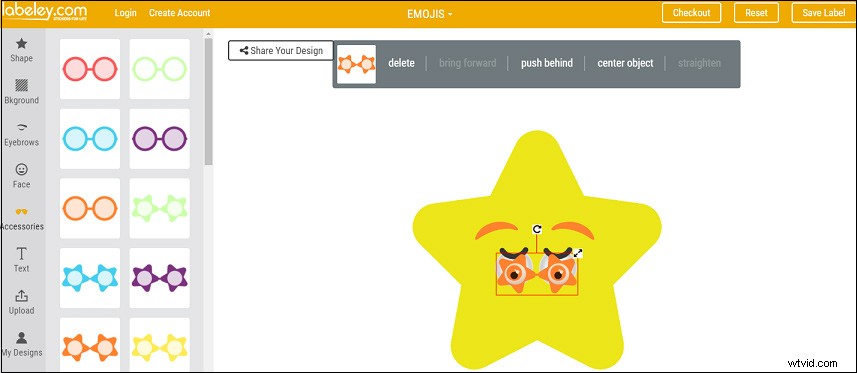
How to create an emoji without installing any software? You can try Labeley. It’s one of the best free online emoji maker apps and requires no account. To enable you to make emojis with ease, this online tool offers a variety of shapes, background colors, faces, and accessories. You can select anyone you like to make your own emojis.
And you can add text to the emoji. Besides, you can upload images and add them to an emoji. When you finish, you’re allowed to share your emoji on Facebook, Twitter, and Pinterest.
Angel Emoji Maker
Angel Emoji Maker is also a simple-to-use and completely free online custom emoji maker. It offers many face shapes and several sample faces, such as People Shapes, Animal Shapes, Common Emoji Shapes, etc. And you can upload your existed images from the computer. Therefore, it’s easy for you to make an emoji of yourself or use friends’ faces to create one.
And this emoji designer allows you to move, edit, zoom in, zoom out, copy, paste, delete, change the layer of any emoji components. Besides, it lets you put text on the emoji and edit the text size, color, style, font. And it offers many stickers which can be used to make special and cute emojis.
How to Make Emojis on the Mobile?
Bitmoji (Android and iOS)
How to create an emoji on your phone? Bitmoji, a popular and free emoji maker, comes as the first choice. As one of the best personal emoji maker apps, Bitmoji lets you make an emoji of yourself with ease, and it offers many components to customize your emojis like stickers, clothes, glasses, and more. What’s more, Bitmoji can use the camera to make an avatar that looks like you.
Emoji Maker- Free Personal Animated Phone Emojis (Android)
How to create an emoji on your Android quickly? Emoji Maker is also a good option. It can make an emoji of yourself from your face, create personalized avatar emoji, or start from scratch. And all emoji stuff is free. Moreover, it supports animated emojis, allowing you to use the Animated Emojis, and the available characters include cat, chicken, panda, monkey, pig, dog, and fox.
Conclusion
Except for the above emoji makers, there’re many other ones like Pizap emote maker, Emojily, Bobble Keyboard, ZMoji.With these applications, you’ll never worry about how to make emojis. Choose one tool from these custom emoji makers and try to make an emoji of yourself.