
Proper video tags help you organize and manage files with ease and sort and find the target video file quickly. Most downloaded videos have the right tags or metadata. But sometimes, you may need to edit or change the video tags. In this post, we will introduce 7 MP4 video tag editors to you.
To help you add or change the general or additional metadata of a video, this post has compiled a list of 8 MP4 tag editors. With them, you can edit the general media information like title, artist, genre, publisher, comments, copyright, album, or track, etc. Want to add text to the video for free? MiniTool MovieMaker is recommended here.
Top 7 MP4 Tag Editors
- VLC Media Player
- Subler
- Amvidia Tag Editor
- TigoTago
- MyMeta
- MetaDoctor
- MP4 Video & Audio Tag Editor
#VLC Media Player
Compatibility: Windows, Mac, Linux
Price: Free
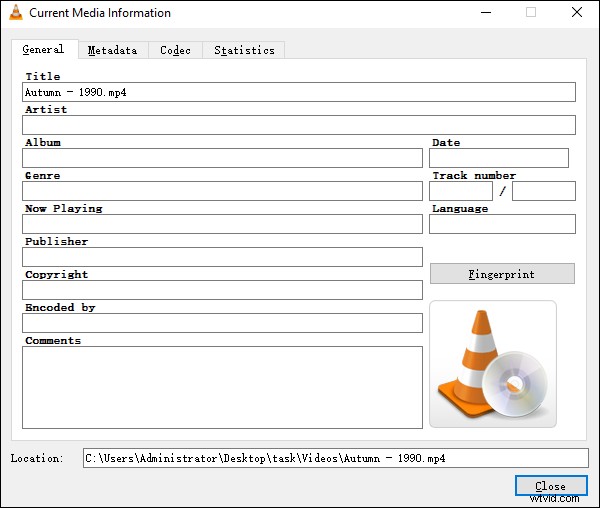
VLC is not only a versatile media player but also a free MP4 tag editor. It enables you to change the general metadata of a video, such as a title, artist, genre, album, copyright, publisher, date, track number, comments, language, etc. And it supports a wide range of video formats. When you open a video, then go to Tools > Media Information, and you can edit the basic tags.
#Subler
Compatibility: Mac
Price: Free
Subler is one of the best MP4 tag editors for Mac users, and it’s also compatible with other Apple devices like iPod, iPhone, QuickTime, Apple TV, etc. This software allows you to edit the information about video and audio files individually. And Subler can create TX3G and WebVTT subtitles tracks, and it supports full iTunes-style metadata editing.
#Amvidia Tag Editor
Compatibility: Mac
Price: Free
Amviodia is also a good MP4 video tag editor. It lets you download metadata and album covers from the network, load tags from iTunes or other paths, rename multiple files, and it also supports batch tagging. Besides, it’s a reliable music tag editor for WAV, AIFF, FLAC, MP3 files, etc.
#TigoTago
Compatibility: Windows
Price: Free
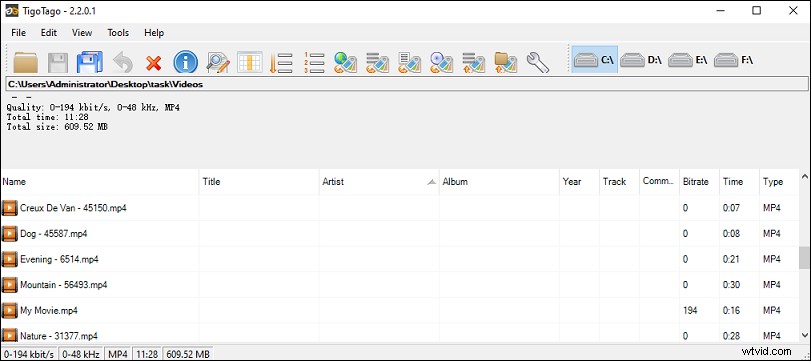
TigoTago is another free video tag editor and it supports MP4, AVI, WMV, OGG, MPEG formats. The basic tag editing includes title, artist, album, year, track, type, etc. And it supports advanced editing, and so you can edit the metadata like copyright, lyrics, and more.
And TigoTago also works with many audio formats like MP3, FLAC, AAC, WAV and supports the lossless conversion between WAV, MP4, FLAC, and APE.
#MyMeta
Compatibility: Windows
Price: $3.49
This is another video tag editor for MP4, M4V, and MOV files. Thanks to the integration of some leading internet metadata providers like TheMovieDB.org, TheTVDB.com, and tagChimp, you can search for metadata and DVD artwork for movies and TV episodes. With the AutoTag feature, this software allows you to automatically set the metadata and cover art of a set of files and tag these files rapidly.
#MetaDoctor
Compatibility: Mac
Price: $4.99
If you want an MP4 tag editor that can work with iMovie and iTunes, you can try MetaDoctor. And it also supports MOV and M4V video files. With this app, you can edit the video metadata easily, and import the video into the TV app for watching.
#MP4 Video & Audio Tag Editor
Compatibility: Windows
Price: $14.49
With this MP4 tag editor, you can edit the MP4 tags in MP4, 3GP, M4V, M4B files, organize the cover arts, and rename the files by the tags. And it allows you to download the tags and posters for the videos from The Movie DB, edit all metadata atoms, and more.
Conclusion
With the 7 MP4 tag editors, you can change the video tags with ease. Choose one and try to tag your videos. Among these video tag editors, which one do you prefer? And if you want to share other MP4 tags editor, you can leave them in the below comments area.