
An automatic subtitle generator is a tool that can generate subtitles for videos automatically. With a subtitle generator, you don’t have to add subtitles to videos manually. All you need to do is spell check subtitles and correct them. Here are the 3 best free automatic subtitle generators for you.
“I have some videos to learn English but they only have English audio tracks. I want to get the subtitles? What should I do? Is there a way to auto-generate subtitles for videos?” To solve this, I’ll show you the 3 best free automatic subtitle generators and how to use them step by step (Want to add animated text to video? Try MiniTool MovieMaker).
3 Best Free Automatic Subtitle Generators
- YouTube
- Kapwing
YouTube
The best free way to create automatic subtitles for your videos is by using YouTube. It can generate subtitles for the uploaded videos automatically. Once the automatic subtitles are created, you can correct misspellings, and adjust the timings. Automatic subtitles are available in English, Dutch, German, Italian, Portuguese, Russian, Spanish, Japanese, Korean, Vietnamese, and more.
Here’s how to use the video subtitle generator feature on YouTube.
Step 1. Go to the YouTube website and sign in to YouTube.
Step 2. Click the camera icon to upload a video you want to create automatic subtitles.
Step 3. After uploading the video, it will take about 30 minutes to auto-generate subtitles. (It depends on the duration of a video)
Step 4. Click on your profile picture and choose YouTube Studio.
Step 5. Click on Content and tap on the uploaded video. Click Subtitles to proceed to the next step.
Step 6. Find the automatic subtitles and click on DUPLICATE AND EDIT to modify the subtitles.
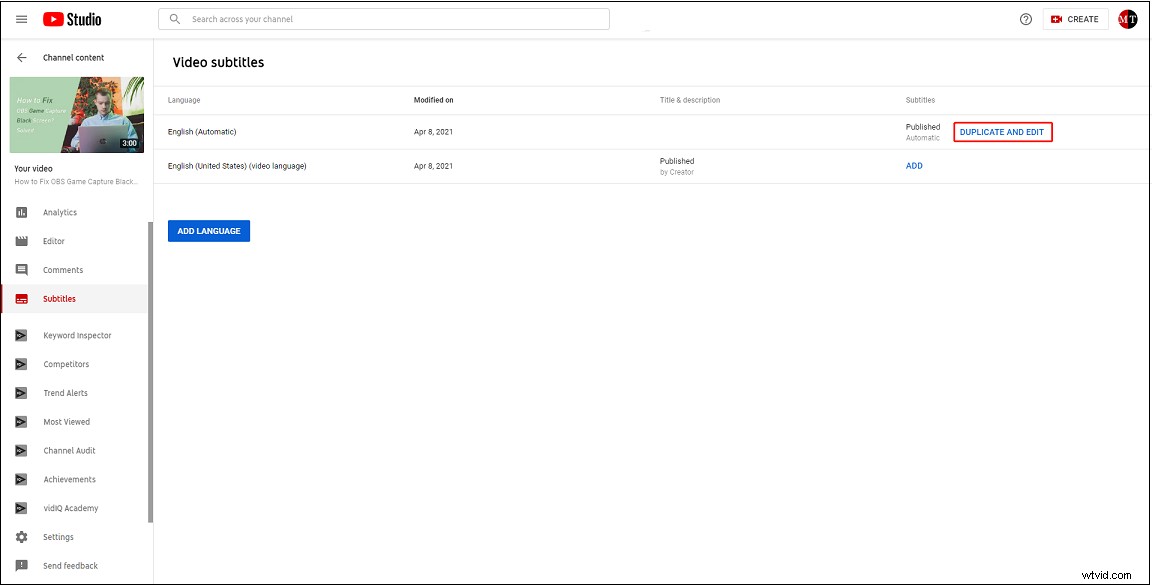
Step 7. Then editing the subtitles and adjust the timings. When you are finished, click PUBLISH to save the changes.
Like YouTube, Facebook also has an automatic captioning feature. But automatic subtitles are only available in English. Besides, the Facebook caption generator allows you to add the SRT file to a video.
Here’s how to generate subtitles on Facebook.
Step 1. Create a video ad after sign in to Facebook.
Step 2. Upload the target video in the Ad Creative section.
Step 3. After uploading the video, click on Edit Video > Captions.
Step 4. Choose Generate Automatically.
Step 5. In the Review Your Captions window, you can review and edit the subtitles.
Step 6. When you are happy with the subtitles, tap on Save To Video.
Kapwing
Another subtitle generator is Kapwing. Powered by AI, it can auto transcribe your videos in any language. Except for auto-captioning, this tool gives you the option to automatically translate subtitles into another language. Kapwing is web-based, so it works in any web browser.
Here’s how to create automatic subtitles for a video online.
Step 1. First, open the Kapwing website and log in to your account.
Step 2. Click New Content and upload the video you need to create auto subtitles for.
Step 3. Click on Subtitles > Auto-generate.
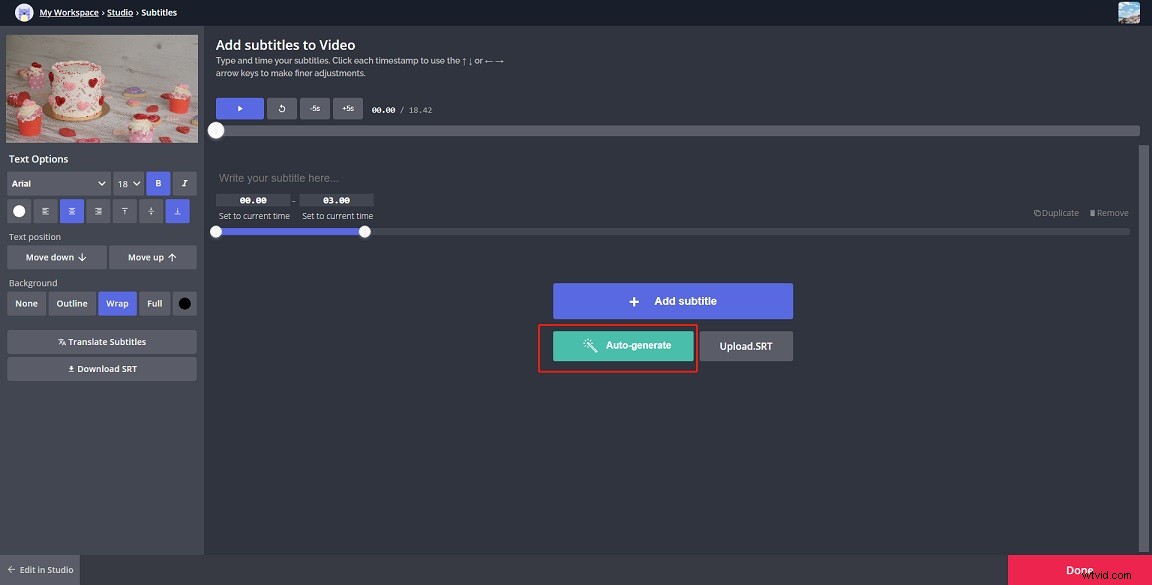
Step 4. Next, select the target video language and click Auto-generate to confirm.
Step 5. It will take a few minutes to generate subtitles. After your subtitles are generated, you can review and edit them.
Step 6. Save the changes and download the video with automatic subtitles. Or download subtitles in SRT.
Conclusion
Here are the 3 best free subtitle generators to auto-generate subtitles for your videos. What’s your favorite video subtitle generator? Tell us in the comments section!