
Spotify now lets creators upload videos. There are some video podcasts and music videos available on Spotify. How to watch video podcasts on Spotify? Everything you want to know about Spotify video podcast is in this post.
Do you prefer audio or video podcasts? Spotify now supports video podcasts. Spotify will meet your needs whether you like watching video podcasts or listening to audio podcasts. So how to watch video podcasts on Spotify? How to watch Joe Rogan's video on Spotify? Continue to read this post! (Try MiniTool MovieMaker to make a video podcast!)
How to Watch Video Podcasts on Spotify
This part will show you how to watch Spotify video podcasts on your phone and computer.
Watch Spotify Video on Mobile Phone
Step 1. Open the Spotify app.
Step 2. Click the Settings icon located in the top right corner of the screen.
Step 3. Turn off Audio Quality and Download audio only.
Step 4. Scroll down to the Canvas and turn it on.
Step 5. After adjusting the settings, you can enjoy video podcasts on Spotify.
Step 6. Take the video podcast The Joe Rogan Experience as an example. Click the Search button and type Joe Rogan in the search field.
Step 7. Tap on the podcast The Joe Rogan Experience and play the episode you want to watch.
Watch Spotify Video on Desktop
Step 1. Go to the Spotify website and sign in to your account.
Step 2. Click search in the left panel and enter the name of a podcast.
Step 3. Open the podcast and play an episode.
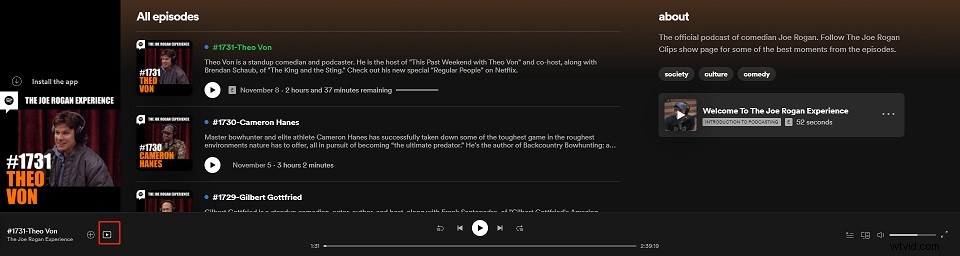
Step 4. Then you will see a button called Show video. Click it to watch the video.
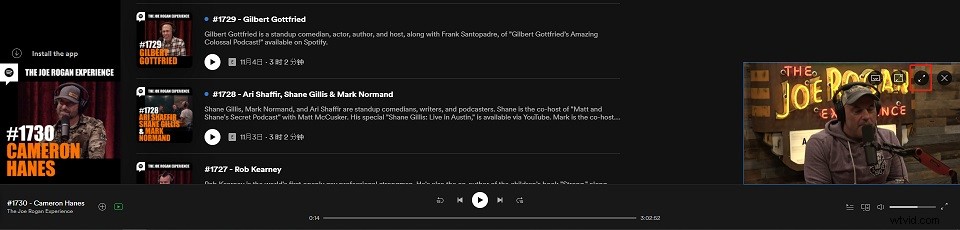
Step 5. Click this icon on the mini player to play the video in full screen. If you need subtitles, click Subtitle next to Volume. Then choose English (auto-generated).
Here Are 7 Best Video Podcasts That You Can Watch on Spotify
- The Joe Rogan Experience
- The Misfits Podcast
- Rooster Teeth Podcast
- Book of Basketball 2.0
- H3 Podcast
- The Morning Toast
- Higher Learning with Van Lathan and Rachel Lindsay
Why Are Video Podcasts Not Working on Spotify?
If the Spotify video podcast only plays audio, you should check the settings and make sure that the Audio Quality and Download audio only options are disabled and the Canvas toggle is on.
If you’re still unable to watch video podcasts on Spotify, you can restart your device, log out from your Spotify account and log back into your account.
Best Video Editors to Edit Video Podcasts
This part will introduce you to serval video editors for video podcast editing.
#1. Adobe Premiere Pro
Adobe Premiere Pro is the industry-leading video editing software. It’s perfect for professionals. This software costs $20.99 per month with an annual plan and $239.88 per year.
#2. Final Cut Pro
Final Cut Pro is the most popular video editor for Mac. It’s powerful and only costs $299.99 (one-time).
See also: Final Cut Pro VS Premiere – Which One is Better?
#3. MiniTool MovieMaker
For beginners, MiniTool MovieMaker might be a great choice. It’s simple to use but comes with all the needed editing features. It’s free of charge and won’t watermark your output video.
Conclusion
Now, you have learned how to watch video podcasts on Spotify. If you want to share some video podcasts with us, please leave your comment below!