
Are you looking for the best photo noise reduction software? There are so many different noise reduction software options in the market, and it will take a while to decide which one to use. Thus, here are the top 4 photo noise software for you.
If you want to make a video from the refined photographs, you can try this free and handy video editor - MiniTool MovieMaker.
Before we dive into the best photo noise reduction software, let’s figure out what photo noise is. Photo noise refers to improper pixelation that can reduce the details of an image. It can make the image look grainy. You don’t need to give up these images.
Photography noise reduction software can help. Noise reduction is the process of reducing or removing noise from images. There are two kinds of noise - luminance noise (too-light or too-dark pixels) and color noise (incorrectly-colored pixels). It’s important to use the correct tool for the best results without losing too many details. Let’s take a look at the top 4 photo noise software one by one.
Photoshop CC
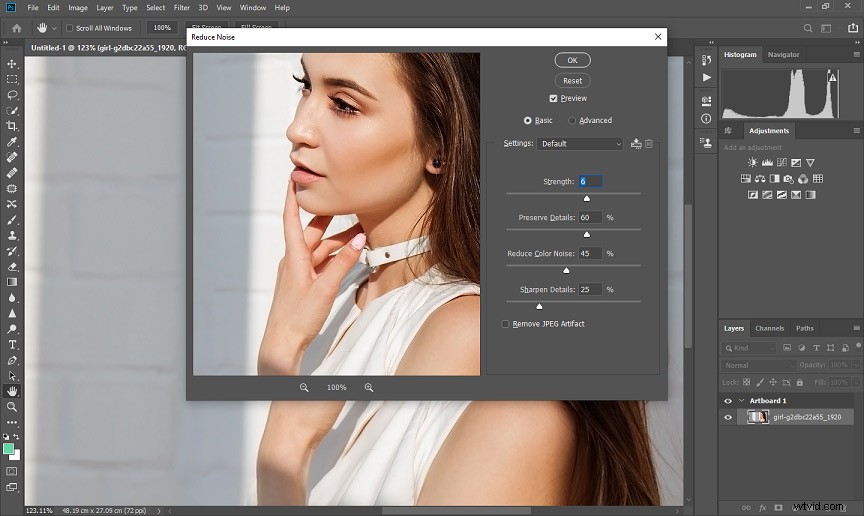
Photoshop CC is one of the best photo noise reduction software for Adobe fans. It does a reasonably good job at removing noise with its basic feature.
The main appeal lies in its ability to apply noise reduction selectively by creating masks and using RGB channels. You can apply noise reduction to a part of the subject in a photo while leaving the rest untouched.
It allows you to adjust the intensity of the noise reduction filters to get pretty decent results. If you are a professional photographer, it is the best suited for you. However, it might need a steep learning curve for beginners.
Lightroom
Adobe Lightroom is a well-known photo editor that copes with image editing perfectly. It offers two types of noise reduction to reduce both color and luminance noise from your images easily and allows you to fine-tune every detail you want. You just need to open the detail panel in the develop module and move the Noise Reduction sliders until you are satisfied with the results.
It offers plenty of denoise lightroom plugins if you need more advanced noise reduction.
Luminar
Luminar, developed by Skylum, is a great alternative to Lightroom as a useful photo noise reduction software. It offers a simple noise reduction tool to handle digital noise. The main advantage is that it offers an amazing user-friendly interface and great tools for auto-correction.
Luminar noise reduction is done by the “Denoise” filter. It’s a convenient tool for noise reduction which allows you to decrease luminance and chromatic noise separately. You can use the boost slider to set the effect to the desired intensity and tweak opacity as well.
By the way, you can use it as a stand-alone program or as a plugin for Adobe and Apple products.
Noiseware
Noiseware is a popular noise reduction software plugin for Adobe Photoshop by Imagenomic. It is dedicated to noise reduction. You can reduce the digital noise in just a few seconds and don’t need any manual adjustments. Because it relies on the artificial intelligence system that automatically analyzes noise patterns for efficient removal.
It offers various preset modes, which allows you to deal with noise in different situations without compromising image quality. Additionally, it offers other options for manual adjustments for detail enhancement. It has advanced controls that you can use to tune tonal range, colors, and frequency, and more.
Basically, Noiseware is a solid choice if you want to invest in Photoshop plug-ins instead of buying a dedicated noise reduction software.
Conclusion
To sum up, we’ve learned the 4 best photo noise reduction software options. I hope this post can help you find the one that fits you most. If you like this post, feel free to share it!