
Actually, GIF frames are individual image frames that combine together to create an animated GIF. You can edit the individual GIF frame precisely with the GIF frame editor. In this post, we’ve tested some frame-by-frame gif editors and handpicked the top 4 options for you.
The following content below covers the features of each GIF frame editor. You can go through t and pick which one suits you most according to your preference.
If you also looking for a GIF maker or video editor, you can try MiniTool MovieMaker.
GIMP (Windows, macOS, Linux)
GIMP is a cross-platform and feature-rich free image editor that can be used to modify GIF frames in Windows, macOS, Linux, and more operating systems.
It contains many GIF frame manipulating tools. You can crop, resize, or rotate frames, insert text to a frame, change color levels, merge layers, add effects, blur GIF frames customize blending mode, and more.
In addition to that, it allows you to change the speed of GIF, delete frames, change the order of frames, add duplicate frames or insert new frames. You can also use it to make a new animated GIF too. Apart from handling GIFs, it also supports other formats editing, including JPG, PNG, BMP, TIFF, SVG, WMF, PDF, and more.
Chasys Draw IES (Windows)
Chasys Draw IES is also a great image processing software that enables you to edit separate GIF frames. You can use its Chasys Draw IES Artist tool to edit GIF frames precisely.
It offers a toolbox consisting of many editing and drawing tools that can be used to make changes in a GIF frame. You can use the brush, eraser, effect brush, texture mapper, and more on the GIF frames. It also lets you import a new layer (blank or image file) to an individual GIF frame. You can merge layers, add borders, and customize blending mode. After that, you can export the edited layer as an individual file.
The standard editing tools like crop, rotate, flip, resize, move, are also available for further editing. Also, you can delete frames, change the position of frames, add new frames.
Ezgif (Web-based)
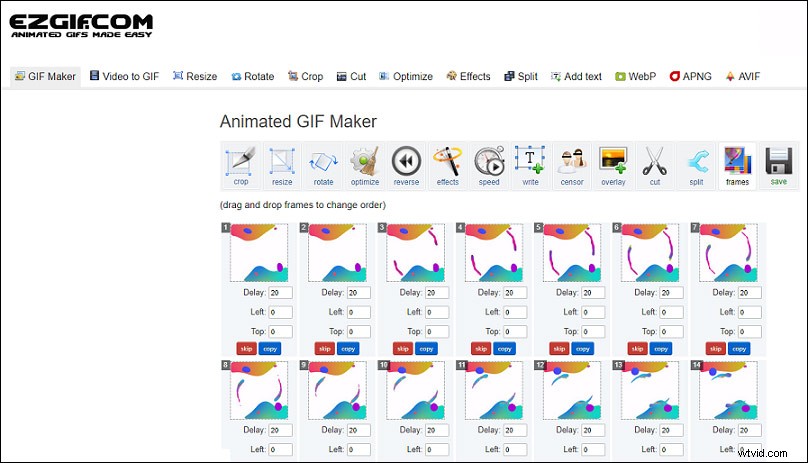
Ezgif is an easy-to-use online GIF frame editor. Once you upload a GIF to Ezgif, you are opting to crop, resize and compress all frames of a GIF. It also lets you reverse GIF frames sequences, add texts to an individual frame, speed up or slow down GIF, add another GIF as an overlay or add mosaic to parts of the frames, etc.
Additionally, it is a useful tool to convert video to GIF and generate animated GIFs by combining separated image files as frames. To make a GIF, you can upload JPG, PNG, BMP, TIFF, HEIC, ZIP archive containing images, and even mix different formats and sizes. They will be converted automatically.
Gifgit (Web-based)
Gifgit is also a user-friendly online tool for GIF editor frame by frame. After uploading your GIF, then the animated GIF will be broken down into many static image frames.
It provides some basic tools to deal with the GIF frames. You can duplicate or delete an individual frame of the GIF, crop the entire frames of the GIF, and add texts to it. You also have options to apply effects to the GIF frames, blur GIF frames, adjust the brightness, saturation, change colors, and so on.
Conclusion
To sum up, we’ve introduced the 4 best GIF frame editors in this post. You can download the software on your PC or use these tools directly on your browser. Just pick one to edit your GIF precisely!