
If you want to get regular content published to your Facebook Page, you may probably wonder if there’s a way to schedule a post on Facebook ahead of time. Well, how to schedule a post on Facebook? After reading this post, I believe you can get the answer to this question.
If you want to make a short video for your Facebook posts, you can try the free video editor – MiniTool MovieMaker.
Scheduling the posts on Facebook is a good way to help your post consistently and stay on top of posting schedules. That way, you will never miss the timeslot for the regular Facebook posts. How to schedule a post on Facebook? The following part will give you the answers.
How to Schedule a Post on Facebook on Desktop Browser
To schedule Facebook messages or posts, you need to have a Facebook Page. Follow this step-by-step guide to learn how to schedule post on Facebook personal account.
Step 1. Go to the Facebook website and log in to your account.
Step 2. Click Pages in the sidebar menu on the left of the Facebook homepage. Then choose the page you want to post under Pages you manage.
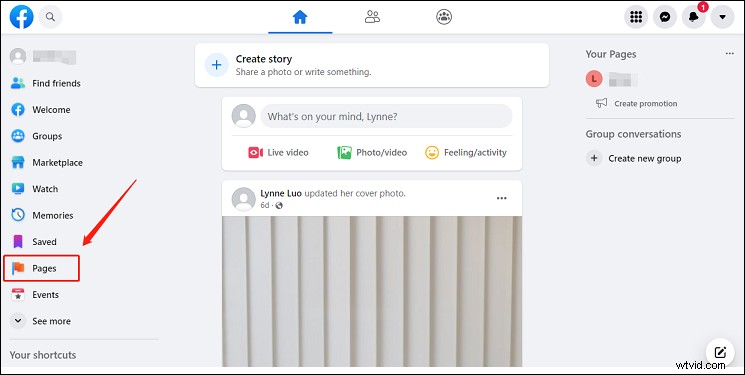
Step 3. Scroll down in the sidebar menu on the left and click Publishing Tools after on your page. You'll be taken to the Facebook Business Suite page.
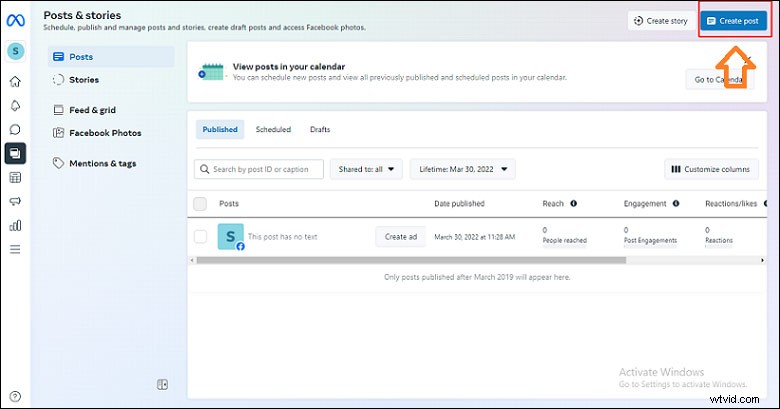
Step 4. Click Create Post in the top-right corner of the Facebook Business Suite page.
Step 5. Type your post in the text field on the left side of the pop-up. Underneath the text field, you can also add media or a location
Step 6. Once you’ve finished writing your post, click the blue downward-facing arrow next to the blue Publish button in the bottom-right corner of the window. Then click Schedule Post in the pop-up.
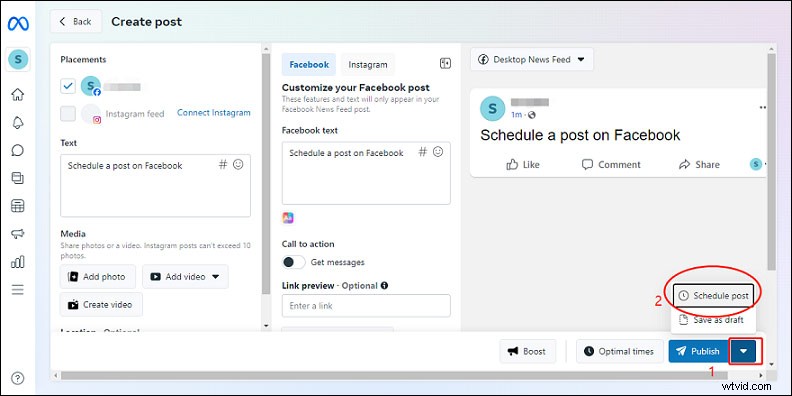
Step 7. Select a date and time for your scheduled post and hit Save. Then click Schedule Post in the bottom-right corner of the window, and your post will be automatically published at the date and time you chose.
How to Schedule a Post on Facebook on Mobile App
In addition to scheduling the post on the desktop website, you can also schedule it on your phone with the Facebook Business Suite app. Let’s take a close look at how to do this on your phone:
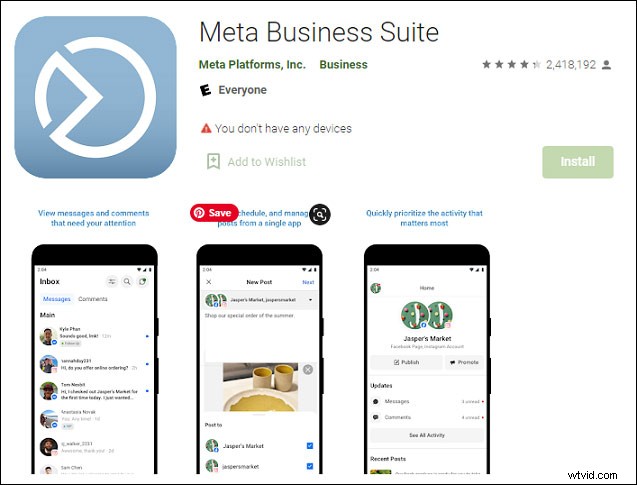
- Download the Facebook Business Suite app for Android or iPhone/iPad, open it, and log in to your account.
- Tap Publish at the top of the page under your page name from the Home tab on the app.
- Write your post’s text in the Write something… section. If you want, you can customize your post at the bottom by selecting Photo/Video, Location, Live Video, Feeling/Activity, or Get Messages.
- Once written and customized your post, tap Next in the top-right corner.
- Click Scheduling Options at the top of the Review page.
- Select Schedule for later, choose a date and time, and hit Done in the top-right corner.
- Review the details of your scheduled post and tap Schedule in the top-right corner.
From the Posts page, you can see your scheduled posts by tapping the Scheduled tab at the top of the page. To edit a scheduled post, tap the three vertical dots icon beside the post details.
Tips to Schedule Facebook Posts
- Carefully create posts: take your time in planning and crafting relevant content that goes with your image.
- Carefully choose the publication date and time: experiment a little and find the right time when your audience is active and post at that time.
- Set a posting frequency: make sure that you don’t overcrowd or overwhelm your Facebook page.
- Track and monitor the posts: know the audience and what they look forward to every day when they open your Facebook page. The data will show you what posts perform well, and where you could make improvements.
Conclusion
In a nutshell, this post introduces how to schedule a post on Facebook on the web browser and mobile app. Hope this post is helpful when you schedule posts. Happy scheduling!