
In this post, we are going to talk about what image annotation is, what is the usage of image annotation tools, and what are the best image annotation tools. If you get confused to choose the best image annotation tool for your specific use case, read this post to find the one you like.
If you also want to add images to a video or make short videos from images, you can try the handy video editing software – MiniTool MovieMaker.
What Is Image Annotation?
Image annotation is the process of assigning labels to an image or set of images. A human operator reviews a set of images and identifies relevant objects in each image, and annotates the image by indicating the shape and label of each object.
These annotations can be used to create a training dataset for computer vision models. The model uses these annotations as its ground truth and uses them to learn to detect objects or label images. It can be used to train models for tasks like image classification, object recognition, and image segmentation.
Image annotation tools support the annotation process (for instance, they enable drawing complex shapes on an image), and provide a structured labeling system so annotators can apply the correct labels to image artifacts.
What Are the Best Image Annotation Tools?
The image annotation technology sound amazing, right? What are the best annotation tools for images? Here we handpicked the 4 best image annotation tools for you to choose from. Each tool might be different, you can make choice according to your preference.
MakeSense.AI
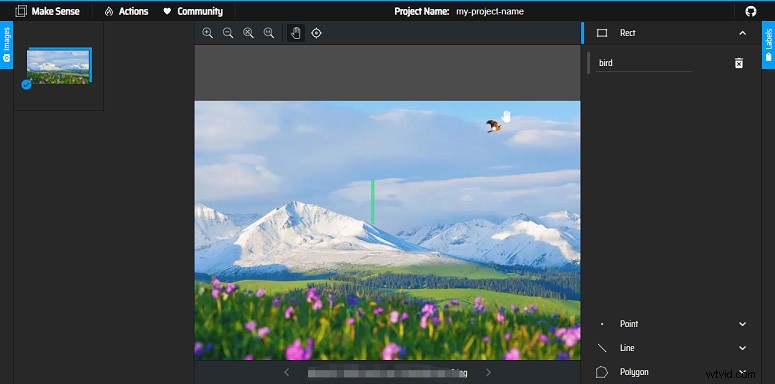
MakeSense.AI is the first one that ranks among the best online image annotation tools. This web-based tool is free to use under the GPLv3 license. It is a good option for beginners because this annotation tool walks the user through the annotation process.
As you can see, this tool features a modern interface and new, time-saving add-ons that are appealing for large datasets. Also, it supports multiple annotation shapes.
LabelImg
Written in Python, LabelImg is also among the popular free-to-use and open-source image annotation tools. The installation is relatively simple and is generally done through a command prompt or terminal. It can save the annotations as XML files in PASCAL VOC format as well as in the YOLO and CreateML formats.
It is a good tool that facilitates your work thanks to its simple and intuitive interface. You can also use it offline for maximum data security. In its default version, it only offers one annotation type- a bounding box or rectangle shape. You need to add another shape with a code using a GitHub page.
Computer Vision Annotation Tool (CVAT)
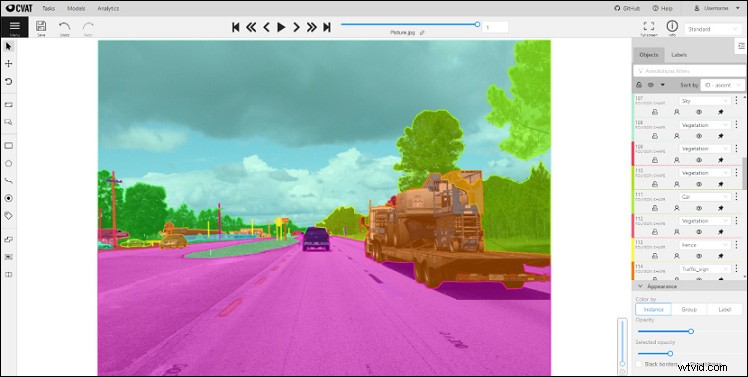
The Computer Vision Annotation Tool (CVAT) is also one of the best image annotation tools developed by Intel. Although the interface is not that initiative, it has very powerful and up-to-date features and functionalities.
This tool offers object detection, image classification, and image segmentation and annotation with boxes, polygons, lines, and points. You can also access automation features such as copying and propagating objects, object tracking and interpolation, and automatic annotation. Collaboration is easy in CVAT and you can split and delegate work.
LabelMe
LabelMe is another online annotation tool created by the MIT Computer Science and Artificial Intelligence Laboratory. It provides a dataset of digital image and video annotations. You can run it on Windows, Ubuntu, and the macOS operating system along with Python launchers.
You have the freedom to choose the six annotation types such as polygon, rectangle, circle, line, point, and line strip. This tool also offers classification through its image flag annotation tool as well as a cleaning feature. With this tool, you can export semantic and instance segmentation in VOC and COCO-formats.
Conclusion
After reading this post, you must know what image annotation is and some of the image annotation tools. What is your answer to the best image annotation tools? Welcome to share your ideas in the comments.