
Looking for something special for your latest project? In this video tutorial, we show you how to create an energetic title sequence using Prism.
Let’s say you want to make a dynamic opener for your series or documentary. Well, using the Prism pack from RocketStock, you can blast through this process and make a really killer opener! Let me show you how.
Build a Project File
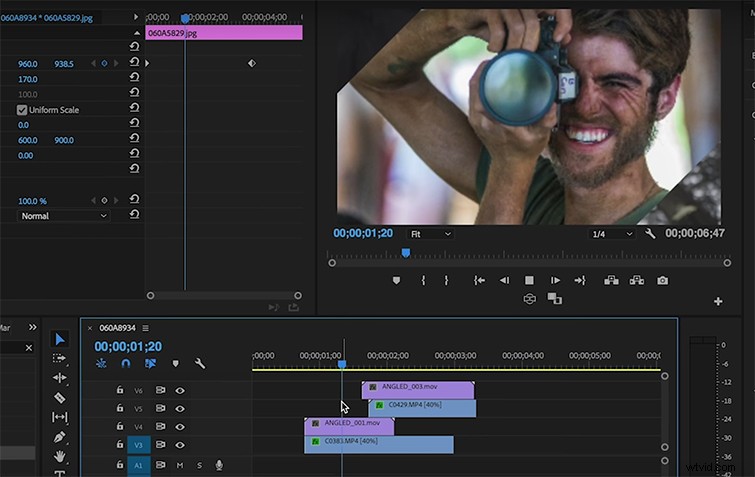
The first step is to build a project file of images and videos you think best represents your brand. Each clip should be no longer than 1.5 seconds. Once you’ve assembled a mini-montage of your opening credit sequence, it’s time to apply the prism effects. Import the video assets, and choose which style you like the most — there are plenty to choose from.
Drag and Drop Prism
Drag and drop your Prism asset over the video layer you want to animate. Next, find the video layer you want to transition into and apply it under your first shot. This will sandwich your transitioning shot in between your Prism asset and your second clip. Repeat this trick at least three times using a different Prism asset for each transition.
Create Unique Transitions
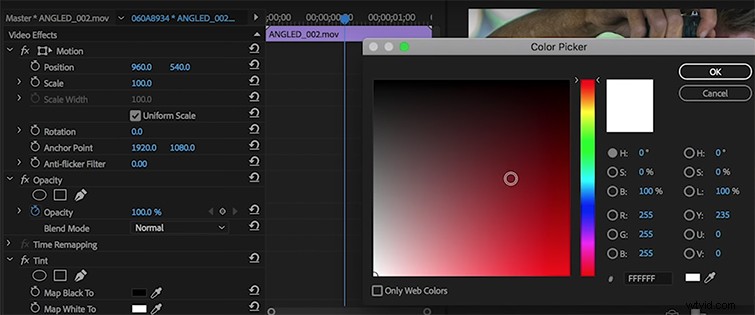
You can also create a unique transition using one of the Prism assets and applying a tint over the footage. Now put this effect into screen mode, and layer it over your sequence. BOOM!
And finally, here are a few other ways you can spice up your title sequence using these FREE effects from RocketStock.