
At the 2018 NAB Show, Blackmagic Design announced the much-anticipated new version of their stellar NLE, DaVinci Resolve 15.
All images via Blackmagic Design.
What’s new to Resolve? Fusion visual effects, thats what! Resolve now offers Fusion visual effects and motion graphics directly in the program. The new software also includes a LUT browser, making it easier to see, preview, and color grade on the go. The new stacked timelines allow you to copy and paste between them, which means more freedom to build and erase sequences as you please. The biggest additions to the already-stellar new software are the Fusion and Fairlight updates. Let’s take a look at some of the key new features for each tab.
Fusion Effects

This could be a serious game changer for motion graphics or visual effects artists. Based on the demo during the press release, the beauty in Fusion lies in the compatibility of the VFX edit with your timeline — that is, it goes right to your timeline. This streamlined workflow will save time during a crunch or while cranking out last-minute revisions.
Here are some of the features of the new program, straight from the product page:
- Vector Paint — resolution-independent paint tools with flexible brush styles, blend modes, and strokes for removing items or painting new elements.
- Rotoscoping — isolate objects from other elements in a scene using bezier and B-spline tools to quickly draw and animate custom shapes.
- 3D Particle Systems — create swirling, sparkling fantastic effects in full 3D, complete with physics and behavioral forces like gravity, avoidance. and bounce.
- Powerful Keying — key any element using the new Delta keyer, Ultra, Chroma, Luma, and differential keyers to create the best composite.
- True 3D Compositing — combine live-action with 3D models, cameras, lights, and more in a true 3D workspace to create amazing photorealistic effects.
- Tracking and Stabilization — use 3D and planar trackers to track, match move, and stabilize anything! Match camera movement with the camera tracker.
Fusion offers titles right from the get-go under Titles > Fusion Titles, which will give you access to Fusion compositions (which will open under the “Fusions” tab) that you can edit however you’d like.
Fairlight
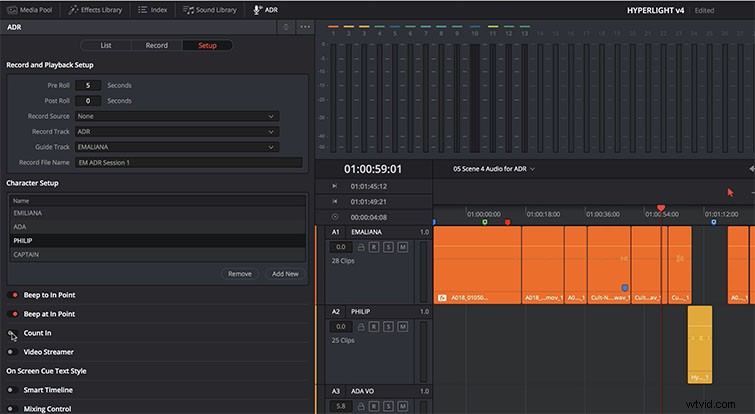
You can import Fairlight and Fusion projects into your Resolve project. The audio editing program has been massively updated featuring ADR Tools, audio normalization, 3D panners, audio and video scrollers, and a sound library database.
Here are some of the new Fairlight features:
- ADR Replacement — comprehensive professional ADR toolset for recording dialog replacement.
- Fixed Playhead — smooth scrolling timeline with fixed playhead in the center of the screen.
- Native Audio-Plugins — cross-platform reverb, de-esser, hum removal, chorus, stereo, and vocal plug‑ins.
- Normalization — apply a constant amount of gain to bring peak amplitude to a specific target level.
- Sound Library Database — scan and search 1000s of audio clips using the internal sound library database.
You can now access subtitles more easily because they’ll be right on the Editing page. The ADR tools in the demo are pretty outstanding, offering you endless ways to customize and categorize which takes you liked best, as well as organize the audio waves for each take — and rate which takes you liked best.
For all the details on the new update, check out Resolve’s website here.
The Free Beta version of DaVinci Resolve 15 is available to download RIGHT NOW.
The studio version is going to be $299.