
How to make sure your online video’s cover image thumbnail showcases your project in the best light possible.
Cover image by GaudiLab.
It turns out, the old adage is not always true: never judge a book by its cover. While it might be true for paperbacks, in the world of online video, the cover image is critical to making sure your video gets clicked, viewed, and shared. Let’s look at some tips and tricks for creating enticing video thumbnails for your projects.
Picking Your Shot
Image by panuwat phimpha.
When you upload your projects, the majority of hosting services are going to create a cover image for you by randomly selecting a screenshot from your video. They also will let you choose random screenshots from your video if you prefer to change the default thumbnail, or you can scroll through your video to pick a shot you like. Things to look for include the following:
- Title screen (if you have one in your video).
- Ideal representation of your project.
- Main subject or character.
- Still action (no motion blur).
- Solid framing of the shot.
Creating Your Own

Image by Rawpixel.com.
Outside of choosing your own thumbnail from your project, you can also create one and then upload it directly. You can do this several ways, either by choosing your best screenshot then touching it up (making it more dynamic or adding titles or other information), or you can create a full title slate from scratch. (Note: if you’re retroactively adding information like festival laurels or awards, you’ll have to upload your own.)
Here are some great resources for creating thumbnails (and interesting titles) on your own:
- 5 Easy Tips For Creating an Awesome Title Sequence
- How To Create A Stunning Custom Title Sequence + Free Ink Splashes
Vimeo Thumbnails
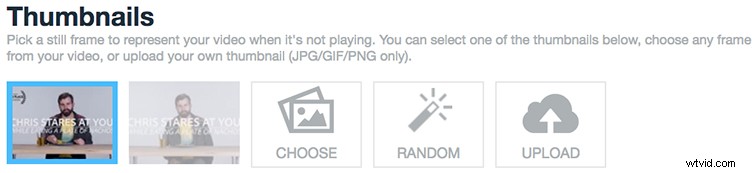
Long a favorite among film and video professionals for hosting videos and short films, Vimeo offers some of the best thumbnail options out there. They also might be the most important because the website favors large screens and minimal text and other information behind click-throughs. Working with Vimeo’s random thumbnail generator is an easy way to start, as it lays out eight random screenshots to choose from. You can also scrub through a lower-res version of your video to pick your shot frame by frame. However, if, say, you’re ever a Vimeo Staff Pick winner and want to add that distinction, you’ll need to create a custom thumbnail and upload it on its own.
To change your Vimeo thumbnails, follow these steps.
YouTube Thumbnails
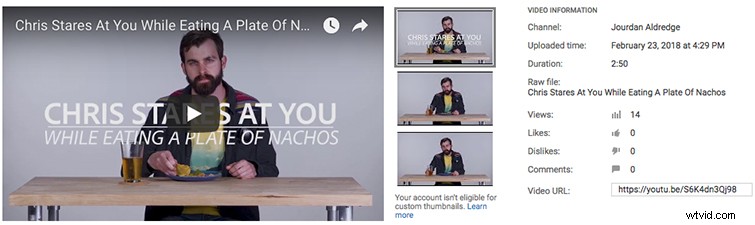
The king of the backend, YouTube offers a ton of customization for how your videos will look and how your YouTube channel page operates. You can change layouts and auto-plays, recommended playlists, and a lot more. Also, based on YouTube’s search engine popularity (it rivals Google), video thumbnails that pop will stand out and help earn clicks. When you create a channel, you immediately get three thumbnail screenshot options; however, once you verify your account, you can upload your own.
To work with YouTube thumbnails, follow these steps.
Facebook Thumbnails

Facebook is pretty simple as well, although it has a tendency to change video upload and posting settings more often than Vimeo or YouTube. As it stands, you can upload videos and immediately choose from 10 randomly selected screenshot thumbnails, scrub through to find your own, or add your own right away. That’s for pages, though; when you’re adding videos to personal profiles, there are fewer options (and they’re not as easy to navigate).
It’s also worth noting that, with Facebook, if you do run a brand page and want to promote your videos with Facebook’s advertising platform, the text cannot take up more than 10% of the screen, so keep that in mind when choosing and creating your own thumbnails.