
In which we examine the differences between All-I and IPB digital compression recording — and the best ways to shoot using each.
If you’ve recently purchased a new mid- to high-end Canon EOS DSLR camera — anything featuring a DIGIC 5+ Digital Image Processor — like a Canon 5D (mk iii or mk iv), Canon 70D, 6D, 1DX, or 7D mk ii, you may notice a couple of recording options that you’re not familiar with. Take the Canon 5D for example: at each frame rate level, there are options for All-I and IPB. Let’s explore what they are, how they work, and how you can best use them for your productions.
(Note: for tips on working with similar compressions with the Panasonic GH5, check out this great article about its firmware compression updates here.)
Digital Compression
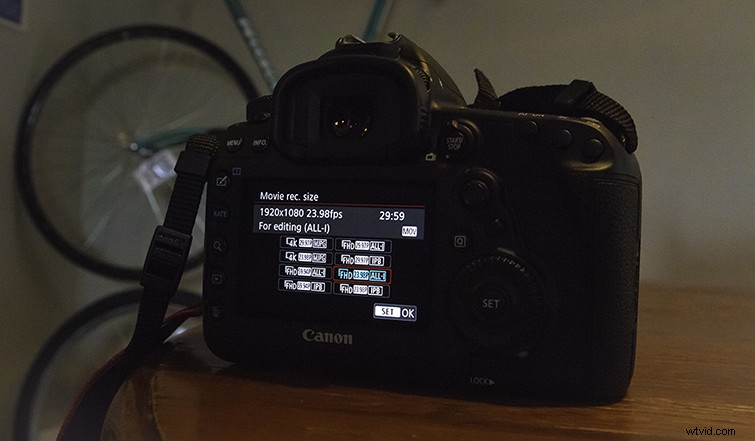
For starters, both All-I and IPB are different compression methods (if you’re using one of the cameras that offer them). For the Canon 5D, they are still both H.264 and output in a standard .MOV — so no major worries about working with the different compressions. However, the two options do vary in several ways in regards to keyframes, quality, file size, and continuous recording times.
All-I Compression

First, let’s look at the All-I compression option — the more powerful of the two. All-I was designed for higher-end cameras to capture the highest quality possible. The compression method works by capturing frames as keyframes and compressing them using an intraframe method of compression. This means three things for videographers, filmmakers, and editors:
- Individual frames are much higher quality than IPB compression.
- Overall files are much larger — about 3 times larger than IPB compression.
- Continuous shooting is limited compared to IPB compression.
So, if you’re capturing more stylized, shorter shots; need more storage space on cards or drives; and are looking for more editing leeway, All-I compression will be your best option for the highest quality recording at your given frame rate. However, if you’re up against the gun and shooting longer, reading up on IPB compression may be a better option. Let’s take a look.
IPB Compression

IPB compression is the more flexible of the two. It’s an update of older IPP compression, which just included I-frames and P-frames — IPB adds B-frames, which conveys the next (and previous) I-frame and P-frame information. This B-frame (which stands for “Bidirectional” in IPB compression), adds compressing power and speed but at the loss of individual frame picture quality. For those interested in getting the most out of this compression option, it means the following:
- Individual frames are lower quality than All-I compression.
- Overall files are much smaller — again, about 3 times smaller than All-I compression.
- Continuous shooting is greater than All-I compression.
Ergo, when you’re on a shoot where you need to record continuous long shots (for the Canon 5D, up to the roughly 12-14 minute max the camera offers), you’ll need to use IPB compression at your chosen frame rate. Your files will be smaller as well, which is helpful when operating with less available space — however, you’ll notice some subtle differences in your frame-by-frame editing once you bring your IPB shots into post-production, meaning less leeway for things like color correction.