
You’re filming outside in very bright light. You cannot adjust your shutter speed because it is set to the correct shutter angle for your frame rate. Your aperture is as small as it will go, and your ISO is as low as possible. But your scene is horribly over-exposed. What can you do? You can use a neutral density filter, aka ND filter.
What is a neutral density filter?
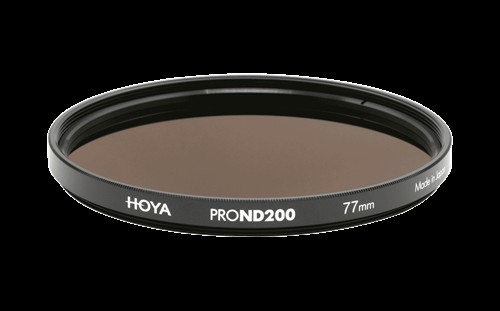
source: https://hoyafilter.com/
An ND filter is a filter that you place over your lens to block light from reaching your sensor without impacting the color in your scene. It’s a bit like sunglasses for your lens. The ‘neutral’ part of ND means they shouldn’t adjust the color, just the brightness. ND filters come in different strengths, which allow you to control the intensity of the light passing through your lens. They are a tool to use in addition to the exposure triangle (aperture, shutter speed and ISO) to help you achieve a good exposure for your scene.
Why would you use an ND filter?
When you shoot a video, your frame rate dictates your shutter angle or shutter speed. You cannot adjust it to control for exposure. You have to rely on aperture, ISO and on your lighting setup skills. Should you reach the limits of your aperture or ISO or be shooting outside where you cannot alter the natural light, using an ND filter will give you a level of control over your exposure and creative processes.
Getting the right exposure
This translates into a few different scenarios in filmmaking. The first, which we’ve already mentioned, is to get a good exposure in very bright conditions. If your aperture is as small as it will go and the ISO is at its lowest, but the scene is still over-exposed, using an ND filter will block out the excess light and prevent over-exposure.

The second situation where you might want to use an ND filter is when you want a shallow depth of field for a scene, but the aperture required means it’s over-exposed. Here, an ND filter will reduce the intensity of the light for you and let you set the aperture you want.
If the weather is changeable, but you want to maintain the same aperture in outdoor scenes, then an ND filter (or maybe a few different ones or a variable neutral density filter) will help you manage your exposure consistently.
Using ND filters
ND filters come in different strengths. A 1-stop ND filter will allow 50% of the available light to pass through the lens to the sensor. A 10-stop ND filter will let through 1/1024 of the available light. Put a 5-stop ND filter over your lens, and you will let through 1/32 of the available light, compared to no filter.
Unfortunately, there isn’t a standard terminology for ND filter grading, and different manufacturers use different terms to describe how much light their filters block. No, they don’t just say ‘2-stops’, and you always need to check carefully. A B+W ND filter is measured in optical density, and it’s the same for Hoya. It’ll read something like ND 0.6 or ND 2.7. Gobe ND filters (also known by the Urth brand name) use the filter factor method, which reads ND2 or ND1000. To help you compare stops to optical density to filter factors, we’ve included an ND filter chart.
But before we get to the chart, what sort of strength ND filters do you need? Obviously, it will depend on how bright your shooting conditions are and how much light you need to block. But when you’re starting out, the best ND filters to pick up would range from ND 0.6 to ND 1.2. You can always stack several filters on top of each other to create a stronger filter.
ND filter chart
| Light reduction in stops | Optical density | Filter factor | Light let through compared to no filter | Notes |
| 0 (no filter) | ||||
| 1 | ND 0.3 | ND2 | 1/2 | Lets through 50% of the light compared to no filter |
| 2 | ND 0.6 | ND4 | 1/4 | Lets through 25% of available light compared to no filter |
| 3 | ND 0.9 | ND8 | 1/8 | |
| 4 | ND 1.2 | ND16 | 1/16 | |
| 5 | ND 1.5 | ND32 | 1/32 | |
| 6 | ND 1.8 | ND64 | 1/64 | |
| 6 2/3 | ND 2 | ND100 | 1/100 | Be sure to check if this means optical density or filter factor |
| 7 | ND 2.1 | ND128 | 1/128 | |
| 8 | ND 2.4 | ND256 | 1/256 | |
| 9 | ND 2.7 | ND512 | 1/512 | |
| 10 | ND 3.0 | 1024 | 1/1024 | Often known as ND1000 |
Manufacturers often produce their own ND filter charts, and some are even available as apps, which are worth downloading for easy reference.
Fixed vs. variable ND filters
You can choose between different types of neutral density filters. A fixed ND filter, as the name suggests, will always block out the same percentage of available light, whatever the conditions. They don’t offer you much flexibility by themselves, but you can stack them to create different densities. A variable ND filter offers you a range of light-blocking properties, which you adjust by twisting a ring on its outside. While they offer you great flexibility, you might find that there can be some distortion or discoloration at the deepest end of the range, so they aren’t quite as far-ranging as you might think.
If you need to control the intensity of the sky in a particular scene, but you know that the exposure of the foreground doesn’t need any adjustment, look for a graduated ND filter. This blocks light on one half of the scene but not the other. The edge can be hard or soft, giving your graduated filter a stark or a smooth transition.
Get unlimited music
for your videos
Start Free Now
Pricing
Choosing the right ND filter

source: https://urth.co/
Which is the best ND filter for you? There are some very cheap filters out there, but you might find that their quality is a little questionable. They can induce vignetting or give you color casts. But, you don’t need to spend a fortune, either. There are great value filters in the mid-range price point. I would recommend buying either a variable ND filter or a set of ND filters that you can stack to give yourself options.
Do bear in mind that your filters will need to fit your specific lenses. If you don’t want to buy separate variable ND filters or multiple sets of ND filters for each of your lenses, consider buying a large ND filter and a set of step-up rings that will allow you to affix it to lenses of various sizes.
ND filters for smartphones
There are plenty of ND filters available for those shooting on a smartphone, so that you can make the most of their video capabilities. Most of these won’t slot over your actual smartphone lens but work in conjunction with an external smartphone lens. If you’re interested, take a look at Moment, Moondog or Neewer to start. But just like ND filters for DSLRs, there are lots of ND filters for iPhones and other smartphones out there.
Final thoughts
An ND filter is a handy and cost-effective camera accessory that can help you get your video’s exposure right and avoid getting over-exposed footage, making them an essential tool in the arsenal of any content creator and videographer.