
In today’s fast‑paced digital world, the ability to transform spoken words into written text instantly is invaluable. Whether you’re a student, a professional, or a content creator, a reliable voice‑to‑text tool saves time and eliminates the tedium of manual transcription.
Below, we evaluate the top free online converters—Notta, Audio2Edit, and Speechnotes—highlighting their strengths, limitations, and ideal use cases. We also explore how Wondershare Filmora’s advanced Speech‑to‑Text feature can elevate your workflow when you need higher accuracy and additional editing capabilities.
Table of Contents
- Understanding Speech‑to‑Text Technology
- Top Free Voice‑to‑Text Tools
- Notta
- Audio2Edit
- Speechnotes
- Choosing the Right Tool for Your Needs
- Filmora’s Speech‑to‑Text Feature – A Step‑by‑Step Guide
- Common Limitations of Free Converters
- Conclusion & Recommendations
1. Understanding Speech‑to‑Text Technology
Speech‑to‑text, also known as voice recognition or automatic transcription, employs artificial intelligence to transcribe spoken language into written text. It’s a cornerstone of modern customer support, healthcare documentation, and educational tools. Online converters analyze audio waveforms, match phonetic patterns to a language model, and output text in real time.
Key benefits include increased productivity, accessibility for the hearing‑impaired, and the ability to generate subtitles for video content.
2. Top Free Voice‑to‑Text Tools
| Feature | Notta | Audio2Edit | Speechnotes |
|---|---|---|---|
| Supported Audio Formats | WAV, MP3, M4A, CAF, AIFF | MP3, OGG, M4A, AAC | MP3, MP4, WAV, MOV, AVI, MPEG |
| Accuracy | ≈98% | >90% | ≈95% |
| Security & Privacy | End‑to‑end encryption | Strong data encryption | No encryption in free version |
| Free‑Plan Limits | Limited minutes per month | File‑size restriction | Ads, limited export options |
Notta
Designed for collaborative teams, Notta records, transcribes, and summarizes meetings in one platform. Its AI automatically generates speaker‑distinguished notes and highlights key take‑aways.
Pros:
- Real‑time summarization and note organization
- Seamless integration with Notion, Trello, and Google Calendar
- Intuitive UI for quick searching and editing
Cons:
- Not ideal for lengthy audio or video files
- Free tier capped at a few minutes of transcription
Ideal for professionals who need a centralized meeting‑recording solution.

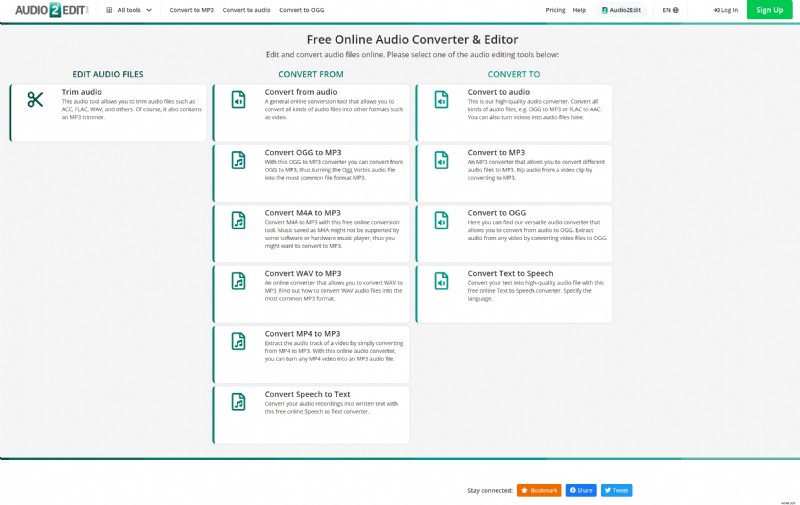
Audio2Edit
Audio2Edit blends audio editing with transcription, supporting over 20 languages. It’s browser‑based, so no downloads are required.
Features:
- Fast conversion with minimal latency
- Format conversion (OGG to MP3/M4A) and basic audio adjustments
- Batch processing for multiple files
Limitations:
- Only certain file types are supported
Best for students and educators needing quick transcriptions of lecture recordings.
Speechnotes
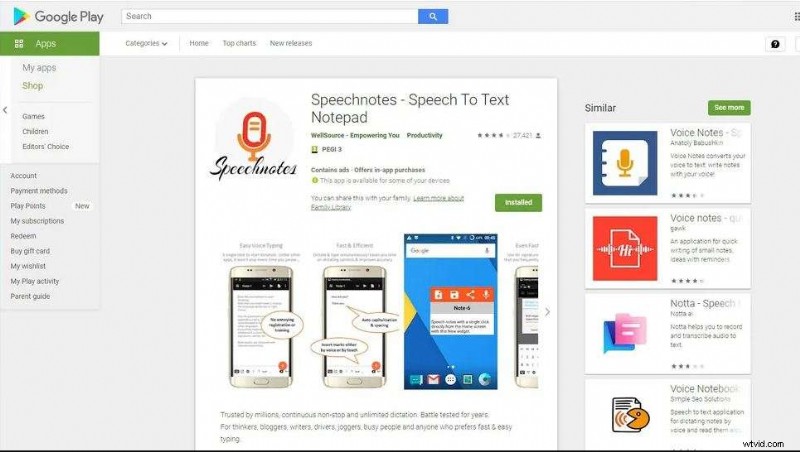
Speechnotes offers a lightweight, browser‑based solution that excels at live speech transcription. Its new “Speechnotes Files” feature allows you to upload audio or video for on‑demand transcription.
Benefits:
- Automatic saving to Google Drive
- Built‑in editing tools for quick corrections
- Cross‑platform availability via Chrome extension
Drawbacks:
- Inconsistent design between Chrome and Android apps
Suitable for occasional note‑taking or short audio clips.
3. Choosing the Right Tool for Your Needs
When selecting a converter, consider:
- Accuracy: Premium tools often exceed 95% accuracy.
- Privacy: Encrypted, end‑to‑end solutions safeguard sensitive data.
- File Size & Format: Ensure the tool accepts your media format.
- Integration: Compatibility with project management or cloud storage services can streamline workflows.
For light, ad‑free transcription, the free options above are sufficient. If you require higher precision, larger file handling, or integrated subtitle generation, consider a paid or all‑in‑one editor.
4. Filmora’s Speech‑to‑Text Feature – A Step‑by‑Step Guide
Wondershare Filmora’s Speech‑to‑Text tool turns spoken audio into editable subtitles with a single click, supporting up to 27 languages.
How to Use Filmora’s Feature
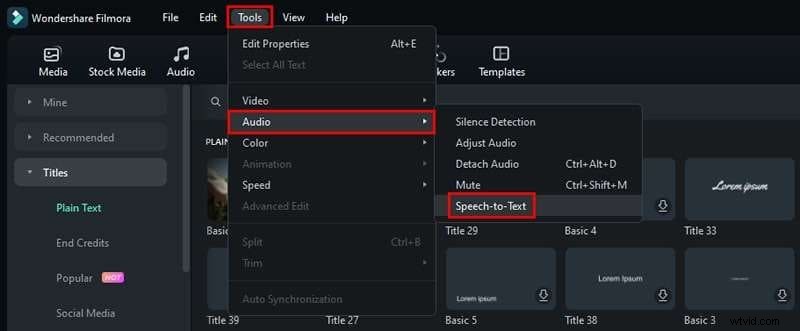
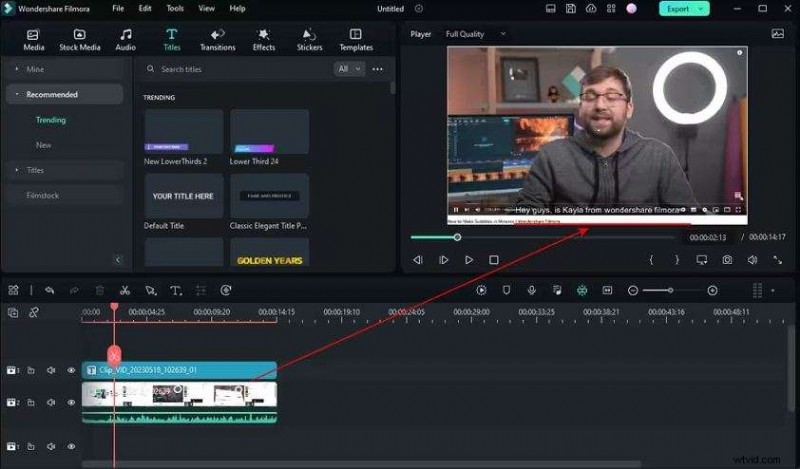
- Import Your Video: Drag your clip into Filmora’s timeline. Navigate to
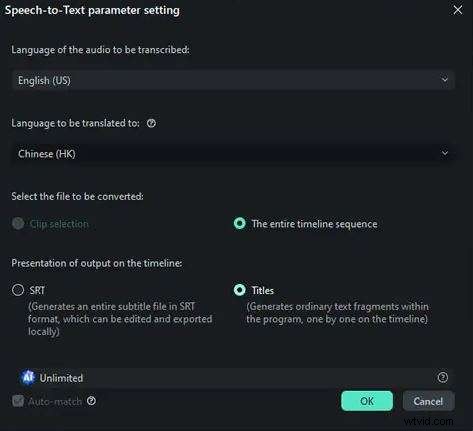
Tools > Audio > Speech‑to‑Text. - Select Language & Settings: Choose the original audio language, set the output format, and enable optional translation (e.g., to Chinese (HK) or Spanish).
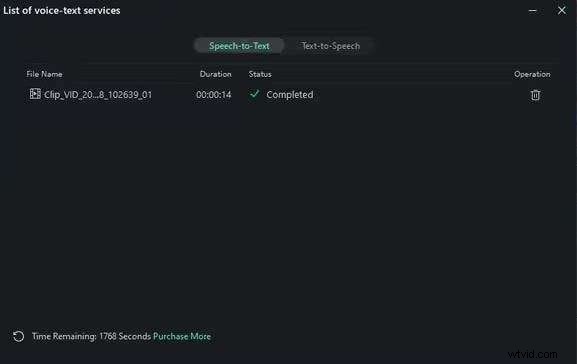
- Start Transcription: Click
OKand let Filmora process the audio. - Review Subtitles: A CC file appears attached to the video. Verify timing and content alignment.
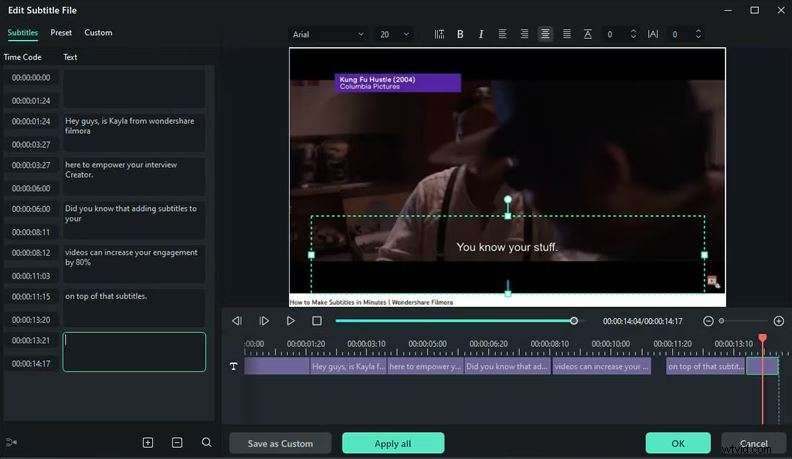
- Customize: Double‑click the CC file to adjust text styles, animations, and positioning.
5. Common Limitations of Free Converters
- Transcription Quotas: Most free plans restrict the number of minutes transcribed per month.
- Accuracy Variance: Non‑premium tools may underperform on complex audio or accents.
- Data Privacy: Lack of encryption can expose sensitive content.
- Ad Intrusion: Advertisements can interrupt the transcription workflow.
Conclusion & Recommendations
Free online voice‑to‑text converters provide an excellent entry point for quick, low‑cost transcriptions. Notta, Audio2Edit, and Speechnotes cover a range of use cases, from team meetings to educational recordings.
When you need top‑tier accuracy, large‑file support, or integrated subtitle creation, Wondershare Filmora’s Speech‑to‑Text feature is a robust choice that blends transcription with advanced video editing.
By selecting the right tool—based on accuracy, privacy, file compatibility, and workflow integration—you can streamline your note‑taking, content creation, and video production processes.
🌟 Related Posts:
- Ultimate Guide to Convert SRT to TXT in Minutes
- The Complete Guide to Help You Convert SRT to Other Formats
- Solutions for Converting XML, SSA, TTML, etc., to SRT