
Many creators invest countless hours producing video content that is only viewed once. Without a clear system to organize and monetize your library, you may be leaving valuable revenue untapped.
Content repurposing transforms your existing library into fresh formats, enabling you to extract more value from each video while reaching new audiences. A centralized library simplifies the decision‑making process for what to repurpose or retire.
In this guide, we’ll explore how to extend the life of your content and build recurring revenue streams.
Why Repurposing Is Essential for Creators
Creators who excel understand that repurposing allows each video to generate multiple touchpoints. It fills publishing gaps, delivers fresh experiences, and turns one‑off content into long‑term assets.
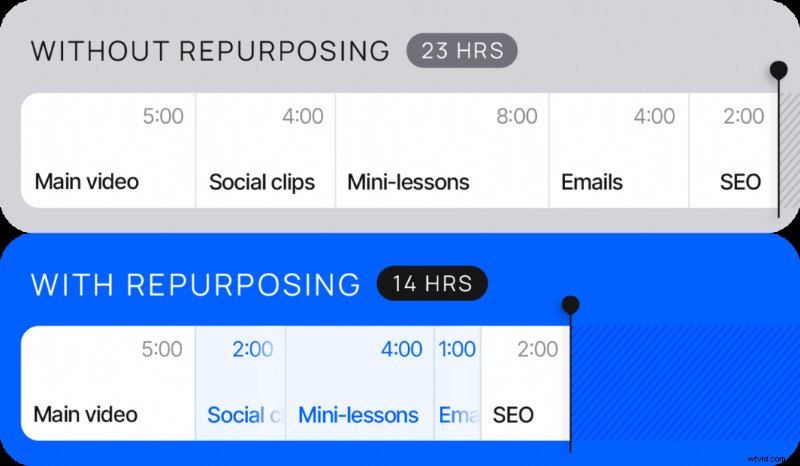
Updating older material keeps it relevant and accessible, while reducing the time and cost of maintaining marketing funnels. A well‑structured library works harder for you.
“Repurposing is a powerful practice for driving success,” says Kylie Julien, Senior Video Production Specialist at Uscreen. She helps video creators unlock the full potential of their content and membership businesses.

Older videos can gain new, monetized life when incorporated into guided experiences—whether a single program, ongoing membership, or added value for coaching.
Kylie Julien
Senior Video Production Specialist at Uscreen
Core Repurposing Methods
Different video formats offer distinct repurposing opportunities. The table below shows how common types can be transformed into new content.
| Original Content | Repurposed Into | Best for |
| Live Workshops |
| Generating revenue |
| Video Courses |
| Creating brand awareness |
| Long‑form Videos |
| Improving member engagement |
| Entire Video Library |
| Increasing retention |
Turn Live Workshops Into On‑Demand Courses
Goal: Convert single‑event workshops into recurring revenue streams.
Split longer workshops into focused lessons that members can follow at their own pace. Pair each segment with PDFs, worksheets, or quizzes to reinforce key concepts and deepen engagement. Organize lessons by skill level or learning path for a clear progression.
Kylie recommends: “A paid live stream or low‑ticket course validates demand. After multiple events, package those sessions into a membership for unlimited access. Members enjoy a simple subscription, and you avoid repeatedly selling each event.”
Tip: Highlight key takeaways at the start of each lesson, link them to the overall theme, and show how each lesson fits into the larger course.
Extract Social Clips and Teasers from Video Courses
Goal: Drive traffic and boost engagement.
Pull 30–60 second highlights from longer lessons and tailor them for TikTok, Instagram, YouTube Shorts, or LinkedIn. Add a clear CTA that directs viewers back to the full course, turning curiosity into membership.
When your catalog grows, don’t assume every member remembers every video. Highlight relevant content in your newsletter to resurface valuable older material. Relevance and value trump age.
Kylie Julien
Senior Video Production Specialist at Uscreen
With a newsletter, you can spotlight older videos that match current themes, keeping content fresh for your audience.
Tip: Focus on the most engaging moments to hook viewers quickly, and add captions for accessibility.
Transform Long‑form Content into Bite‑Sized Lessons and Highlights
Goal: Deliver digestible content that keeps members engaged.
Break extensive videos into 5–15 minute lessons that focus on key concepts. Create highlight reels or “key takeaways” compilations from older videos to provide new members with essential lessons they may have missed. Add intros or outros to guide viewers to related content or full courses.
Tip: Use consistent branding and thumbnails so short‑form lessons feel cohesive and recognizable within your library.
Repackage Video Library Into Themed Playlists and Drip Programs
Goal: Boost engagement and monetize legacy content.
Group older videos into themed playlists—such as “Beginner Basics” or “Advanced Techniques”—and set up automated drip programs that deliver new lessons weekly or monthly. Highlight progression to help members feel they’re advancing through a structured learning path.
Repurposing older videos by grouping them into challenges or themed highlights can give your library new life. For example, a wellness membership might feature a 14‑day meditation streak using popular meditation videos, while a platform with multiple instructors could spotlight a “teacher spotlight” series.
Kylie Julien
Senior Video Production Specialist at Uscreen
Tip: Refresh titles, descriptions, and thumbnails to match current branding and improve discoverability.
Implementing a Repurposing Strategy
While upfront work is required, the long‑term payoff is significant time savings, new content creation, and business growth. Follow these steps:
- Audit your library: Identify older videos that can be updated or repurposed into lessons, social clips, or drip programs.
- Break up long videos: Create shorter, focused lessons or clips for easier consumption.
- Update metadata: Refresh titles, descriptions, and thumbnails to keep content current and searchable.
- Add supporting materials: Include PDFs, worksheets, or quizzes to reinforce key points and boost engagement.
- Upload and organize: Use your membership platform’s taxonomy to house all content in one place, simplifying management and redistribution.
Centralizing content on a membership platform accelerates repurposing. Built‑in analytics reveal what works and spotlight improvement opportunities, ensuring each piece reaches the right audience.
Real‑World Repurposing Examples
Seeing repurposing in action helps you envision its impact on your own content. Here are three scenarios that illustrate how existing videos can engage viewers and generate recurring revenue.
Turn a Live Stream Into a Step‑by‑Step Series
After hosting a two‑hour live stream on crocheting a granny‑square throw blanket, transform it into a on‑demand series:
- Segment the session into focused lessons—stitch learning, granny‑square creation, and blanket assembly.
- Add supporting materials like patterns and practice assignments.
- Arrange lessons sequentially for a self‑paced learning path.
- Publish on your platform as an on‑demand series.
Key takeaway: A single live event can become a comprehensive learning path, maximizing the value of your content.
Convert Full‑Length Workouts Into Social Clips
As a fitness instructor, repurpose long workout videos into 30–60 second highlights that showcase key moves, tips, or motivational moments. Format clips for TikTok, Instagram, YouTube Shorts, and LinkedIn. Add clear CTAs that direct viewers to the full workout or membership page. Experiment with hooks, captions, and edits to find what resonates.
Key takeaway: Repurposing full‑length videos into social clips turns existing content into a powerful marketing tool, reaching new audiences and driving membership.
Create a Beginner‑Friendly Drip Playlist
For a plant‑care expert, curate a beginner‑focused playlist that combines older videos on easy‑care plants with new content on propagation, tools, and common mistakes. Organize the playlist as a logical learning path, guiding new plant owners from basics to advanced techniques.
Key takeaway: Repurposing older videos into a structured playlist provides new viewers with essential lessons, saves time, and delivers a cohesive learning experience.
Turn Your Existing Content Into Recurring Revenue with Uscreen
Content repurposing is a smart strategy for boosting digital monetization and extracting more value from your videos. Turning a single video into multiple formats saves time, engages more members, and keeps your publishing schedule consistent.
Uscreen simplifies this with a centralized library, multiple monetization options, and built‑in analytics to track performance. These tools help you identify what works and guide members through engaging learning paths.
FAQs
What is content repurposing?
Content repurposing involves reformatting existing videos for new uses—such as turning a live stream into a short social clip or a mini‑lesson for members—maximizing value and reach.
How can transcripts aid repurposing?
Transcripts enable you to extract key moments for short clips, captioned social posts, or written content, improving discoverability and SEO.
What are the four types of content?
- Educational: Teach skills or lessons
- Entertaining: Engage and delight members
- Inspirational: Motivate or inspire the audience
- Promotional/Conversion: Highlight offers or memberships
Understanding content types guides effective repurposing strategies.
Is it okay to repurpose old content?
Absolutely. Older videos often contain valuable lessons that new members may have missed. Repurposing gives your library fresh life, increases discoverability, and boosts overall value.