
Take advantage of drone technology and learn how to add captivating aerial footage to your next live production!
If you’re in the Pro AV space, or are familiar with streaming and recording live events, you’ve no doubt heard of drones. And if you’re curious about using drone technology in your next live production, you’ve come to the right place.
In this post I’ll cover the value drones bring to live events and then take you through two different live production setup using drones as video sources: one that’s simple and cost-effective, and a second that’s geared for live production at a more advanced level.
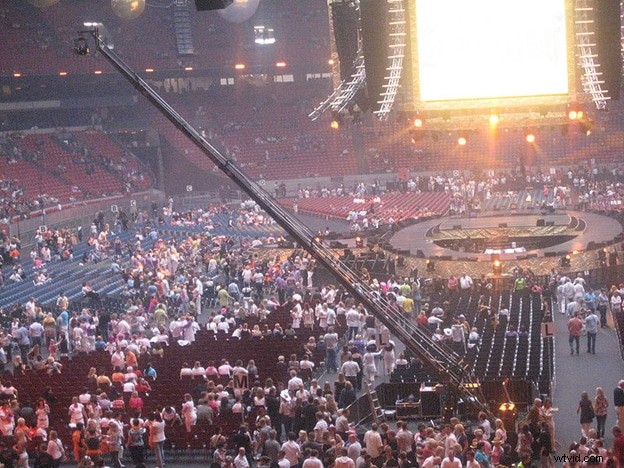
The death of the camera crane
Camera cranes have always been the most popular choice to capture overhead or steady motion video shots. Generally, due to the high cost and complexity of operation, the crane shot was reserved for big budget productions or movies.
A typical crane shot at a large event or concert is complex, costly and cumbersome. And until the video drone came along, there was no better option. Of course, smaller jib cranes exist, but they suffer from the same size and price limitations that are common to all types of camera cranes.
Drones – the new king of crane shots
Drones (also known as quadcopters or multicopters) make the crane-style shot accessible to video productions of any size. To many live event productions, drones are an invaluable, versatile tool that allows event operators to captivate viewers with engaging and dynamic aerial footage.
With the advent of FPV (first person view) drones, the capability to downlink live video directly from the drone in real time allows the producer to view and control the shot in a similar way as with using a camera crane.
While the output of most FPV drones is viewed on a phone, tablet or other mobile screen, professional drones add an HDMI™ video output directly on the remote control. For some drones an HDMI output module can be purchased separately.
The simple and cost-effective way to add your drone footage into your basic live stream
A typical live event has multiple video sources – like presentation slides, cameras and now… drones! But what’s the easiest and most cost-effective way to add captured drone footage to your live stream?
To find out, we did a little test. For our experiment, we used the relatively inexpensive Dromida Ominus FPV drone. At a retail price of under $200, this is one of the most affordable FPV drones available.
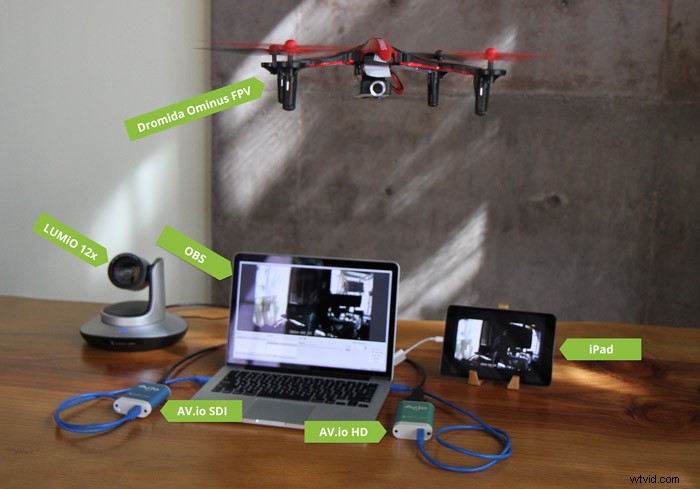
Here’s what we did to create a cost-effective live production using a drone as one of the input sources:
- On our laptop, we downloaded OBS Studio software (free!) for our streaming and encoding. (See our related How-to for detailed instructions on how to live stream using OBS.)
- We then added our LUMiO 12x PTZ camera into OBS, using an AV.io SDI video grabber to capture the SDI signal.
- We used our iPad Mini tablet to download the Dromida Ominus app, which allows the tablet to receive video output from the drone via Wi-Fi.
- We added the tablet (receiving the drone video) as a second source in OBS, using an Epiphan AV.io HD to capture the HDMI signal.
The result? Success! We were able to add a drone into our live production with minimal drone and live production software cost! It’s also worth noting that the same setup works with all other live video production software such as Wirecast, vMix, mimoLive, and so on.
Taking it to the next level
Software-based solutions such as OBS and Wirecast are great for smaller, simpler productions, but what happens when you need to live stream a production with multiple cameras and switch between a variety of sources and layouts at high resolutions and frame rates? In this case, using an all-in-one live production mixer hardware, such as Pearl, is your best bet.
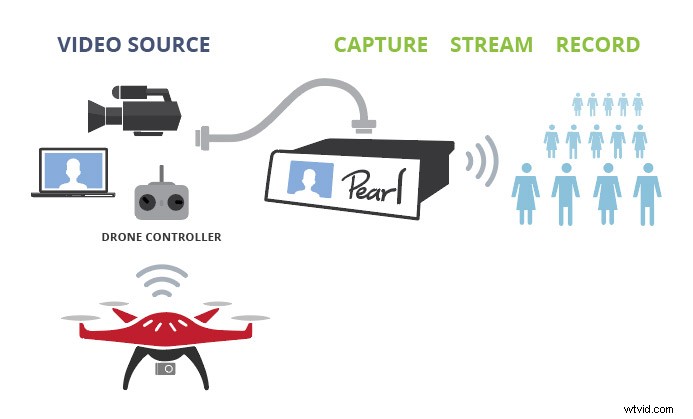
Many professional live production software tools share a few of the same fundamental features as Pearl, such as customized multi-source layouts and live switching.
However, using Pearl to as your live production hardware offers the following distinct advantages over commonly-used live production software:
- Additional sources – with Pearl, you can connect up to 4 different HD sources (cameras, drones, tablets, etc) and add them to your custom layouts.
- Fewer cables and pieces – With no need for a laptop, software, grabbers or any other additional external devices, the setup is simplified and contains minimal points of failure – a huge plus for “mission-critical” events and webcasts.
- Simultaneous, high-quality streams and recordings – Stream to multiple destinations at the same time at bandwidth-friendly bitrates while also creating independent high-quality recordings saved to Pearl’s internal hard drive for easy offloading.
Where will your drone take you?
We’ve seen our customers deploy our products to use drones as an extra camera shot in their webinars, conferences, and even live streaming and recording of concerts. We aren’t kidding when it comes to drones! No matter what drone you are planning to deploy in your next event, Epiphan’s video grabbers and live production hardware are there to help make your live production a smash hit.
Have you used a drone in your live production yet? If yes, how did it go? If not, tell us why!