
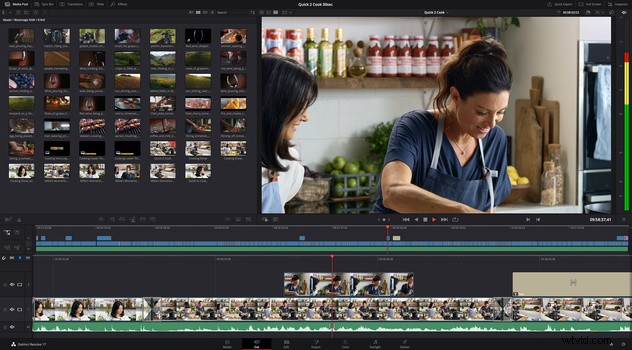
My favorite editing software, DaVinci Resolve, has just released the newest version, and for a limited time, you can get a full license to the latest version and an incredibly powerful keyboard editing interface for just the price of the license alone. The Speed Editor bundle includes a purpose-built portable keyboard with a unique set of features, including dedicated keyboard shortcuts and a weighted search dial. Want to know what makes it such a good value?
The Deal
To recap, this pack includes a full license to DaVinci Resolve 17 Studio and the dedicated keyboard editing interface called the Speed Editor. Resolve 17 Studio is a major feature release to the already phenomenal DaVinci Resolve program. With over 100 new features, this isn't just a minor set of improvements. The Speed Editor also comes from Blackmagic Design, already well established with their panels and keyboards for use in Hollywood color editing work.
Resolve 17 Studio has added a number of features. Among the headlining improvements are new image-processing tools for HDR support, a new audio engine, 3D audio workflows, HDR color grading tools, a powerful AI "magic mask," and broader support implementations of their 3D Fusion-powered effects. As before, Resolve 17 Studio rolls up a number of useful workflows into one program. Editing, visual effects and motion graphics, audio editing, color correction, and content delivery all get their own dedicated workspaces.
To complement this new software, Blackmagic Design has also released the Speed Editor, a set of physical controls perfect for editing footage. It's a dedicated keyboard-style interface, with the notable addition of a large control wheel. It can connect to Mac or Windows computers via Bluetooth or USB-C and is designed to work directly with Resolve. The dial lets you quickly shuttle, jog, and scroll through footage, while the dedicated trimming and insert buttons let you get footage in place quicker than ever. The source button lets you browse your media as a continuous tape, akin to a retro tape-based linear editor, letting you more quickly scroll through all your footage.
While a dedicated interface can potentially feel limited, in this case, Blackmagic Design has provided a wide array of options for each function. Consider the ability to place a clip: the Speed Editor lets you smart insert, append to the end, ripple overwrite, fake a closeup, place on top of an existing clip, or overwrite source clips based on timecode. There's a similarly large range of options for trimming and adding effects.
The keyboard features a machined metal design and costs $295 on its own. Right now, however, you can pick up a bundle with a full license to Resolve 17 Studio and the keyboard for $295 total. Resolve 17 is actually available for free on its own, with only a set of features limited to the Studio version. It's available for download here.
The Value
There's a number of aspects that make this such a good deal. The first is the insane value presented by Resolve. While being free, it provides one of the best editing experiences I've had, even when compared to paid products. While a number of the more advanced features are limited to the Studio version, you can easily edit even smaller professional projects for free, with no limitations like watermarks. The software contains everything you need for editing, basic 3D work, stabilization, color work, audio editing, and more; a competing cloud subscription with similar features from the leader is $50+ a month.
If you do find that you want the Studio version, you can purchase a license for a single, reasonable payment, no cloud subscription necessary. Right now, if you're interested in either the studio version or the editor, you can basically buy one, get one, making for huge savings.
I've loved working with Resolve: I've found it super easy to pick up, with a direct option to map shortcut keys from other editors like Final Cut or Premiere making the transition even easier. On top of that, it's been a pretty solid performer, with fewer crashes and incompatibilities than my previous editor.
If you're already editing with Resolve, this "free" Speed Editor is a great incentive to upgrade, further sweetening the set of new features available in version 17. If you're coming over from another editing tool or want to step up beyond the editing possibilities offered by something like iMovie, give Resolve 17 a try first. As it's free but powerful, you might find it to be a perfect fit.