
REC

Recommended: Video Production, Editing & Gear Maintenance Guide

 WTVID >> WTVID >  >> video >> Video clip

Master Stunning Glow Effects: Elevate Titles & Graphics in After Effects

In this After Effects video tutorial, learn how to make your titles and graphics really pop with this amazing glow effect technique.

In this video tutorial, we’ll take a step-by-step look at how to create an awesome glow using Adobe After Effects. Ready? Let’s get started.


Use These Four Easy Steps

Step One

Use drop shadows to expand the glow potential. Most of the time, you may just drop the glow effect right away; however, to get the most out of the glow effect, you need to expand your title to maximize the glow radius.

Master Stunning Glow Effects: Elevate Titles & Graphics in After Effects

Step Two

Sawtooth Glow. Dropping the glow effect after using drop shadows may look great. If you want to really make the color pop from the glow, be sure to set the color looping to “Sawtooth B > A.” From there, you can adjust the glow radius and intensity.
Master Stunning Glow Effects: Elevate Titles & Graphics in After Effects

Step Three

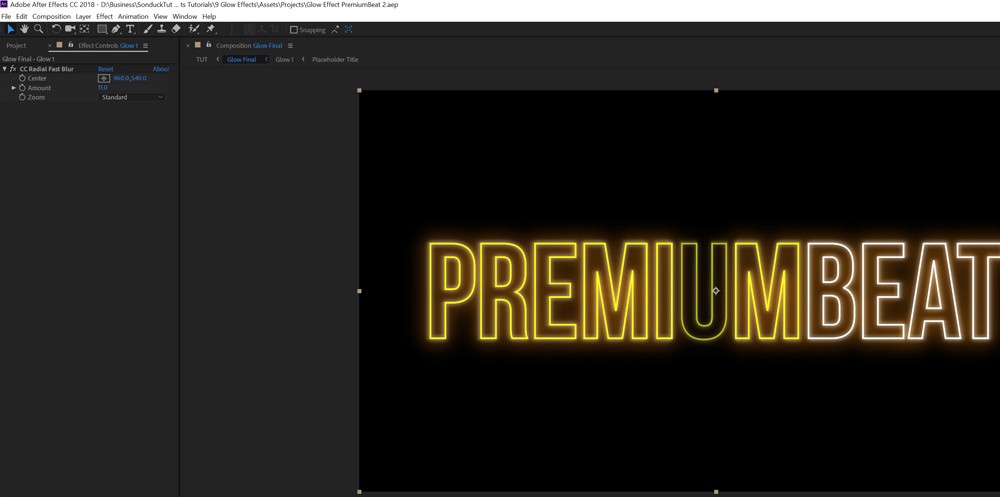
Apply CC Radial Fast Blur. The glow effect along with the initial drop shadows is solid, but if you want to take this to the next level, use Radial Fast Blur to create light streaks within your glow. Be sure to control the length of the blur, as this effect can become extreme.
Master Stunning Glow Effects: Elevate Titles & Graphics in After Effects

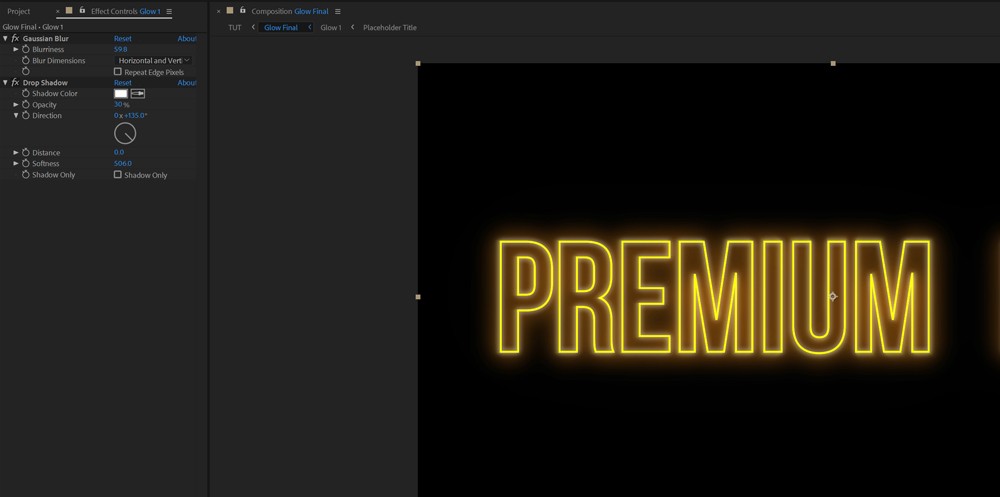
Step Four

Add an intense drop shadow to create an ambient glow. To finish off everything off, add one more drop shadow to smooth out the glow coming from your graphic.


  1. Less is More: Mastering Simple Titles and Graphics in Video Editing

  2. Master the Art of Titles and Graphics: Live Webinar on Wednesday, November 30

  3. Webinar Wednesday: Master the Art of Video Titles & Graphics – June 27

  4. How to Create Smooth Slow-Motion and Fast-Motion Effects in Videos

  5. How to Animate Your Photos: Easy Steps to Add Motion and Cinematic Effects

Video clip
  1. 5 Proven Tips to Boost Productivity with ScreenPal Video Messaging

  2. Create Stunning 3D Titles in Final Cut Pro X: Elevate Your Projects with Free Stock Assets

  3. Create Stunning Halftone Effects in After Effects & FilmoraPro: Step-by-Step Guide

  4. Stunning Video Effects to Transform Your Footage in Filmora

  5. Create Stunning Stylized Film Titles for Your Videos: Pro Tutorial

  6. Elevate Your Videos: Master Speed Ramping for Captivating Effects

  7. Create Stunning Bullet Time Effects on a Budget: Simple 120 FPS Slow-Motion DIY

  8. 3 Easy Editing Hacks to Make Your Videos Pop Professionally