
While they were originally for designing automobiles, Bezier curves are now your best friends for keyframe interpolation.
When working with motion and movement, it’s important to understand your Bezier options. The process of keyframe interpolation has come a long way as a means of digital motion, and Adobe programs like Premiere Pro and After Effects make great use of the technology.
If you’re working with keyframes and motion, you’ll notice that you have several similar options for how to ramp and smooth your motion. Whether that’s for digital zooms, motion, audio dips, or anything in between, it’s important to know how to choose the right option.
So, let’s dive into what Bezier curves offer, and how you can use them on your next project.
What Are Bezier Curves?
Based upon the mathematical theorems of the Bernstein polynomial, the modern “Bézier Curve” was pioneered by a French engineer named Pierre Bézier, who used them to help with his work as a automobile designer in France. The basis of the Bezier curve is how to model smooth curves that are indefinitely scaleable and unbound by the limits of rasterization. For our purposes in video editing and keyframe interpolation, Bezier curves can specify the velocity over time of an object moving from a point A to a point B — rather than simply moving at a fixed number of pixels per step (Wikipedia).
How to Use Them
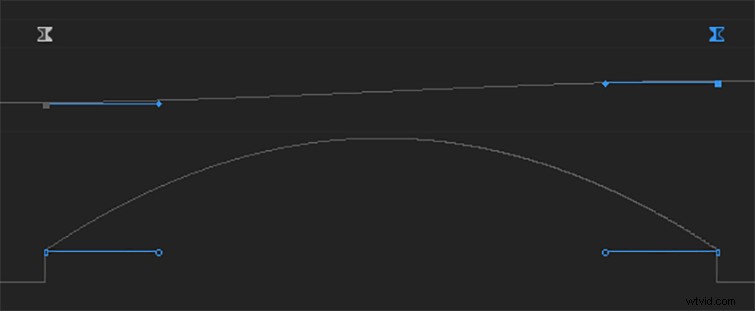
So, how do we use Bezier curves in video editing? Well, when working with motion that has clearly defined beginning points and ending points (a point A and a point B), a Bezier curve is a good way to smooth the curve of the motion (as opposed to linear interpolation, wherein values change at a consistent pace from point A to point B). For example, if you’re working with two keyframes on a video clip in Premiere Pro (say motion, scale, or opacity), you can use the Bezier curve to smooth that transition’s pacing. Or, in a Premiere Pro timeline, you can use the Bezier curve for working with audio tracks when changing decibel levels.
Understanding Different Options
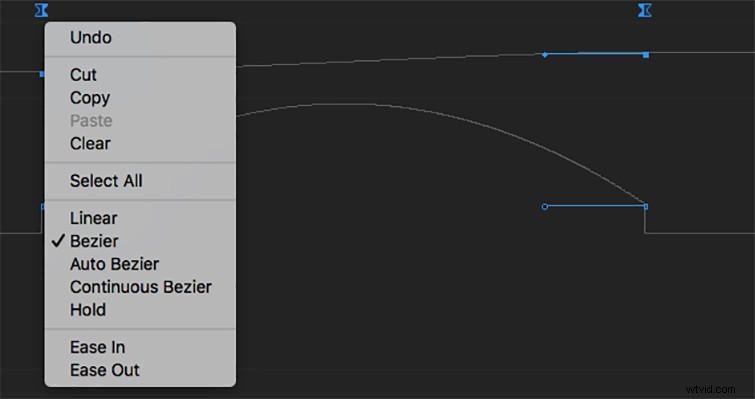
Once you’ve decided on your keyframe points, you have several Bezier curve options at your disposal. In Premiere Pro, the standard options include Linear, Bezier, Auto-Bezier, Continuous Bezier, Hold, Ease In and Ease Out. Each operates slightly differently, but you can try them all out yourself to get a feel for which one looks and feels (or sounds) right for your project. Here’s a breakdown of each option:
- Linear: consistent rate of change between keyframes from beginning to end.
- Bezier: allows for manual adjustments to the shape of the curve and rate of change on both sides of your keyframe.
- Auto-Bezier: Like the manual Bezier, auto-Bezier automatically creates a smooth rate of change through each keyframe.
- Continuous Bezier: Similar to Bezier and auto-Bezier, but still gives you the option to change the shape of the curve on one side of the keyframe.
- Hold: non-Bezier option that changes the keyframe value without a gradual Bezier effect.
- Ease In: Simply slows down the value change when entering a keyframe.
- Ease Out: Simply slows down the value change when exiting a keyframe.