
Video is taking over the marketing world, and for good reason—it grabs attention, boosts engagement, and drives sales like nothing else. Studies show that adding a promo video to your strategy can increase conversion rates by up to 80%, and videos are shared way more often than text or images. Sounds like a no-brainer, right?
However, while a well-made product promo video can work wonders, a poorly executed one can fall flat. Don't worry, though—this guide has your back. From learning how to make your own promotional video to promoting it like a pro, we'll cover everything you need to know to create a video that sells. Scroll down and find out!

In this article
- Types of Effective Promo Videos
- How to Create Eye-Catching Promo Videos
- Simple Ways to Promote Your Brand Effectively
Part 1. Types of Effective Promo Videos
Before you learn further into how to create a promo video, it's important to understand what makes them work. The best way to do that is by watching real examples. Seeing successful promo videos in action helps you get a feel for different styles, what captures attention, and how to craft a video that delivers real results for your brand.
So, let's go over the different types of promo videos, each with its own purpose. We'll also break down real examples to show you why they work and how you can apply the same strategies to your own video.
Product Promo Videos: Product promo videos use visuals to show off a product's best features without needing words. Product promo video usually uses fast, zoomed-in editing to make the product look super appealing. And, sharp cuts and smooth movements highlight its freshness and quality, making it stand out.
Explainer Promo Videos: When editing explainer Video, voiceovers and simple animations work together to clearly show how the app works. The clean and simple editing keeps the focus on the explanation without any distracting effects. This is exactly what an explainer promo video should do—make information easy to understand while keeping it visually interesting.
Testimonials Promo Videos: Next up, Direct Agents know that nothing builds trust better than hearing from happy customers. The promo video, features real clients sharing their positive experiences, making it feel personal and genuine. It also includes behind-the-scenes footage of the product in action to give a reliable and professional vibe.
Animated Promo Videos: Finally, even without a voiceover, Animated Promo Video gets its message across with smooth, well-designed animations. The visuals make it easy to understand what's being promoted. Plus, try to keep the music subtle, so viewers stay focused on what's happening on screen.
From these examples, it's clear that different promo video styles have different purposes. The key is choosing the right one for your brand. One common trait among all great promo videos is that they are under a minute long. Keeping it short and engaging is essential to hold the audience's attention.
Part 2. How to Create Eye-Catching Promo Videos
Now that you've seen different examples of promo videos and what makes them great, it's time to learn how to make your own promotional video. But to bring your vision to life, you'll need a video editor that's easy to use, powerful, and won't break the bank. And honestly, there's no better choice than Wondershare Filmora.
Here's why Filmora is the perfect option for making a promo video:
- Video Templates and Presets: Filmora includes ready-made templates and presets for all kinds of promotional videos, making it easy to achieve a polished, professional look.
- Seductive Narration: With Text-to-Speech tools, you can narrate your product's strength that can capture your audience's attention. Plus, with AI Voice Changer and AI Voice Cloning, you can customize voices to match your brand's vibe.
- Create Logo with Ease: With Filmora, you can easily create eye-catching logo animations to make your brand memorable.
- Create Engaging Scripts: AI Copywriting feature helps you craft compelling video scripts and captions that resonate with your audience.
- Built-in Media Library: Access tons of royalty-free music, filters, stickers, effects, and stock footage to make your promo videos even better.
- Easy Sharing: Share your promo video online and gain traction from various platforms like YouTube, Instagram, Facebook, TikTok, Vimeo, and more.
On top of that, Filmora is super budget-friendly, even with all these awesome features. It offers flexible pricing plans and even a free trial, making it possible for you to make free promo videos. Plus, it works on both Windows and macOS, so no matter what device you're using, you're good to go! So, what are you waiting for? Create a promotional video for free right now with Filmora!
Here's a simple step-by-step guide to help you get started:
01of 06Open Filmora and select a video template
If you haven't done it yet, go ahead and download and install the latest version of Filmora on your computer. Once it's ready, open the program and click "New Project" to start editing on the main timeline.
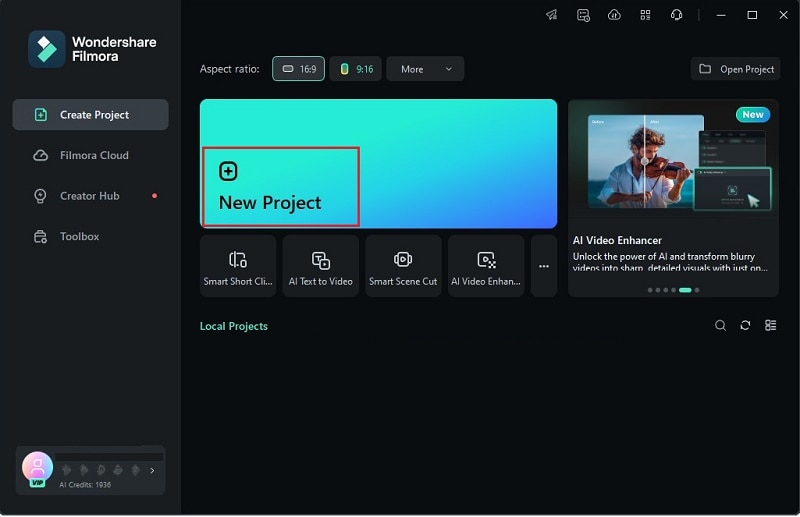
Next, head over to the "Templates" section and check out the available options from the "Promo" category—this way, you don't have to start from scratch. If you're making a promo video for a fashion brand, for example, just pick a template that matches your style and drag it onto the timeline.
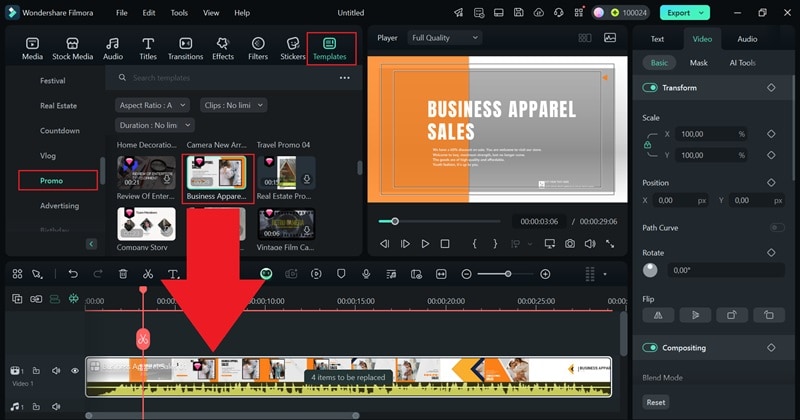
02of 06Customize the template
Now, click on the "4 items to be replaced" note in the video timeline. Swap out the placeholder clips with your own product footage by selecting each one and uploading your files.
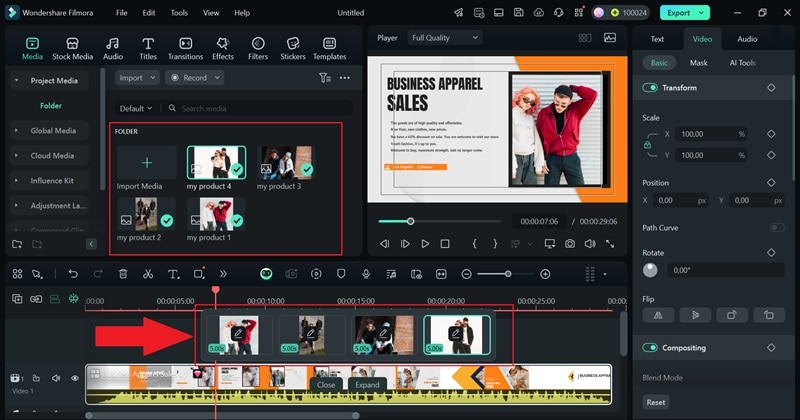
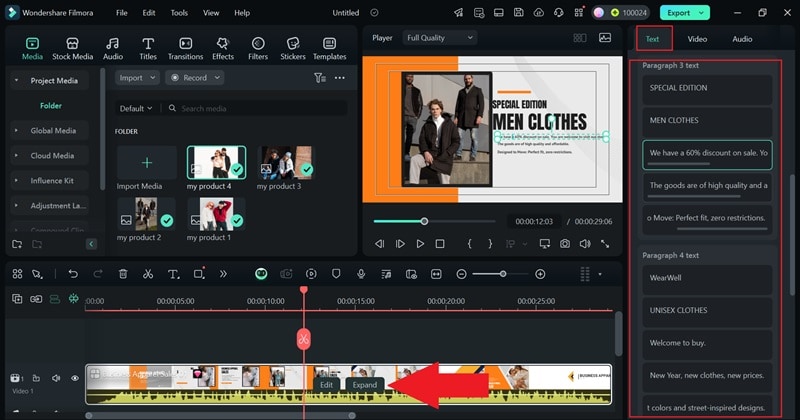
Next, go to the property panel on the right and click on "Text" to customize it however you want. Add key details about your product, like special discounts or standout features. Once you're happy with it, click "Expand" on the timeline to see how everything flows together.
03of 06Insert your brand logo
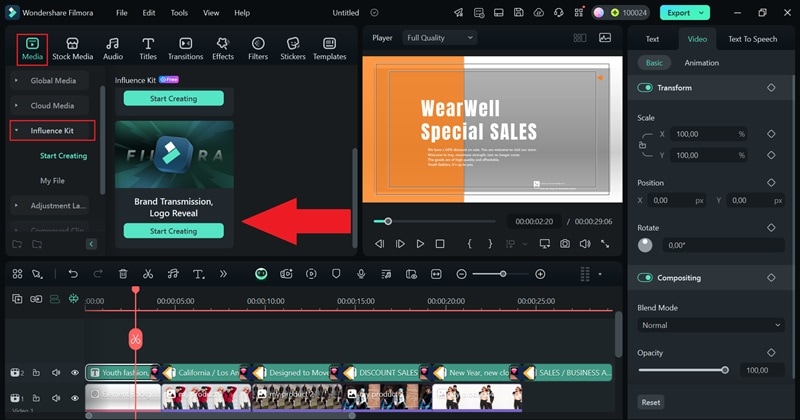
Now, add your logo at the beginning of the video to strengthen your branding. If you don't have a logo yet, no worries! You can create one using Logo Reveal feature. Just click on the "Media" tab, head to "Influence Kit", and select "Logo Reveal" to get started.
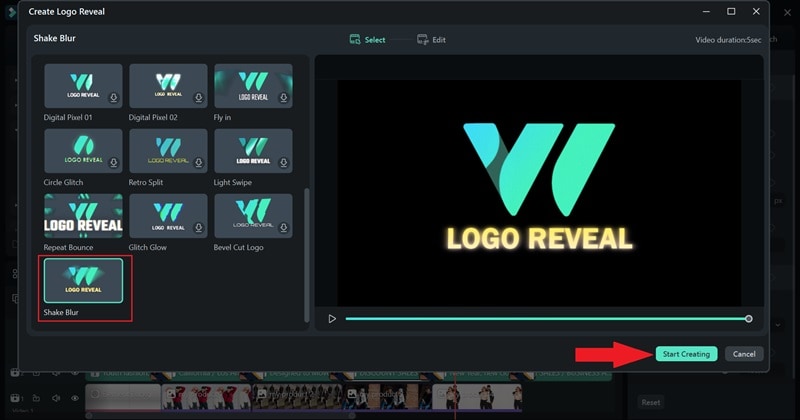
In the next window, pick an effect that fits your animated logo. Then, hit "Start Creating" to move on.
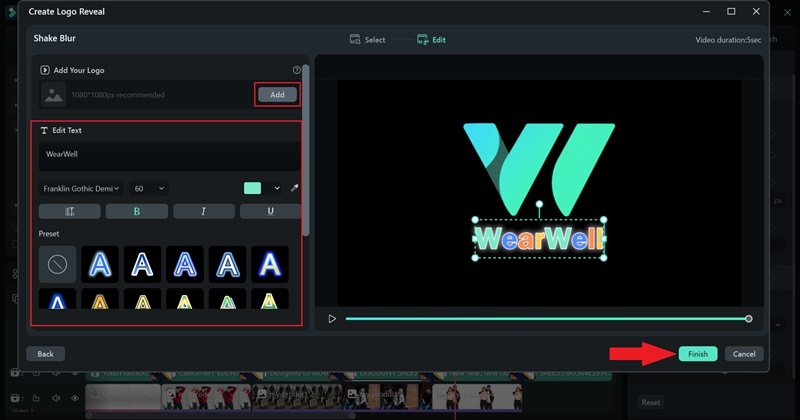
Now, type in your brand name and tweak the font, size, and color to match your style. If you already have a logo, just upload it instead. Once everything looks good, click "Finish", and your logo will be added to the video timeline!
04of 06Use AI Tools for voiceovers and branding
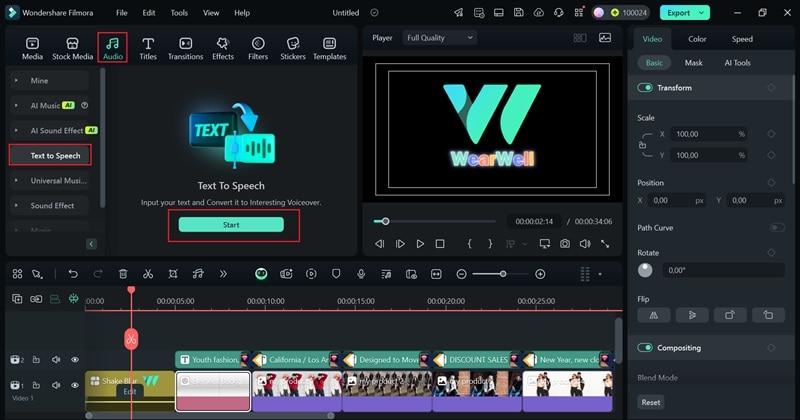
To guide your viewers in your promo video, add a narration to highlight key details about your product. You can record it in Filmora, but an easier way is using the Text-to-Speech feature. To use it, just click "Audio" in the top menu bar, select "Text to Speech", and hit "Start".
In the next window, write the product details you want in the narration. If you're feeling stuck, you can use AI Copywriting by filling in the category provided there. Then, click "Generate" to let AI write the script.
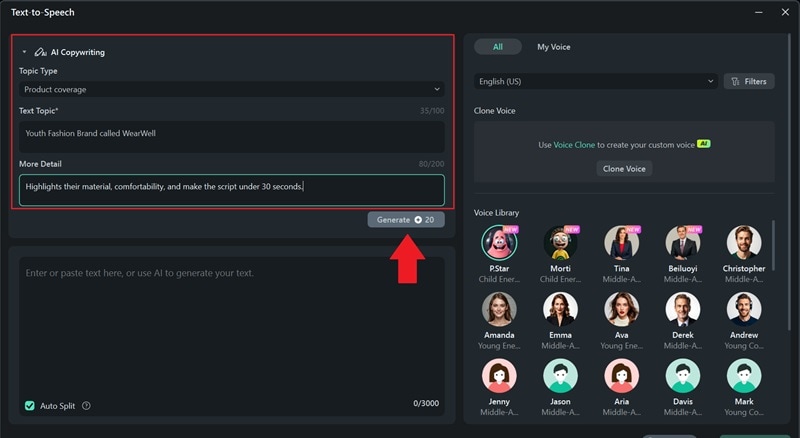
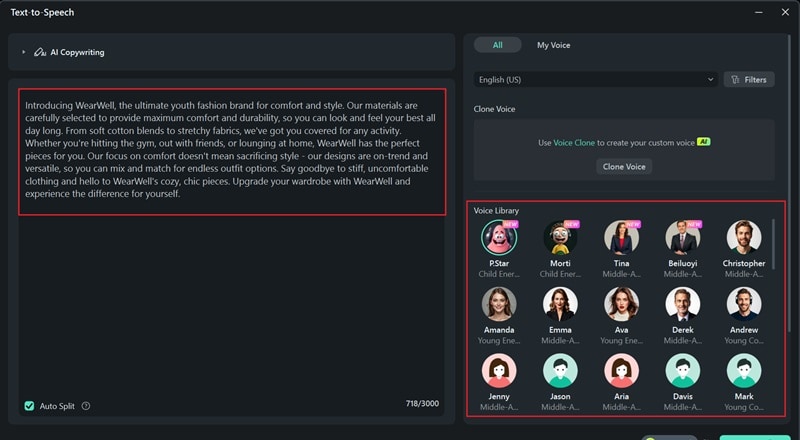
Once the script is ready, paste the text and choose a voice for the narration. You can also try AI Voice Clone, but you'll need to give permission for it to use your voice.
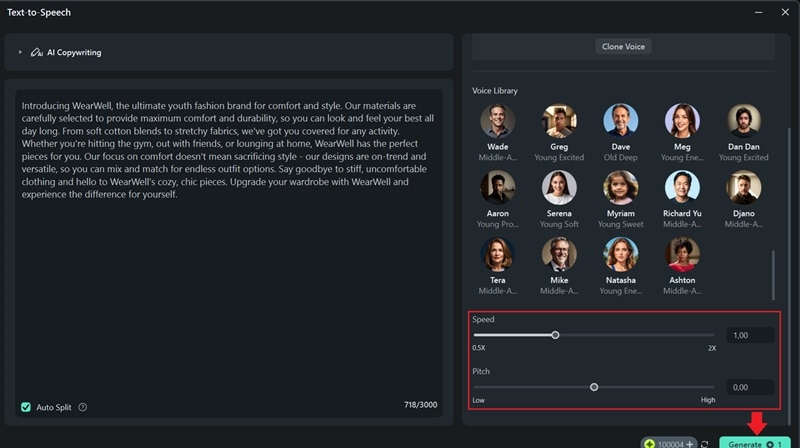
Scroll down to tweak settings like speed and pitch to get the perfect sound. When everything looks good, hit "Generate" to create the narration using AI.
05of 06Add music and enhance your video
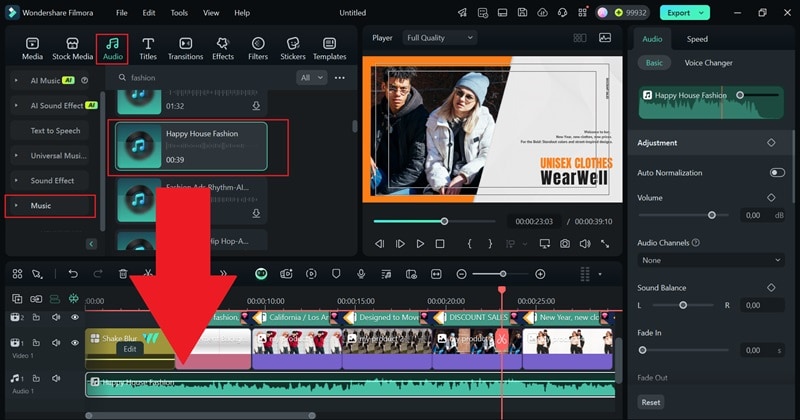
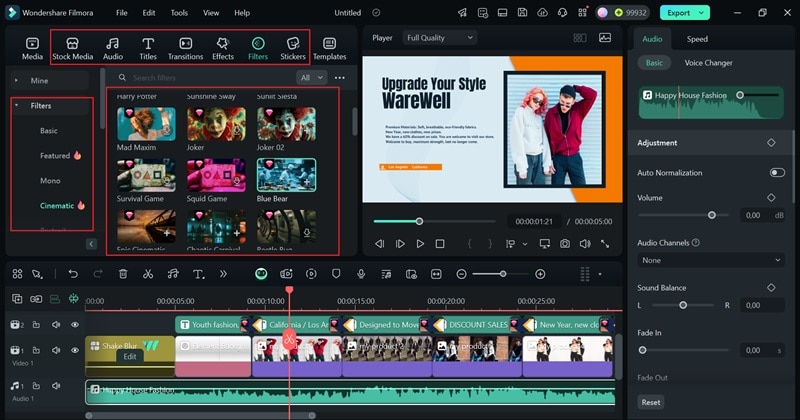
As you can see, Filmora's templates already come with background music, but you can easily swap it out for a royalty-free track from Filmora's built-in music library. Just go to the "Audio" tab, pick a track that fits your brand, and add it to your video. Once it's in, use the property panel on the right to adjust the volume and fine-tune the sound until it's just right.
Since your promo video has narration, you can quickly add subtitles using Automatic Captions feature. To enhance the look, try AI Color Palette to make the colors pop. You can also add filters, transitions, and effects that match your brand's style. Just explore these features in Filmora's menu bar and customize them to make your video unique and memorable!
06of 06Save your video
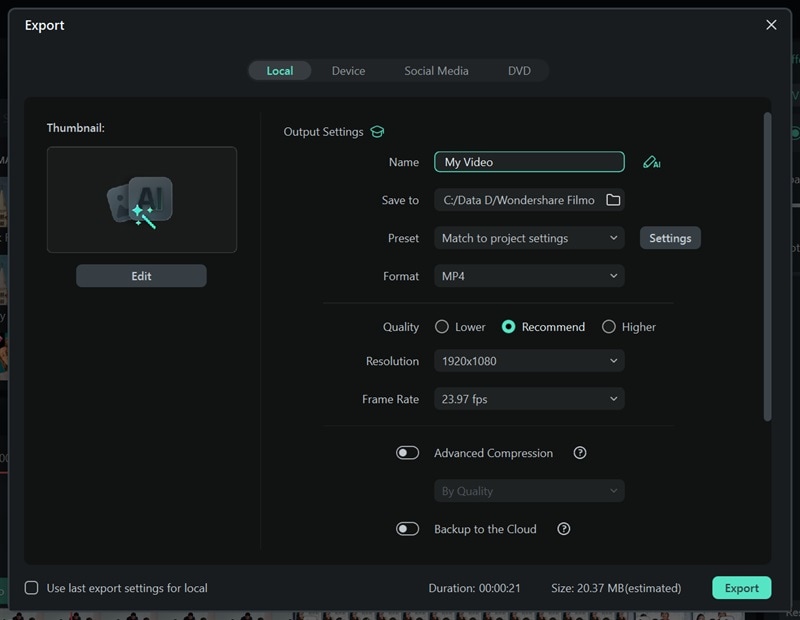
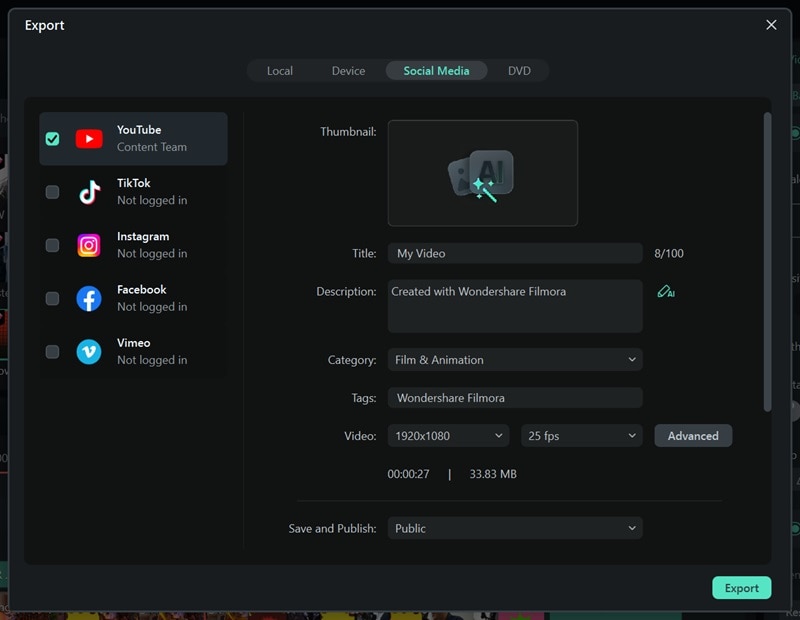
Once your video is good to go, click "Export" in the top-right corner. You can either save it to your device by selecting "Local" or upload it directly to social media using the "Social Media" option. Before finishing up, make sure to update the title, description, format, and resolution so everything looks perfect!
Part 3. Simple Ways to Promote Your Brand Effectively
As you can see, making a product promo video with Filmora is super easy and fun! But knowing how to make your own promotional video is just the first step—you also need to get it in front of as many people as possible! A great video won't do much if no one sees it, so promoting it the right way is just as important as making it.
Here are some simple and effective ways to get your promo video noticed:
● Maximize Social Media
Platforms like Instagram, Facebook, and TikTok are perfect for organic reach. Thankfully, you can post your promo video across multiple platforms directly from Filmora. Don't forget to use hashtags and engage with your audience to boost visibilit.
● Run Contests or Challenges
Get people involved by hosting a fun contest based on your promo video. Ask followers to share, tag friends, or create their own content to boost engagement. For example, if you have a fashion brand, you could run a style challenge where people post their best outfit. The winner gets a free clothing set—easy and exciting!

● Team Up with Influencers or Brands
Collaborating with influencers or partnering with other brands can help you reach a bigger audience. Find people who align with your brand and have them share your promo video to expand its reach.

● Content Diversification
Don't just stop at one video! Repurpose your promo video into GIFs, still images, blog posts, or short clips for different platforms. This keeps your content fresh and makes sure more people see it in different formats. In that case, you can rely on Filmora! It's packed with all the tools you need to easily create and customize content for any format.
Conclusion
Since videos get shared way more than text or images, creating a product promo video is a no-brainer for promoting your brand. So, this guide highlights how to make your own promotional video by showing real examples, breaking down what makes them work, and sharing tips on how to get your video seen.
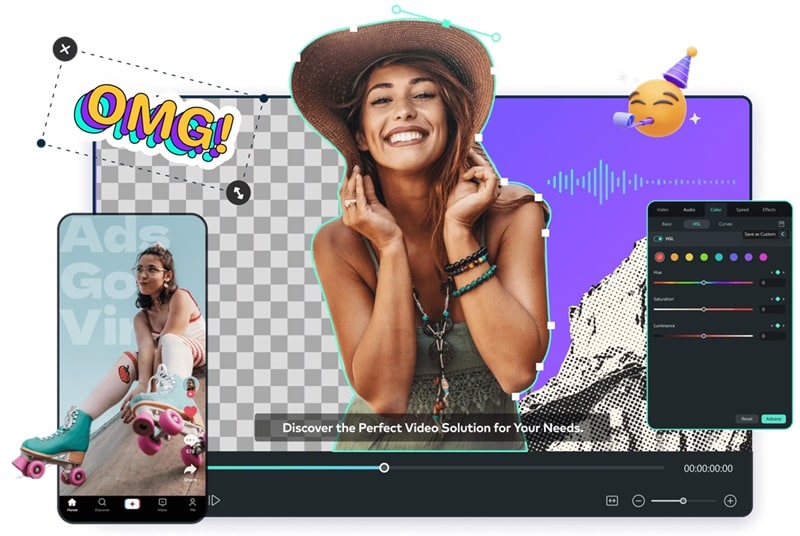
Among many other video editors that can help you create a promo video, Filmora is hands down one of the best options. It not only saves you time with ready-made templates but also gives you full creative control with its media library and advanced features. You can customize everything to match your brand and make your video stand out.