
Launching your brand is super exciting, but the impact of your brand launch video can significantly influence how potential customers perceive your brand. After all, you want to make a strong first impression that lays the groundwork for all future interactions, right?
If that sounds like what you're aiming for, you'll need the right tools and a little bit of inspiration. As you prepare to unveil your brand to the world, this guide will show you how to utilize the best brand launch video templates and provide the best samples to spark your creativity. Let's begin!
In this article
- What to Include in Brand Launch Video
- Best Brand Launch Videos for Your Inspiration
- Make Your Own Brand Launch Videos with Templates
Part 1. What to Include in Brand Launch Video
Before we get into a more technical part, let's discuss what a brand launch video is. Essentially, it's a marketing tool used to introduce a new brand or product to the global market. This video will serve as a visual announcement that highlights the unique selling points and core values of the brand.
A great brand launch video should not only grab attention but also succinctly convey who you are, what you stand for, and what you offer. To achieve this, there are several essential elements you should include in your brand reveal video:
- Logo and Brand Philosophy:Start your video by prominently featuring your logo to establish brand recognition. Accompany this with a clear articulation of your brand philosophy. This is your chance to share the mission, vision, and values that drive your company so that the viewers understand the soul of your brand.
- Brand Colors and Design Motifs: Consistently use your brand colors and design motifs throughout the video to reinforce brand identity. These visual elements should be a thread that ties all parts of your video together.
- Product or Service Showcase: Show off what you offer! Highlight the best features and benefits of your product or service with clear visuals and demonstrations. Help your audience see the real value of what you're bringing to the table.
- Call-to-Action (CTA): Make it clear what you want viewers to do next—visit your website, sign up, or start shopping. Keep your CTA straightforward and easy to follow, and don't forget to repeat it to reinforce the message.

Part 2. Best Brand Launch Videos for Your Inspiration
To help you visualize what makes a brand launch video successful, we've gathered some of the most effective and inspiring examples from recent years. These videos showcase a range of styles and strategies that you can follow to develop your own unique approach.
1. Tesla Cybertruck
The launch video of Cybertruck does a fantastic job showcasing its product through strong visuals. It blends various natural scenes to show off the Cybertruck's versatility in any setting. You'll see it cruising through different terrains, keeping you hooked as it goes while powerful music plays in the background.
Key Takeaways:
- Make use of strong visuals to tell the story and show off your product's strength
- Use multiple camera angles to showcase the product from every perspective
- With the absence of a voiceover or narration, music plays a crucial role in setting the tone and keeping the viewers engaged from start to finish
2. Fresco Brand Launch Video
Fresco's brand launch video is simple yet effective. It focuses on a clear, compelling copy and uses animated text alongside visual elements that complement and enhance the narrative.
Key Takeaways:
- Experiment with motion graphics. It doesn't have to be something fancy–just a simple animation will do. You could use animation presets for an easy start or try keyframe animationfor a more advanced approach.
- Maintain consistent branding by using your brand's color scheme throughout the video. This helps reinforce brand identity and ensures that viewers easily associate the visuals with your brand.
- Make sure your copy is straightforward, clear, and concise. This way, your viewers can quickly grasp the product you are presenting.
3. Buffer
Buffer brand reveal video uses lively animations that fit perfectly with what they're all about—social media management. The tone of the video is fun, light, and playful, with a professional voiceover that seamlessly ties everything together. This makes it enjoyable to get the scoop on what Buffer offers.
Key Takeaways:
- Start the video by pinpointing the problems users face and introducing your brand as the solution, highlighting how it works
- Using the brand's colors all through the video helps keep things cohesive.
- Keep things interesting with fun animations
- Use smooth transitions to flow naturally from one scene to the next
Part 3. Make Your Own Brand Launch Videos with Templates
Have you brainstormed some brand launch video ideas from the examples above? Great! Now, let's put those ideas into action. One of the simplest ways to create your own video is by using templates from Wondershare Filmora.
Filmora is a versatile video editing software that comes packed with pre-designed templates, including some fantastic options for brand launch videos. These brand launch video templates allow you to effortlessly create a video that fits your brand. Plus, you still retain complete creative freedom to tweak and customize using Filmora's robust editing tools.
How Filmora Can Help You Make Effective Brand Launch Video
- Scriptwriting Assistance: Use Filmora's AI Copywriting tool, which is integrated with the ChatGPT API to easily come up with compelling scripts.
- Professional Voiceovers: Generate professional-sounding voiceovers with the Text to Speech.
- Extensive Video Templates: Access a wide range of video templates in various styles and themes to find the perfect fit for your brand.
- Logo Reveal Animation: Utilize the brand logo reveal animation preset to make your logo stand out impressively.
- Comprehensive Editing Tools: Enhance your video with special effects, animated stickers, built-in music, and stock footage, all available in Filmora's editing suite.
From making the script and finding the right template to sharing the video, you can do it all in Filmora. Follow the steps below on how to make the best brand launch video using templates.
1. Prepare your script
Your script is key to making your video effective. Start by making a compelling script that conveys your brand's message clearly. Focus on the key points you want to highlight about your brand and what makes it unique.
If you want to use Filmora's AI Copywriting, simply access the tool from Filmora's Toolbox and input your video description. Then, watch it generate video scripts in seconds.
2. Record a voiceover
Once your script is ready, you can start recording a voiceover for your video. If you want to use your own voice, you can record it directly within Filmora. Or, you can generate a voice professionally from text using Filmora's Text to Speech.
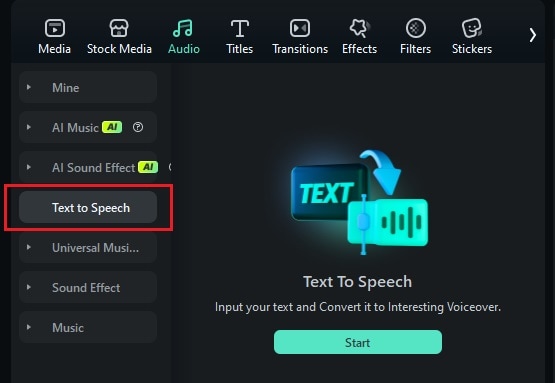
Go to the Audio menu and click on "Text to Speech", then press Start.
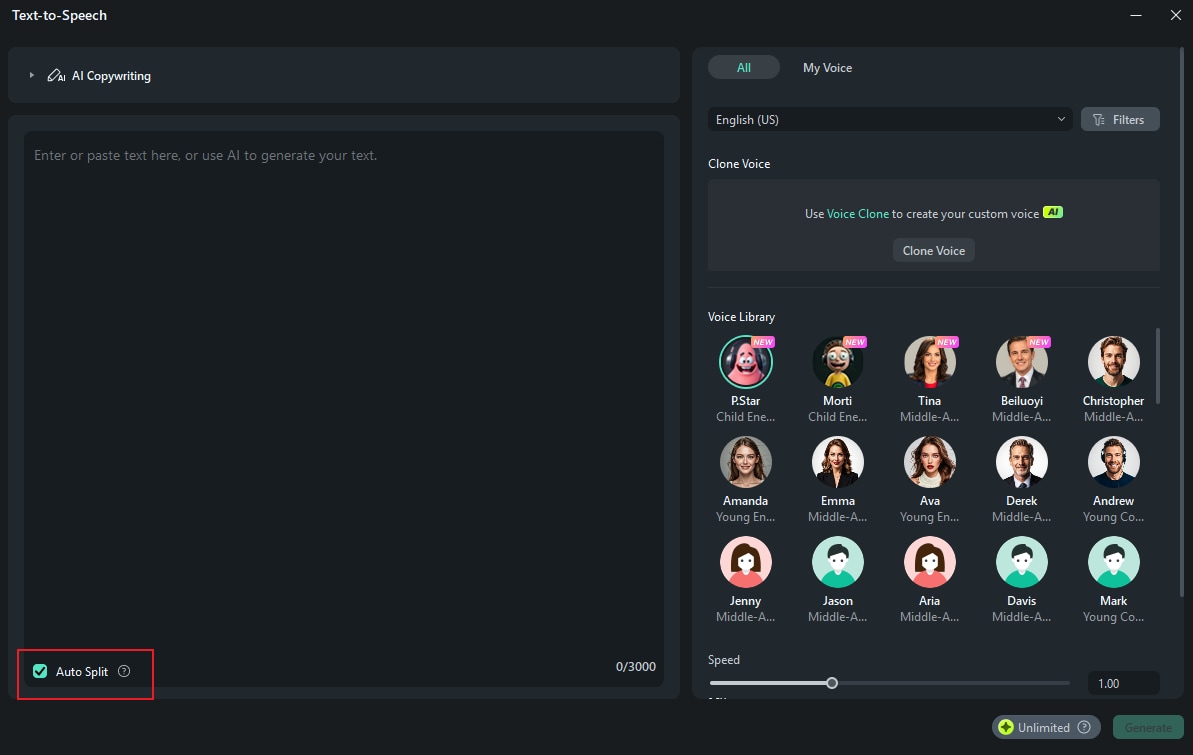
Type your script into the Text to Speech tool or utilize AI Copywriting from here to let it make the script for you. Choose your preferred voice and modify the pitch, speed, and language settings as desired. Hit Generate to create the voiceover.
Place the newly created voiceover onto your timeline and make any necessary edits, such as trimming or adjusting the timing.
3. Edit your video with brand launch video templates
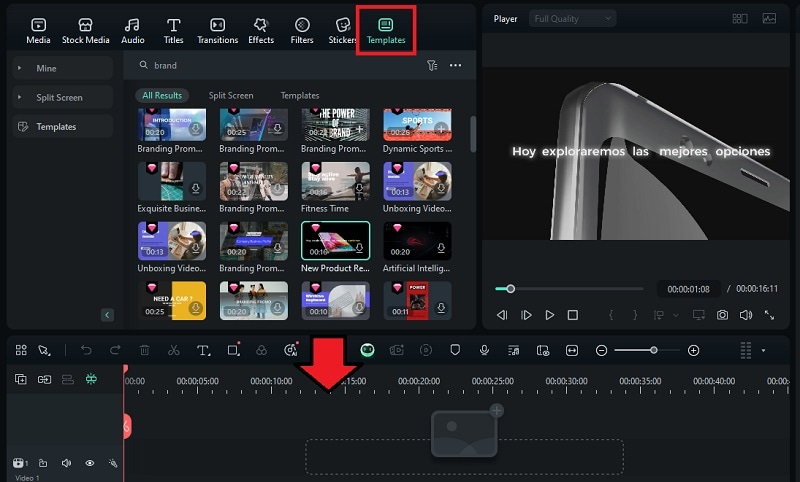
Next, it's time to edit your video with brand launch video templates in Filmora. First, navigate to the Templates section. Use the search function to locate the templates for the brand reveal video. Select your preferred template and download it. Then, drag the template to your timeline.
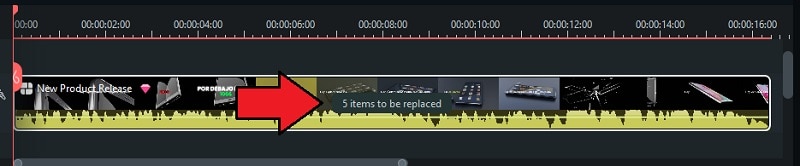
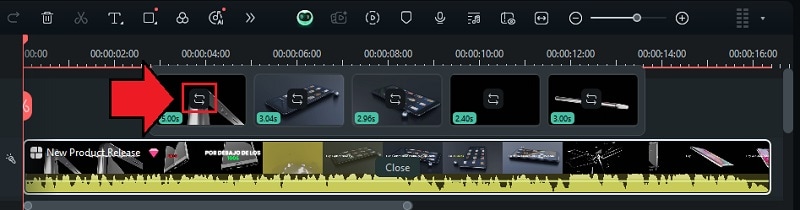
In the timeline, look for "items to be replaced" and click on it to replace the stock footage with your own brand videos.
Next, use the Switch button to upload your own footage from your device.
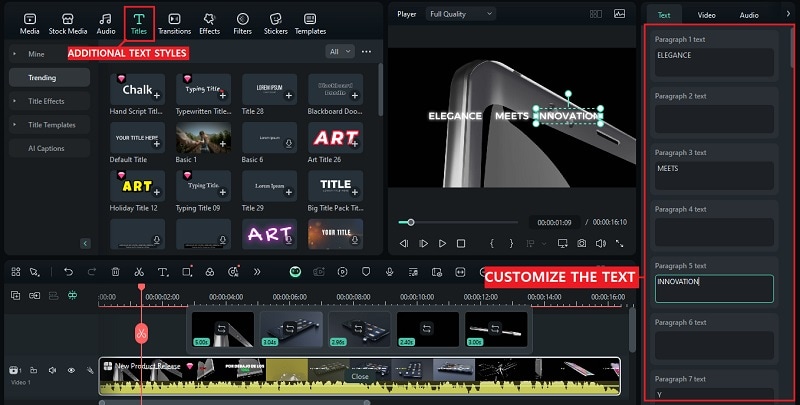
To customize the text, navigate to the property panel and click on the Text tab. For additional text styling options, check out the Titles tab and select a style that complements your video.
4. Incorporate your logo
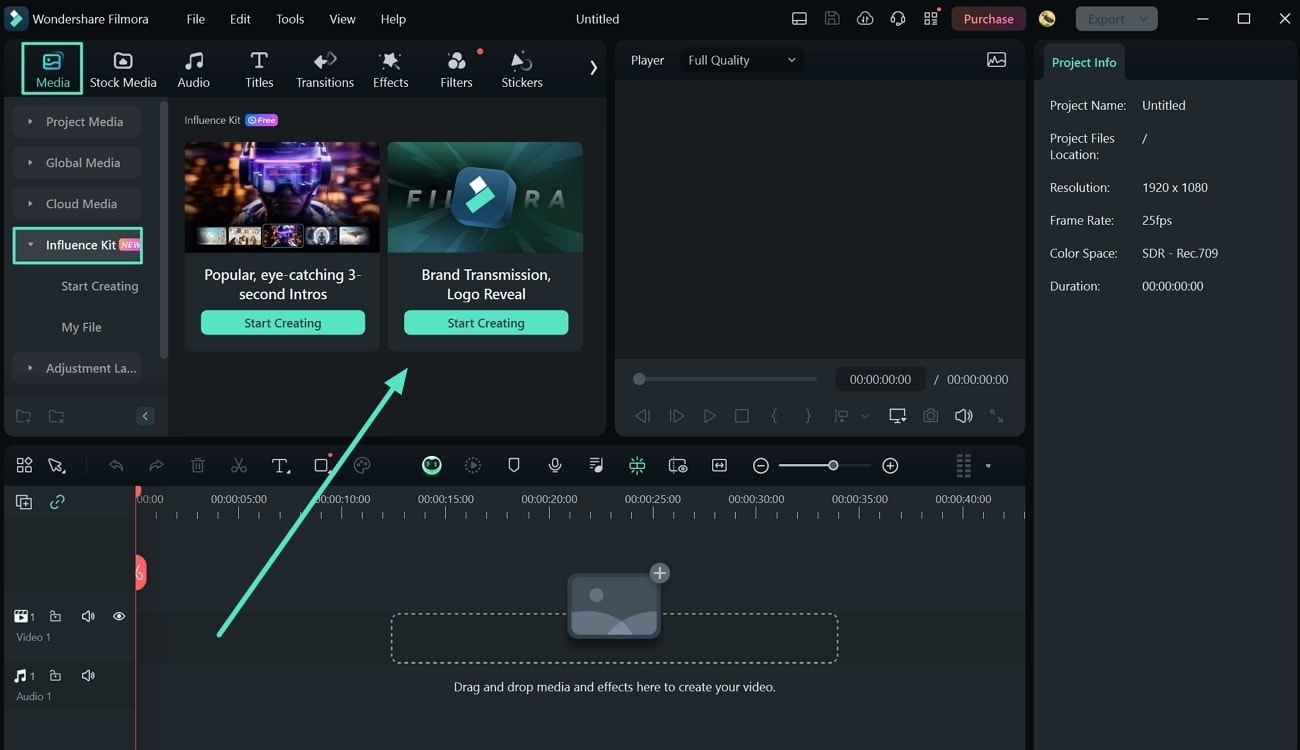
For strong branding, leverage the brand reveal logo preset in Filmora to add some animation to your logo. Go to the Media tab and select the "Influence Kit" section. From there, click "Start Creating" under "Brand Transmission, Logo Reveal."
A new window will appear, prompting you to choose a suitable effect for your animated logo.
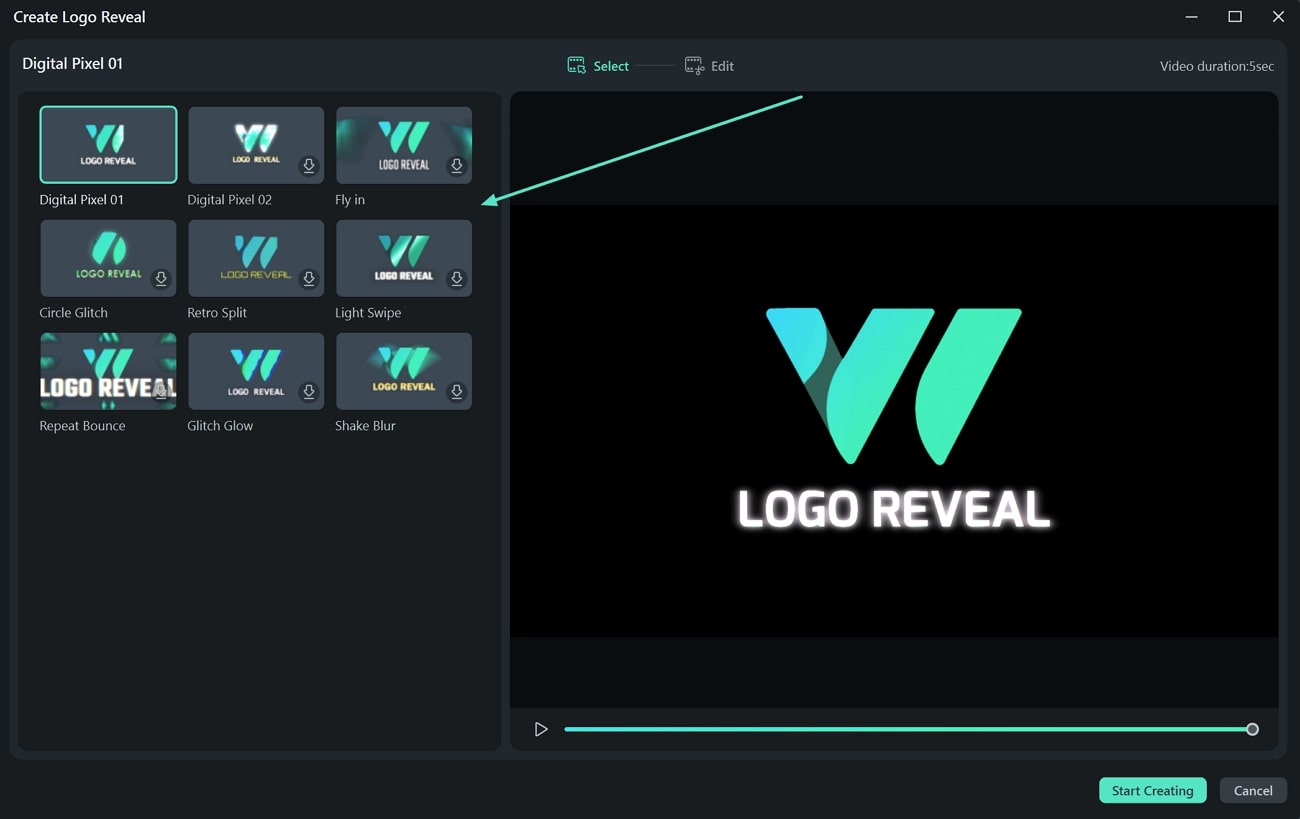
Once you select an effect, proceed to upload your logo image. Then, customize the accompanying text in the logo reveal animation via the "Edit Text" section. Then, click "Finish" to complete your logo animation.
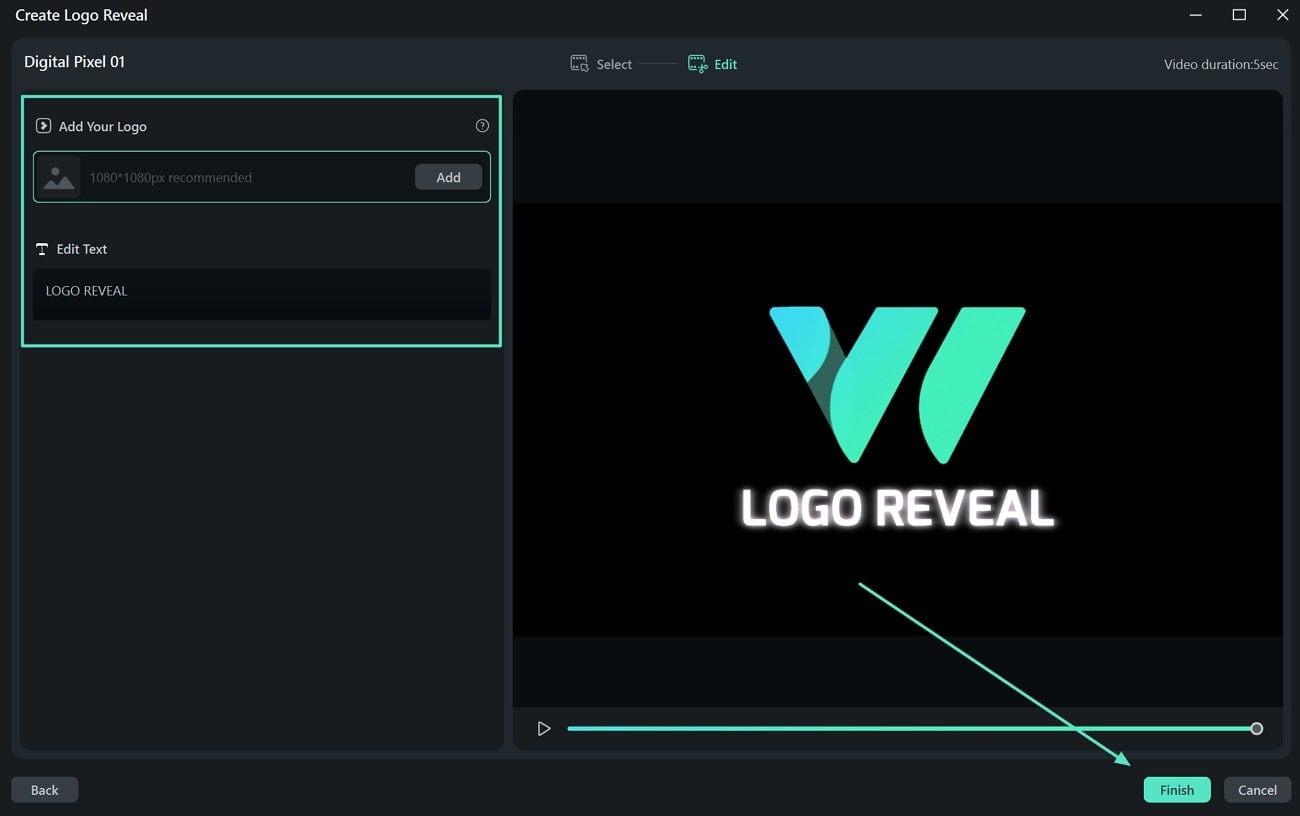
This animation will now be placed on the Filmora timeline for further editing and integration into your project.
Conclusion
You are now ready to make your own brand launch video that shows off the best of what your brand has to offer! We've gone through what makes a great launch video and even peeked at some inspiring examples.
To help you get started quickly, you can make use of the brand launch video templates in platforms like Filmora, where you can also find various editing tools to fine-tune your video to perfection. Filmora offers features like drag-and-drop editing, special effects, and custom animations, making it super easy to make any video you're proud to share with the world.

Filmora
⭐⭐⭐⭐⭐
The Best AI-powered Video Editing Software and App