
Imagine scrolling through your feed when a sleek, futuristic product floats onto your screen. It spins, zooms in, and unfolds before your eyes, showing off every little detail in a way that feels almost magical. That is the power of a 3D product animation video.
Brands everywhere are using animated product videos to tell stories, simplify complex ideas, and turn casual viewers into eager buyers. Thankfully, making this does not require a huge budget or advanced skills.
In this guide, we'll teach you how to make product animation videos by showing inspiring examples, a simple step-by-step process, and the game-changing benefits of product animation.
In this article
- Learning from the Best: Examples of Animated Product Marketing Videos
- Step-by-Step Guide to Creating a 3D Animated Product Video
- Benefits of Product Animation Videos
Learning from the Best: Examples of Animated Product Marketing Videos
A well-made animated product video isn't just about cool visuals. It needs to tell a story, keep people engaged, and make the message stick. So, before you learn how to make product animation videos, it's important to understand what makes a great one in the first place.
The best way to improve is by learning from brands that have already mastered the art of animated product marketing videos. Below, we'll break down some of the most successful animated product videos, why they work, and what you can take away to make yours just as good if not better.
1. A Collection of DR.VFX Product Animation Videos
DR.VFX is a 3D animation company known for creating 3D product animation videos and this video showcases their work throughout the year, featuring everything from mascara and grass mowers to razors. What makes this video stand out is the way it breaks down product components and demonstrates how they work in real life. Even without narration, the animation alone makes it clear why each product is worth buying.
2. Squidz Product Animation Video
This is a great example for anyone looking to create an animated product video. Squidz, a brand specializing in E-cigarettes with nicotine, highlights its seven unique flavors, each showcased with a distinct background and animation style to bring out the essence of the taste experience. The use of vibrant visuals and smooth transitions makes each flavor stand out, creating a memorable impression without overcomplicating things.
3. Smeg Product Animation
Smeg takes a sleek and sophisticated approach to showcasing its mixer in this animated product video. Instead of just showing the final product, the video breaks down each individual component, and then seamlessly assembles them piece by piece. This technique not only highlights the quality and craftsmanship of the mixer but also gives a visually satisfying way to appreciate the product's design and durability.
Step-by-Step Guide to Creating a 3D Animated Product Video
After checking out those amazing animated product marketing videos, it is time to learn how to make your own product animation video. But before jumping into the process, choosing the right product animation video maker is key.
The best tool should be easy to use, offer plenty of customization options, and include powerful features without being overly complicated. Among all the options out there, Filmora stands out as one of the best choices for creating stunning animated product videos.
Here's why Filmora is the perfect solution for anyone wanting to create animated product videos:
- Templates for Different Products: Filmora provides ready-made templates for various product categories, so you do not have to start from scratch. These templates help speed up the process while keeping your video professional.
- AI Copywriting for Clear Scripts: Writing a script is easier with Filmora's AI Copywriting tool, which generates clear and engaging text in seconds. This ensures your product message is well-structured and easy to understand.
- AI Voiceovers and Subtitles: With Filmora's Text-to-Speech, you can create voiceovers without recording anything. Automatic subtitles make videos more accessible and engaging for all viewers.
- Strengthen Your Brand: Adding your logo and watermark keeps your brand visible and gives your video a polished, professional look. This helps build recognition and trust.
- Animated Media Library: Filmora offers a wide range of animated stickers, effects, filters, and transitions to make your video more dynamic and visually appealing. These features help keep viewers interested from start to finish.
- One-Click Sharing: Once your animated product video is ready, you can instantly upload it to YouTube, TikTok, and other social media platforms with just one click. This saves time and makes sharing effortless.
On top of that, Filmora is available on both Windows and macOS, making it easy to use no matter what device you have. Not to mention, even with all these great features, it remains budget-friendly. With flexible pricing plans and a free version to try out, you can explore its tools before deciding to purchase or subscribe.
So, there is no reason not to try Filmora for creating an animated product video. Now, let's go through a simple step-by-step guide on how to make a product animation video from start to finish.
01of 07Open Filmora and select a video template
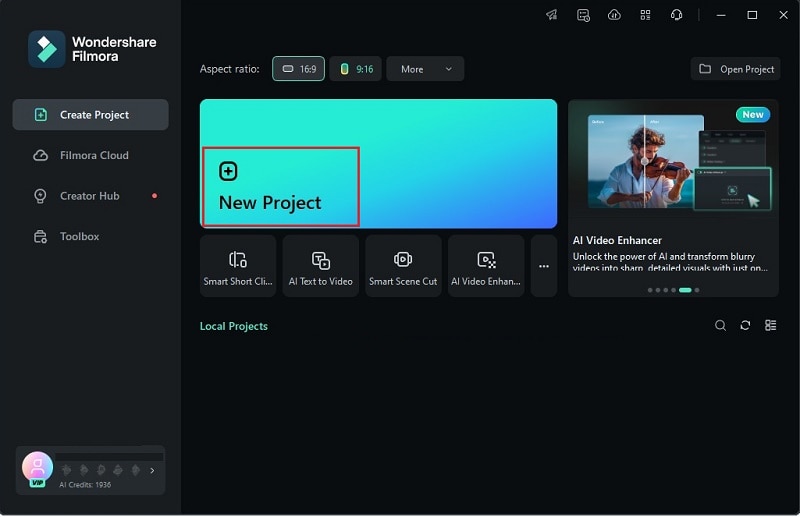
First, make sure you have the latest version of Filmora installed on your device. If you haven't downloaded it yet, go ahead and do that. Once it's ready, open the program, click "New Project", and you'll be taken to the main editing timeline where you can start creating your video.
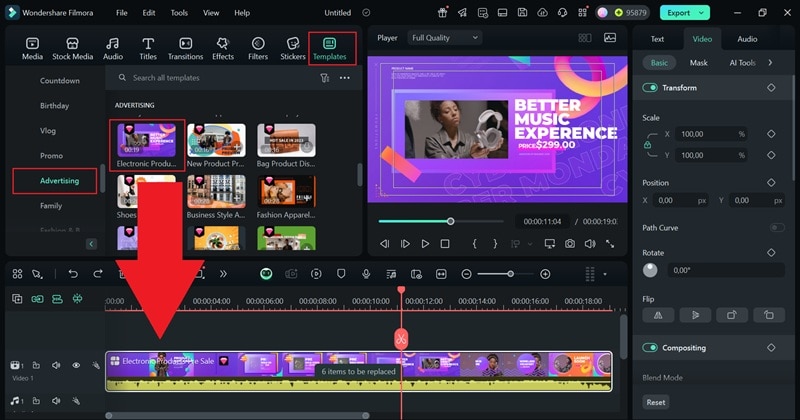
Next, go to the "Templates" section, select "Advertising", and browse the options. For example, if you're making a VR product video, pick a template that fits your style and drag it onto the timeline below.
02of 07Customize the template
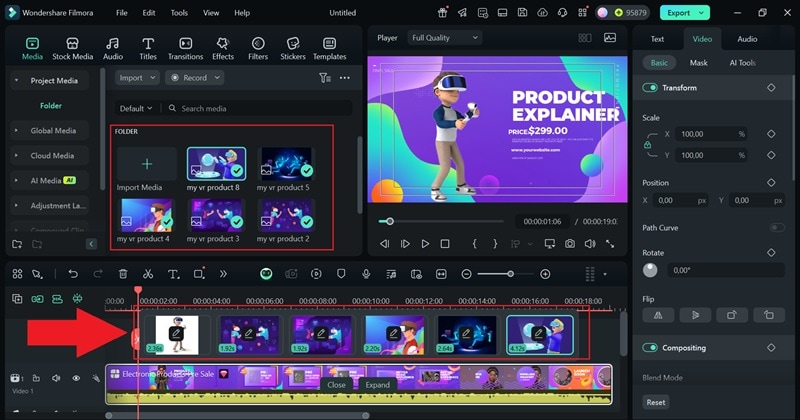
Now, click on the "6 items to be replaced" note in the timeline. Select each placeholder and upload your product clips to swap them with your own footage.
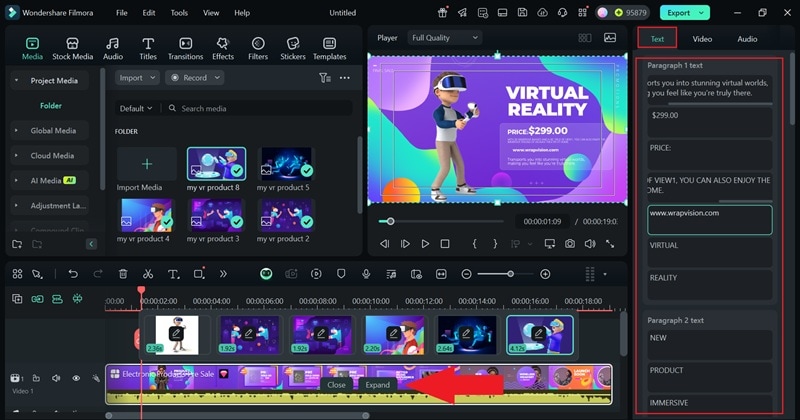
Now, head to the property panel on the right and click "Text" to customize it. Add key details about your product, like its standout features. Once you're done, click "Expand" on the timeline to preview your video.
03of 07Add voiceovers
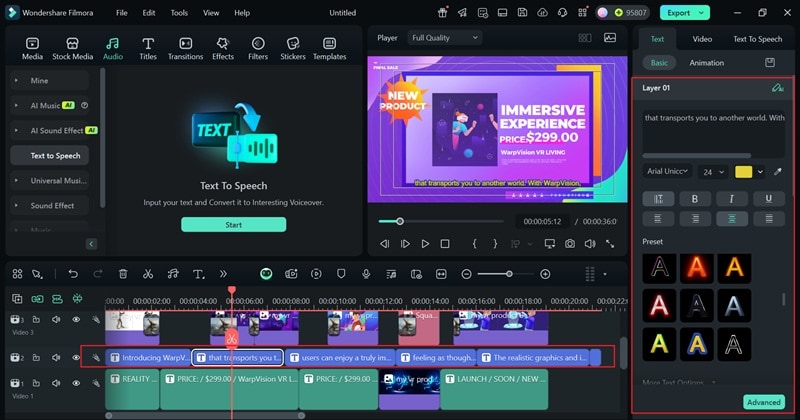
Adding narration makes your product video more engaging, but you don't have to record one yourself. With Filmora's Text-to-Speech feature, you can generate a natural-sounding voiceover in seconds. Simply go to the "Audio" tab, choose "Text to Speech", and hit "Start" to generate a voiceover instantly.
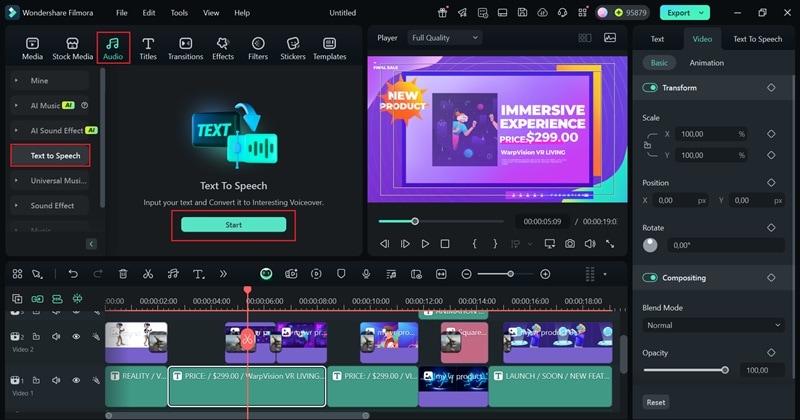
Type your text into the description box, and Filmora will automatically break it into sections for a smoother flow. If you need help with writing, the AI Copywriting tool has you covered. Just open the tab, choose "Product Coverage" as the topic, enter your prompt, and click "Generate" to get a well-structured script.
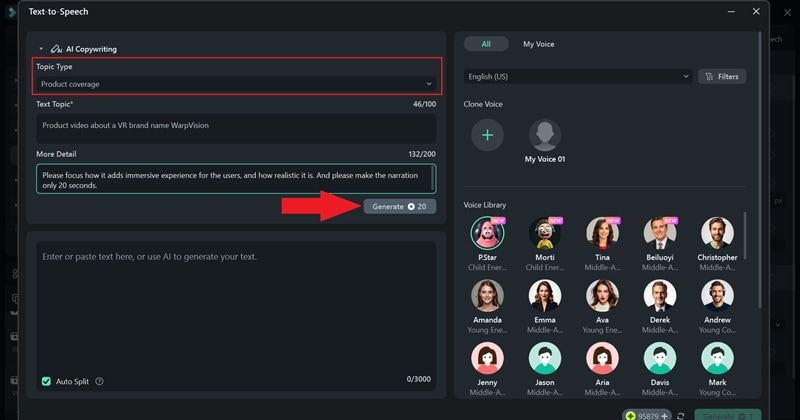
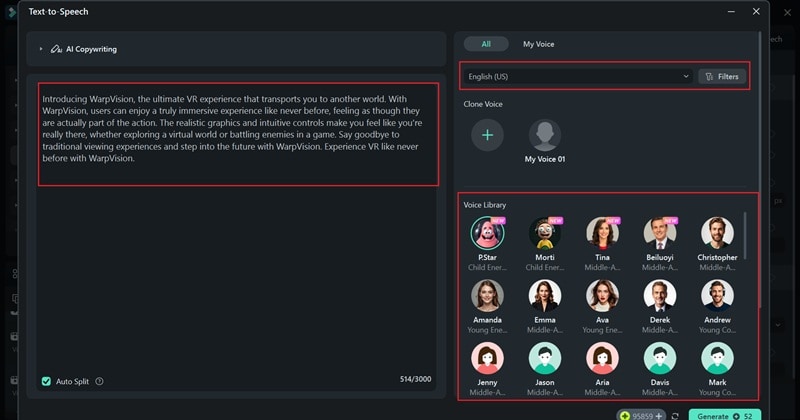
With your product promo text ready, it's time to turn it into narration. Select your preferred audio language, then choose from a variety of AI voice options, including male, female, or regional accents, to match the tone of your video.
Use the sliders to adjust the speed and pitch until it sounds just right. Once you're happy with the settings, click "Generate" to create your audio.
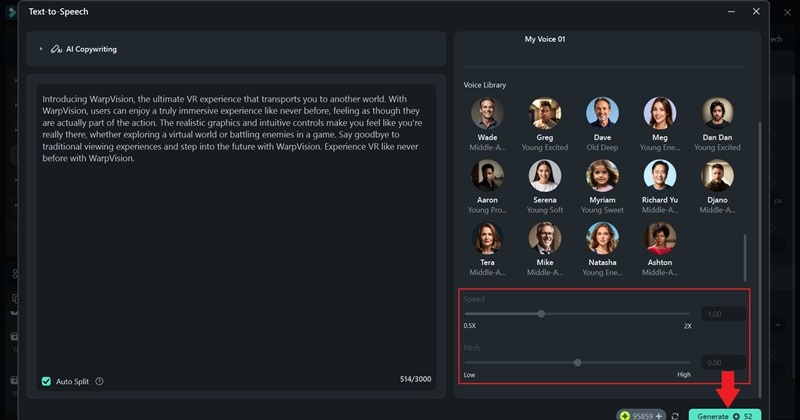
After the audio is generated, it will automatically be added to the timeline along with subtitles. You can adjust the narration volume or tweak the subtitle style in the property panel on the right to match your video's look and feel.
04of 07Insert your brand
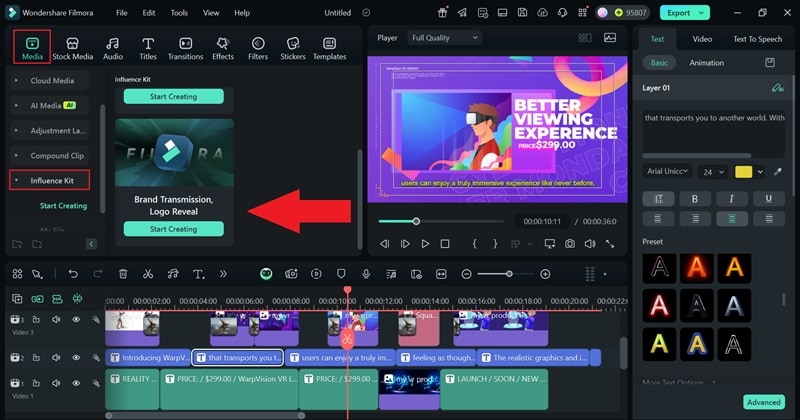
Now, add your logo at the start of your video to boost brand recognition. If you don't have one yet, Filmora's Logo Reveal feature can help. Just head to the "Media" tab, open the "Influence Kit", and select "Logo Reveal" to create a professional-looking logo animation.
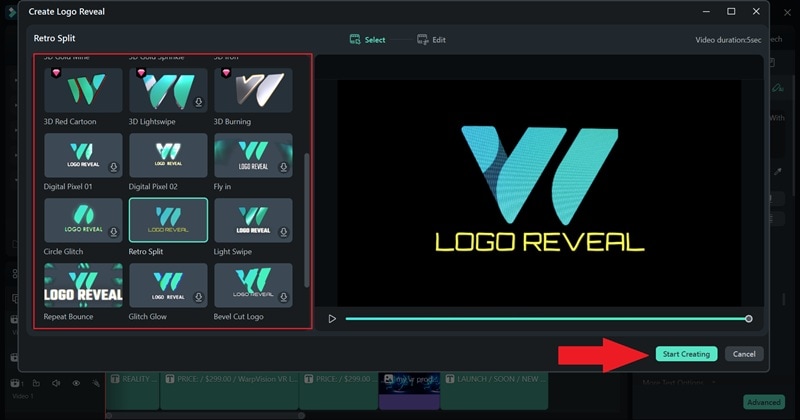
In the next window, choose an effect that matches your animated logo's style. Once you've found the perfect one, click "Start Creating" to move forward.
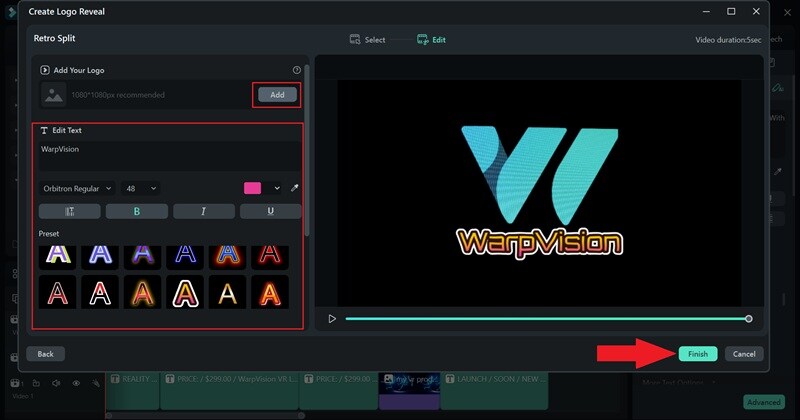
Type in your brand name and customize the font, size, and color to match your style. If you already have a logo, you can upload it instead. Once everything looks just right, click "Finish", and it will be added to your timeline.
05of 07Insert background music
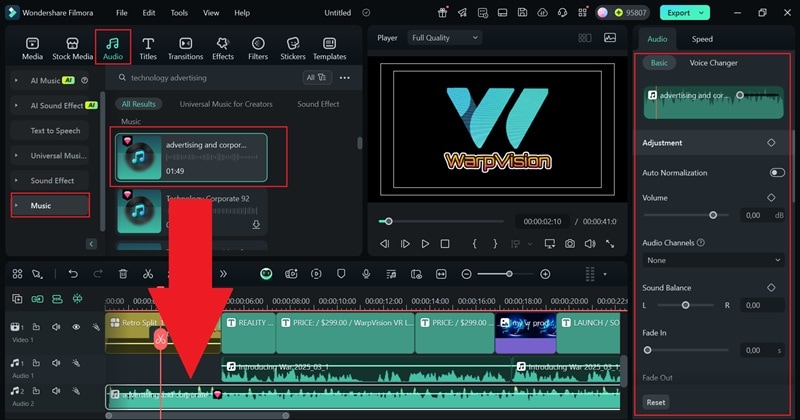
If the template doesn't come with music or you want to switch things up, you can use Filmora's music library or the AI Music Generator to find the perfect track. Just go to the "Audio" tab, select "Music", pick a royalty-free song that matches your video's vibe, and add it to the timeline. Then, head to the property panel on the right to fine-tune the volume and other settings until it sounds just right.
06of 07Enhance your video
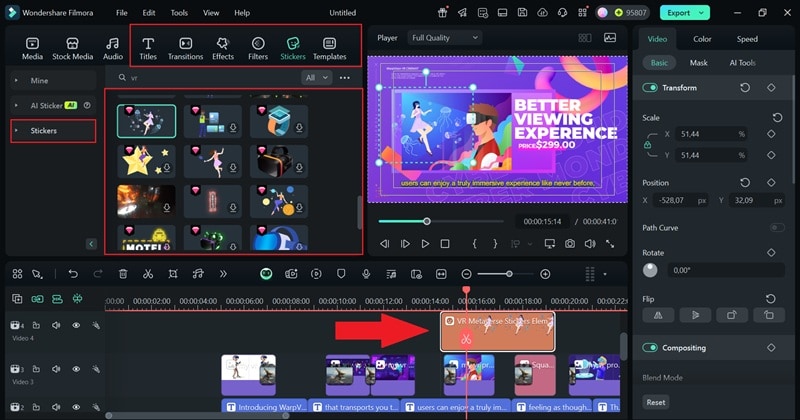
Now, give your video a final touch by adding animated stickers, filters, and effects to make it look sleek and professional. Feel free to get creative, but keep it balanced so your product stays the star of the show while keeping the visuals engaging.
07of 07Export your video
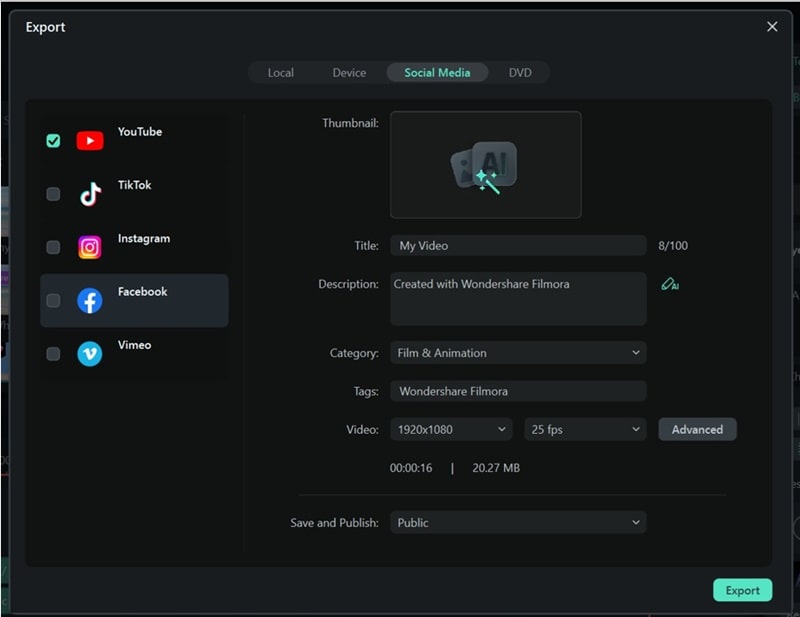
Once you're done editing, click "Export" in the top-right corner. To save the video to your device, choose "Local", or upload it straight to social media using the "Social Media" option. Before exporting, double-check the title, description, format, and resolution to make sure everything is set just right!
Part 3. Benefits of Product Animation Videos
As you can see, creating an animated product video with Filmora is easy, fun, and effective. Now, you can make as many videos as you want, try out different styles, and experiment with creative ideas to see what works best for your brand.
The more you create, the better you get, and the more benefits you unlock along the way. After all, a 3D product animation video is a powerful marketing tool that helps businesses grab attention, boost sales, and stand out in a crowded market. Here are some of the biggest benefits of using product animation videos:
- Unlimited Creative Freedom: Unlike traditional video, animation allows you to bring any idea to life, whether it is futuristic product breakdowns, floating objects, or smooth transitions that show off every little detail.

- Makes Your Brand More Memorable: People are more likely to remember a fun, engaging animation than a basic product image. Creative storytelling through animation helps build brand recognition and keeps your product in people's minds.
- Cost-Effective Production: Filming a live-action product video can get expensive with actors, sets, and equipment. Animation removes those extra costs while still delivering high-quality results.

- Helps Explain Features Quickly: Instead of long descriptions or lengthy tutorials, an animated product video can quickly highlight key features in seconds, making it easier for customers to understand why they need it.

- Breaks Language Barriers: With animation, you do not always need voiceovers. A well-made animated product video can tell a story visually, making it understandable for audiences worldwide, no matter what language they speak.
Conclusion
Animated product marketing videos are everywhere right now, with brands using them to showcase and sell their products in a more engaging way. So, this guide walks you through how to make a product animation video, featuring examples from some of the best and highlighting the benefits you can gain. But to make that happen, you need a reliable and powerful video editor, and Filmora is the best choice.
Filmora makes creating a 3D product animation video easy and fun. With advanced features like AI Copywriting for scriptwriting, Text-to-Speech for instant voiceovers, and a wide media library filled with effects, filters, and stickers, it offers everything you need to produce content without the hassle. Whether you're promoting a gadget, beauty product, or household item, Filmora helps you create animated product videos that are engaging and professional.

Filmora
⭐⭐⭐⭐⭐
The Best AI-powered Video Editing Software and App