
Imagine creating a professional commercial without hiring a full production crew or breaking the bank. AI commercial generators make this possible—turning a simple concept into a polished ad in minutes.
The platform automatically creates scenes, animates products, and layers VFX and background music, delivering faster production, lower costs, and trend‑aligned content.
Now’s your chance to build ads the way top brands do—smarter, quicker, and cost‑effective.
In this article
-
- Who Benefits from an AI Commercial Generator
-
- Turn Your Concept into a Script
- Creating the Scenes
- Generating a Voiceover
- Editing and Polishing the Commercial
-
- Coca‑Cola Ad – "Holidays Are Coming"
- Miniature Coca‑Cola Ads: A Tiny Revolution!
- Original Source – Nature Hits Different!
Part 1. How AI Commercial Generators Are Changing Modern Marketing
Traditional ad creation is a time‑consuming process involving extensive planning, scripting, filming, and editing. AI generators now deliver high‑quality commercials in a fraction of that time.
Businesses can simply type a prompt or select a style, and instantly generate ads featuring scenes, animations, and voice narration that spotlight their products.
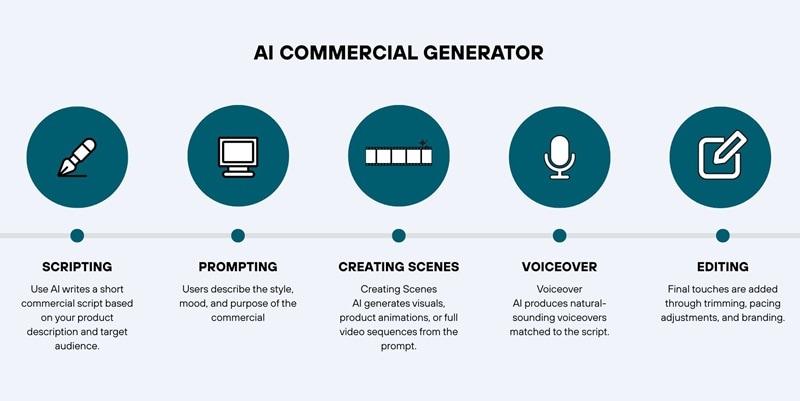
The AI analyzes your product, interprets your prompt, and produces an ad with consistent pacing, visuals, and messaging—enabling small businesses and marketers to scale campaigns quickly and cost‑effectively.
Here is a simple comparison to illustrate the transformation:
| Category | AI Commercial Generator | Traditional Ad Production |
| Speed | Minutes to a few hours to generate a full ad | Days or weeks to plan, shoot, and edit |
| Cost | Lower | Higher. Requires crew, studio, actors, and equipment |
| Scalability | Can produce multiple variations quickly | Scaling means more shots and a higher cost |
| Visual Quality | Improving fast with AI‑generated scenes and animations | High when done professionally |
| Skill Required | Beginner friendly | Requires multiple creative and technical specialists |
| Revision Process | Instant regeneration with new prompts | Reshoots or re‑edits will increase costs and time |
Who Benefits from an AI Commercial Generator
AI commercial generators simplify video production and reduce costs for many groups:
- Small businesses and online shops looking to produce professional ads without a full production team.
- Marketers who need rapid campaign testing for offers, hooks, and creatives in paid media.
- E‑commerce sellers creating engaging product ads—rotating bundles, beauty showcases, or gift‑box reveals.
- Social‑media advertisers requiring multiple variations for A/B testing on TikTok, Instagram, and YouTube.
- Agencies handling high‑volume client work and seeking to boost production efficiency without expanding teams.
- Startup brands launching new products and needing launch trailers or promo clips on a limited budget.
Part 2. How to Create AI-Generated Commercials Using Only One Platform
Wondershare Filmora stands out as a comprehensive solution that keeps you within a single application.
Watch the AI advertising example we created using Filmora below:
Everything from script writing to final export is possible inside Filmora, thanks to AI text generation, Image‑to‑Video templates, built‑in stock media, AI text‑to‑speech, and a full editing workspace.
The process of making an AI commercial ad can be broken down into four steps:
- Turning your concept into a script
- Creating the scenes based on the script
- Generating a voiceover
- Editing and polishing the video ad
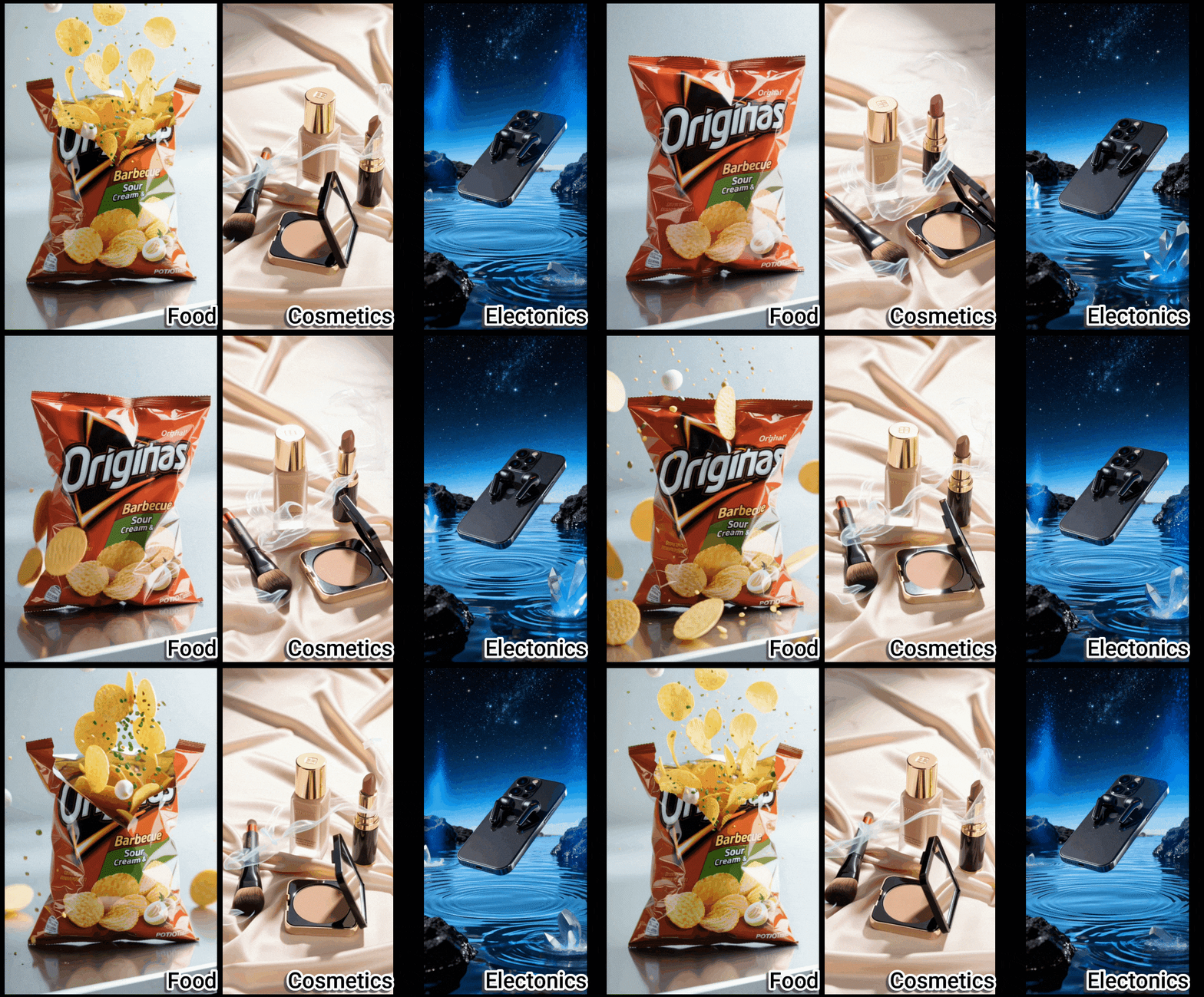
Note: Filmora offers AI templates across multiple product categories, allowing you to choose and customize according to your needs.
1. Turn Your Concept into a Script
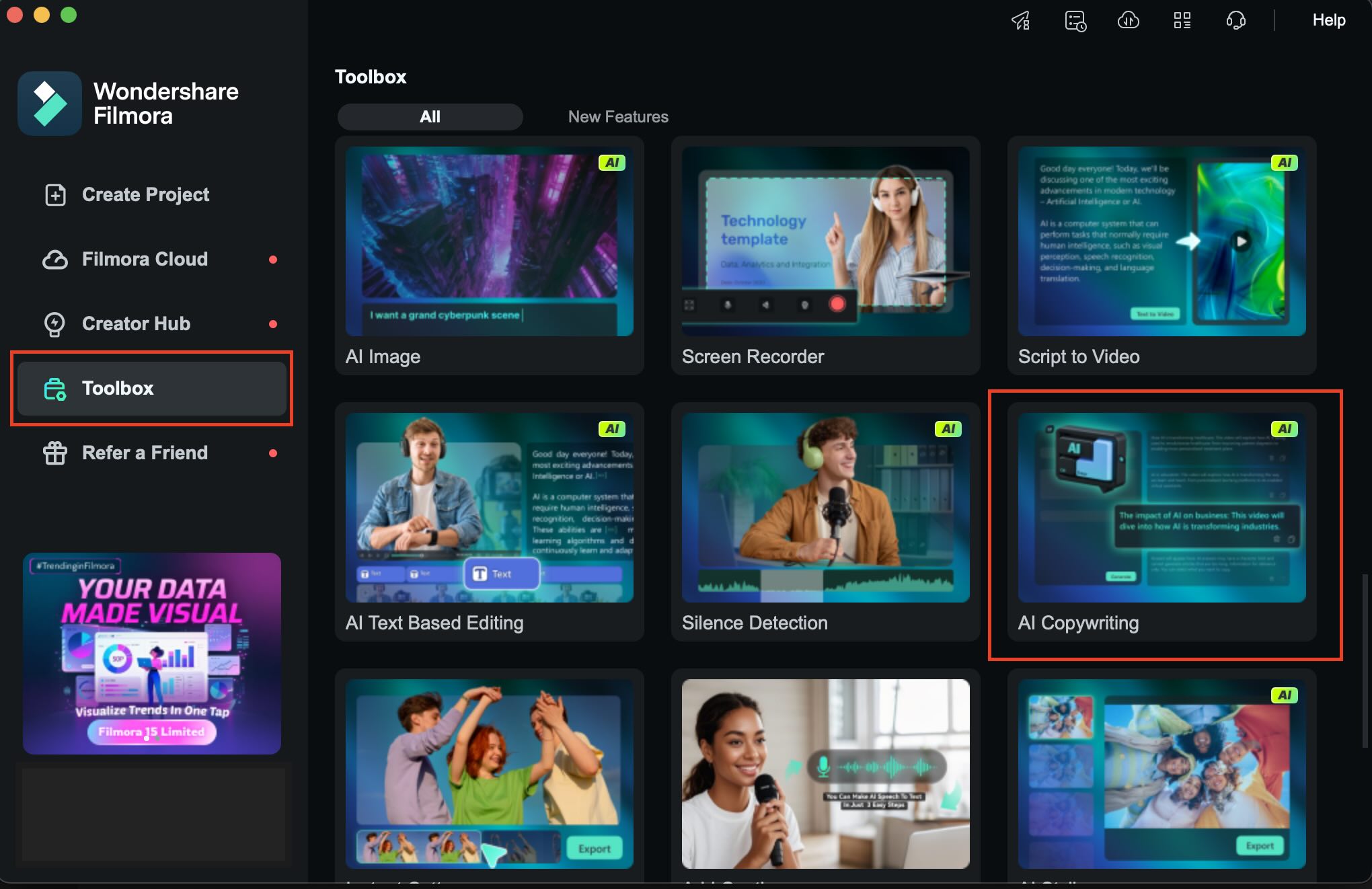
Start by crystallizing your commercial idea, then craft a concise script. Filmora’s AI Copywriting tool—found under AI Toolbox > AI Copywriting—lets you generate multiple short variations for A/B testing.


2. Creating the Scenes
From your script, generate matching scenes using Filmora’s versatile tools.
1. Create an Ad Clip from an Image Using Templates
Even a single product photo can become a full commercial using Filmora’s Image‑to‑Video templates, many of which are tailored for marketing.
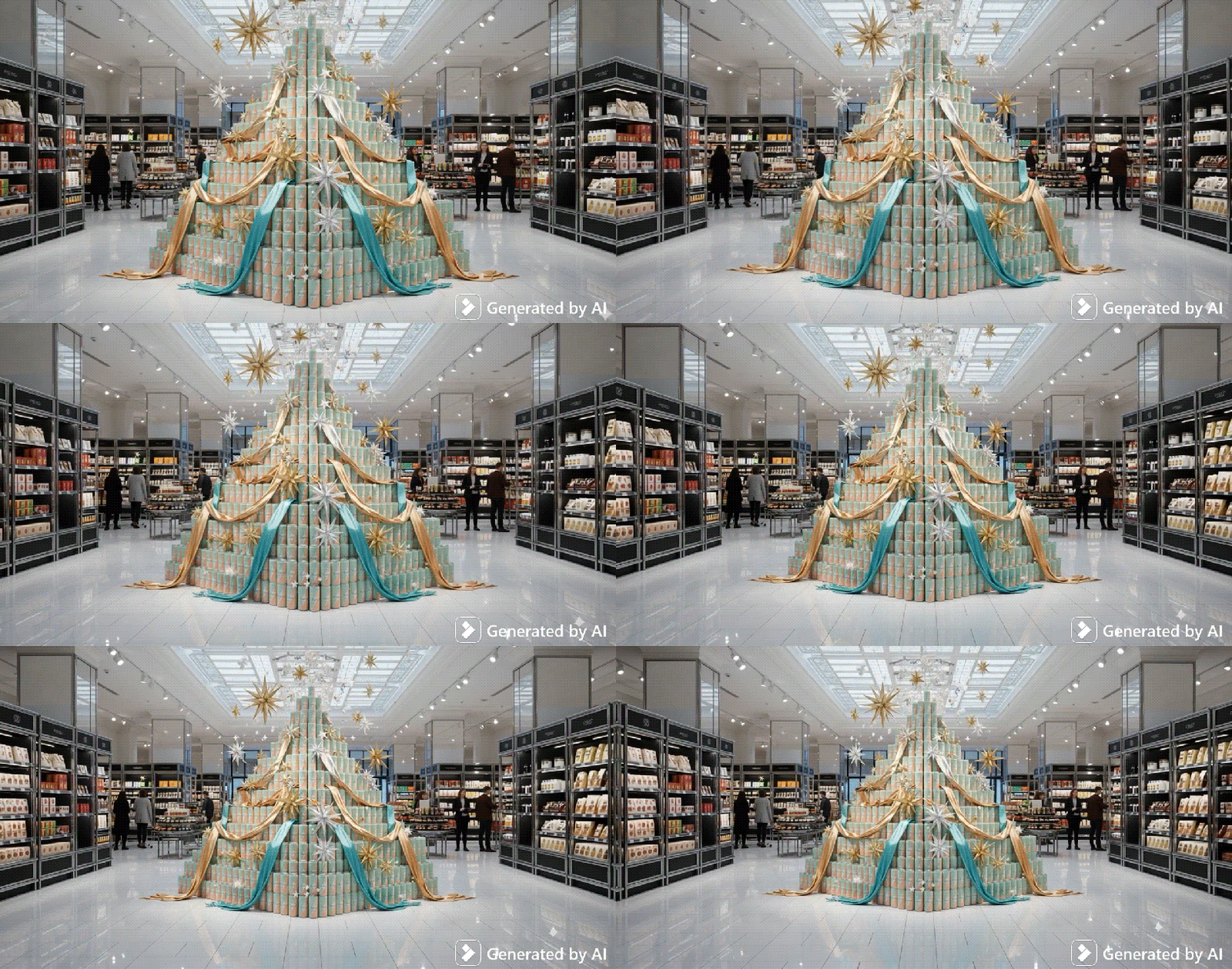
Follow the steps below to create a video ad from an image like the example above.
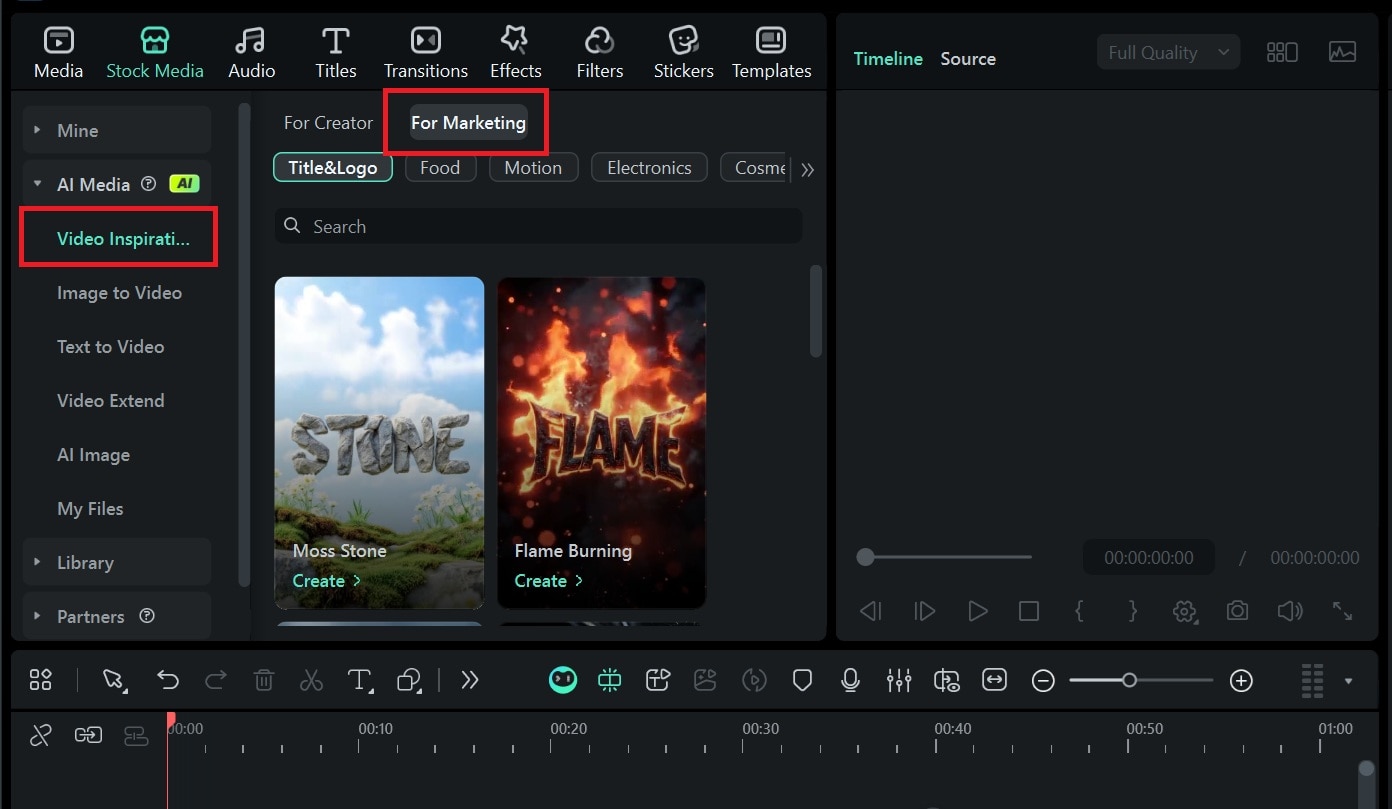
Step 1: Go to Stock Media > AI Media > Video Inspiration. If you want to narrow the results, open the Marketing tab to filter the templates.
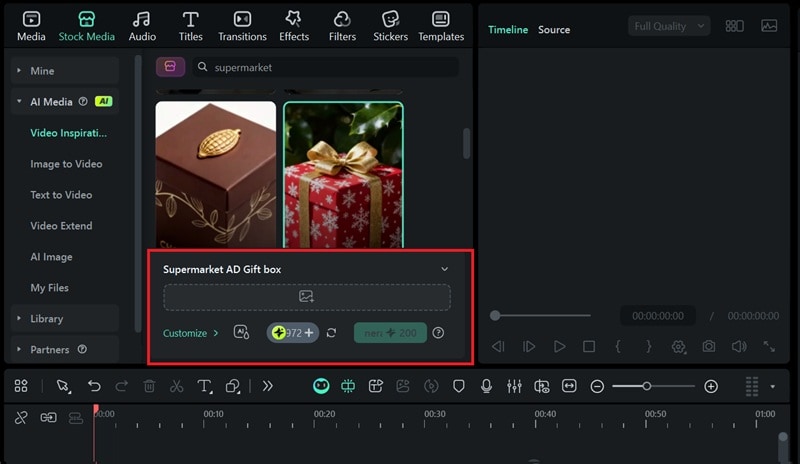
Step 2: Select a marketing template you like. Then, upload the image of your product as the base reference. In this example, we are using the "Supermarket AD Gift Box" template.
Your commercial video result will appear in the My Files panel. Next, you can add it to the timeline and combine it with other clips until everything comes together.
💡 Tip: If your product photo has a plain background, the animation will look better. Crop it slightly to center the product before applying the template.
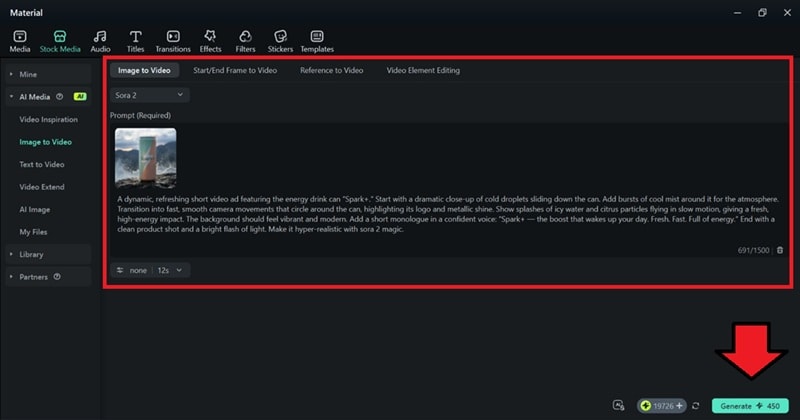
2. Turning Your Image into a Video with a Prompt
Filmora’s Image‑to‑Video feature also lets you describe motion, lighting, and camera moves with a prompt, choosing advanced models like Veo 3 or Sora 2 for realism or stylized motion.
Below is a step‑by‑step guide for using Image‑to‑Video:
Step 1: Go to Stock Media, then select AI Media > AI Image to Video. Choose model: Veo 3 (for realism) or Sora 2 (for stylized motion).
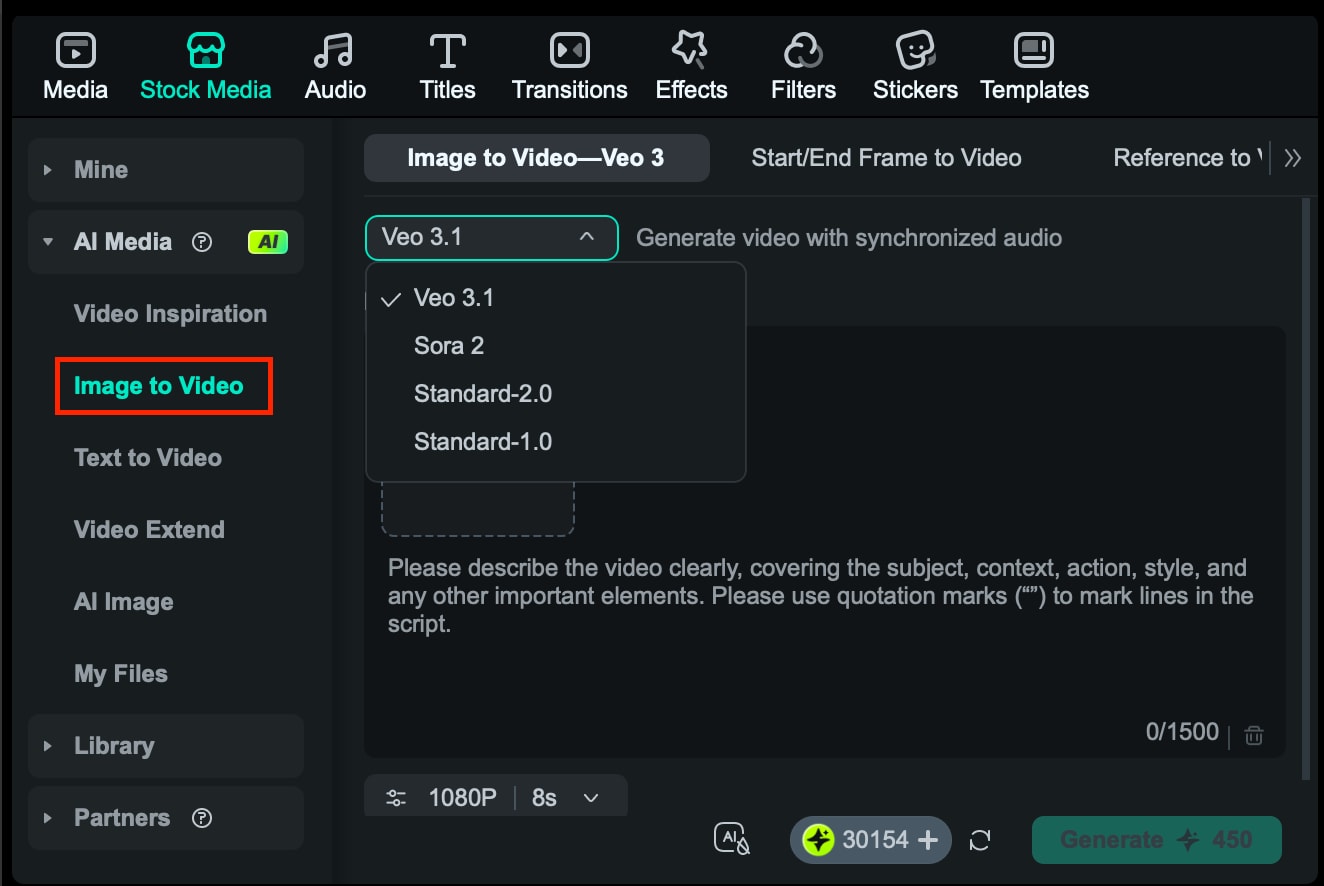
Step 2: Paste your prompt and set the duration (4–8 seconds). Then start generating and let the tool create the scene.
3. Insert Raw Footage
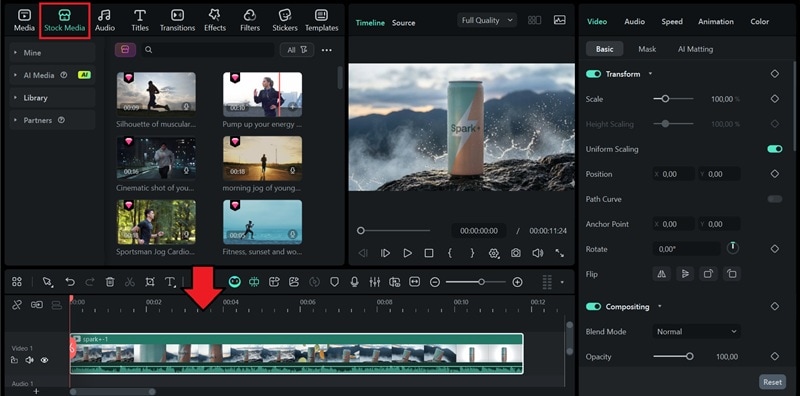
Besides generating the visuals, you can also import the footage you have or download from Filmora’s Stock Media library.
Step 1: Import your videos under the Media tab or download from Stock Media > Library. Drag them into the timeline. Trim to match script timing.
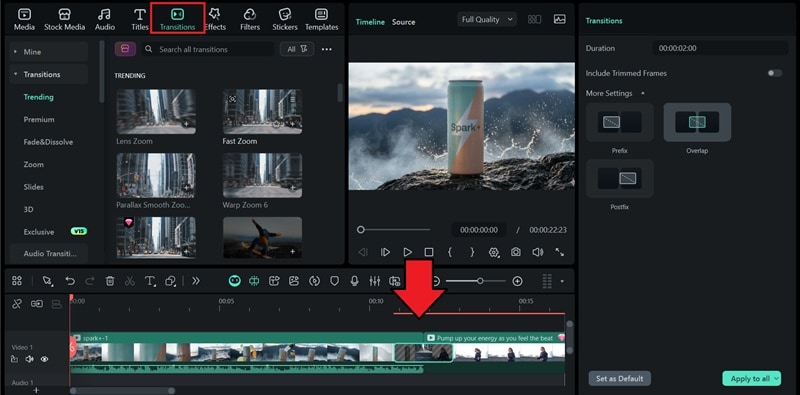
Step 2: Add transitions from the Transition tab to blend the clips.
3. Generating a Voiceover
Once your scenes are in place, add a voiceover that aligns with your script. Filmora lets you record your own voice or use AI Text‑to‑Speech, which even supports voice cloning for a personalized touch.
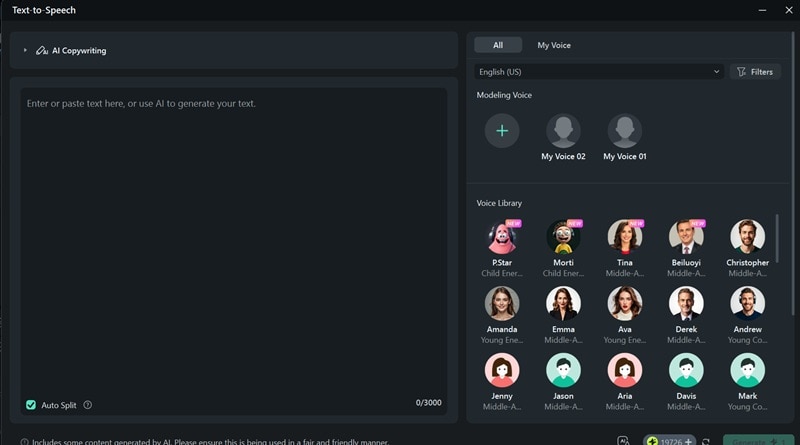
Step 1: Select Audio > Text to Speech and click Start to open the TTS window.
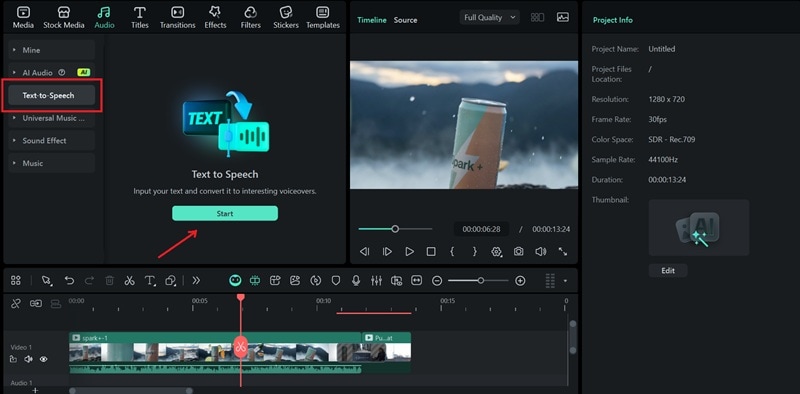
Step 2: Paste the final script and choose a voice that matches the clip. Generate TTS and place the audio on the timeline under your clips.
4. Editing and Polishing the Commercial
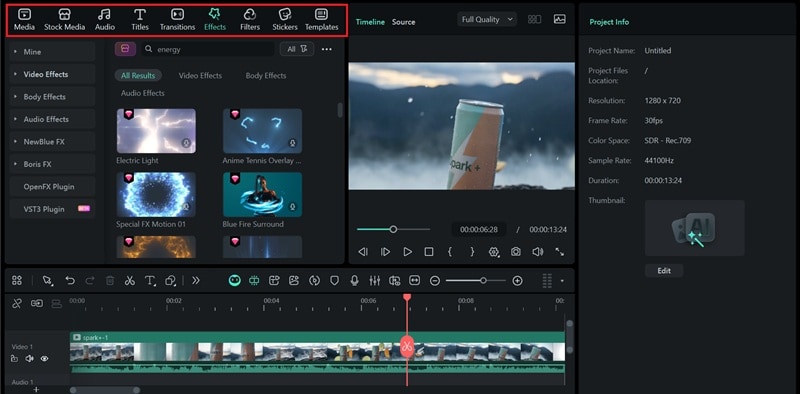
Assemble all components and polish them for a professional finish. Use the toolbar to add effects, text, captions, and stickers, ensuring a visually appealing commercial before exporting.
Part 3. Explore AI Advertising Examples to Learn From
Seeing real‑world examples helps you understand how to leverage AI in commercial creation. Below are standout campaigns that showcase the power of AI‑generated ads.
1. Coca‑Cola Ad – "Holidays Are Coming"
Key takeaway:
- The ad displays the brand name clearly without distorted text, even with AI.
- Snow, streets, lights, and buildings appear detailed and atmospheric, creating a strong holiday vibe.
- The holiday jingle builds excitement for the "Holidays are coming" moment.
2. Miniature Coca‑Cola Ads: A Tiny Revolution!
Key takeaway:
- This short‑form ad relies on clever visual tricks that transform ordinary scenes into tiny miniature worlds.
- Its charm comes from creative set design, shallow depth of field, and close‑ups that feel handcrafted.
- You can recreate a similar look using the "Mini World" template in Filmora.
3. Original Source – Nature Hits Different!
Key takeaway:
- AI blends generated shots with real footage to create a vibrant visual narrative.
- Exaggerated organic shapes and bold, highly saturated colors grab attention.
- Smooth transitions between natural elements like water, leaves, and flowers.
- Fast‑paced motion sequences create an energetic atmosphere.
- The focus is on sensory experiences rather than traditional storytelling.
Conclusion
You’re now equipped to create AI‑powered commercials that rival industry standards—fast, affordable, and professional.
AI gives you the freedom to produce high‑quality results without a large budget or studio team. Try the techniques and examples in this guide, experiment boldly, and discover how easy it is to create ads that stand out.

Filmora
⭐⭐⭐⭐⭐
The Best AI‑powered Video Editing Software and App