
With a new camera, you might be overwhelmed with a large amount of information provided on the LCD screen and (possibly) through the viewfinder. It could be challenging to figure out what your camera display is showing you.
Learning what all the information means can help you use the camera more effectively.
Camera Display Tips
An F or an f/ followed by a number refers to the aperture setting (or f-stop) for the photo. With a larger aperture (signified by a smaller F number), more light reaches the image sensor, allowing for faster shutter speeds.
A larger F number allows a greater depth of the photo to be in focus. A smaller F number means a small portion of the depth of the photo will be in focus, meaning only the subject might be in focus, and the background will be blurry.
A number listed as a fraction, such as 1/2000 or 1/250 represents the shutter speed in a fraction of a second. A shorter shutter speed makes it easier to capture moving subjects. You might find that some cameras list the shutter speed as a single number, such as 2000 or 250, rather than a fraction. It means the same thing as the fraction.
A segmented line that looks a little like a ruler or tape measure usually is the exposure or white balance indicator.
A plus/minus icon (+/-) could refer to a couple of things with your camera settings: Exposure compensation or flash compensation.
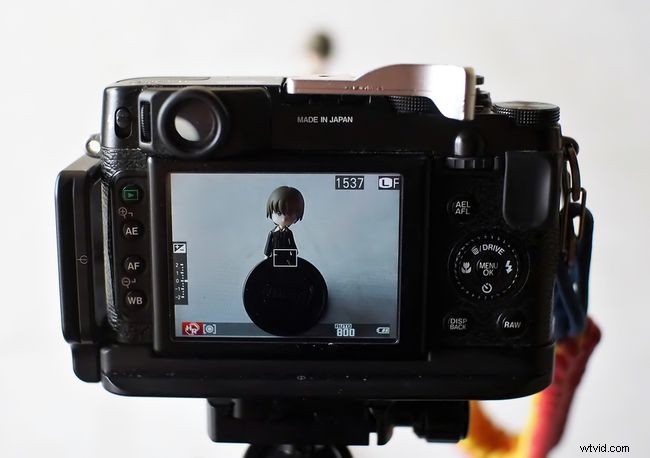
A number inside a set of parentheses usually refers to the number of photographs you can still shoot at the current resolution before the memory card is full. Some cameras list this number without parentheses too. Look at the portion of the screen where the camera's resolution is listed, and you'll usually see the number of photos remaining listed nearby.
You'll usually see the movie resolution listed near the still image resolution as well. After the movie resolution, which might also include listing the number of frames per second at which you're shooting, you should see a listing for the amount of time remaining on the memory card for video recording. This number is listed most of the time as minutes and seconds, with the minutes number followed by an apostrophe and the seconds number followed by a quotation mark.
A number next to an ISO icon refers to the camera’s ISO setting. Higher ISO settings are required for shooting in less external light.
A QUAL icon or a number with an M, such as 10M, refers to the resolution and image quality for the photo. L typically refers to the largest resolution number, while S refers to the smallest resolution.
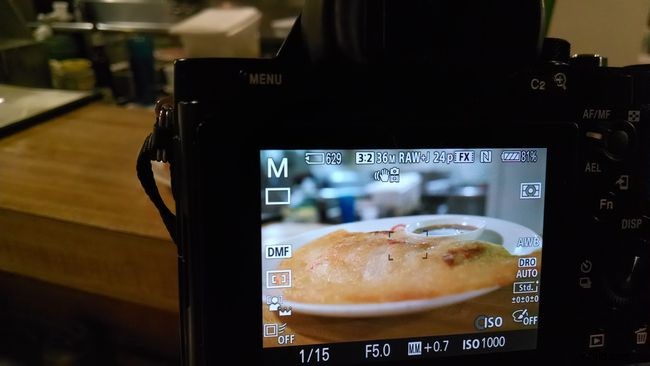
Because most DSLR cameras have a viewfinder, you usually can choose to have the LCD display the camera’s settings information on the live view of the photo you’re going to shoot.
With some cameras, you can change the information shown on the display. Look for a button with an i or INFO marked on it. Pressing this button should change the information on the display. Depending on the camera model, you also can specifically select the information that is displayed through the camera’s various menus.