
Getting the Most from TTL Flash
Flash photography can feel daunting, especially when the results fall short of expectations. This guide demystifies TTL flash, explains why it can sometimes fail, and shows you how to tweak it for reliable, high‑quality images at events or portraits.
What Is TTL Flash?
TTL—short for Through The Lens—is the method your camera uses to gauge exposure by reading light that passes through the lens. In flash mode, TTL means the camera and flash communicate to calculate the exact amount of light needed, based on the pre‑flash that hits the subject and reflects back to the camera.
Not all flashes support TTL. If you’re buying new gear, confirm the specifications. For example, the Godox Speedlight for Nikon offers TTL functionality.
New to flash? Check out our Meet Your Flash tutorial to familiarize yourself with basic controls.
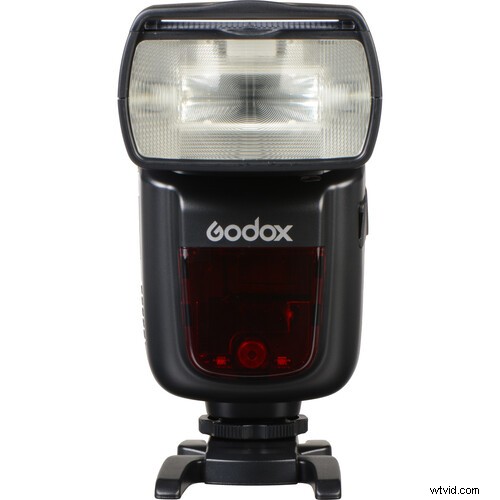
How TTL Flash Works
When you half‑press the shutter, the camera focuses and the flash fires a tiny 1/32‑power pre‑flash. The camera reads the reflected light, determines the ideal flash output, then fires the main burst at that calibrated power.
Types of TTL Flash Systems
- TTL – Basic through‑lens metering.
- A‑TTL – Automatic TTL, common on older Canon models.
- E‑TTL / E‑TTL II – Evaluative TTL, the current standard for Canon.
- i‑TTL – Nikon’s equivalent of E‑TTL.
All these systems rely on a pre‑flash, but E‑TTL is typically the most accurate. Remember: the pre‑flash is invisible to the eye; it’s a sub‑millisecond cue for the camera.
For optimal performance, the flash must be compatible with your camera’s metering system. Mixing brands (e.g., a Canon flash on a Nikon body) will prevent TTL from working correctly.
TTL can also be used off‑camera, though that introduces additional variables. This guide focuses on on‑camera TTL for clarity.
Common Reasons TTL Fails to Deliver
Even with a perfect TTL setup, photographers often encounter dark, washed‑out, or overly “flashy” images. The root cause is usually the system’s reliance on a single metered tone.
Why the Tone Matters
The TTL meter reads the tone under the focus point and adjusts the flash to make that tone mid‑gray—just as your camera’s built‑in meter does. If you meter a black tuxedo, TTL will brighten it to mid‑tone, resulting in overexposure. Conversely, metering a white dress can lead to underexposure.

Because TTL can’t interpret color, it may misjudge scenes with extreme tonal ranges. The solution is to intervene with flash compensation.
Using Flash Compensation to Fine‑Tune Exposure
Flash compensation lets you override TTL’s automatic setting. By adjusting the flash exposure value (often a +/- button paired with a lightning‑bolt icon), you can dial the flash power up or down to match your creative vision.
Unlike exposure compensation, which changes the camera’s ISO, shutter, or aperture, flash compensation specifically alters the flash’s output.

For example, setting flash compensation to –1⅓ stops reduces the flash power, bringing a previously overexposed image into balance.

Using a gray card can confirm that your TTL exposure is now accurate; the photo should reflect a neutral mid‑tone.

Remember that scene changes—new subjects, lighting, or backdrops—alter the camera’s reading. Always review your images and adjust flash compensation as needed.
Why Backgrounds Can Be Dark with TTL Flash
TTL flash typically lights the subject, not the background. If the background remains underexposed, increase ambient light by lowering shutter speed, opening the aperture, or raising ISO. Then retest with TTL enabled and fine‑tune flash compensation.
Managing “Flashy” Photos
A “flashy” image often means a mismatch between ambient and flash exposure, or excessive contrast. To correct this:
- Ensure the ambient light matches your desired look—soft, diffused lighting is preferable for portraits.
- Use a larger light source (e.g., an umbrella or softbox) or bounce the flash to soften the light.
- Adjust camera settings to balance background exposure, then tweak flash compensation.
Below is an example where subtle flash combined with open shade produced a natural, balanced portrait.

TTL vs. Manual Flash
Which method is better depends on your workflow and skill level. TTL excels in fast‑paced environments like weddings, where quick adjustments are needed. Manual flash offers full control and repeatability, essential for studio work or when you need to recreate a specific lighting setup.
Learning manual flash first provides a solid foundation that makes TTL more intuitive and allows you to adapt when TTL isn’t available.
Takeaway
TTL flash is a powerful tool, but it demands understanding and adjustments to truly shine. Master the basics, practice flash compensation, and you’ll unlock reliable, high‑quality flash photography in any setting.