

Have you ever wanted to know if a particular iOS feature is supported in your country, or perhaps a country you are traveling to with an iPhone or iPad?
As you may know, some iPhone and iPad features are limited to specific countries. This can be for varying reasons, perhaps due to initial feature availability, regional restrictions or laws, or the availability of necessary resources for a particular feature to work. Additionally, often new iOS features roll out in a few select countries first, and then release into other countries as time goes on, as is the case with Apple Pay or Apple News or Siri.
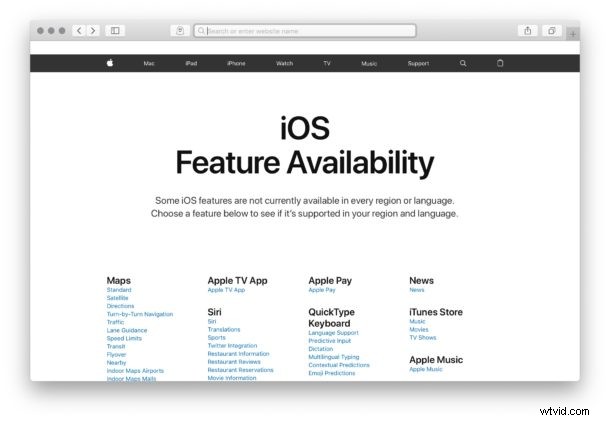
If you’re wondering if a particular iOS feature is available in your country, you can find out rather easily by going to a little-known Apple website to confirm feature availability for iOS versions on iPhone and iPad.
How to Check iOS Feature Availability For Specific Countries
- Open any web browser from any device or computer
- Go to the iOS Feature Availability page on apple.com here
- Find the feature you are interested in and click on it to see the country list that supports that feature
For example, you can go to that link, then click on ‘Apple Pay’ to see the latest list of countries where Apple Pay is supported.
Even if a feature is not yet available in a particular country or region that does not mean it never will be. Apple works to bring features to new regions constantly, and as time goes on more and more countries typically support more features.
It’s important to note this is feature availability, which can differ per country, and not feature compatibility, which can differ per device and iOS version. It’s quite possible that a feature is technically compatible with the iOS device and version that is installed on say a particular iPhone or iPad, but that the country the device is registered and used in does not support that feature.