
Want to add some hand-painted, paper-textured, and torn-up graphics to your edits? This free pack of motion graphic templates for Premiere has you covered.
Sometimes it’s good to add a little bit of chaos to your work. With this pack of FREE motion graphics templates for Premiere, you can add a hand-made feel to your lower-third animations, title animations, and even transitions.
This pack is fully customizable, even down to your font choice, and you can do it all in Premiere. No need to open After Effects. In the Essential Graphics Panel in Premiere, you have options to change colors and size, turn textures and objects on/off, and much more.
NOTE: In order to use these graphics, you’ll need to at least have After Effects installed. If you don’t use Premiere, you can still use the included After Effects project file to customize and export your own versions.
This FREE pack of motion graphic templates includes the following:
- 13 motion graphics templates for Premiere (.mogrt)
- The After Effects project file used to create them
- 7 title animations
- 3 lower thirds
- 3 video transitions
Download the FREE Motion Graphic Templates
Click the button below to download the free motion graphic templates. In the download, you’ll find everything you need to get started. These motion graphics are free to use in any personal or commercial projects. By downloading, you agree not to resell or redistribute these free assets.
DOWNLOAD FREE Motion Graphics
How to Use And Install These Free Motion Graphics
The video above is a good rundown of how to use .mogrt template files. You can only use these templates in Adobe Premiere Pro, unfortunately, so if you work in a different editor, you’ll need a different solution. This pack in particular includes the After Effects project file, so if you have After Effects but use a different editor, you can still customize and use these templates in AE and then render them to your editor of choice.
With these free Premiere motion graphics templates, you have certain control and customization options that will allow you to get the look you want. Here are more details about how to install these assets.
Install The .Mogrt Files in Premiere
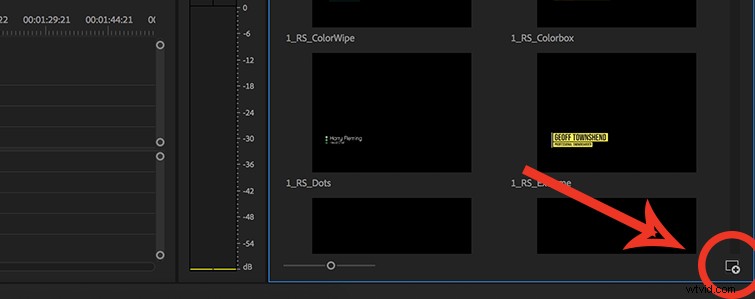
In Premiere, make sure you have the “Essential Graphics Panel” open. You’ll most likely need to click on the window tab at the top of the screen, and make sure that the Essential Graphics Panel is checked.
Once you’re in the Essential Graphics Panel, look to the bottom-right of the panel, and you should see a little plus sign with a square around it (pictured above).
Once you click that button, you’ll get a file dialogue box you can use to navigate to the template you want to add. Unfortunately, you have to do this process one template at a time instead of adding them all at once. Hopefully Adobe will change that soon.
How to Customize These Free Motion Graphics
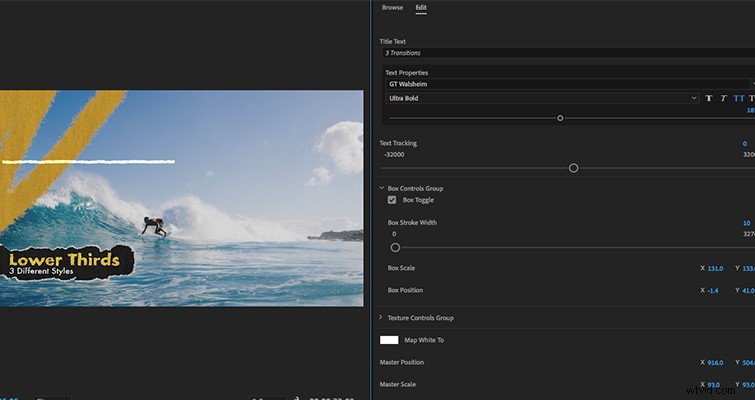
Once you’ve installed your template files into the Essential Graphics Panel, you can drag and drop them into your timeline.
Once it’s in your timeline, you can simply click on the the graphic, and it will change the Essential Graphics Panel to a suite of customization options. Here, based on the template, you’ll have different options, like size, opacity, color, and even font.
(NOTE: If you don’t like the amount of texture, or want to add more, there are sliders for all of the textures and roughness.)
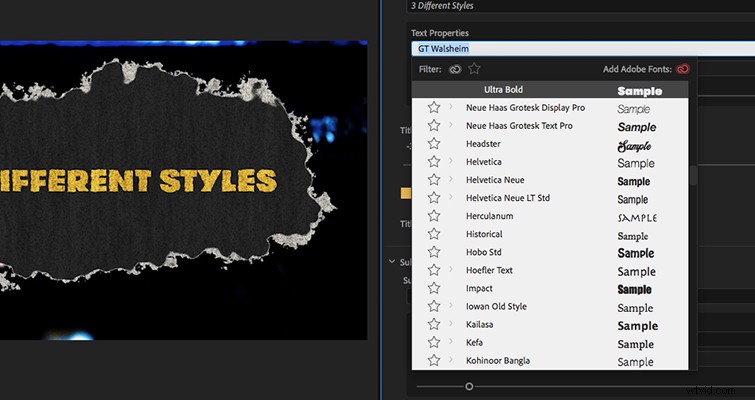
I highly recommend experimenting with these templates and mixing and matching them to create your own looks. I tried to make them as modular as possible.
Hope you enjoy them!