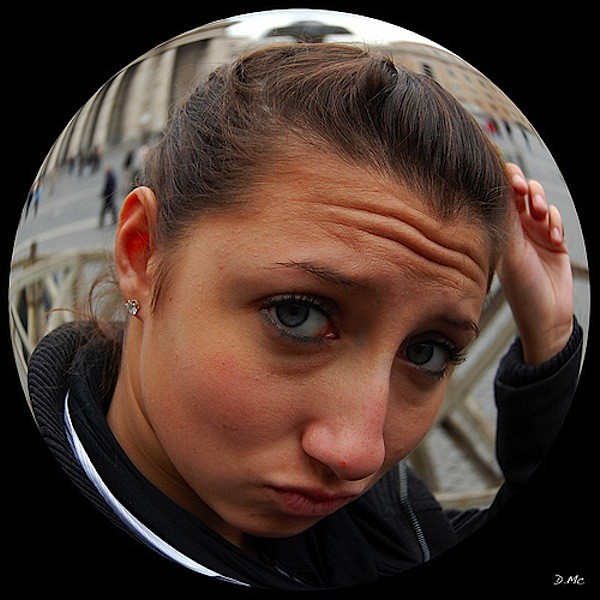
 Dan McGinty (see his work on Flickr)- one of our wonderful Forum members – submitted this tutorial on how to create a bubble portrait using Photoshop CS3. Got a tip or tutorial to share? Post it in the tutorials section of our forum.
Upon request I am posting a step by step how to on a recent photo I posted in the share section. I wanted to try something different so I thought of fish eye effects, Well I decided to do the opposite. More of a bubble effect and I loved it for this photo.
Program Used: Photoshop CS3
Difficulty: Easy to Average
Things You Need: A photograph!
Ok, Well here it goes. I will post screen shots along with directions.
Step 1: Open your Image in Photoshop:
Step 2: Draw a box around the part that you would like to put in the bubble.(Hold Shift to keep the rectangle tool as a box.) Remember that you will be losing your corners.
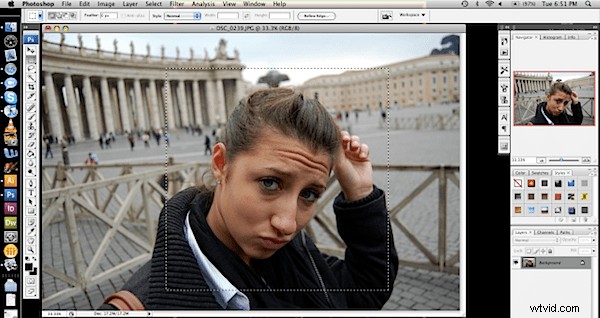
Step 3: deselect the part you have cropped (Apple-d). Then go to filter: Distort: Spherize… Keep it at 100%
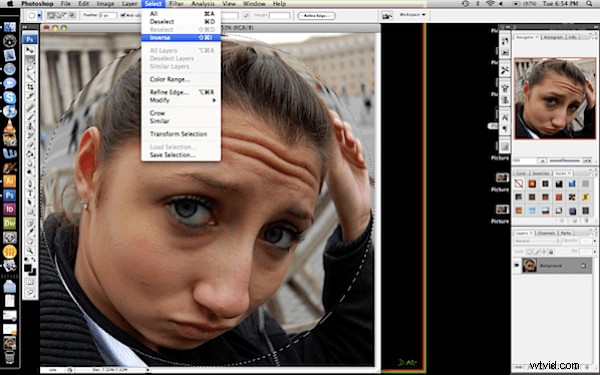
Step 4: Now you will have your square image with a sphere effect to the whole center. Select the circle tool now. Start in one corner and drag to the other corner while holding shift to get a perfect circle selecting your sphere.
Then, select:inverse. (selecting all the areas that aren’t in the sphere.)
Step 5: Add a layer. You will still have the area from step 4 selected. Then grab the paint bucket and whatever color you’d like to use and pour it into the space selected!
And now you have completed your Portrait in a bubble!!! Easy right?
Final: