

Everybody sends and receives lots of photographs through email, especially us photographers. We all inadvertently lose track of some of those photos too. That’s just the way it is. It happened to me and, yesterday, thanks to the app I’m reviewing today, I was reunited with one special long-lost photo of mine!
Lost Photos – The App
Circumstances came to pass that I was introduced to this App called, Lost Photos. The promise this App makes to you is to uncover photos buried deep in your email account. After all, the photos we share with family and friends are the ones we care most about and would hate to lose track of any of them forever, right? With the App Lost Photos, that just won’t happen. If it’s in your email, you’ll get it back. If you have more than one email account, you can search them all. The limitation is that you have to do them one at a time. Simply enter your username and password for each account.
Simplicity
There is no learning curve to use this App. After downloading and installing it on your Mac or Windows computer you’re presented with this simple interface:
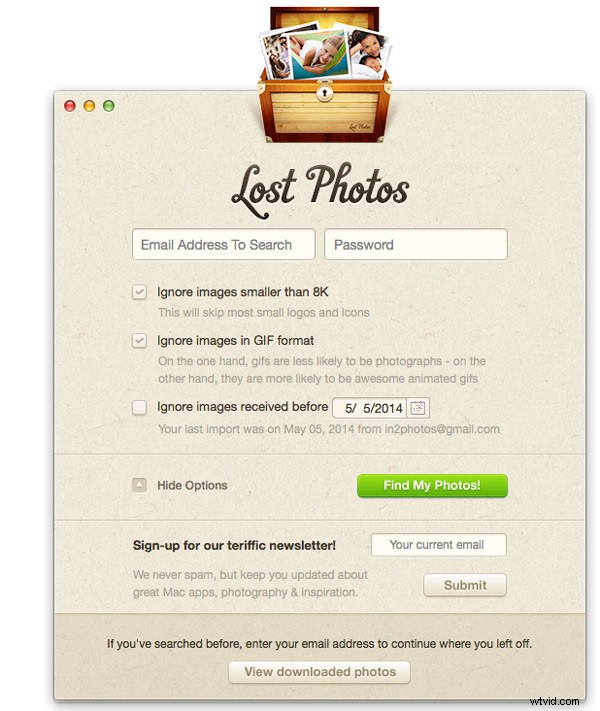
Could it be any easier? All you need to do is enter the login credentials of the email account you want to search for those lost gems. For me, it’s my gmail account. I’ve had this account ever since gmail began in the 90s. Along the way I’ve had to delete some of the old ones because of bloat and my account pushing the 15GB limit of gmail. Still, there are over 100,000 emails in there and I know there are hundreds of old photos that will be so much fun to find and revisit.
Helpful Options
Before pushing the green “Find my photos!” button, there are some options which you might find helpful. There are three simple options which are accessed in the handy pull-down menu. Set these however it pleases you.
NOW you can push the green button! Could it be any simpler?
Then What Happens?
Now you wait. The size of your email account and the photos in it will determine how fast Lost Photos finishes its job. From my experience with the app, it will finish in under two hours. The app even has a safety mechanism if it finds too many photos. In the video below, you’ll see that actually did happen to me and the App paused the download to prevent the risk of my email provider detecting excessive downloading from the account and possibly disabling it. So the App has got your back.
What Did Lost Photos Find?
In my case, after scanning over 100,000 emails, it recovered over 3,000 photos. One of them, I show it in the video, is one precious photo that I thought was lost forever. Now I have it back! That’s worth the $2.99 price of the app to me! When you download the App, you get the FREE version, which will recover just a few lost photos in your email account. That probably won’t be too helpful so the full version is an upgrade you will want to buy. If you’re ready for a ride down memory lane, just download the free Windows version or free Lost Photos for Mac. Here are a couple that I recovered.


Let me give this one 5 stars because it does perfectly what it’s designed to do and it’s very intuitive to use.
The folks at Macphun software that created Lost Photos are currently running a contest for found photos. You can check out the rules and enter that contest here.
For more articles on finding lost photos, backing up and best practices try these:
- Solving the Problem of Duplicate Photos
- Help! Lightroom Lost My Files!
- Recovering lost or deleted files – Backing Up & Saving Your Images: Part 4
