
In an era where content must move fast, creators are constantly seeking tools that blend speed with quality. Pollo AI positions itself as a one‑stop solution, turning simple text prompts or uploaded images into polished videos in minutes.
Whether you’re a social media influencer, a marketer, an educator, or a novice content maker, Pollo AI promises to remove the tedious steps of traditional video editing—timelines, transitions, voice‑overs—so you can focus on storytelling.
Quick Feature Overview of Pollo AI
| Feature Category | Summary |
| Core Function | AI‑powered text‑to‑video and image‑to‑video generation with lightweight editing tools |
| Editing Features | Basic trimming, text overlays, royalty‑free stock assets, AI utilities such as object removal and background blur |
| Ease of Use | Intuitive, beginner‑friendly interface with a minimal learning curve |
| AI Capabilities | Text‑to‑video, text‑to‑image, AI upscaling, special effects, and (paid tier) voice cloning |
| Performance & Speed | Fast generation for short, simple content; rendering times vary by model and resolution |
| Value for Money | Generous free plan; Pro tier offers excellent value for frequent creators—check usage limits before upgrading |
| Best For | Social media creators, educators, marketers, and beginners who need rapid prototyping |
| Limitations | No multi‑track timeline, keyframe control, or advanced compositing tools for seasoned editors |
Pricing & Plans – Is Pollo AI Affordable?
| Plan | Monthly Price | Credits / Month | Video Limit | Image Limit | Key Features | Support |
| Free | $0 | 10 credits | 1 video | 10 images | Watermarked outputs, text/image/video‑to‑video, consistent characters, AI effects & upscales, 40+ templates | Standard |
| Lite | $10 (50% OFF) | 300 credits | 30 videos | 300 images | No watermark, faster generation, private visibility, more camera movements, copy protection | Priority |
| Pro | $14.5 (50% OFF) | 800 credits | 80 videos | 800 images | All Lite features + higher limits, 3 parallel tasks, full access to advanced tools | Priority |
Getting Started with Pollo AI – A Step‑by‑Step Guide
Pollo AI’s workflow is intentionally straightforward, enabling anyone to produce a video from scratch in just a few minutes.
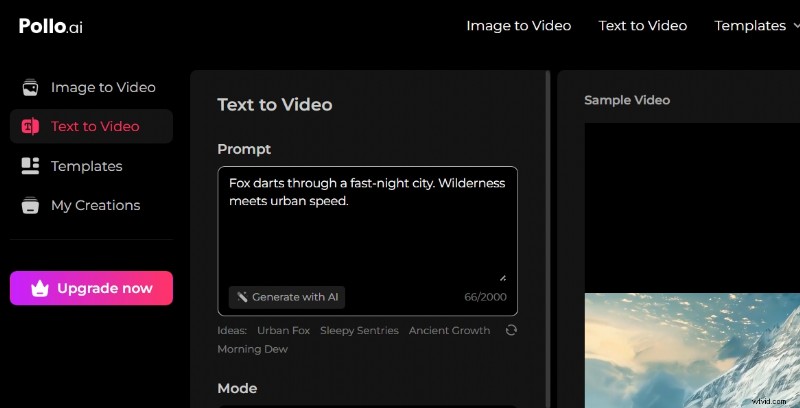
Step 1: Define Your Vision or Upload Source Images
Begin by writing a concise text prompt—e.g., “a girl walking through a cyber‑punk city”—or by uploading one or more images. Pollo AI supports both text‑to‑video and image‑to‑video conversions, even allowing you to blend elements from multiple photos.
Step 2: Fine‑Tune Video Settings
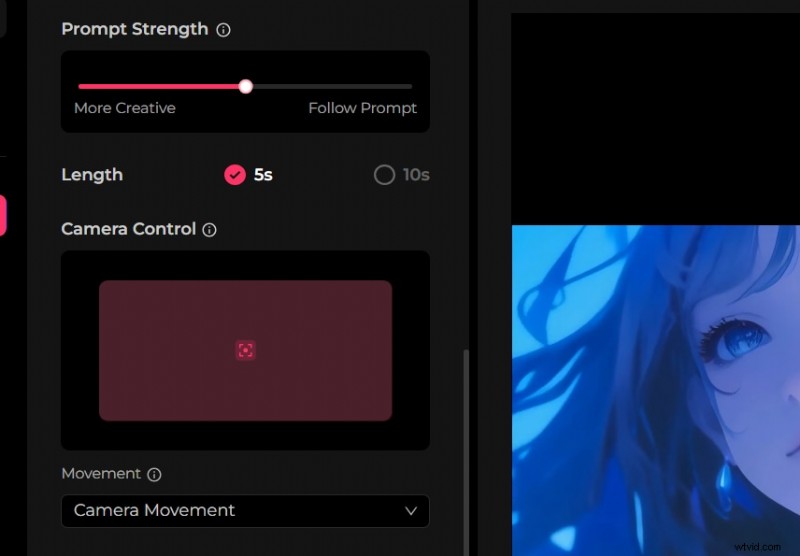
Before generating, adjust aspect ratio, camera movement, duration, and quality mode. You can also set how creatively the AI interprets your prompt, which is handy for abstract or hyper‑realistic requests.
Step 3: Create Your Video with One Click
After previewing your settings, click Create. Pollo AI handles all processing in the cloud—no powerful local hardware is required.
Step 4: Review, Download, or Share
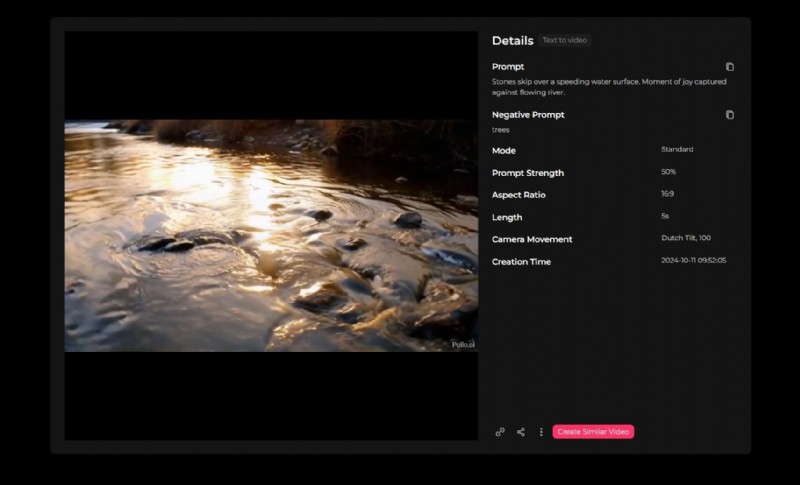
The finished video appears within seconds. You can preview it, download it, or share it directly to social platforms. For quick tests or idea validation, Pollo AI delivers results in record time.
Deep Dive: Pollo AI’s Core Capabilities
- Text‑to‑Video Generation – Powered by cutting‑edge models such as Veo 3, Kling 1.6, Runway Gen3, and Pika. These models produce cinematic clips with consistent motion and color, even for complex prompts.
- Text‑to‑Image Generation – Utilizes Stable Diffusion, Ideogram, Recraft, GPT‑4o, and DALL‑E to produce high‑resolution images that can be overlayed or used as scene elements.
- Video Enhancement – Built‑in AI upscaling to HD/4K, object addition/removal, green‑screen background editing, and over 40 creative effects (Melt, Squish, Hug, Explode, etc.).
- Audio & Voice Features – Multilingual voice cloning (paid tier), natural TTS in various emotions, a licensed music library, and basic audio editing (volume, fade, sync).
- Stock Media Library – Royalty‑free clips, images, and music that align contextually with your prompt. Commercial use is permitted on paid tiers.
- Basic Editing Toolkit – Drag‑and‑drop editor for trimming, adding text overlays, transitions, and logos—ideal for quick finishing touches.
User Experience & Interface – How Intuitive Is Pollo AI?
Pollo AI operates entirely in the browser, presenting a clean dashboard that groups text, image, and video tools into a single canvas. No downloads or powerful local machines are required.
Beginners can produce a video in under ten minutes thanks to guided prompts and pre‑built templates. Professionals may find the lack of a multi‑track timeline, keyframe control, and advanced compositing limiting.
From prompt to preview, the workflow is fast, and revisions can be made within the same interface without the need for export‑import cycles.
AI Intelligence – How Smart Is Pollo AI?
Strengths: Integrating top models such as Veo 3 and Runway Gen3 results in high‑quality, coherent storytelling. The platform handles camera movements, creative tones, and scene styles effectively, producing consistent output across complex layers.
Weaknesses: Lower‑tier models (e.g., older PixVerse versions) may introduce visual artifacts, flickering, or inappropriate morphing, especially in dynamic scenes. Achieving polished results often requires trial‑and‑error.
Innovation: Pollo AI uniquely connects more than 15 models, offering text‑to‑video, image‑to‑video, video‑to‑video, character consistency, avatar creation, and a suite of advanced effects—all within one platform.
Reliability: The service enjoys good uptime; however, heavy traffic can occasionally lead to generation failures or slower feedback.
Performance, Speed & Rendering
Pollo AI runs smoothly on modern browsers, particularly Chrome. Older devices or mobile browsers may experience reduced feature sets or occasional crashes.
Generation Speed: A 5‑10 second clip typically renders in a few minutes. PixVerse models deliver 360p in ~30 s and 720p in ~1 min; premium models finish in 2–5 min. Kling 1.0/1.5 takes ~6 min, while Kling 1.6 completes in ~4 min.
Export Times: Once generation completes, exporting is swift. Enhancements such as upscaling or noise removal add minimal extra time.
Output Quality: Tier 1 models deliver Full HD (1080p) visuals with smooth motion. Lower tiers may appear softer. Video length caps at ~10 seconds, with watermark‑free HD available on paid plans.

Filmora 14 – AI‑Enhanced Traditional Video Editing
Filmora 14 blends classic editing tools with AI features to accelerate workflow without sacrificing quality. It caters to both beginners and professionals, offering a more granular timeline control than text‑prompt platforms like Pollo AI.
Key AI Features of Filmora
- AI Copilot Editing – Analyzes footage to suggest edits, effects, and transitions.
- AI Text‑Based Editing – Allows editing directly through text instructions.
- AI Text‑to‑Video – Converts scripts into visuals with timeline control.
- AI Thumbnail Creator – Generates optimized thumbnails instantly.
- AI Smart Masking & Cutout – Accurate object tracking for background removal.
- AI Audio Tools – Includes sound removal, noise elimination, music creation, and speech recognition.
Steps to Create an AI Video with Filmora
Step 1: Launch and Select AI Video Creation
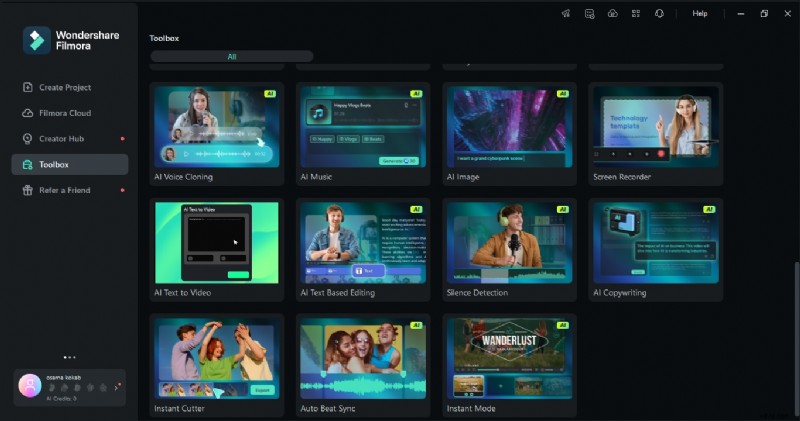
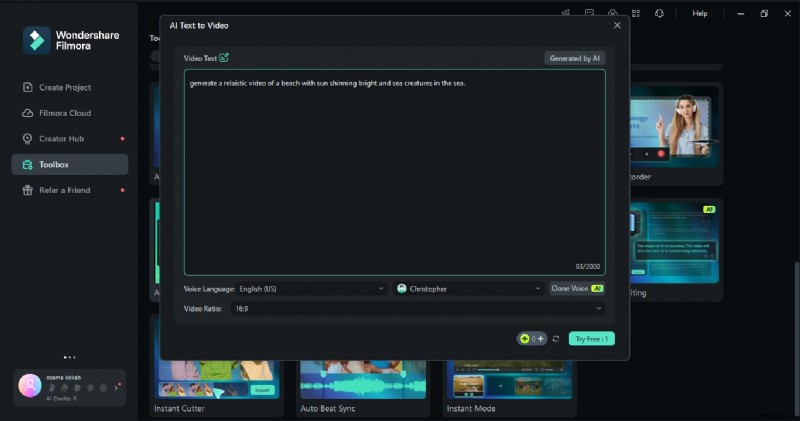
Open Filmora, locate AI Text‑to‑Video on the main screen, and click to begin.
Step 2: Provide Your Script or Prompt
Enter a script (max 1000 characters), adjust language, ratio, and narration voice. You can even generate voice clones.
Step 3: Review and Export
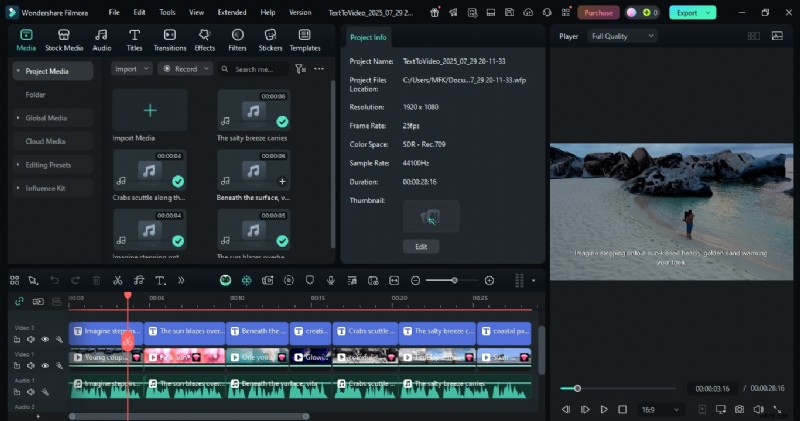
After generation, the video appears on the timeline. Preview, then click Export to save locally.
 Secure Download
Conclusion
Pollo AI delivers a streamlined, beginner‑friendly experience that excels at rapid prototyping and short‑form content. Its AI models produce decent quality, but the lack of advanced editing tools limits its use for professional‑grade productions.
For creators who need more control, higher fidelity, and a robust timeline, Filmora’s AI‑enhanced traditional editor remains the stronger choice. Pollo AI is ideal for quick, cost‑effective videos, while Filmora suits long‑term, high‑impact projects.
Ultimately, the right tool depends on your workflow: choose Pollo AI for speed and simplicity, and Filmora for depth and precision.