
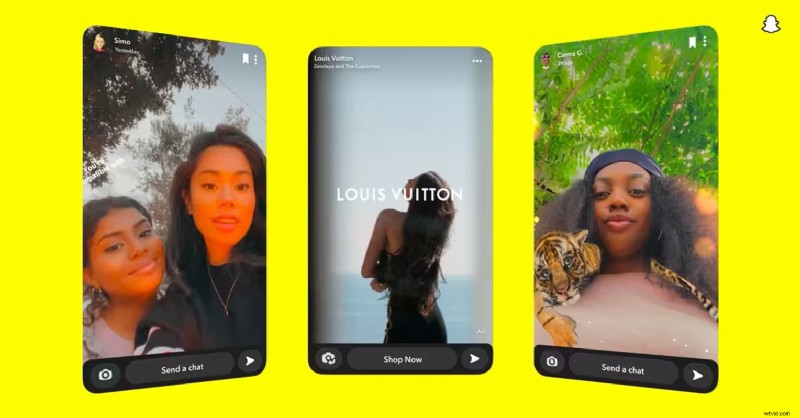
Snapchat is designed for quick and creative sharing, but its built-in editing tools often feel too limited when you're trying to make your content stand out. A Snapchat video editor app gives you more flexibility to add stylish effects, music, text overlays, and smooth transitions that can instantly improve your snaps.
Creating content for Stories, Spotlight, or short vertical clips becomes much easier. You can sync your videos to music, apply more filters, and enhance every scene directly from your phone. These tools help transform everyday moments into stories that your audience won't want to skip.
To help you out, we've selected the top Snapchat video editor apps based on ease of use, creative features like filters and templates, mobile performance, and compatibility with Snapchat's vertical 9:16 format.
Why Filmora is the Top Snapchat Video Editor App
If you want to go straight to the best options, these three apps are the top choices trusted by Snapchat creators for stunning, high-quality edits:

Wondershare Filmora Mobile – Best for editing vertical videos with social-ready exports and built-in trendy effects
If you need a Snapchat video editor app that makes it easy to edit vertical videos with built-in music, text, and social-ready templates, Filmora is a great choice.
Download Download Download
Funimate – Best for visual effects and motion transitions.
The perfect choice for adding bold visual effects, dynamic transitions, and keyframe animations that make your videos stand out.
View detail
YouCam Video – Best for creators focused on beauty, makeup, and face retouching edits
Ideal for a creator who focuses on beauty and wants to apply makeup, smooth skin, and highlight facial features with just a few taps.
View detail
Part 1. Snapchat Video Editor App Comparison Chart
| App Name | Best For | Platforms | Price | Key Features | Rating (average) |
| Funimate | Trendy visual effects and motion transitions | Android, iOS | Free / Pro starts at $2.99/week | FX effects, basic keyframes, music sync, custom transitions | ⭐ 4.3 |
| Filmora Mobile ✅ | AI-powered Snapchat video editing with pro results | Android, iOS | Free version available / Pro starts at $9.99/month | AI Captions, AI audio denoise, AI Image to Video, social templates, royalty-free music, cross-device sync | ⭐ 4.7 (Highest Rated) |
| YouCam Video | Beauty filters and face retouching | Android, iOS | Free / Premium from $5.99/month | Makeup tools, skin smoothing, background blur, AR filters | ⭐ 4.6 |
| Premiere Rush | Simple but professional multi-track editing | Android, iOS | Free / Pro $9.99/month | Multi-track timeline, motion graphics, audio control | ⭐ 4.2 |
| VLLO | Beginner-friendly vlog editing (no watermark) | Android, iOS | Free / Premium $19.99 annually | Animated text, transitions, background music | ⭐ 4.6 |
| Splice | Quick cinematic edits with music sync | Android, iOS | Free / Pro $9.99/month | Beat syncing, overlays, slow motion effects | ⭐ 4.6 |
| VivaVideo | Fun daily vlogs and lifestyle edits | Android, iOS | Free / VIP $6.99/month | Stickers, collage maker, voiceovers, slideshow builder | ⭐ 4.6 |
Part 2. Top 7 Snapchat Video Maker Apps to Download in 2025
Once you're ready to take a closer look, here's a detailed review of each Snapchat video editor app on our list. These apps offer a variety of creative tools, including beauty filters, motion effects, and ready-made templates, so you can find the one that you need.
1. Funimate
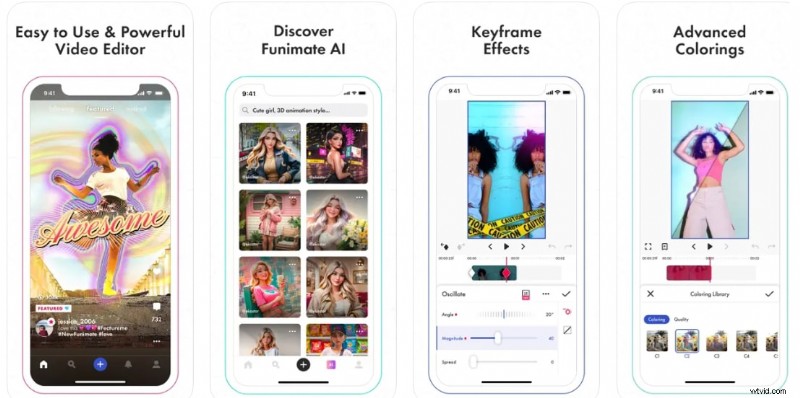
Funimate is a Snapchat video editor app known for bold visual effects, smooth transitions, and animated text. The app is a favorite among young creators who want to make standout vertical videos without using complicated tools.
Pricing
Free with in-app purchases; Pro version starts at $2.99 per week or $35.99 per year.
Pros & Cons
- Best for trendy, eye-catching videos
- Active creator community
- Simple mobile interface
- Watermark on the free version
- Some features are locked behind a subscription
Key Features
- Built-in transitions and keyframe effects
- Masking and AI effects, looping videos, and animated text
- Beginner-friendly tools
Target users and use cases
It's ideal for casual creators who want to enhance their Snapchat Stories or Spotlight videos with trending visual effects.
Star rating
- ⭐ 4.1/5 from 1.13M reviews on Google Play
- ⭐ 4.5/5 from 19.3K reviews on App Store
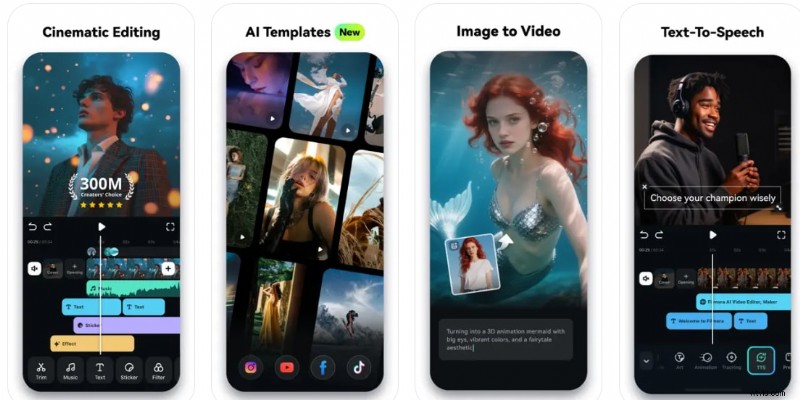
2. Filmora Mobile: The Best All-in-One AI Video Editor for Snapchat
 Secure Download
Filmora Mobile is more than just a Snapchat video editor app—it's an AI-powered editing solution designed for creators who want professional results with minimal effort. With features like auto subtitles, AI audio denoise, and beat sync, Filmora helps you create standout Snapchat Stories and Spotlight videos. Unlike Funimate or YouCam, Filmora combines trendy filters with advanced AI tools, making it the go-to app for both casual and pro-level creators.
Pros & Cons
- A wide range of vertical video templates designed specifically for Snapchat, TikTok, and Instagram
- Royalty-free tracks and sound effects included for quick editing
- Features like auto subtitles and beat detection simplify edits for social sharing
- Advanced tools require the Pro plan
- May lag on older devices
Key Features
- 9:16 templates and vertical video formats
- AI tools like auto subtitles and beat sync
- Music library, animated text, and stickers
- Simple timeline editing
Target users and use cases
Best for creators who want quick, high-quality editing with exports ready for social media and various creative tools.
Star rating
- ⭐ 4.6/5 from 1.11M reviews on Google Play
- ⭐ 4.7/5 from 80.8K reviews on App Store

Filmora
AI Video Editing App & Software
Best tool for making videos anywhere for all creators!
Simplify all your steps in video editing, from the pre-processing to finalizing, Filmora AI stays tuned.
3. YouCam Video
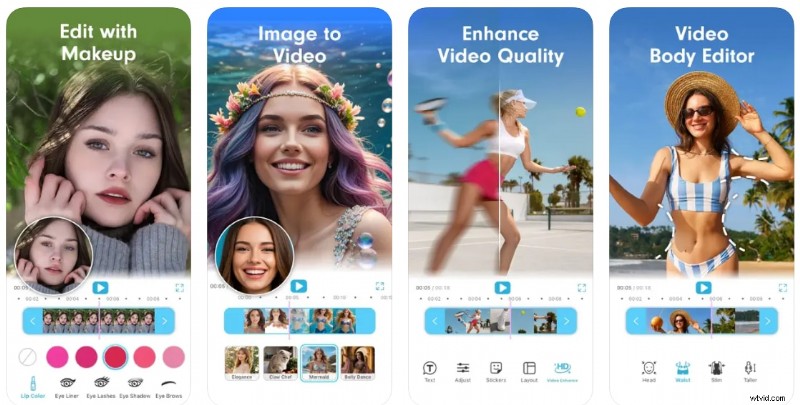
YouCam Video stands out as a Snapchat video editor app that focuses on facial enhancements, beauty filters, and retouching tools for creators who want to look neat and professional in every clip.
Pricing
Free with premium features via subscription at $5.99 per month or $39.99 per year
Pros & Cons
- Instant beauty filters
- Best for selfies and vlogs
- Snapchat-style aesthetic enhancements
- Limited non-beauty editing tools
- Watermark unless subscribed
Key Features
- Face reshaping and skin smoothing
- Virtual makeup and filters
- Hair color and background blur
- Lightweight video editing tools
Target users and use cases
It's ideal for creators who regularly share selfies, beauty tutorials, or vlogs on Snapchat and want to enhance their appearance on camera.
Star rating
- ⭐ 4.4/5 from 14.7K reviews on Google Play
- ⭐4.7/5 from 12.8K reviews on App Store
4. Premiere Rush
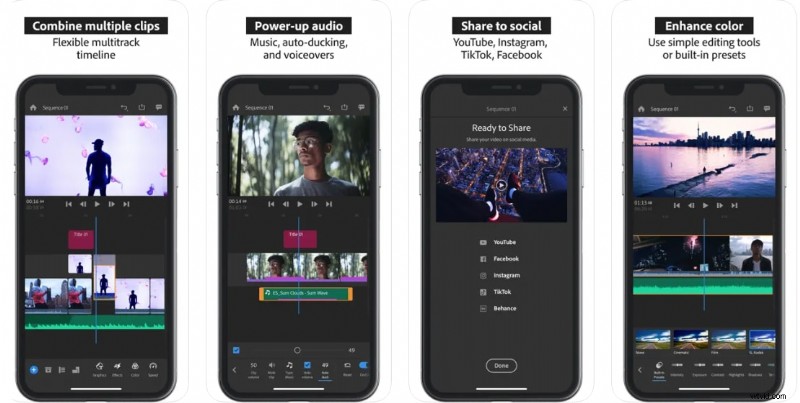
Adobe Premiere Rush is a more advanced Snapchat video editor app for creators who want multi-track timelines, desktop-level power, and the ability to edit across devices.
Pricing
Free with limitations; full version costs $9.99/month.
Pros & Cons
- High-resolution output
- Suitable for mobile and desktop workflows
- Reliable audio and visual tools
- Limited effects in the free version
- Larger app size
Key Features
- Multi-track video timeline
- Audio mixing and voiceover
- Motion graphics templates
- Cloud sync with Adobe apps
Target users and use cases
It's well-suited for creators who already use Adobe tools or need cross-device editing with higher production quality.
Star rating
- ⭐ 3.8/5 from 37.1K reviews on Google Play
- ⭐ 4.6/5 from 129.9K reviews on App Store
5. VLLO
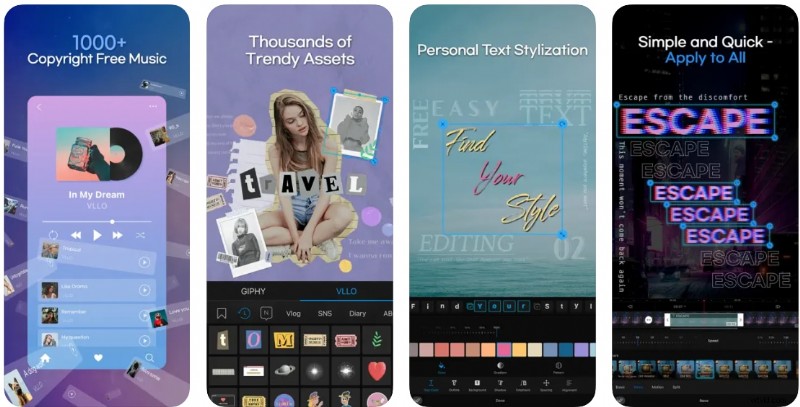
VLLO is a minimalist Snapchat video editor app that combines powerful tools with an intuitive layout. It offers advanced options like speed ramping and chroma key while keeping editing accessible.
Pricing
The free version is available, Annually VLLO Premium at $19.99.
Pros & Cons
- Beginner-friendly with professional tools available
- Customizable filters and effects
- Best for vlog-style edits
- No templates or AI tools
- Subscription required for most features
Key Features
- Motion stickers and filters
- Speed control and split editing
- Voiceover and audio fade
- No watermark in the free version
Target users and use cases
Ideal for everyday users, vloggers, and Snapchat storytellers who want more creative control without the complexity.
Star rating
- ⭐ 4.4/5 from 140K reviews on Google Play
- ⭐ 4.8/5 from 82.3K reviews on App Store
6. Splice
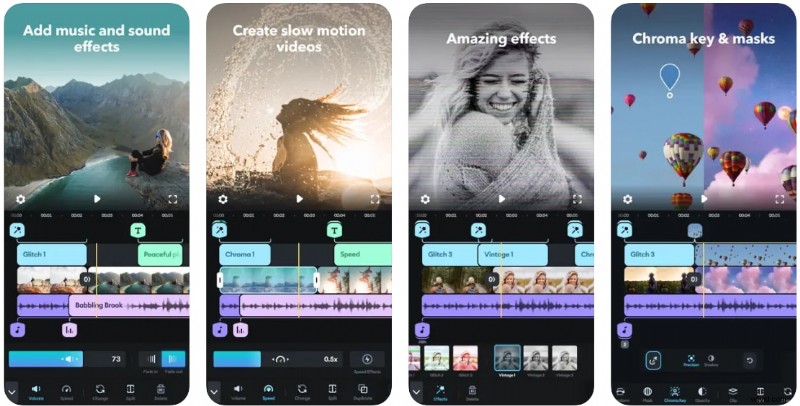
Splice is a fast and convenient Snapchat video editor app, designed specifically for mobile creators who want to cut, edit, and share videos with minimal steps.
Pricing
Free with in-app purchases; Premium starts at $9.99 one-time.
Pros & Cons
- Access over 6,000 royalty-free songs from Artlist and Shutterstock libraries
- Trim and mix multiple audio tracks with ease and accuracy
- Import and use songs directly from your iTunes collection
- Some advanced features
- Subscription required for full access
Key Features
- Smart audio syncing
- Filters, overlays, and trimming
- Smooth transitions and music integration
- Optimized for quick social sharing
Target users and use cases
Splice is ideal for creators who want quick editing and solid quality, especially for fast-paced daily Snaps and Stories.
Star rating
- ⭐ 4.5/5 from 137K reviews on Google Play
- ⭐ 4.6/5 from 409.6K reviews on App Store
7. VivaVideo
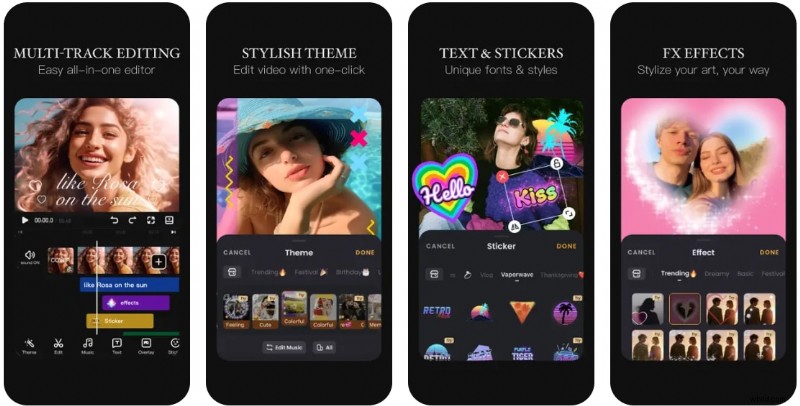
VivaVideo is a long-time favorite Snapchat video editor app offering creative effects, trendy templates, and simple tools that anyone will find easy to learn.
Pricing
Free with ads; VIP starts at $6.99 per month or $35.99 per year.
Pros & Cons
- A large collection of fun visual effects that match Snapchat's playful style
- Easily turn photos into dynamic video stories
- Add animated text and captions with customizable fonts and colors
- The free version includes ads and a watermark
- Not ideal for users needing professional-level tools
Key Features
- Video collage and slideshow tools
- Beauty filters and AR effects
- Large music and sticker library
- Format settings for Snapchat and more
Target users and use cases
Perfect for beginners and casual Snapchat users who like to try out filters, effects, and short montages.
Star rating
- ⭐ 4.3/5 from 12.5M reviews on Google Play
- ⭐ 4.8/5 from 280.6K reviews on App Store
Part 3. How to Choose the Best Snapchat Video Maker App
Finding the right Snapchat video editor app isn't just about features; it's about finding the one that fits your creative style and content goals. Here's how to choose the best tool based on what you make and how your editing process works:
1. Match Your App to Your Content Type
- ✅ Vlog or Lifestyle Content: Look for apps like Filmora or VLLO that offer transitions, voiceovers, and smooth editing controls.
- ✅ Beauty and Selfie Videos: Opt for apps like YouCam Video that specialize in skin retouching, makeup filters, and facial effects.
- ✅ Meme or Comedy Shorts: Choose apps like Funimate with visual effects, motion text, and funny templates to match the mood.
- ✅ Music-Synced Videos or Dance Clips: Try tools like Splice or VivaVideo, which allow you to sync video clips with the music's beat.
2. Prioritize Essential Features
- Need voice-overs or sound effects? Look for tools with layered audio editing.
- Want auto subtitles or text animations? Make sure the app supports those features.
- Into visual storytelling? Apps that offer filters, transitions, and drag-and-drop templates can speed up your workflow.
3. Consider Your Device and Workflow
All the Snapchat video editor apps we listed above work on both iOS and Android, so you only need to choose the one that caught your interest most. But if you like having more editing power or often switch between phone and computer, you can opt for Filmora.
Filmora also has a desktop version for Windows and Mac. That means you can start editing on your phone and finish things up on your laptop with more advanced tools when you need them.
Conclusion
Creating standout content on Snapchat takes more than just filters and quick edits. With the right Snapchat video editor app, you can turn your clips into something that looks polished, personal, and fun to watch. Each app we discuss offers a different editing experience, from advanced effects to beginner-friendly tools that save time.
The best choice depends on the type of story you like to share, whether it's beauty edits, short vlogs, or visuals synced to music. Once you find the right app, you'll spend less time struggling with editing and more time sharing content that reflects your style.
Filmora
AI Video Editing App & Software
Best tool for making videos anywhere for all creators!
Simplify all your steps in video editing, from the pre-processing to finalizing, Filmora AI stays tuned.
Frequently Asked Questions
-
What is the best Snapchat video editor app?
It depends on what you're looking for. Filmora Mobile is great for casual editing with trendy effects and social-ready exports. Funimate is ideal for visual effects lovers, and YouCam Video excels at beauty and face editing.
-
Can I make aesthetic Snapchat videos without TikTok?
Yes, apps like Filmora Mobile allow you to create aesthetic, TikTok-style vertical videos without having to open TikTok. You can edit, add music, effects, and share them directly to Snapchat Stories or Spotlight.
-
Which Snapchat video editor app has AI subtitles and beat sync?
Filmora Mobile offers AI auto subtitles, beat sync, and audio denoise—features that apps like Funimate or VLLO don't provide. This makes Filmora the best choice for Snapchat creators who want polished edits fast.